Skip to content
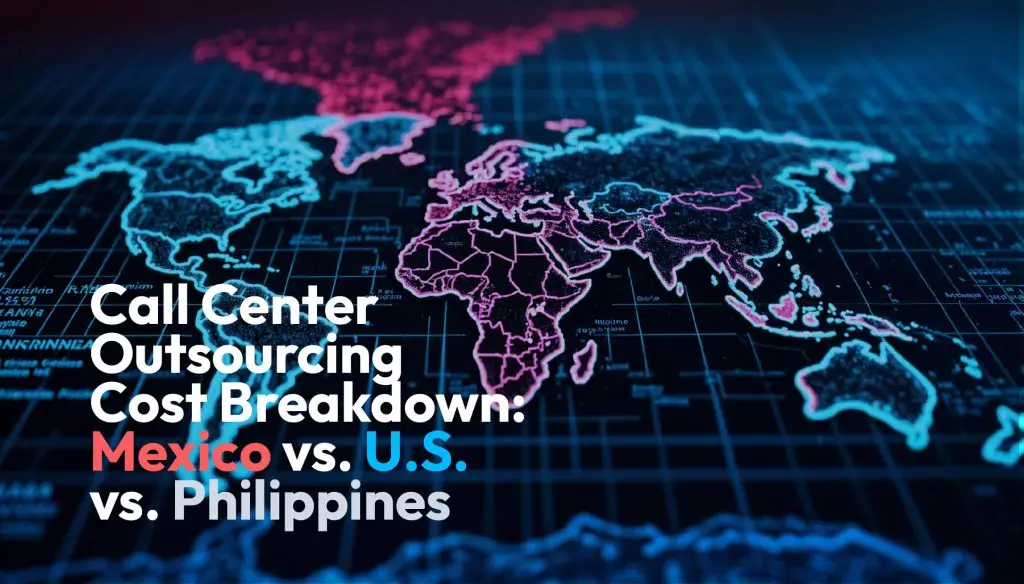
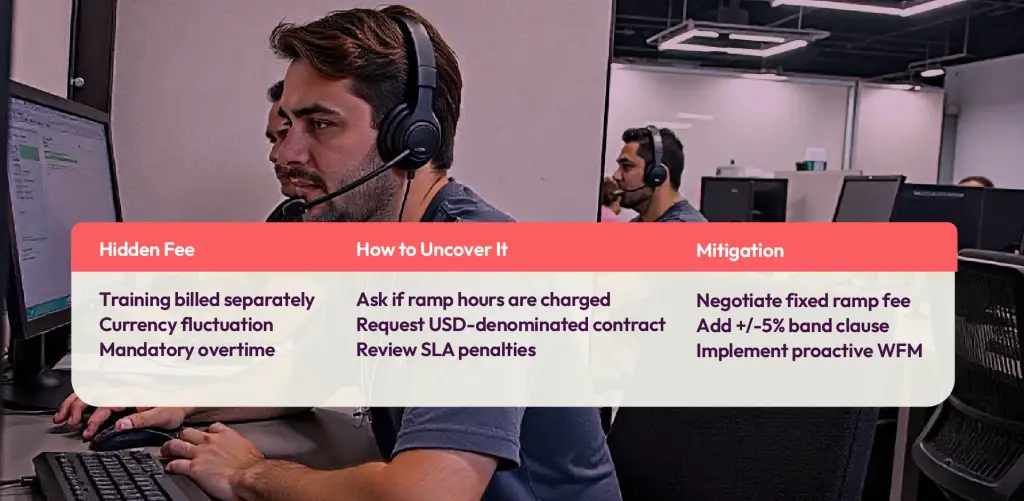
When procurement teams evaluate a potential call center outsourcing partnership, they often focus solely on call center cost and hourly rates. However, relying on this narrow view of outsourcing cost can lead to unexpected expenses—sometimes adding 30–50% to the total bill once hidden fees and operational charges surface.
This guide provides a transparent breakdown of the true, fully-loaded call center pricing per agent, helping you better assess the BPO cost in three of the most sought-after outsourcing locations: Mexico, the United States, and the Philippines. Whether you’re exploring call center services for inbound support or outbound campaigns, this data-driven comparison will help you make a cost-effective, bottom-of-funnel decision based on real numbers, not assumptions.
Call Centers vs. Contact Centers: Features and Cost Differences
When weighing outsourcing options, it’s important to determine whether your needs align more closely with a traditional call center or a modern contact center—there are meaningful distinctions in both features and pricing.
Call centers are purpose-built for handling voice calls—think inbound troubleshooting, outbound sales, or support hotlines. Their main capabilities revolve around managing and tracking phone interactions, with typical tools including:
- Interactive Voice Response (IVR)
- Automatic Call Distribution (ACD)
- Call recording and monitoring
- Call queuing and routing
- Real-time and historical reporting on call metrics
- Basic call management (such as escalation or supervisor intervention)
Costs for call center technology usually start around $60 per user per month (when paying annually), with prices reaching up to $129 per agent for advanced functionalities or shorter-term agreements.
Contact centers, on the other hand, bring multichannel communication to the table. In addition to voice calls, they support email, web chat, SMS, and even social media messaging—all managed under one roof. This approach enables fully integrated customer experiences and more robust reporting, including:
- Multichannel communication (voice, chat, SMS, email, social, and video)
- Unified analytics dashboard covering all channels
- Greater focus on customer satisfaction metrics (not just call KPIs)
- Seamless transitions between communication channels for customers
- Scalable capabilities that connect to emerging platforms
Contact center solutions, reflecting their added reach and complexity, start at a higher price point—generally beginning at $159 per agent per month. Final costs depend on selected features, integrations (for CRMs, ticketing, etc.), and implementation scope.
Understanding these core differences will help you select a solution that fits both your operational needs and your budget, without surprises lurking behind product labels.
| Location | Average Hourly Wage | Source |
|---|---|---|
| United States | $17.22 | Zip Recruiter |
| Mexico | $8.90 (MX$15,500/mo ÷ 174hrs) | Glassdoor |
| Philippines | $3.25 (18,000/mo ÷ 174hrs) | Glassdoor |
Note: Wage is only the starting point; taxes, benefits, management overhead, and quality differentials change the calculus.
Beyond base pay, it’s important to consider additional overhead costs that factor into your total spend. These include management, insurance, accounting, and legal fees—expenses that can significantly impact your per-agent cost. If your call center is part of a larger organization, some of these may be absorbed into broader business expenses, but for standalone operations, these overheads become much more visible. Be sure to adjust your per-user figures according to your expected headcount, and when in doubt, consulting with an accountant or financial advisor can help clarify these often-overlooked line items.
What’s the Price Tag for Call Center Software?
When budgeting for call center operations, software is a critical piece of the puzzle. Here’s a snapshot of what you can expect to pay across the different tiers:
- Basic call center software (think Five9 or Talkdesk) typically ranges from $60–$129 per agent, per month, depending on contract length and selected features.
- Multichannel or omnichannel platforms (like Genesys Cloud or Zendesk) start around $159 per agent, per month, with costs rising as you add advanced features, CRM integrations, or custom workflows.
As with hourly wages, software sticker price is only part of the story—the real cost depends on your stack, integration needs, and the complexity of your customer journey.
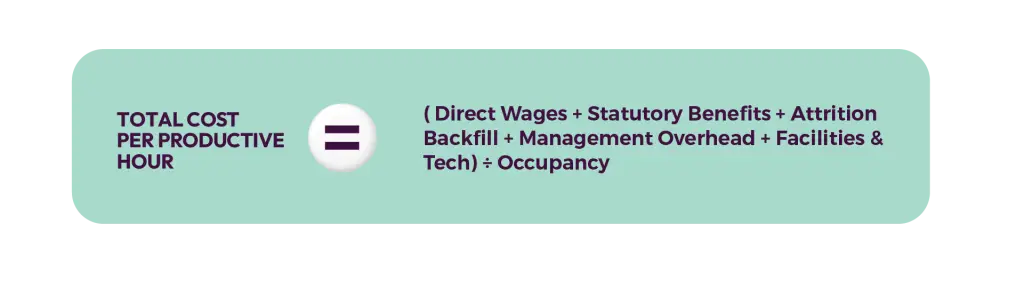
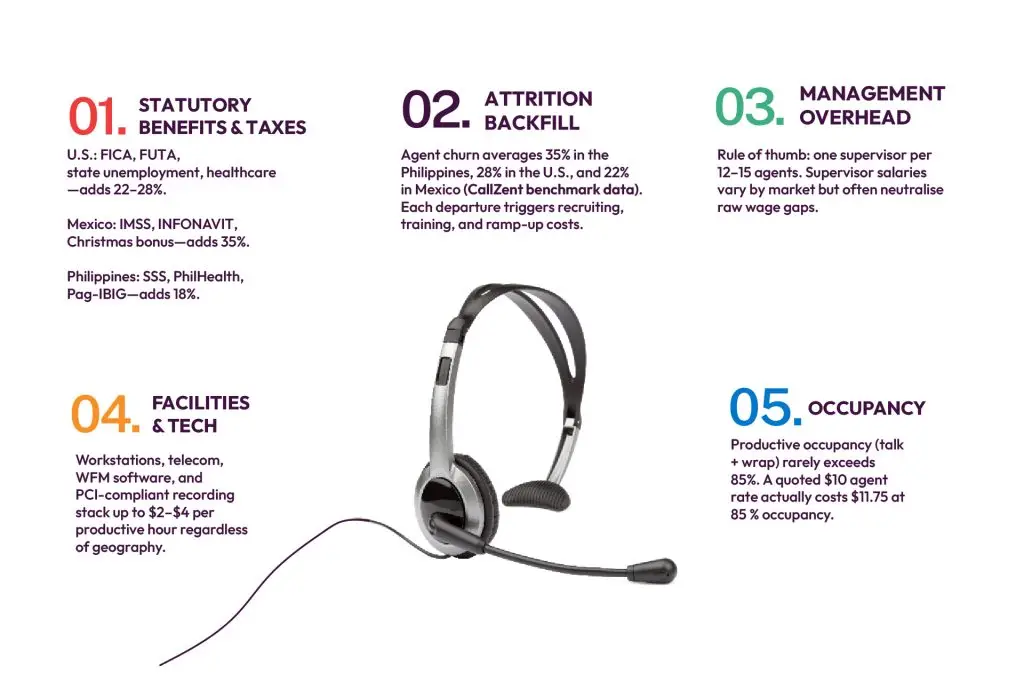
The Fully‑Loaded
Call Center Outsourcing Cost Formula
What Are the Estimated Annual Staffing Costs for a 20-Person Call Center?
When tallying up the annual staffing expenses for a typical 20-seat call center, it’s important to look beyond just base wages. True costs include not only agent salaries, but also ongoing training, recruitment, and employee benefits—each of which significantly affects your bottom line and employee retention.
Here’s how those core components typically break down:
- Base salaries: At an average rate per agent, total annual salaries for a 20-person team are the anchor of your staffing budget.
- Training and onboarding: Continuous investment in training ensures both new and existing staff maintain productivity and service quality.
- Recruitment expenses: Sourcing and hiring talent incurs costs, from advertising to onboarding logistics.
- Benefits: Competitive benefits—such as dental or life insurance, health plans, wellness programs, or even remote work stipends—help reduce churn and improve satisfaction.
Factoring in all these elements, the all-in staffing cost for a 20-person call center generally lands in the neighborhood of $694,000 per year. Keep in mind, this accounts for the recurring investment needed to maintain a stable, high-performing workforce and underscores why a focus on agent retention pays off in the long run.
Facilities-Related Expenses: What’s Really Included?
When calculating the true cost of a call center, facilities represent a crucial—yet often underestimated—slice of the budget. If you’re setting up a brick-and-mortar operation, expect these expenses to top your list:
- Rent and Lease: The monthly price tag for office space can vary wildly by region and city. For a small-sized call center, benchmark figures suggest around $2,500/month, though locations in high-demand markets or premium districts can easily drive that number higher.
- Utilities: Electricity, water, heating, and internet connectivity are baseline requirements. In many leases, some or all are bundled in the rental cost, but it pays to double-check contract fine print.
- Furniture: Desks, ergonomic chairs, conference tables, and communal break areas all add up. Modular workstations and sturdy seating are standard, but savvy buyers can sometimes offset costs by sourcing through office supply resellers like Staples or Office Depot.
- Office Supplies: Day-to-day essentials—think headsets, notepads, pens, and printer ink—quickly accumulate. Bulk purchasing can offer some relief here, but ongoing replenishment is needed as the team scales.
- Maintenance and Cleaning: Regular cleaning services, minor repairs, and general upkeep ensure your workspace stays safe and professional.
Of course, not every call center requires a dedicated physical presence. Opting for a home-based or remote model slashes most of these overheads, though companies may need to invest more in onboarding, training technology, and remote collaboration tools—especially when building an inexperienced or distributed team.
With facilities costs mapped out, let’s look at how these factors influence the final price tag for your outsourcing decision.
What Are the Real Technology Costs of Call Center Operations?
It’s easy to focus on agent wages, but overlooking technology expenses is a common pitfall. A truly accurate call center outsourcing cost comparison must factor in both essential and ongoing tech investments per seat. Here’s what you should expect to budget:
- Call Center Software: Plan for roughly $120 per user each month for robust SaaS platforms (think Five9, Talkdesk, or Genesys). These tools enable cloud-based telephony, omnichannel routing, call recording, workforce management, and real-time analytics.
- Hardware for Each Agent: Phones and professional headsets can add $50 or more per agent. Don’t forget periodic replacements as gear wears out.
- Business-Grade Internet: Reliable, dedicated internet suitable for voice and data traffic typically runs about $165 a month, though costs vary by region and provider.
- Network Infrastructure: Initial setup—covering routers, managed switches, firewalls, and cabling—can require a one-time investment of around $2,000 to support even a modest 30-seat operation.
- Data Security Tools: Compliance and data protection are non-negotiables. Budget approximately $60 per user per month for licensed endpoint protection, password management, and secure backup solutions.
All these costs (recurring and upfront) combine with labor and overhead to deliver the true, fully-loaded price of outsourcing—not just a rock-bottom wage.
Why Understanding Expected Usage Matters
A clear grasp of your anticipated usage is one of the most practical tools for managing call center expenses. Whether your team handles steady inbound queries or faces fluctuating volumes during product launches or holiday peaks, knowing your call and data patterns ahead of time can prevent budget surprises down the road.
Here’s how expected usage plays a pivotal role:
- Billing Structure Awareness: Call center pricing models vary widely. Some providers offer unlimited packages that sound foolproof, but may hide overage fees in the fine print via fair usage clauses. Others meter services—charging per minute, call, or gigabyte—making accurate estimates essential to avoid overspending.
- Seasonal Readiness: If your business cycles are marked by sharp volume surges, failing to project these spikes can lead to unplanned charges. By proactively sharing seasonal expectations with your provider, you enable them to offer flexible solutions or recommend plans better suited to your true needs.
- Informed Negotiation: Detailed usage projections—based on historical data or campaign forecasts—equip you to negotiate contracts on more favorable terms, ensuring you only pay for what your organization truly needs.
Taking the time to assess expected usage not only protects your budget but helps align your operational strategy with the realities of your business.
Only Pay for What You Actually Use
Another crucial piece of the outsourcing cost puzzle: avoid overcommitting to more resources or licenses than your contact center genuinely requires right now. Modern cloud platforms let you add seats, users, or advanced roles as your business grows, instead of locking in—and paying for—capacity that might sit idle for months.
For example, you might start with licenses for your current agent team and only scale up when you bring on new hires. Likewise, when someone steps up to a supervisor role down the line, you can upgrade their access at that point—no need to pay for supervisory features before they’re needed.
This flexible, needs-based approach not only optimizes your budget, but also reduces waste and keeps your operation nimble. In tight-margin industries where every dollar counts, this type of dynamic resource allocation is a key component in maximizing value from your outsourcing investment.
Typical Costs of Call Center Software: What to Expect
While agent wages and location make up a large portion of your call center budget, the technology stack powering your operation is another critical—often underestimated—component. Understanding the true cost of call center software goes beyond scanning price tags; it means factoring in both upfront and recurring expenses, as well as the features and scalability you actually need.
Subscription and Licensing Fees
At the core, you’ll pay a monthly subscription fee for each user accessing your call center platform. The price varies widely based on the solution tier:
- Voice-only call center software: Generally ranges from $60 to $129 per agent, per month (lower rates often require annual commitments).
- Omnichannel contact center platforms (supporting voice, email, chat, SMS, and social integrations): Expect entry points around $159 per agent, per month, scaling up with additional analytics, integrations, and feature sets.
Leading vendors—such as Genesys, Five9, and Talkdesk—offer sliding scales depending on contract length, feature bundles, and user volume.
Setup, Implementation, and Professional Services
One-time costs can add up quickly, especially if your tech stack isn’t plug-and-play. Consider these typical line items:
- Custom integrations (connecting CRMs, helpdesks, or ticketing platforms)
- Data migrations from legacy systems
- User onboarding and administrator training
- Workflow configuration and test runs
Professional service engagements may be billed hourly, or as flat project fees—think anything from a few thousand dollars for basic setups to significantly more for complex, multi-system integrations.
Ongoing Support and Maintenance
Don’t overlook the long-term costs of supporting and evolving your call center environment. Ongoing expenses can include:
- Technical support (often tiered by response time or coverage hours)
- Updates and system maintenance
- Additional training sessions for new features or processes
- Internal IT resources required to monitor and maintain connections
These can surface as monthly retainer fees or as-needed charges, and are essential for minimizing downtime or frustrating user experiences.
Data Transfer and API Usage
Modern cloud-based call center platforms typically charge for advanced integrations or high data throughput. Costs may arise from:
- API usage for real-time data exchange between platforms
- Data egress (external data transfers), priced by bandwidth consumed
For high-call-volume operations, or those relying on frequent back-and-forth data sharing with other business systems, these can meaningfully impact your bottom line. Always request clear details about data and integration fees before signing any agreement.
By breaking down these core expense buckets, you’ll get a clearer picture of your true call center technology investment—enabling smarter vendor comparisons and far fewer billing surprises when you launch your new program.
Development and Ongoing Support Costs: What to Expect
When considering the total investment for call center software, development and ongoing support expenses often fly under the radar. Yet, they can significantly influence your actual spend—pushing costs well beyond simple wage comparisons.
The Real Cost Drivers
Beyond the sticker price, you’ll want to look out for:
Custom Integrations & Development: If your operation requires advanced connections to CRMs, ticketing platforms, or bespoke tools, you may need internal IT resources or third-party developers for tailored solutions. This kind of custom work adds time and money to your deployment.
Professional Services Fees: Many call center providers charge extra for services like:
Migrating technologies and data
Initial setup and user onboarding
Training for agents and managers
Dedicated support or premium service tiers
Custom API or workflow implementations
Ongoing Maintenance: Integrations don’t maintain themselves; keeping your systems humming usually requires continued attention—from troubleshooting to upgrading connections as your underlying tools evolve. This can either tap into your in-house IT team or trigger additional fees from your provider.
What to Ask Before You Sign
Before finalizing your outsourcing agreement, it’s wise to clarify:
- What specific integration and support services are included in the quoted rate?
- Are there one-time vs. recurring fees for customization, migrations, or premium support?
- How is continued technical assistance (beyond basic help desk queries) structured and priced?
Factoring in these hidden and recurring costs ensures your budget reflects the true total cost of ownership—not just the starting wage or hourly rate.
Factoring in Data Usage and Associated Costs
When calculating the total cost of a call center, it’s easy to overlook expenses tied to data usage. Yet, these operational charges can quickly add up, especially for outbound call centers or teams handling high call volumes across local, national, or international lines.
To accurately estimate these costs:
- Outbound Calling Patterns: First, forecast the number of outbound calls you expect to make each month, accounting for the average duration and destination—be it domestic, cross-border, or international. Outbound-intensive operations, such as lead generation, drive significantly higher data and telecom expenses compared to inbound-only teams.
- Telecom Package Selection: With call volume and destinations in hand, request bundled pricing options from your telecom provider (e.g., AT&T, Telmex, Globe Telecom). Providers often offer tiered deals that bundle minutes and data, but actual value depends on matching the package to your real usage.
- Internet Connectivity: Assess whether your chosen internet package provides truly unlimited data or enforces data caps that could trigger overage charges. Scrutinize the service agreement for fine print about bandwidth throttling or surcharges, especially if agents are expected to run VoIP platforms or handle multiple communication channels.
In short, a realistic budget should layer in projected calling costs and connectivity fees alongside the base wage. Taking these factors into account up front protects you from unplanned operational overruns—ensuring that your total cost model remains both predictable and transparent.

Comparative Call Center Outsourcing Cost Model (30‑Seat Program, Voice + Email)
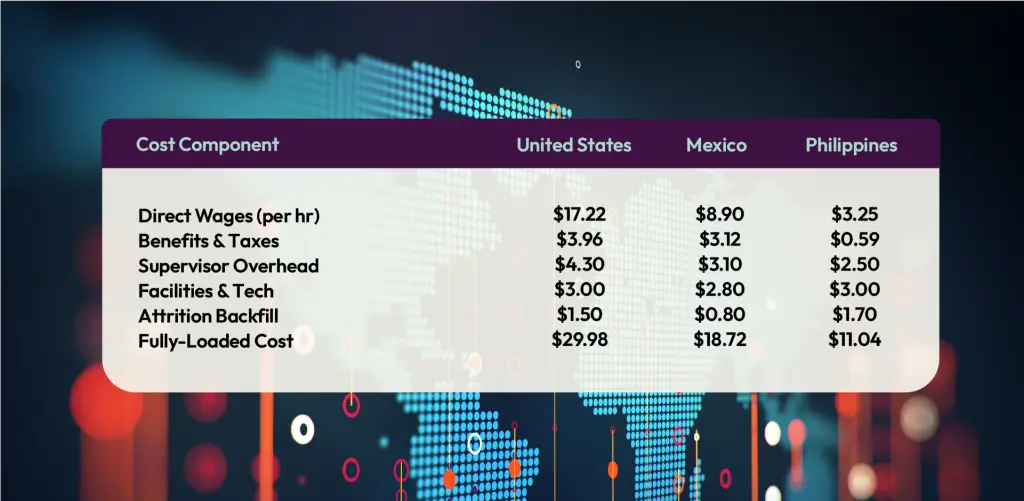
Key takeaway: Mexico offers a 37 % savings vs. U.S. while maintaining near‑shore time‑zone alignment and accent neutrality. The Philippines is cheaper on paper but often erodes savings once quality and rework are factored in.

Quality‑Adjusted Cost of Ownership (QACO)
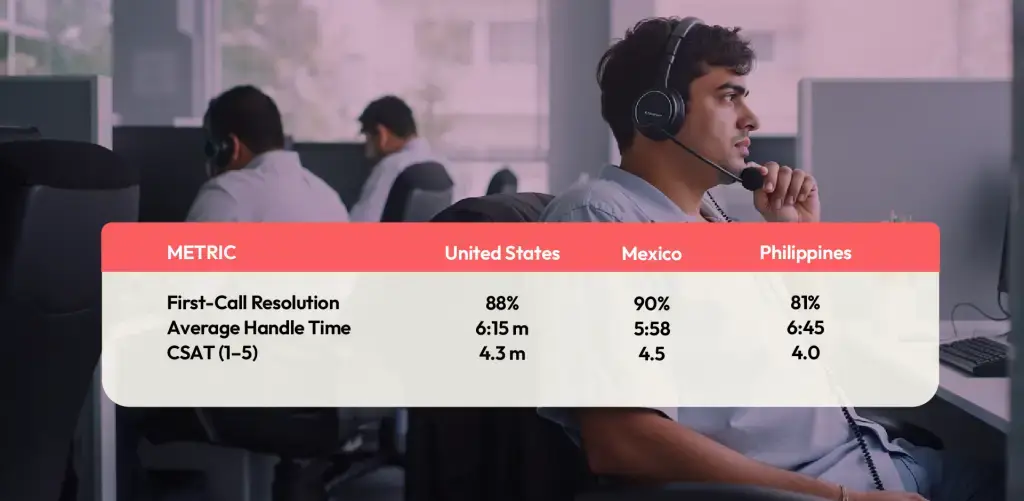
An hourly rate of $11 in the Philippines is only a bargain if the call is resolved on the first attempt. Re‑work, callbacks, and escalations inflate cost and crush CSAT.
Home-Based vs. Office-Based Call Centers: Cost and Complexity
Facilities are a crucial—yet often underestimated—part of the total cost equation. Traditional office-based call centers require a physical space for your team, which means factoring in monthly rent, utilities, cleaning, and all the trimmings: desks, workstations, and everyday supplies. For a modest operation, expect to budget around $2,500 a month, based on industry benchmarks. These costs scale rapidly as your team grows or as you move to higher-end business districts.
By contrast, a home-based—or remote—call center model offers significant cost savings. Eliminating the need for a central office means zero spending on real estate and far lower overhead. However, this leaner approach introduces new operational complexity. Onboarding and managing remote agents, especially those new to call center work, can demand more training time and technology investments to ensure everyone is set up with secure, reliable communication tools and proper infrastructure.
In short, while a remote workforce trims traditional facility costs, you’ll need to weigh those savings against the potential need for enhanced training, robust IT support, and ongoing agent engagement programs to maintain quality and performance.
What Types of AI Features Help Optimize Call Center Operations?
AI has moved beyond buzzword status, now powering some of the most critical functions in modern BPO operations. Here are a few of the capabilities leading outsourcing providers (think: Genesys, NICE, Five9) have brought to the table to boost efficiency and quality:
- Sentiment and Call Analytics: Automatically record and analyze customer interactions, flagging frustration, satisfaction, or emerging trends—so you can course-correct before NPS slides south.
- Virtual Agents & Smart Routing: Machine-learning-driven virtual assistants now handle simple inquiries, routing customers to human agents only when a real touch is needed.
- Predictive Insights: AI tools forecast peak periods, optimize staffing, and even predict when a call may escalate, arming your team with data to avoid bottlenecks.
- Automated QA & Coaching: Every interaction gets scored in real time for compliance, tone, and accuracy—no more random spot checks. Agents receive targeted feedback and micro-learning nudges.
- Interactive Voice Response (IVR) Enhancements: Natural-language IVR can triage caller requests swiftly, lowering average handle time and sending routine queries straight to self-service.
Integrate these AI-powered features, and you not only drive down cost but also raise the bar on CX consistency and first-call resolution rates.
ROI Calculator: How Much Can You Save on Call Center Outsourcing Costs?
Input current in‑house cost per productive hour. (U.S. average is ~$35.)
Select target geography.
Enter projected call volume and FCR.
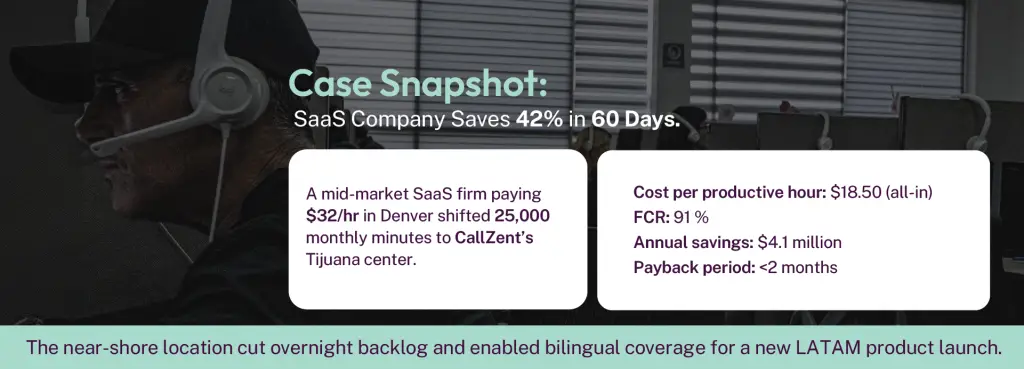
Example: A retailer handling 50,000 voice minutes per month at $35/hr can save $10,000+ monthly by moving to a Mexican partner at $18.72/hr, even after a 5 % buffer for implementation.
Cloud vs. On‑Premises vs. Hybrid Call Center Models: Cost Pros and Cons
While the location of your agents shapes your labor costs, your choice of technology platform brings another layer of impact to your total cost of ownership. Three primary models dominate call center deployments—cloud, on‑premises, and hybrid—each with its own economic ripple effects.
Cloud Call Centers
Upside:
- Minimal upfront investment—think monthly per‑agent subscriptions, rather than capital outlay.
- Maintenance, updates, and security patches are handled offsite, slashing the need for an internal IT army.
- Scaling up or down is fast, so you only pay for what you need as volume fluctuates.
Trade‑offs:
- Recurring fees stack up over time, especially as you add features like call recording, analytics, or workforce management.
- Dependence on internet reliability and the vendor’s compliance protocols—key concerns for regulated industries.
Financial Snapshot:
Expect predictable monthly operational costs, but factor in charges for add-ons and data usage. The best value is realized when flexibility and continuity outweigh the allure of long‑term asset ownership.
On‑Premises Call Centers
Upside:
- You control the data, security, and infrastructure—nothing leaves your four walls.
- Over a long contract, depreciation of hardware can translate to lower costs per seat—if all runs smoothly.
Trade‑offs:
- Significant capital investment upfront for hardware, software licenses, and buildout.
- Ongoing burden of repairs, IT staffing, and upgrades—not to mention limits on rapid scaling.
Financial Snapshot:
Upfront expenditures can be daunting, and unpredictable fixes can erode long‑term savings. Best suited for enterprises with steady call volumes, rigorous compliance needs, and ample IT support.
Hybrid Call Centers
Upside:
- Marry the advantages of both models: retain critical functions onsite, while leveraging cloud agility for overflow or remote teams.
- Customizable to fit complex requirements or phased cloud migration strategies.
Trade‑offs:
- Dual environments mean dual cost structures—potential for overlap and complexity.
- Internal IT teams must integrate and manage both sides, which can stretch resources thin.
Financial Snapshot:
Budget for overlapping operational and capital costs. Hybrids pay off for organizations in transition or those needing high customization without disrupting core operations.
Explore these deployment models with both your growth forecasts and current capabilities in mind. The right choice has the power to keep hidden costs in check as you scale.
What Are the Cost Differences Between Cloud-Based, On-Premises, and Hybrid Call Center Solutions?
While labor is the primary driver of BPO spend, your technology stack also plays a crucial role in your total cost of ownership. The choice between cloud-based, on-premises, and hybrid call center platforms brings major budget implications—and not always in the way you might expect.
Cloud Call Center Platforms
Cloud-based solutions like Genesys, Five9, or Talkdesk offer attractive entry points thanks to their monthly subscription models. The headline benefits include:
- Lower upfront capital outlay (no servers or hardware to purchase)
- Effortless scaling: Spin up or down as needed, avoiding both capacity shortages and unused overhead
- Automatic maintenance: Vendors push updates and new features automatically, so you aren’t straining in-house IT
However, ongoing costs can climb as you add premium features (analytics, call recording, PCI compliance, workforce management, etc.). And your performance is ultimately tied to both internet connectivity and the strength of the provider’s SLAs.
Typical costs:
- $75–$175 per agent/month for basic voice and omnichannel
- Add-ons for advanced reporting, integrations, or AI features can nudge TCO upward
On-Premises Call Centers
With on-premises systems (think: Avaya, Cisco), you invest heavily at the start—buying hardware, server licenses, and networking gear up front. This delivers maximum control over your data, routing, and integrations. For some regulated industries, it’s non-negotiable.
- Pros:
- Single-tenant security
- Customizable to fit legacy workflows
- Cons:
- 6–7 figure initial investment isn’t unusual
- Ongoing costs—hardware refreshes, vendor support, and IT salaries—add up fast
- Limited scalability; expanding for a seasonal spike isn’t instant or cheap
Typical costs:
- Initial setup: $500,000+ for a 30-seat environment
- Annual maintenance: 10–20% of original hardware cost
- Salaries for on-site IT staff, often $80,000–$120,000/year per engineer
Hybrid Call Centers
Hybrid platforms aim to split the difference, integrating cloud flexibility with local control—often layering cloud features atop an existing on-prem system. While this promises the “best of both worlds,” you’re also paying for both worlds.
- Benefits:
- Staged migration to the cloud without disrupting mission-critical operations
- Flexibility for disaster recovery and compliance
- Drawbacks:
- Duplicated expenses (cloud subscriptions plus ongoing on-prem maintenance)
- More complex to manage and troubleshoot
Typical costs:
- Running parallel systems means you’ll shoulder both subscription fees and hardware/maintenance costs
- Integration and management complexity can add another 10%+ to total IT spending
In short, while cloud systems minimize capital expenditure and make ramping up staff a breeze, on-premises solutions require heavy upfront investment but may cost less over many years if you avoid frequent upgrades or tech turnover. Hybrid models may provide transition flexibility—but not always at a savings. As you weigh options, always factor in the full lifecycle cost, not just the sticker price.
What’s the Alternative to Outsourcing for After‑Hours Coverage?
If you decide not to outsource, your primary option for after-hours call center coverage is to build out your own internal team of dedicated night and weekend staff. However, be prepared: attracting in-house agents willing to work odd hours usually means offering premium pay, overtime rates, or additional incentives. This can drive your per-hour wage above standard daytime rates—especially in competitive labor markets.
Beyond higher wages, maintaining an internal after-hours team adds complexity to scheduling and often results in underutilization during off-peak periods. It’s a delicate balance: too few staff leads to missed calls and poor customer experience; too many, and your labor costs spike without corresponding volume.
Organizations like American Express and Zappos have experimented with creative shift structures and rotating schedules, but these strategies often require advanced workforce management tools and a robust HR strategy to avoid burnout and turnover. For many, outsourcing remains appealing precisely because it offloads these staffing headaches to a partner optimized for 24/7 operations.
Hidden Costs to Watch For
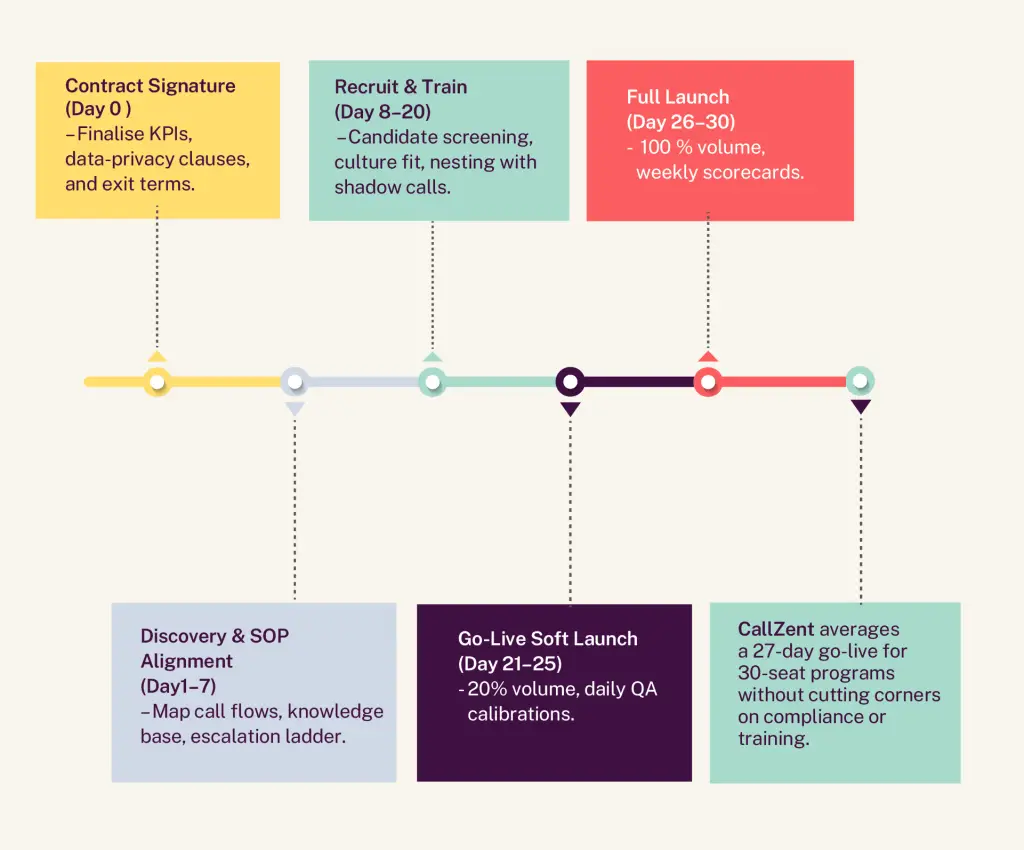
Implementation Timeline: Day 0 to Day30
Frequently Asked Questions about Call Center Outsourcing Cost
Accent preference varies by vertical, but U.S. consumers rate Mexican‑near‑shore agents as 15 % easier to understand than Philippine agents in telecom and e‑commerce surveys.
Mexico’s Federal Law on Protection of Personal Data (LFPDPPP) aligns closely with GDPR. CallZent maintains SOC 2 controls and a PCI‑DSS certified environment.
What else should you know?
For industries handling sensitive data, compliance doesn’t stop there. Depending on your sector, you may need to account for additional requirements like HIPAA for healthcare or PCI for processing payments. This can include fees for certifications, periodic security audits, and ongoing staff training to ensure adherence.
Best practice:
Investigate your specific compliance landscape before launching a program. Falling short of regulatory standards—whether local data privacy laws or international benchmarks—can mean hefty fines and operational headaches down the line.
Our standard is 6‑month cancellable with 60‑day notice—enough time to ramp without trapping you.
Conclusion: Don’t Buy on Sticker Price Alone
A sub‑$10 rate looks tempting until re‑work, churn, and currency swings blow up your P&L.
It’s easy to underestimate the true cost of staffing a call center. People cost money—good people cost more, and keeping them is where the real investment lies. High retention starts with paying agents competitively from day one and supporting them over time. Skimp here, and you’re paving the way for disengagement, high turnover, and a revolving door that derails service quality.
Consider the hidden line items in your budget:
- Average agent salary: $31,200 (from entry-level to seasoned pro)
- Annual training: $1,000 per agent
- Recruiting costs: $2,500 per new hire
- Bonus benefits: dental, life insurance, subsidized lunches, or even gym memberships
- Hybrid/remote extras: home internet or electricity stipends (because if you’re not paying for their desk, you’re paying for their bandwidth)
Worse yet, replacing an agent can cost upwards of $31,416 once you factor in lost productivity, training, and recruiting. Skipping on compensation or engagement isn’t just penny-wise and pound-foolish—it’s a fast track to a vicious cycle of turnover and spiraling costs.
A Mexico‑based partner like CallZent balances cost efficiency with quality, compliance, and time‑zone alignment—delivering total cost of ownership you can defend to the CFO.
Ready to see your numbers? Book a 15‑minute cost analysis and get a custom ROI worksheet within 24 hours.