

Call Center Pricing
Master Call Center Pricing in 2026 and Lower Total Cost of Service
Learn how call center pricing really works in 2026. Compare pricing models, hidden fees, regional benchmarks, and Total Cost of Service to choose the right outsourcing partner.
TL;DR — Quick Takeaways
- Call center pricing is not just about hourly rates. It is about what you spend to get customer issues resolved well.
- The three common models are pay-per-hour, dedicated agent or monthly staffing, and performance-based pricing.
- The smart way to compare vendors is to look at Total Cost of Service, not just the base quote.
- Nearshore outsourcing often makes sense when you need bilingual coverage, tighter collaboration, and higher service quality across North America.
- If you are building your own benchmark first, this call center outsourcing cost guide gives a useful starting point for understanding quote structure.
Are you paying for an agent’s time, or for a resolved customer issue?
That question sits at the center of good call center pricing decisions, and most buyers skip it. They compare hourly rates, ask for a discount, and assume the lowest quote wins. In practice, the cheapest line item often creates the most expensive operation.
A low hourly rate can look efficient on paper while generating more repeat contacts, more supervision, more onboarding friction, and more customer frustration. A slightly higher rate can produce cleaner handoffs, better communication, and fewer unresolved interactions. That is where the ultimate margin lives.
What Is the True Cost of Your Customer Support
The cheapest hourly rate rarely produces the lowest overall cost.
That’s the trap. Buyers often focus on visible labor cost and ignore what happens after go-live. If customers call back because the first interaction didn’t solve the problem, your real support cost rises fast. If training takes longer than expected, your launch slows down. If reporting is weak, managers spend more time chasing answers than fixing operations.
A better way to think about support spend is simple. Ask what it costs to serve customers successfully, consistently, and at a quality level your brand can live with.
A practical way to frame call center pricing
If you’re comparing providers, separate price into two buckets:
-
Visible costs
Hourly rates, monthly staffing fees, software charges, and setup costs. -
Operational costs
Repeat contacts, QA rework, agent turnover, poor escalations, and management overhead. -
Business impact costs
Lost sales, compliance exposure, churn risk, and weaker customer trust.
That broader view matters even more if you’re weighing employment structure and workforce administration alongside outsourcing. Teams that are reviewing staffing complexity may also find PEO Metrics on call center PEOs useful for comparing another operating model.
Practical rule: If a vendor can’t explain how its pricing affects outcomes, the quote is incomplete.
What experienced buyers look for first
Discerning buyers rarely start with “what’s your hourly rate?” They start with questions like these:
- How will this team handle my specific contact types
- What will I need to provide for training and systems access
- How quickly can the operation stabilize
- What happens when volume changes
- How transparent is the reporting
Those questions lead to better decisions because they expose the difference between a low quote and a low-cost operation.
The Three Core Call Center Pricing Models Explained
Every outsourcing quote usually falls into one of three structures. Each model can work. Each model can also fail when it’s matched to the wrong workload.
Pay per hour
This is the most familiar model. It works like hiring a contractor by the hour. You pay for time, whether that time is packed with productive work or not.
Pay-per-hour pricing tends to fit teams that need flexible coverage, changing schedules, or support volume that moves up and down. It’s straightforward, which is why many buyers start here.
Typical strengths:
-
Simple budgeting logic
You can estimate cost by multiplying agent count, hours, and rate. -
Flexible staffing
It can work well when support volume isn’t stable every week. -
Clear scheduling control
Buyers often like the visibility of assigning exact shifts.
Typical drawbacks:
- You’re paying for time, not outcomes
- Idle time can creep in during slow periods
- Efficiency risk stays with the client
Dedicated agent or monthly staffing
This model is closer to having a full-time employee on another payroll. You’re not buying slices of labor. You’re buying stable capacity and deeper familiarity with your brand, workflows, and systems.
This setup is usually best for businesses with steady volume, more complex processes, or customer interactions that require consistency over speed alone. Technical support, reservations, retention, and back-office tasks often fit well here.
A dedicated team usually performs better when agents need to know your CRM, product catalog, refund policies, escalation paths, or compliance workflows in detail.
A cheap rotating pool of agents may answer calls. A dedicated team learns your business.
Performance based pricing
This model ties payment to a result, not agent availability alone. The most common version is pay-per-resolution. It can be attractive when you want spending tied more closely to completed work.
According to the 2026 outsourced call center pricing guide from Crescendo.ai, outsourced pay-per-resolution pricing in Mexico and Latin America is projected to range between $1 and $7 per resolution, with an industry average of about $4, and providers typically use a credit-based system where businesses purchase resolution credits upfront.
That model can work well when the definition of “resolved” is clear in the contract. It gets messy when the SLA is vague.
Comparison of Call Center Pricing Models
| Model | Best For | Pros | Cons |
|---|---|---|---|
| Pay per hour | Fluctuating volume, simple support queues, short-term programs | Easy to understand, flexible scheduling, quick to launch | Can reward inefficiency, may include idle time, outcome quality varies |
| Dedicated agent or pay per month | Stable volume, complex workflows, brand-sensitive support | Better process ownership, stronger product knowledge, more consistency | Less flexible for sharp volume swings, usually requires stronger onboarding |
| Performance based or pay per resolution | Clear workflows, measurable outcomes, efficiency-driven programs | Aligns spend with results, can reduce wasted labor, easier to tie to SLA performance | Requires precise definitions, contract design matters, not ideal for every support type |
Which model fits which business
A practical shortcut helps.
- Choose pay per hour if your volume changes often and your tasks are relatively simple.
- Choose dedicated staffing if customers need continuity, deeper knowledge, or bilingual support tied to your brand voice.
- Choose performance pricing if your operation can define success tightly and both sides agree on how resolution is measured.
The mistake isn’t picking one of these models. The mistake is assuming one model is automatically cheaper in every situation.
Key Drivers That Influence Your Final Call Center Price
A quote isn’t just a pricing model. It’s a stack of decisions. Change the stack, and the price changes.
Some buyers see two vendors quoting the same model and assume they’re equivalent. They usually aren’t. Final call center pricing depends on the operational levers behind the proposal.

Agent skill level changes the cost fast
Basic order status questions cost less to handle than technical troubleshooting, billing disputes, or regulated account updates. When a provider needs agents who can operate multiple systems, document accurately, and de-escalate tense conversations, the quote rises for a reason.
A common example is e-commerce versus healthcare support. An e-commerce team may need fast access to Shopify, order history, returns, and shipping updates. A healthcare support team may need stronger process discipline, cleaner documentation, and more careful language handling. Those are not the same hiring profiles.
Language requirements affect staffing depth
Bilingual service is another major lever. English-only support and English-Spanish support do not pull from the same talent pool. If your customers switch between languages mid-call, the provider needs agents who can do more than recite a script. They need real fluency.
That’s one reason many North American companies look closely at nearshore labor markets. If you want a clearer view of that cost logic, this overview of labor arbitrage in outsourcing explains why lower wage geography alone doesn’t guarantee better value.
Coverage hours, compliance, and tech stack
A quote also moves based on how you want the operation to run day to day.
-
Hours of operation
Business-hours coverage is simpler than overnight, weekend, or round-the-clock support. More shifts mean more coordination and staffing depth. -
Compliance needs
Healthcare, finance, insurance, and collections often require tighter controls, stricter workflows, and more supervision. -
Systems and integrations
Salesforce, HubSpot, Zendesk, Shopify, proprietary CRMs, booking tools, payment workflows, and ticket routing all add complexity. -
Reporting expectations
Basic dashboards cost less to support than custom reporting with business-specific KPIs.
If your operation needs skilled bilingual agents, platform fluency, and regulated workflows, a “standard” rate won’t tell you much.
The levers you can actually pull
If budget pressure is real, don’t only ask for a lower rate. Adjust the operating design.
You can often improve the economics by doing things like:
-
Narrowing scope at launch
Start with a limited queue such as order support or appointment scheduling, then expand. -
Reducing unnecessary coverage windows
If your customers don’t need overnight live support, don’t pay for it. -
Improving documentation before training
A cleaner knowledge base reduces errors and shortens ramp time. -
Separating complex from simple contacts
Let specialized agents handle escalations while a broader team manages routine volume.
That’s where a good quote becomes a workable support plan instead of a generic price sheet.
Regional Call Center Pricing Benchmarks for 2026
Geography still matters in call center pricing, but not in the simplistic way many buyers assume. The more important question isn’t “which region is cheapest?” It’s “which region gives me the best balance of cost, communication, and control?”
Here’s the benchmark view many companies start with.
What the benchmark ranges show
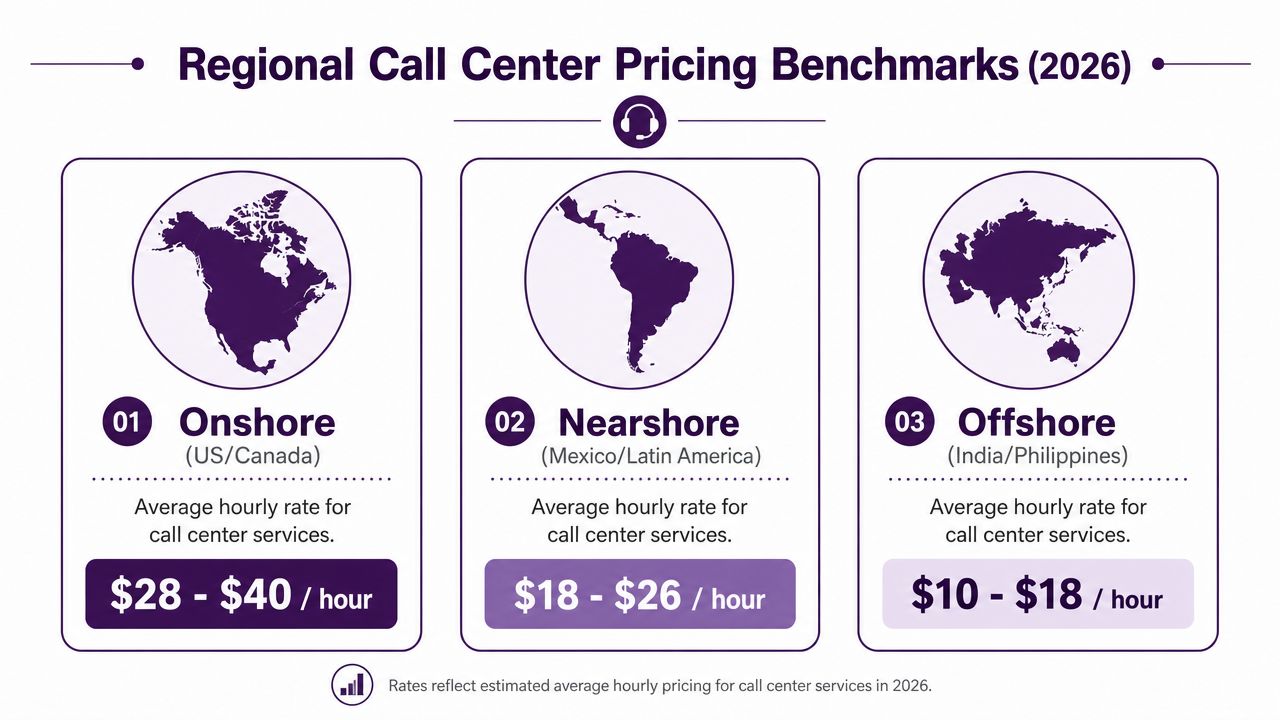
The benchmark graphic compares projected hourly ranges across major outsourcing regions for 2026:
| Region | Typical benchmark range |
|---|---|
| Onshore US and Canada | $28 to $40 per hour |
| Nearshore Mexico and Latin America | $18 to $26 per hour |
| Offshore India and Philippines | $10 to $18 per hour |
Those ranges are useful for orientation, but the more grounded number for Tijuana is narrower. In Tijuana, Mexico, the cost to operate a call center typically ranges from $15 to $19 per hour per agent, and representative salaries are approximately 50% lower than the average U.S. call center hourly wage, making it a cost-efficient alternative, according to this Tijuana call center pricing overview.
Why nearshore often lands in the sweet spot
Onshore teams offer proximity and fewer communication concerns, but the price is usually the highest. Offshore teams can offer the lowest visible hourly rate, but the operating trade-offs may be larger, especially when customers expect fast issue resolution, native-level fluency, or same-day collaboration with your internal team.
Nearshore sits in the middle on rate and often performs strongly on coordination. For North American companies, that usually means:
- Better time zone alignment
- Easier meetings with operations managers
- Stronger cultural familiarity with U.S. customer expectations
- More natural English-Spanish coverage for bilingual programs
That combination matters more than many buyers expect. It affects training speed, QA consistency, and how quickly problems get fixed when they show up.
Regional fit by business type
Different regions make sense for different operating goals.
- Onshore often fits brands where every interaction carries high sensitivity and budget is less constrained.
- Offshore may fit highly standardized workflows where script adherence matters more than conversational nuance.
- Nearshore often works best for e-commerce, healthcare access, retail support, reservations, financial services support, and mixed inbound-outbound programs serving North America.
If you want to compare quote structure by geography in more detail, this call center outsourcing cost breakdown is a useful companion read.
Regional pricing matters. Regional fit matters more.
How to Evaluate Quotes and Spot Hidden Fees
Most bad outsourcing decisions happen before the contract is signed. The buyer sees a low rate, assumes the rest is standard, and doesn’t press on what the quote leaves out.
That’s how the Total Cost of Service problem starts.
The hourly rate trap
Many pricing guides omit upfront setup costs of $2,000 to $15,000+ and focus on hourly rates. That’s the trap. Poor First Contact Resolution can double the cost per issue, and inefficiencies can inflate labor costs by 5% to 20%, making a lower hourly rate far more expensive in practice.
Buyers need to stop treating vendor comparison like commodity shopping. If one provider charges less per hour but needs more touches to solve the same issue, the lower rate is misleading.
What usually gets left out of the quote
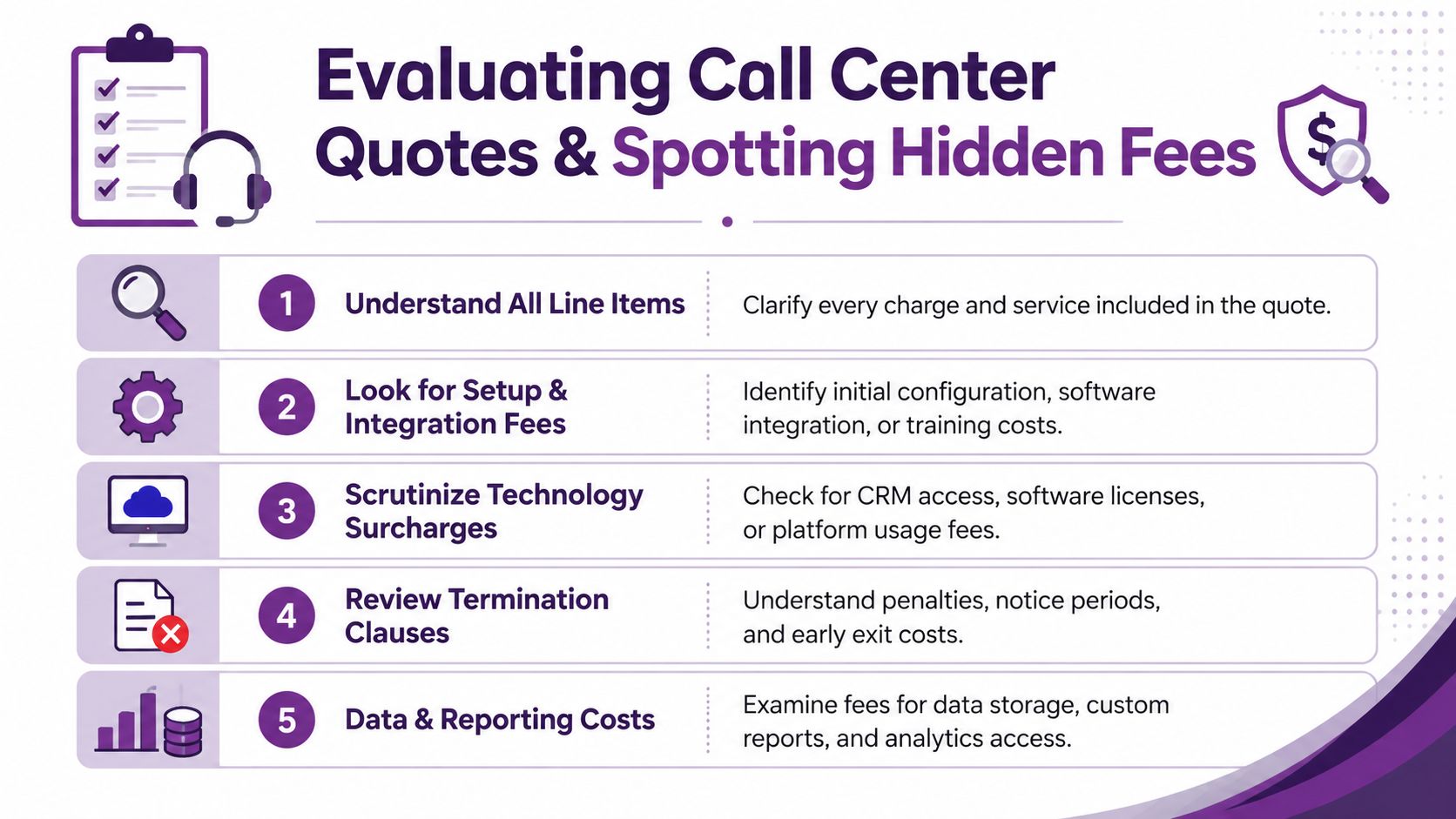
Hidden fees usually show up in predictable places:
-
Setup and onboarding
Training time, process mapping, documentation work, and launch configuration. -
Software access
CRM seats, help desk licenses, dialer seats, reporting tools, or quality assurance platforms. -
Security and infrastructure
VPNs, network controls, recording tools, compliance-related systems, and device requirements. -
Change requests
New workflows, revised scripts, updated QA scorecards, or additional reporting. -
Exit terms
Notice periods, early termination costs, and transition assistance charges.
A startup often feels this first. The quote looks manageable until systems access, QA setup, and training layers are added. A retail brand can run into the same problem before peak season when volume planning changes and the vendor revises assumptions.
Questions smart buyers ask before they sign
Use a checklist. Don’t rely on verbal reassurance.
-
Ask what is included in setup
Request a written list covering training, implementation, documentation, and system configuration. -
Ask how “resolved” is defined
If the pricing model is performance-based, the SLA language must be precise. -
Ask which tools create extra charges
Name the systems. Zendesk, Salesforce, HubSpot, custom CRM access, dialers, WFM tools, reporting layers. -
Ask what happens when volume changes
Some vendors handle spikes smoothly. Others add fees, staffing delays, or service degradation. -
Ask how reporting is delivered
Confirm whether dashboards, recordings, scorecards, and custom analytics are standard or extra.
A useful companion if you’re reviewing proposals line by line is this guide to call center outsourcing costs and pricing.
The quote that looks cheapest at signature is often the one that costs the most to operate.
A practical review habit
Read every proposal twice. First as a finance buyer. Then as an operations manager.
Finance sees rates and terms. Operations sees training burden, rework risk, and implementation friction. You need both views before you can judge true value.
Calculating ROI and Choosing the Right Partner
A good outsourcing decision is an ROI decision, not a rate decision. That sounds obvious, but many teams never build the math beyond “vendor A is cheaper than vendor B.”
That’s too shallow. Support operations don’t live in a spreadsheet cell. They live in customer conversations, escalations, and manager time.
A simple ROI framework that actually helps
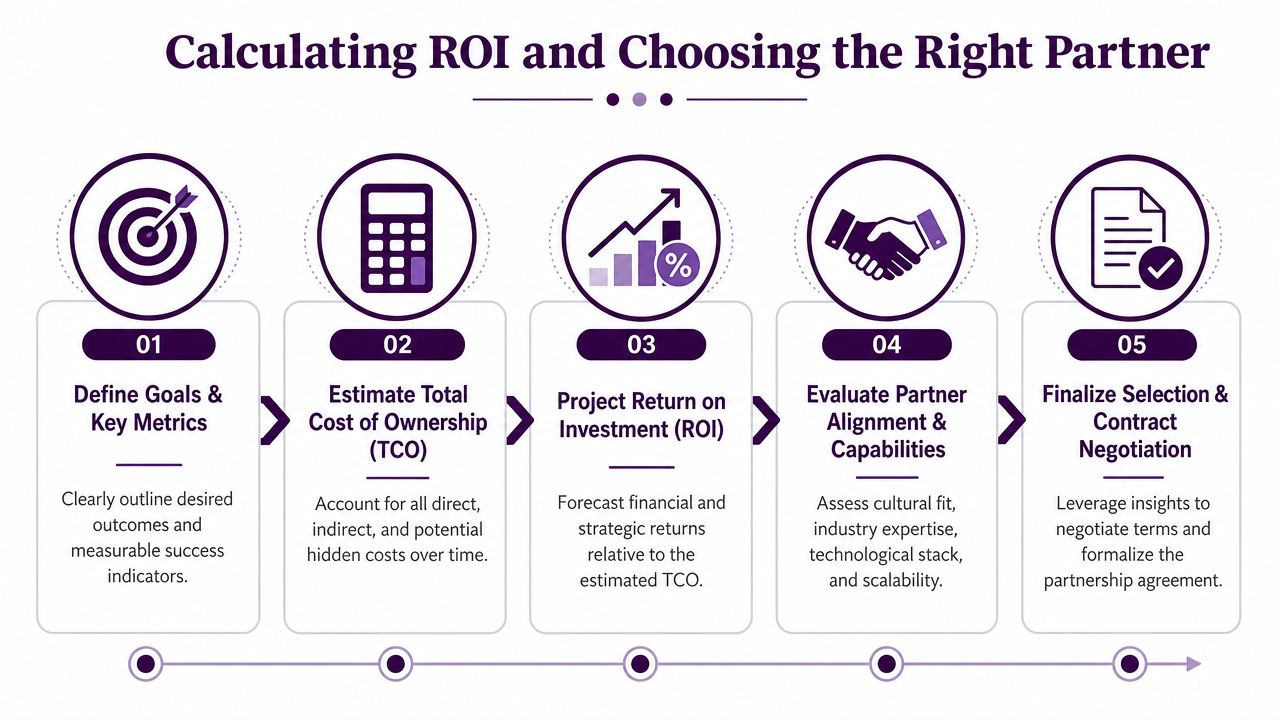
Use a working model like this:
-
Define the business outcome
Faster response, fewer repeat contacts, stronger bilingual coverage, lower internal management burden, or better customer retention support. -
Estimate full operating cost
Include base rate, setup, software, supervision time, and transition effort. -
Estimate service quality impact
Think in terms of fewer repeated issues, smoother escalations, and better coordination with your internal team. -
Compare cost per successful outcome
Often, the stronger provider wins on this metric, even with a higher sticker price. -
Stress test the model
Ask what happens during peak season, staffing changes, product updates, or compliance reviews.
A real-world way to compare two quotes
Say you receive two proposals. One has the lower hourly rate. The other has the higher rate but presents a clearer onboarding plan, stronger bilingual staffing, tighter reporting, and a more stable operating model.
The first quote may still lose if your internal team ends up spending more time retraining agents, handling escalations, and cleaning up failed contacts. The second quote may produce better ROI because it reduces operational drag.
That’s especially true in healthcare, finance, insurance, and high-touch retail support. In those environments, the cost of a failed interaction isn’t limited to agent time. It can affect compliance, customer trust, and repeat workload.
Vendor selection checklist
Use this list before you commit.
-
Operational fit
Does the provider understand your contact types, escalation paths, and system environment? -
Communication quality
Can the team support your customers in the tone and language they expect? -
Time zone alignment
Can your managers, trainers, and QA leads work with the vendor in real time when needed? -
Scalability
Can the operation expand without breaking quality? -
Transparency
Are reporting, QA, and cost assumptions easy to verify? -
Contract clarity
Are setup fees, software costs, SLAs, and exit terms clearly documented?
For teams that want a more formal procurement lens, this guide to vendor evaluation criteria is a helpful place to pressure-test shortlists.
Choose the partner that lowers friction in your operation, not just the one that lowers the first invoice.
What works and what usually doesn’t
What works:
- A provider that asks detailed questions before pricing
- A scope that matches the complexity of your customer conversations
- Clear onboarding ownership
- Consistent reporting and accessible operations leadership
- A contract that explains assumptions in plain language
What usually doesn’t:
- Quotes built around a single attractive hourly rate
- Vague SLAs
- “All-inclusive” promises with no line-item detail
- A rushed launch with weak documentation
- Choosing a region based only on labor cost
🚀 Understand the Real Cost of Your Call Center Operation
If you are comparing vendors and want a clearer view of what your support operation should cost, CallZent can help you evaluate pricing through the lens that matters most: service quality, operational fit, and total cost to serve.
Talk to an ExpertIf you’re comparing vendors and want a clearer view of what your support operation should cost, CallZent can help you evaluate pricing through the lens that matters most: service quality, operational fit, and total cost to serve.