Skip to content

Help Desk Support
Help Desk Support for Growing Businesses: In-House vs. Nearshore Guide
Learn how help desk support works, which metrics matter, and how to choose between in-house, offshore, and nearshore models for a growing business.
TL;DR — Quick Takeaways
- Help desk support is the system your business uses to capture, organize, resolve, and escalate customer or employee issues.
- A modern help desk usually runs on tiers, from self-service to specialist support.
- Speed matters because customers judge service quality by how quickly problems get solved.
- The market’s growth shows help desk support is now core business infrastructure, not an optional add-on.
- For SMBs, the biggest strategic choice is whether to build support in-house or partner with an outsourced team.
- Nearshore models give many North American companies a practical middle ground, especially when they need bilingual support and same-day collaboration.
- If you are evaluating support quality, this guide on what defines excellent customer service is a useful next read.
Your support team might be answering tickets all day and still slowing growth.
That’s the gap many business owners miss. They look at support as overhead, not as the system that protects revenue, customer trust, and operational focus. When support is unstructured, sales gets pulled into service issues, managers chase updates manually, and customers repeat themselves across email, chat, and phone.
Is Your Customer Support a Growth Engine or a Bottleneck
Businesses are investing heavily in structured support operations. The global help desk software market is projected to reach approximately 11 billion U.S. dollars by the end of 2025, and 21.8 billion by 2027, according to SaaSWorthy’s help desk software market summary.
That matters for one reason. Companies don’t put that kind of money into software unless support has become a core operating function.
Key takeaway: A strong help desk doesn’t just answer problems after they happen. It creates order, protects customer relationships, and gives a growing business room to scale.
A business owner usually feels the need for better help desk support before they can define it. Orders increase. More customers contact the team through more channels. Basic questions pile up beside urgent issues. Suddenly, every problem feels equally important, and the team loses the ability to prioritize.
That’s when support stops being a back-office task and becomes a growth decision.
What Exactly Is Help Desk Support
A simple definition helps, but it’s not enough. A help desk is better understood as the air traffic control system for your business. It receives incoming issues, decides where they should go, tracks what’s happening, and makes sure nothing disappears.
Its primary role is straightforward. A help desk handles initial customer or employee inquiries, logs them into a ticketing system, and resolves basic technical issues like password resets or simple software glitches before escalating more complex problems, as described in this overview of what help desk support does.
What help desk support looks like in practice
Say you run an e-commerce brand. A customer writes in because a package shows as delivered, but it isn’t at the door. Without a help desk process, that message might sit in a shared inbox while someone in operations tries to investigate it manually. With a real help desk, the inquiry becomes a tracked ticket, gets categorized, routed to the right queue, and updated until it’s resolved.
The same logic works in healthcare. A patient can’t complete an appointment booking because the portal keeps failing at the confirmation step. The help desk logs the incident, checks whether it’s a known issue, guides the patient if there’s a workaround, and escalates to technical staff if the problem points to a system error.
If you want to see how these workflows fit into modern support operations, review these help desk software solutions.
Why businesses need a single source of truth
Most support confusion comes from fragmentation. One request arrives by phone, another by email, another through chat, and a fourth through social messaging. Without a central process, your team works from memory, screenshots, and half-finished notes.
A proper help desk creates:
- Ticket visibility: Everyone can see the issue status instead of asking for updates in Slack or email.
- Clear ownership: One person or queue owns the next step.
- Escalation discipline: Basic requests stay with frontline support, while harder problems move upward.
- Knowledge reuse: If an agent solves a recurring issue once, the answer can be documented and reused.
A help desk is not just a department. It’s the operating system behind consistent support.
That distinction matters for SMBs. You may not need a huge support team, but you do need a reliable system for intake, routing, follow-up, and resolution.
The Tiers and Functions of a Modern Help Desk
The biggest misconception about help desk support is that every agent should handle every problem. That sounds efficient, but it usually creates bottlenecks. Skilled staff spend time on repeat questions, while urgent technical issues wait too long.
Modern help desks solve that with a tiered model.
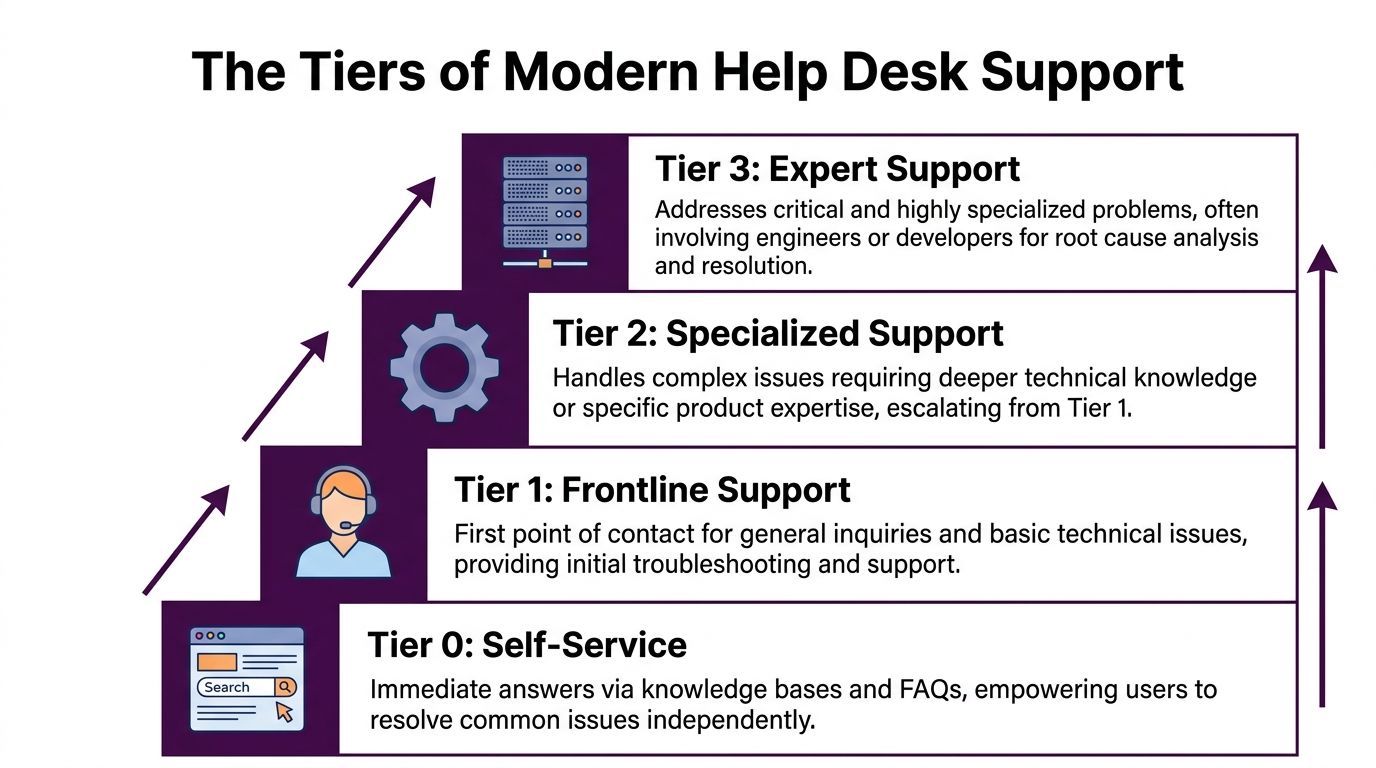
According to CG Technologies’ overview of IT help desk support levels, Tier 0 and Tier 1 handle over 60 to 70% of incidents through self-service and scripted responses, and clear tiering can reduce escalations to more expensive Tier 2 and Tier 3 teams by 30 to 50%.
Tier 0 and Tier 1 in help desk support
Tier 0 is self-service. This includes FAQ pages, how-to articles, password reset instructions, and guided portal flows. When done well, it solves the easiest problems before an agent gets involved.
Tier 1 is the frontline support layer. These agents handle first-contact questions, verify account details, follow troubleshooting scripts, and resolve standard issues.
Common Tier 1 examples:
- Login trouble: A user forgot a password or got locked out after too many attempts.
- Order status questions: A customer wants shipping confirmation or return instructions.
- Basic software guidance: An employee can’t find a menu setting or needs help with a standard workflow.
For many growing companies, this is the layer that determines whether support feels fast or frustrating. Teams that need this capability often pair it with more advanced Tier 2 network support services when issues move beyond routine troubleshooting.
Tier 2 and Tier 3 in help desk support
Tier 2 takes over when an issue needs deeper expertise. This could mean repeated payment gateway failures, recurring authentication issues, or a system integration that’s behaving unpredictably.
Tier 3 is the expert layer. That often includes engineers, product specialists, or developers who can identify root causes and implement fixes. If a mobile app bug is causing customer login failures, Tier 3 doesn’t just answer the ticket. They fix the underlying defect.
Here’s the practical value of this structure:
| Support tier | Typical job | Real-world example |
|---|---|---|
| Tier 0 | Self-service | Knowledge base article for resetting a password |
| Tier 1 | Basic issue resolution | Agent helps a shopper track a late delivery |
| Tier 2 | Specialist troubleshooting | Support tech reviews a recurring payment failure |
| Tier 3 | Root-cause correction | Developer patches a bug causing checkout errors |
Practical rule: Don’t ask expensive specialists to spend their day on repeat questions. Build a support ladder that matches issue complexity.
That’s how a help desk scales without headcount rising at the same pace as ticket volume.
Metrics and Technologies That Define Success
Once the structure is in place, the next question is simple. Is the help desk working?
Many teams get lost in acronyms. FCR, MTTR, SLA, CSAT. Those labels matter less than what they represent in day-to-day operations. A business owner needs to know whether customers are getting answers quickly, whether issues are solved cleanly, and whether repeat problems are being prevented.
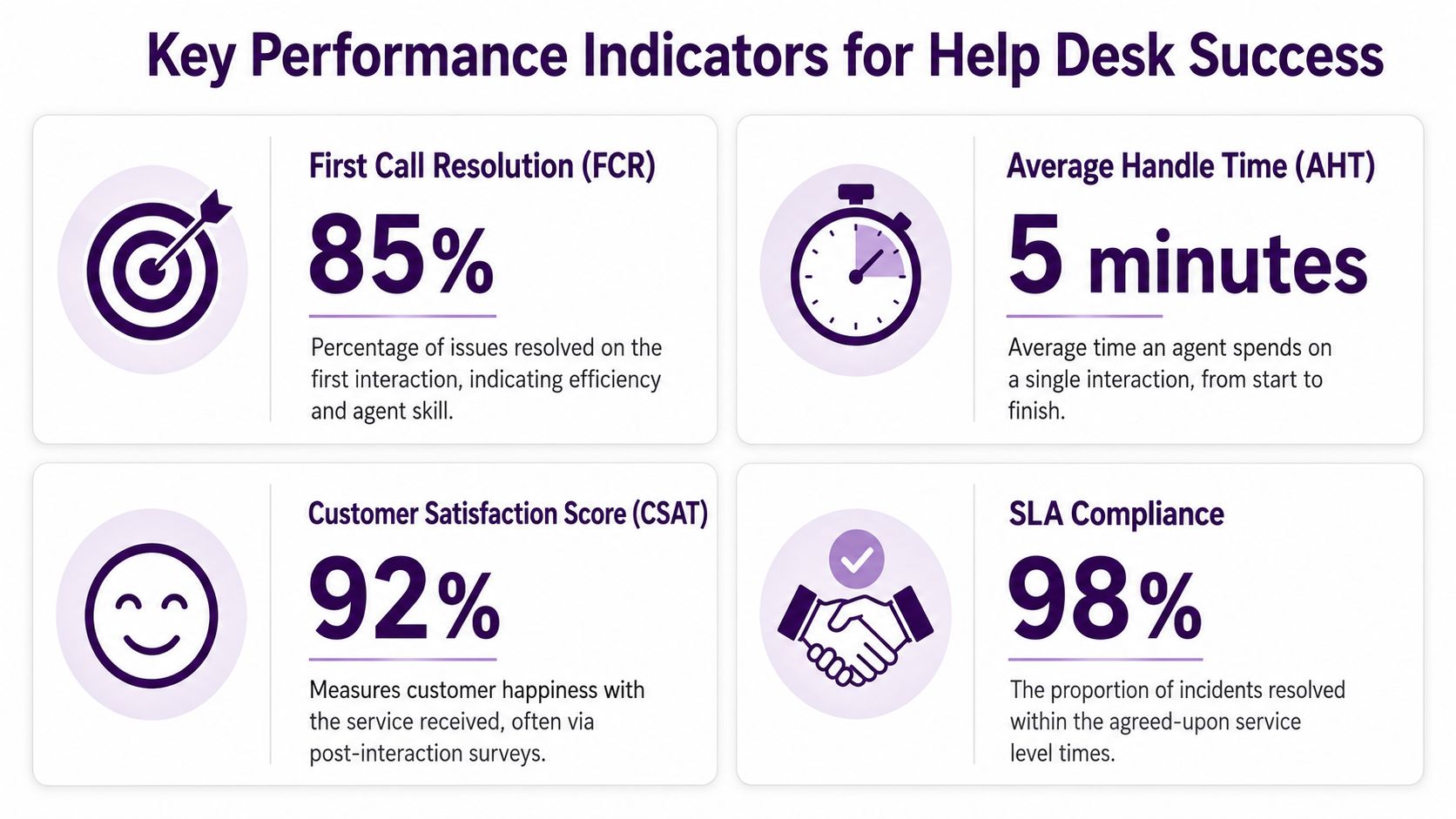
ServiceNow notes in its roundup of help desk statistics and service expectations that 90% of consumers consider fast issue resolution the most important factor in customer service, and teams using automation can resolve tickets up to 52% faster.
The metrics that matter to a business owner
You don’t need a giant analytics department to manage support well. You do need a few meaningful indicators.
- First Contact Resolution: This tells you how often the team solves the issue in the first interaction. A strong number here usually means less customer effort and less rework.
- Mean Time to Resolution: This shows how long issues stay open. If it keeps rising, your queue design, staffing, or escalation rules may be off.
- SLA compliance: This tracks whether your team meets the response and resolution windows you promised.
- Customer satisfaction: This helps you see whether “resolved” felt resolved to the customer.
A dashboard becomes much more useful when leaders can tie it to operating decisions. If chat tickets close quickly but email cases linger, you may need to rebalance channels. If one issue type keeps reopening, your knowledge base or root-cause process probably needs work.
For support leaders evaluating dashboards and reporting workflows, these call center reporting and metrics dashboards KPIs offer a practical reference point.
The technology stack behind strong help desk support
A modern help desk usually depends on a few core systems working together:
- Ticketing software to log, route, and track issues
- CRM integrations so agents can see order history, account details, or prior cases
- Knowledge bases for both self-service and internal troubleshooting guides
- Automation tools that assign tickets, trigger alerts, and handle common workflows
- AI assistance for triage, suggested replies, and faster issue classification
A good example is an online retailer dealing with a surge in “where is my order” contacts. Automation can tag those tickets, pull shipment status, and route exceptions to the right queue. The agent spends less time hunting for details and more time helping the customer.
Fast support isn’t only about more staff. It often comes from better routing, cleaner data, and fewer manual steps.
That’s where the help desk starts acting less like a queue and more like an operating system.
The Big Decision In-House vs Outsourced Support
For an SMB, this is usually the hardest call. Should you build your own help desk team, or should you outsource it?
Neither option is automatically right. The better answer depends on product complexity, staffing capacity, operating hours, language needs, and how much management attention you can realistically give support.
When in-house help desk support makes sense
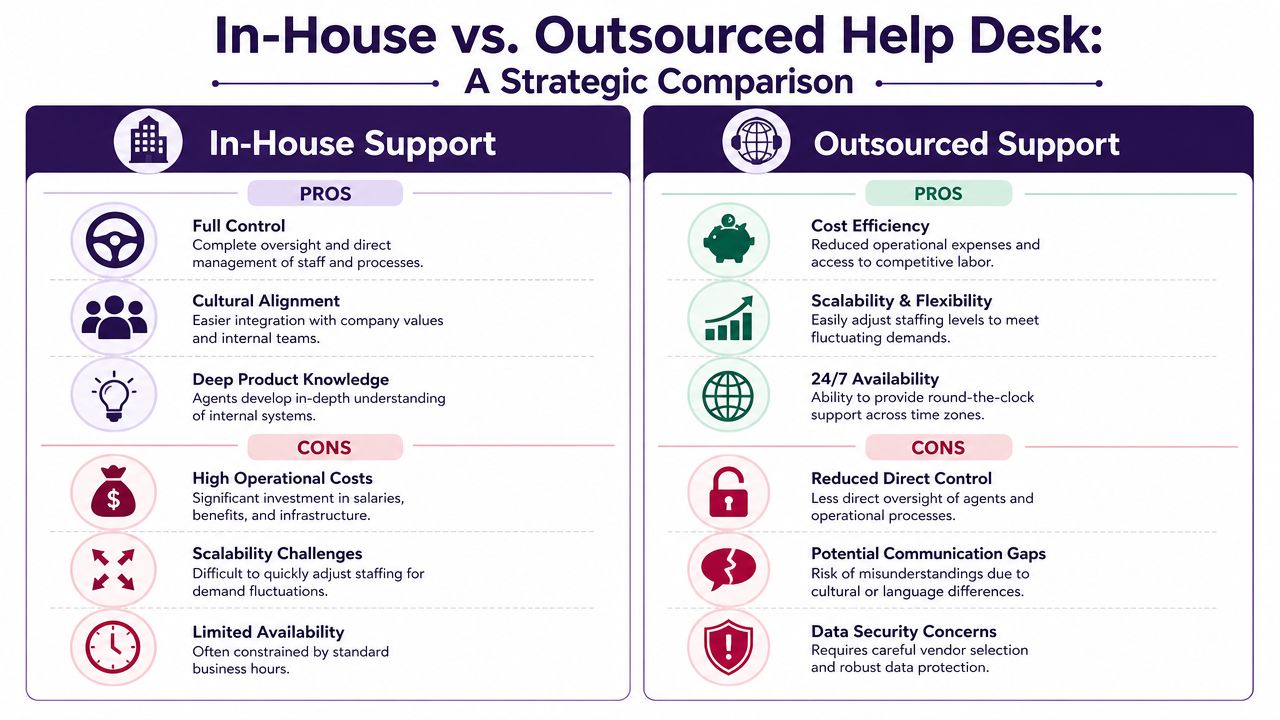
An internal team can work well when your business relies on highly specialized internal systems or very sensitive workflows. You get close supervision, direct access to managers, and deep immersion in company culture.
That said, in-house support also brings operating challenges that owners often underestimate.
| Model | Strengths | Tradeoffs |
|---|---|---|
| In-house | Direct oversight, stronger internal immersion, easier face-to-face coordination | Recruiting burden, training overhead, harder schedule coverage, less flexibility |
| Outsourced | Faster ramp, broader staffing options, process experience, easier scaling | Requires vendor management, process clarity, and strong quality controls |
A common hidden cost of in-house support isn’t just payroll. It’s management bandwidth. Hiring, scheduling, QA, training, attendance coverage, and benefits administration all land on the business. For owners already juggling growth, that can become a drag on execution. The same operational complexity appears in other people decisions too, which is why resources on choosing employee benefits options can be useful when you compare the true administrative load of building internal teams.
When outsourced help desk support makes sense
Outsourcing works well when you need support to become more structured, more available, or easier to scale without building every layer yourself.
Consider a healthcare group adding more patient inquiries after expanding locations. An outsourced team can handle intake, appointment support, portal questions, and general account issues while the internal staff stays focused on care delivery. Or take an e-commerce company preparing for seasonal spikes. Outsourcing can create coverage elasticity that’s difficult to build in-house at short notice.
What matters most is vendor fit. If the partner can’t communicate clearly, match your service expectations, or work inside your systems, outsourcing creates a different kind of friction.
The real question isn’t “in-house or outsourced.” It’s “which model gives your customers reliable answers without stretching your business too thin?”
That’s why many companies end up looking for a middle path instead of picking the most extreme version of either model.
The Nearshore Advantage for Your Help Desk Support
For North American businesses, nearshore support often solves the exact problems that make traditional outsourcing feel risky. You still gain flexibility and external support capacity, but you reduce many of the communication and collaboration gaps that show up with distant offshore models.
Research summarized in this discussion of language alignment and cultural familiarity in customer service points to a clear advantage: language fit, cultural familiarity, and time-zone proximity significantly improve first-contact resolution and customer satisfaction.
Why Tijuana is strategically practical
For a U.S. or Canadian company, a Tijuana-based partner offers something very specific. The team works in close time alignment with North American business hours. That changes the working relationship in a practical way.
If your internal manager needs to adjust a workflow in the morning, a nearshore team can usually respond in the same working window. If there’s a billing issue affecting customers in both English and Spanish, you don’t need to wait overnight for clarification or handoffs across widely separated shifts.
That same logic matters for customer experience:
- Bilingual coverage: English and Spanish support fits the realities of many North American customer bases.
- Cultural familiarity: Agents are often better positioned to understand communication styles, expectations, and tone.
- Operational overlap: Real-time coaching, QA reviews, and process updates are easier when teams share the day.
If you’re weighing this model, the nearshore advantage is easiest to evaluate through workflow, not theory. Ask how quickly the partner can update scripts, join calibration meetings, and align with your internal leads.
Where nearshore help desk support creates the most value
Nearshore is especially useful when precision and clarity matter.
A financial services firm may need agents who can explain account steps accurately in two languages. A healthcare provider may need patient support that sounds clear, calm, and culturally aware. An online retailer may need fast bilingual assistance for shipping, returns, and payment confusion during peak periods.
One provider in this space is CallZent, a Tijuana-based nearshore call center and BPO that supports bilingual customer service, technical support, and back-office workflows for North American businesses.
Nearshore works well when a business wants outsourcing benefits without giving up working-hour alignment or bilingual service quality.
For many SMBs, that’s the missing option. Not fully in-house. Not distant offshore. A support model close enough to collaborate tightly and flexible enough to scale.
Build a World-Class Help Desk with CallZent
A well-run help desk does three things at once. It keeps routine issues from overwhelming your team, gives customers a smoother experience, and protects leadership from getting dragged into daily service chaos.
That’s why the strategic decision matters more than the label. You’re not just choosing who answers tickets. You’re choosing how your business will organize demand, measure service quality, and scale support as complexity grows.
For some companies, in-house support still makes sense. For many SMBs, a structured outsourced model is the more practical move. And for North American businesses that need bilingual service, same-day collaboration, and operational flexibility, a nearshore model often gives the cleanest balance of quality, cost control, and responsiveness.
If your current support operation feels reactive, fragmented, or too dependent on a few key people, that’s usually the signal to redesign the system before growth makes the problem harder to fix.
🚀 Ready to Build a Better Help Desk Support Model?
CallZent helps growing businesses build bilingual nearshore support teams for customer service, help desk support, technical troubleshooting, ticket management, and scalable customer care.
Talk to an ExpertFAQs About Help Desk Support
What is help desk support?
Help desk support is the system a business uses to capture, organize, resolve, and escalate customer or employee issues through tickets, workflows, knowledge bases, and support teams.
Why is help desk support important for growing businesses?
Help desk support helps growing businesses protect customer trust, reduce internal chaos, prioritize issues, track resolution, and scale service operations without relying on scattered emails or manual follow-ups.
What are the main help desk support tiers?
The main help desk support tiers are Tier 0 self-service, Tier 1 frontline support, Tier 2 specialist troubleshooting, and Tier 3 expert or engineering-level resolution.
What metrics should a help desk track?
Important help desk metrics include First Contact Resolution, Mean Time to Resolution, SLA compliance, customer satisfaction, ticket volume by channel, escalation rate, and reopen rate.
Should help desk support be in-house or outsourced?
It depends on your business complexity, staffing needs, hours of operation, budget, language requirements, and management capacity. In-house support offers direct control, while outsourced support can provide flexibility, faster ramp-up, and easier scaling.
Why choose nearshore help desk support?
Nearshore help desk support gives North American companies better time-zone alignment, bilingual English-Spanish coverage, cultural familiarity, and same-day collaboration compared to many distant offshore models.
What businesses benefit from outsourced help desk support?
E-commerce companies, healthcare providers, SaaS firms, financial services companies, insurance agencies, home services businesses, and growing SMBs can all benefit from structured outsourced help desk support.
How can CallZent help with help desk support?
CallZent helps businesses build bilingual nearshore help desk support teams that manage tickets, customer inquiries, technical troubleshooting, escalation workflows, and scalable support operations from Tijuana, Mexico.
If you’re evaluating help desk support for your business, CallZent can help you assess the right operating model, map the right support tiers, and build a bilingual nearshore solution that fits your workflows.