Skip to content
TIER 2 NETWORK SUPPORT
Tier 2 Network Support for Growing Businesses | In-House vs Nearshore Guide
Learn what Tier 2 network support does, how it differs from Tier 1 and Tier 3, which KPIs matter, and when nearshore outsourcing makes sense for growing businesses.
TL;DR — Quick Takeaways
- Tier 2 network support handles issues too technical for frontline support but not serious enough for Tier 3 engineering escalation.
- A strong Tier 2 structure protects senior engineers from spending their time on repeat troubleshooting and operational cleanup.
- Nearshore support models improve collaboration because overlapping business hours reduce escalation delays and communication friction.
- The biggest Tier 2 problems are operational, not technical. Weak escalation standards, poor documentation, and fragmented ownership create most support bottlenecks.
- Growing companies often benefit from hybrid support structures where architecture stays internal while repeatable Tier 2 workflows are supported externally.
Your internal IT team probably isn’t failing. It’s getting trapped.
A lot of growing companies hit the same wall. The help desk handles the easy stuff quickly, but the harder tickets keep piling up. VPN issues that come back every week. Access problems that touch three systems. Network slowdowns that nobody can reproduce on command. Meanwhile, your senior people get pulled away from projects that move the business forward.
That’s where Tier 2 network support matters. It’s not just an IT org chart label. It’s the layer that keeps difficult technical work from swallowing your entire support operation.
If your business is trying to scale support without overbuilding an expensive internal team, there’s a practical sourcing question underneath all of this: should you build Tier 2 in-house, outsource it, or use a nearshore model that gives you more coverage and technical depth without the friction of offshore handoffs?
Is Your IT Team Drowning in Complex Support Tickets?
A common pattern looks like this. Tier 1 closes the obvious tickets fast, but everything slightly messy gets escalated. Soon your backlog is full of issues that aren’t catastrophic, yet still take time, context, and technical judgment to solve. Your strongest people become permanent firefighters.
That hurts more than support metrics. It delays infrastructure work, cloud migrations, policy cleanup, security improvements, and application rollouts. The business feels it as slower execution.
The fix usually isn’t “hire a few more generalists.” It’s to structure support so each issue lands with the right level of skill. A tiered model does that. It separates routine requests from deeper troubleshooting and gives your team a clean path for escalation, ownership, and documentation. If you’re seeing recurring ticket quality issues, these common IT help desk problems and solutions are a useful starting point.
Key takeaway: If your senior IT staff spends too much time chasing repeat network issues, you probably don’t have a staffing problem first. You have a Tier 2 design problem.
What the pain looks like in real operations
You don’t need a major outage for Tier 2 gaps to become expensive.
One employee can’t connect through VPN after a policy change. Another loses access after a role update syncs incorrectly. A warehouse site reports slow application performance, but only during certain shifts. None of those belong with a script-driven frontline queue. None should go straight to your most senior engineer either.
Without a clear middle layer, every “not simple, not critical” issue becomes a judgment call. That’s when queues slow down and accountability gets fuzzy.
What Is Tier 2 Network Support Exactly
The easiest way to explain Tier 2 is to compare it to medical care. Tier 1 is the triage desk. Tier 3 is the specialist surgeon. Tier 2 network support is the specialist who investigates the problem, orders the right tests, and treats most cases that require real expertise but not extreme intervention.
That middle layer matters because most support environments don’t fail on the easy tickets. They fail on the tickets that need analysis.
Industry guidance describes Tier 2 as the middle of the support hierarchy for issues too complex for Tier 1 but not yet serious enough for Tier 3 engineering. It also notes that Tier 2 handles about 20% of all IT support requests and that technicians often spend 2 to 4 hours per ticket because the work requires investigation rather than scripted fixes, according to Cloudtango’s breakdown of IT support tiers.
What Tier 2 actually does
In practical terms, Tier 2 picks up where the script stops working.
That usually includes:
- Persistent connectivity problems that survive basic resets and standard checks
- Software conflicts where one system update or local setting breaks another dependency
- Access and permission issues involving identity, policy, or application behavior
- Deeper diagnostics that require tracing symptoms across multiple systems
Tier 2 teams usually work with privileged access, better monitoring visibility, and enough authority to make controlled changes. That’s why they’re central to any serious IT help desk support services model.
Why business leaders should care
A good Tier 2 function reduces waste in two directions.
It stops easy tickets from flowing uphill, and it stops highly specialized staff from wasting time on problems that can be solved through disciplined troubleshooting. The result is better uptime, cleaner escalation, and fewer “all hands” moments for issues that should have been contained earlier.
Tier 2 isn’t just an escalation queue. It’s the part of support that turns messy technical symptoms into clear action.
How Tier 2 Support Differs from Tier 1 and Tier 3
Most confusion around support staffing comes from treating all technical tickets like they belong in one pool. They don’t. Each tier exists for a different kind of work, and the handoff rules matter.
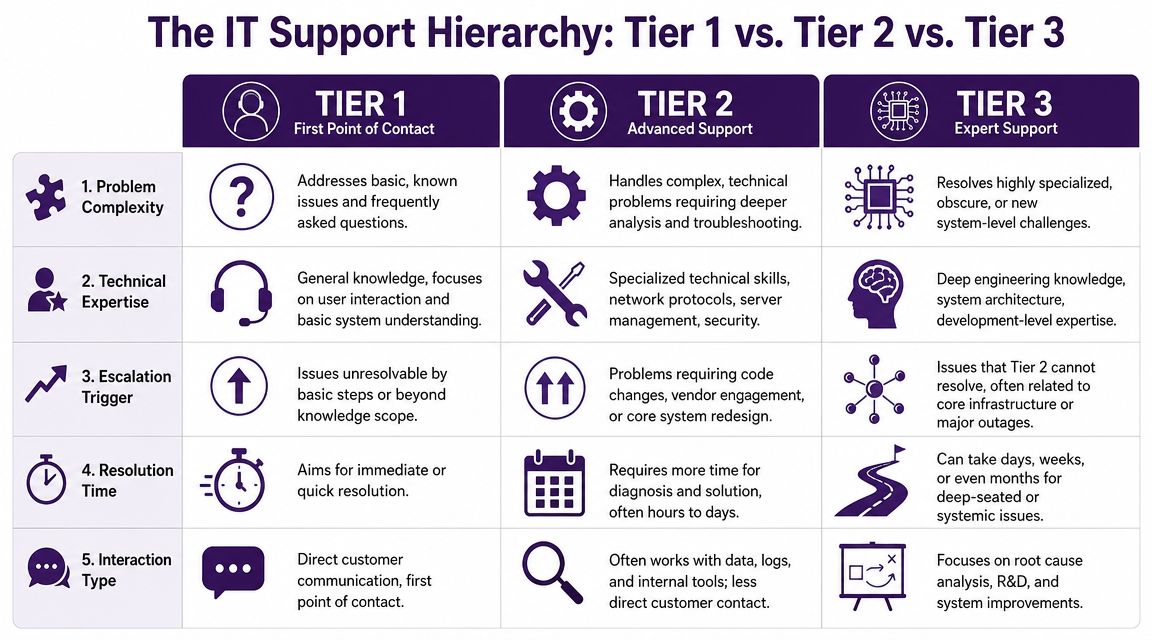
A useful benchmark is that Tier 1 resolves about 70-80% of routine issues, Tier 2 receives around 25-35% of escalated tickets, and Tier 3 handles only 5-10% of highly complex cases, based on EXTNOC’s overview of IT support tiers. That filtering role is why Tier 2 has such an operational impact.
IT support tiers at a glance
| Attribute | Tier 1 Support | Tier 2 Support | Tier 3 Support |
|---|---|---|---|
| Primary role | First-line intake and routine troubleshooting | Advanced diagnosis and resolution | Engineering-level fixes and deep specialization |
| Typical issues | Password resets, basic setup, standard how-to requests | VPN failures, access conflicts, recurring network problems, service degradation | Core infrastructure failures, architectural issues, vendor-level defects |
| Work style | Scripted and process-driven | Investigative and analytical | Specialized and design-oriented |
| System access | Limited | Elevated | Full or highly specialized |
| Goal | Resolve fast or escalate cleanly | Find cause, apply fix, document learning | Resolve rare or high-impact technical edge cases |
| Customer interaction | Frequent direct contact | Mixed, often less direct | Usually indirect through lower tiers |
A simple way to think about the handoff
Tier 1 asks, “Can we solve this with a known fix?”
Tier 2 asks, “What’s causing this, and what controlled change will fix it?”
Tier 3 asks, “Is there a deeper systems, architecture, or vendor issue here?”
That difference sounds subtle, but it changes staffing, training, and cost.
Real-world examples
- Tier 1 case: An employee forgot a password and needs account access restored.
- Tier 2 case: A remote employee can log in locally but fails authentication when trying to connect through VPN after a policy update.
- Tier 3 case: A network service outage points to a firmware defect or a design issue affecting core infrastructure.
Operational rule: If your highest-skilled people are regularly solving Tier 2 problems, your escalation path is leaking value.
What works and what doesn’t
What works is strict routing logic, complete escalation notes, and clear authority boundaries.
What doesn’t work is sending half-documented tickets upward with comments like “user still having issue.” That forces Tier 2 to redo intake work and pushes true specialists into cleanup mode instead of resolution mode.
Key Responsibilities and Technical Scope of Tier 2
Tier 2’s concrete function is realized. The team’s value comes from what it can touch, test, and change.
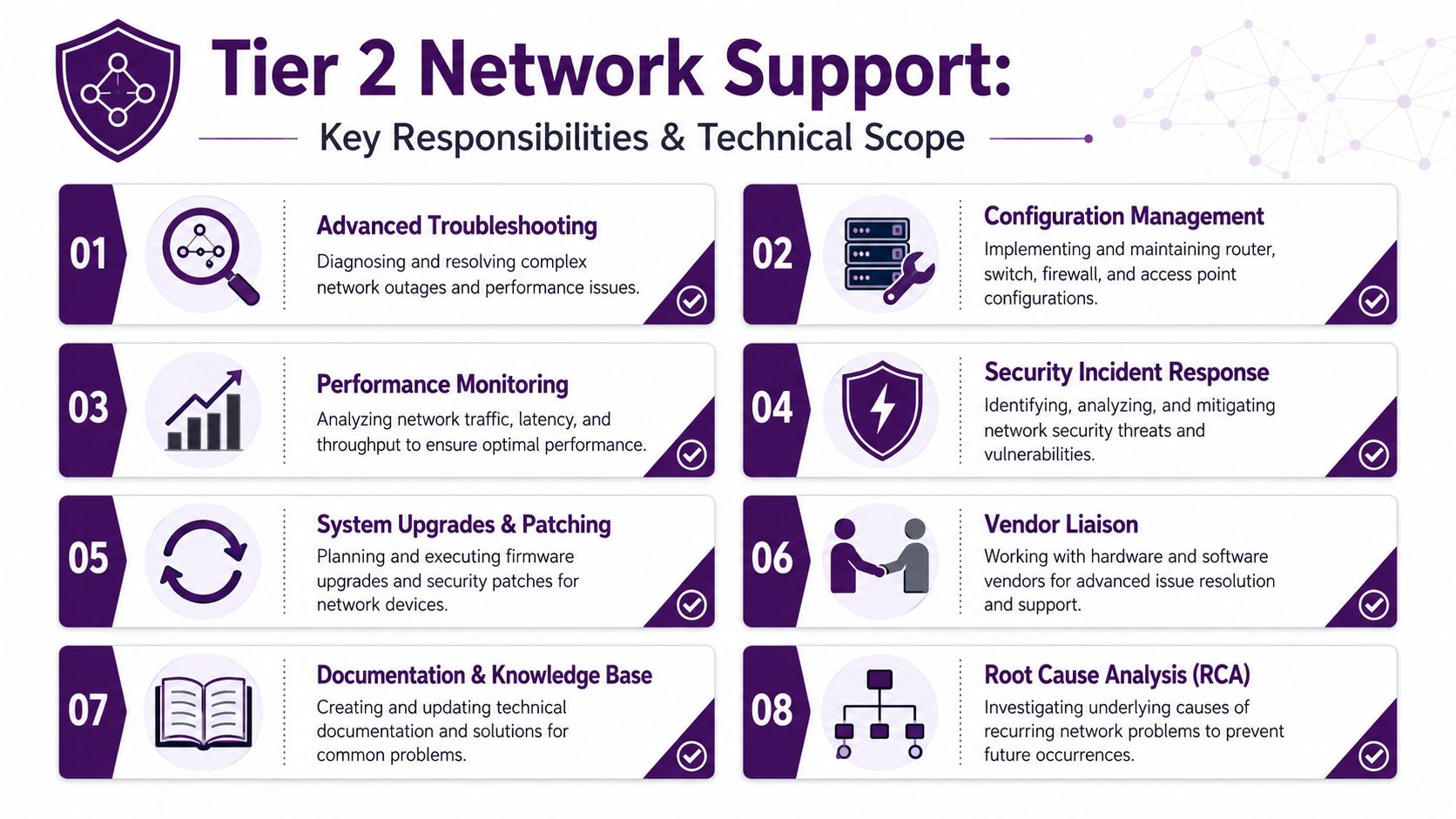
Tier 2 technicians commonly have system-level access, advanced diagnostic tools, and database query capability. That lets them determine whether the problem comes from local misconfiguration, authentication, routing, or backend service behavior. It also explains why they often spend 2 to 4 hours per ticket on root-cause analysis, according to ITBD’s guide to support tiers.
What falls inside Tier 2 network support
- Advanced troubleshooting: Investigating recurring connectivity failures, remote access issues, unstable service behavior, and application-to-network dependencies.
- Configuration changes: Adjusting settings that Tier 1 shouldn’t touch, including controlled updates tied to access, networking, and service functionality.
- Permission and identity work: Resolving cases where authentication succeeds in one place but fails in another, or where role mapping creates inconsistent access.
- Log review and correlation: Comparing ticket history, event logs, monitoring alerts, and system state to isolate the actual point of failure.
- Patch and rollback tasks: Applying fixes or reversing failed changes when a recent update introduced instability.
- Vendor coordination: Preparing evidence, reproducing issues clearly, and escalating only when internal troubleshooting has reached a hard boundary.
- Knowledge capture: Turning solved incidents into reusable articles and better escalation guidance.
A practical example
Take a recurring VPN complaint. Tier 1 can confirm credentials, reinstall the client, and verify basic user settings. Tier 2 should go further. It should check authentication behavior, compare policy assignment, review logs, and determine whether the issue sits with endpoint config, routing, identity rules, or a backend service dependency.
That’s the difference between closing a ticket and solving a class of problem.
If your support scope also touches application workflows, this application maintenance support playbook is relevant because many “network” tickets are really cross-functional incidents involving app logic, permissions, and backend behavior.
Hardware context matters too
Tier 2 teams often get dragged into complaints that seem like user issues but trace back to infrastructure choices. A simple example is switching hardware. If your environment mixes business-grade equipment with consumer-grade assumptions, even routine diagnostics can take longer. For a concise refresher, it helps to compare managed vs unmanaged switches before you define what your Tier 2 team should own versus what should be standardized upstream.
Good Tier 2 teams don’t just troubleshoot. They narrow scope fast, change carefully, and leave a trail others can reuse.
Essential Tools and KPIs for Managing Tier 2 Support
If you manage Tier 2 by feel, you’ll miss the actual problem. Backlogs usually don’t start with effort. They start with poor visibility.
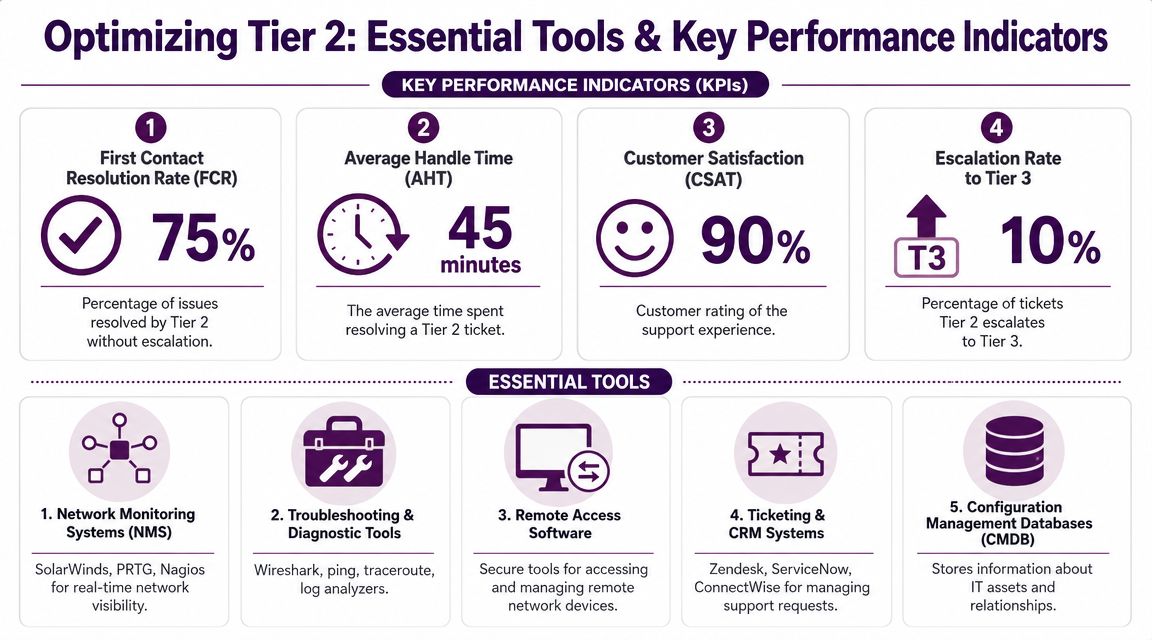
You need two things at the same time. First, tools that let technicians investigate effectively. Second, metrics that tell you whether the team is solving the right problems at the right level.
The core tool stack
A solid Tier 2 setup usually includes:
- Ticketing platform: ServiceNow, Jira Service Management, Zendesk, or ConnectWise to manage escalation flow, notes, ownership, and closure quality.
- Monitoring and observability tools: SolarWinds, PRTG, Nagios, or similar systems that surface network and service conditions before technicians have to guess.
- Remote access tools: Secure remote session tools so analysts can inspect systems directly instead of relying on long back-and-forth exchanges.
- Log and query access: Enough visibility into system logs, identity systems, and application data to confirm where the failure begins.
- Knowledge base platform: A searchable internal repository that reflects actual resolved incidents, not just onboarding documents.
The KPIs that matter
Avoid vanity reporting. Track the measures that reveal friction.
| KPI | Why it matters |
|---|---|
| Escalation quality | Shows whether Tier 1 is passing complete, actionable tickets |
| Backlog by issue type | Reveals recurring faults and staffing mismatches |
| Time to resolution for Tier 2 work | Helps identify tool gaps, training needs, or approval bottlenecks |
| Escalation rate to Tier 3 | Tells you whether Tier 2 has the authority and skill it needs |
| Repeat incident volume | Exposes unresolved root causes and weak documentation |
Expert guidance also stresses that effective Tier 2 teams should maintain knowledge articles and detailed closure notes in the ticketing system. That creates a feedback loop for service quality and can reduce repeat tickets while improving first-contact resolution over time, as noted in Xantrion’s explanation of support tiers.
What managers often get wrong
Some teams obsess over handle time and unintentionally reward shallow fixes. Others let every technician document issues in a different style, which kills searchability later.
A better approach is to review resolved tickets for diagnostic quality. Did the analyst identify the actual fault domain? Did they document the fix clearly enough that Tier 1 can reuse it? Did they flag a recurring issue for preventive action?
The healthiest Tier 2 teams produce two outputs from every good ticket. A resolution, and a better support system.
Deciding Your Strategy Building In-House vs Outsourcing
The sourcing decision usually comes down to control, speed, and flexibility.
Building in-house can make sense when your environment is highly specialized, heavily regulated, or tightly coupled to internal systems and personnel. Outsourcing can make sense when ticket volume is volatile, hiring is slow, or your internal team keeps getting distracted by support work that should be handled elsewhere.
Use this decision lens
Ask yourself these questions:
- How hard is it to hire for this role locally? Tier 2 isn’t entry-level help desk. You need people who can troubleshoot calmly and document clearly.
- How variable is your workload? If demand rises and falls, a fixed internal team can leave you either overstaffed or overloaded.
- How expensive are interruptions to your senior staff? Every escalation they absorb has an opportunity cost.
- How important is schedule overlap? If your support function depends on rapid coordination with internal IT, time zone alignment matters.
- How mature are your processes? Outsourcing weak processes won’t fix them. It usually exposes them.
In-house advantages and limits
In-house works well when the environment is unique, security review is strict, and your team needs daily contact with local stakeholders.
In-house breaks down when recruiting takes too long, after-hours coverage is thin, or your most capable people spend too much time doing repetitive diagnostic work instead of higher-value projects.
Outsourcing advantages and limits
Outsourcing works well when you need faster deployment, broader shift coverage, and access to established support processes.
Outsourcing fails when the provider operates like a black box, doesn’t document well, or can’t integrate with your escalation standards. If you’re evaluating the broader model, this overview of IT department outsourcing is a useful companion read.
For companies comparing geographic models, this breakdown of nearshore vs offshore outsourcing costs risks and ROI helps frame the decision in operational terms rather than theory.
A practical rule for growing companies
Keep ownership of architecture, policy, and high-risk changes. Be open to external support for repeatable Tier 2 workflows, overflow coverage, bilingual support needs, and structured escalation handling.
That split usually gives you the control you need without forcing internal engineers to become permanent queue managers.
The Nearshore Advantage for Tier 2 Network Support
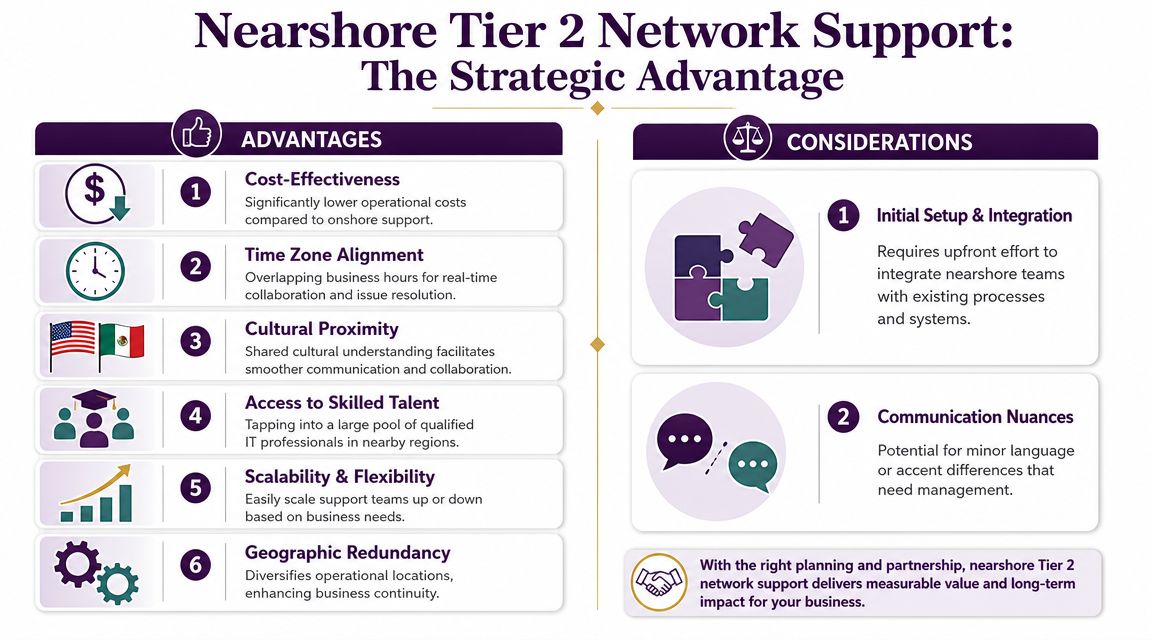
Nearshore works well for Tier 2 because this layer depends on real-time coordination more than many leaders realize. Tickets are more technical than Tier 1, but they still require handoffs, clarifications, and business context. If your partner is asleep when your internal team starts work, friction shows up fast.
Current best practices emphasize living knowledge bases, self-service, and automation across support tiers. As AI and self-service absorb more repetitive work, Tier 2 shifts toward higher-complexity root-cause analysis and exception handling. That trend makes specialized, cost-effective nearshore teams more attractive, according to PrimeSecured’s guide to IT support tier best practices.
Why nearshore fits Tier 2 better than many companies expect
The win isn’t just cost.
It’s the combination of overlapping business hours, easier collaboration with North American teams, bilingual coverage, and faster operational alignment. In a Tier 2 environment, those details affect queue health, ticket clarity, and escalation speed every day.
The best nearshore setups feel like an extension of your operations team, not a distant vendor queue.
Where nearshore creates business value
- Real-time collaboration: Your internal admins, app owners, and support leads can work with the partner during the same business day.
- Bilingual support capability: That matters for companies serving English- and Spanish-speaking users across North America.
- Scalable coverage: You can add capacity for launches, seasonal demand, or backlog reduction without rebuilding your org chart.
- Better use of internal talent: Your senior staff can focus on architecture, prevention, and high-impact engineering work.
- Operational resilience: A geographically separate support function can help reduce concentration risk.
What you still need to manage
Nearshore isn’t automatic. You still need:
- Clear escalation standards
- Shared documentation practices
- Access controls and approval boundaries
- Regular reporting that shows ticket quality, not just volume
- Defined ownership for repeat incidents and root-cause trends
One option in this model is CallZent, which provides bilingual nearshore support and BPO services from Tijuana. For companies that need multi-tier support coverage with close time zone alignment, that model fits especially well when the goal is to add Tier 2 capacity without creating offshore communication lag.
When nearshore is the strongest choice
A nearshore partner makes the most sense when your company is large enough to feel support strain, but not so large that you want to build a full bench of internal specialists for every shift and every queue spike.
That includes multi-location businesses, e-commerce teams with extended support needs, healthcare and financial operations with bilingual demand, and companies trying to keep internal IT focused on systems improvement rather than endless escalations.
🚀 Scale Technical Support Smarter With CallZent
CallZent helps North American businesses improve bilingual technical support, Tier 2 escalation handling, customer service operations, and back-office workflows through scalable nearshore support services from Tijuana, Mexico.
Talk to an ExpertIf your team is spending too much time on complex support tickets and not enough time on strategic work, it may be time to redesign how Tier 2 gets handled. CallZent supports North American businesses with bilingual nearshore operations that can extend customer support, technical support, and back-office capacity with tighter collaboration than a typical offshore model.