Skip to content
Technical Support Outsourcing
Technical Support Outsourcing Guide for 2026 and Beyond
Learn how technical support outsourcing works, compare onshore, nearshore, and offshore models, evaluate risks, vet vendors, and build a smooth transition plan with a nearshore-first lens.
TL;DR — Quick Takeaways
- Technical support outsourcing means handing some or all support functions to an external team, from basic help desk work to advanced product and infrastructure support.
- The biggest strategic decision is often the geographic model. Onshore offers proximity, offshore often lowers cost, and nearshore can deliver a practical speed advantage.
- Nearshore teams can reduce first-contact resolution latency by up to 35% compared to traditional offshore hubs, according to TalentMSH’s analysis of outsourced IT tech support.
- Outsourcing can bring meaningful cost efficiency, but vendor quality, attrition, security, and communication discipline matter more than pitch decks.
- A strong transition plan determines whether outsourcing becomes a clean scale move or a messy handoff.
Most companies ask the wrong first question about technical support outsourcing.
They ask, “How much can we save?” A better question is, “How fast can issues get resolved without creating new risk?” That gap in thinking is where many first outsourcing decisions go sideways. A cheap support model that slows down escalations, frustrates customers, or creates security blind spots often costs more than it saves.
For growing businesses, especially in e-commerce, healthcare, finance, telecom, and retail, a key benefit of outsourcing is enhanced operational capacity. This provides support coverage, specialized skills, and room to scale without forcing your in-house team to carry every ticket, outage, password reset, and billing-related technical question.
What Exactly Is Technical Support Outsourcing
A common scenario looks like this: your internal team starts the day fixing a login bug, then gets pulled into customer emails, then answers live chat complaints about failed payments, then spends the afternoon explaining the same setup issue for the tenth time. Nobody gets enough deep work done, and customers still wait too long.
That’s where technical support outsourcing comes in. It means assigning some or all technical assistance work to an external team that’s trained to handle user issues, troubleshooting, escalation paths, and support workflows as part of your operation.
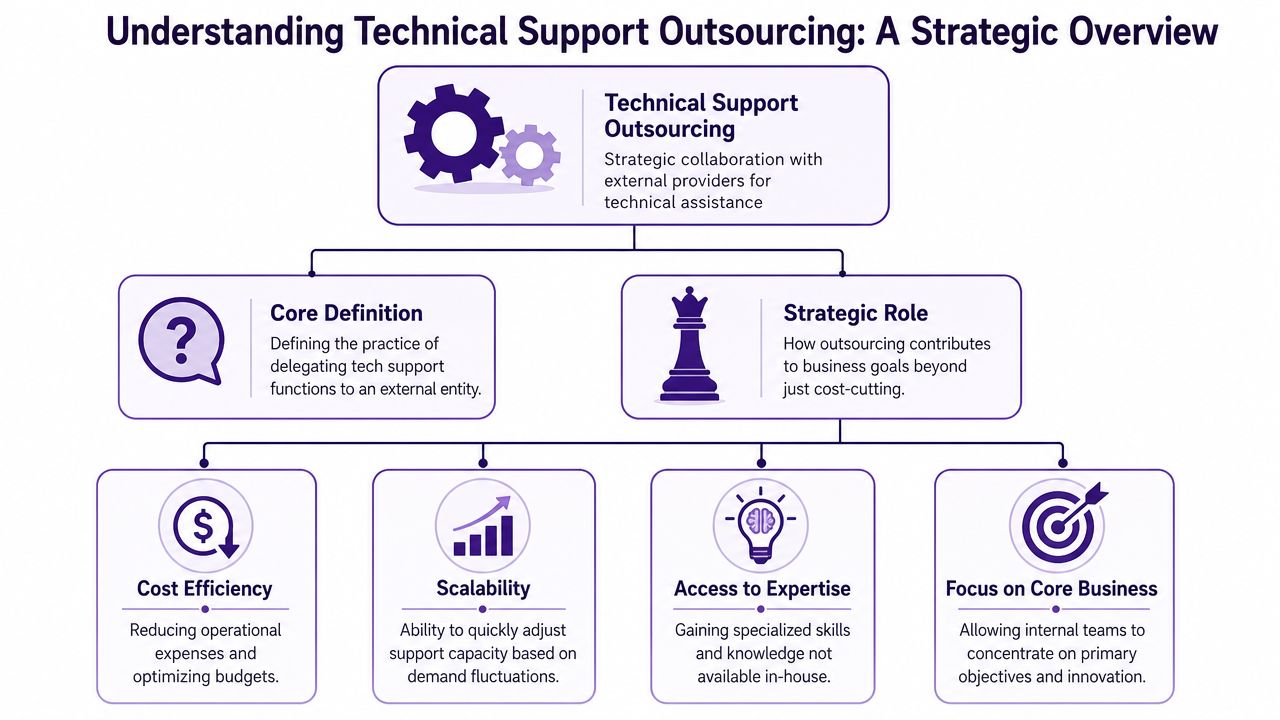
Technical support outsourcing isn’t only about cutting payroll or getting after-hours coverage. Done well, it gives your business a support structure that can absorb routine demand, protect your engineering time, and improve the customer experience around technical issues. Businesses exploring this model usually start by mapping what they want to offload and what must stay in-house. For a practical benchmark, it helps to review how IT help desk support services are typically structured.
The support tiers that matter
Not all technical support work is the same. The fastest way to make a bad outsourcing decision is to treat every ticket like it belongs in one bucket.
| Support tier | Typical work | Example |
|---|---|---|
| Tier 1 | Basic troubleshooting and repetitive requests | Password resets, account access, simple device setup, checkout errors |
| Tier 2 | Product-specific troubleshooting and deeper diagnosis | API configuration questions, software setup problems, failed integrations |
| Tier 3 | Advanced engineering or infrastructure issues | Server incidents, root-cause analysis, code-level bugs, architecture problems |
An online store might outsource Tier 1 issues such as password resets, order-status access problems, and checkout friction. That frees its internal product team to focus on site performance, payment logic, and release quality.
A SaaS company may push part of Tier 2 work to an external team that understands its CRM, billing logic, and user permissions. It might keep Tier 3 ownership inside the company because those tickets require engineering judgment and direct access to development workflows in Jira, GitHub, or internal observability tools.
Practical rule: Outsource the work that follows process. Keep the work that depends on product judgment, architecture decisions, or sensitive strategic context.
What businesses actually hand off
Support leaders usually start with a defined scope rather than a full transfer. That scope often includes:
- High-volume recurring issues: Login failures, installation help, account setup, device pairing, browser troubleshooting
- After-hours queue coverage: Overnight email, live chat, callback management, incident triage
- Multichannel support execution: Ticket handling across Zendesk, Freshdesk, Salesforce Service Cloud, Intercom, or phone systems
- Escalation filtering: Identifying which cases belong with engineering, billing, compliance, or account management
The strongest setups don’t replace internal expertise. They organize it. External agents handle what can be standardized. Internal specialists focus on edge cases, major incidents, and product improvements.
That division is what turns technical support outsourcing from a staffing shortcut into an operating model.
Onshore Nearshore and Offshore Outsourcing Models
How much delay can your support operation afford before cost savings stop looking attractive?
Where your outsourced team sits changes more than hourly rates. It affects how fast agents can get answers, how often tickets bounce between queues, how much manager oversight the vendor needs, and how quickly customers get a resolved case instead of a status update. Onshore, nearshore, and offshore models can all work. The right choice depends on the speed your business needs, not just the budget you want to hit.
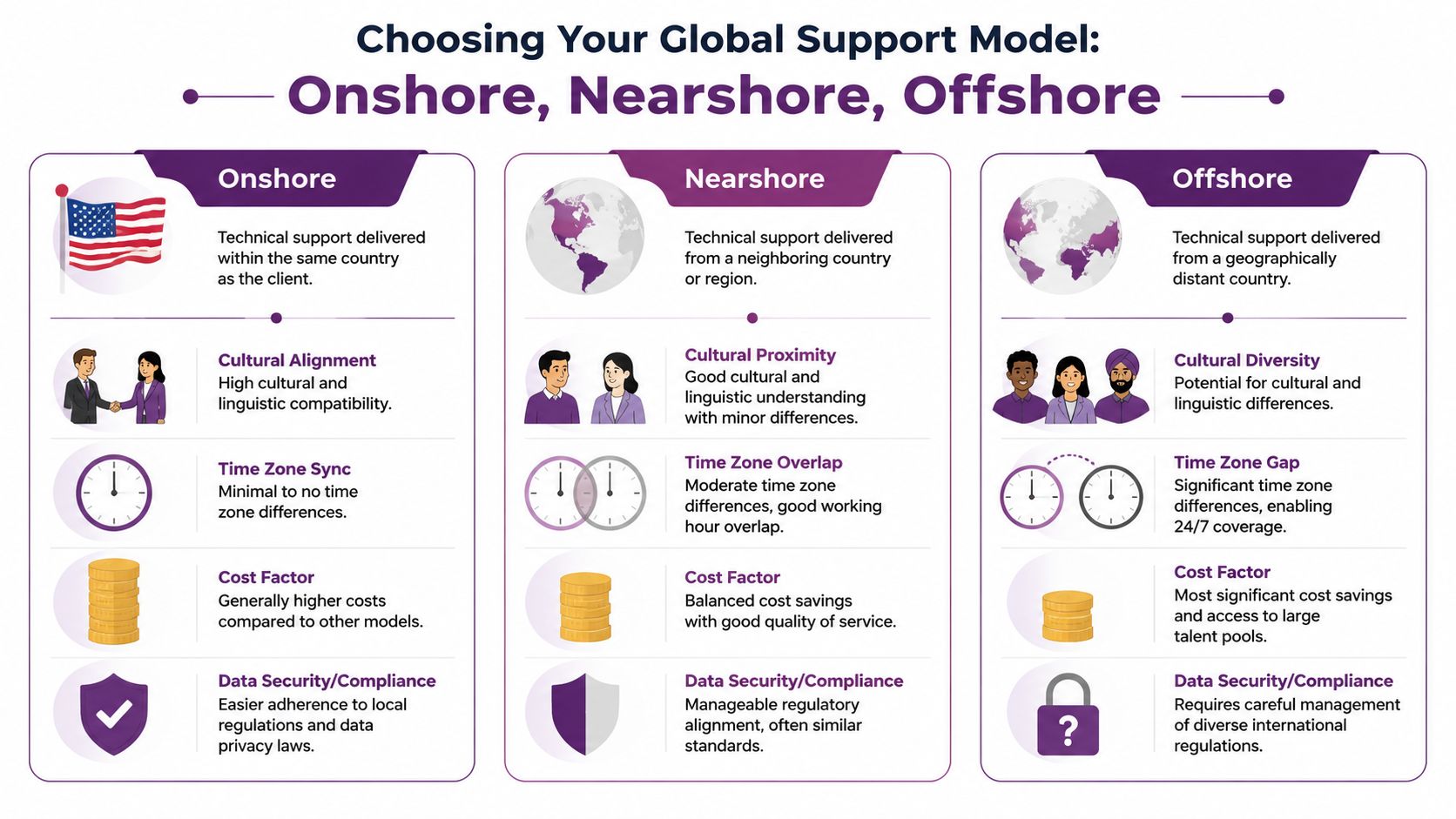
The biggest mistake I see in first-time outsourcing decisions is treating labor arbitrage as the whole business case. For technical support, the larger return often comes from faster clarification, quicker escalation, and fewer stalled tickets. A team that works in sync with your product, billing, or operations leads can close issues in the same business day. A team working half a day apart often cannot. Businesses sorting through those trade-offs usually benefit from a more detailed nearshore vs offshore outsourcing business guide.
Onshore outsourcing
Onshore means the support team is in the same country as your business.
This model gives you the closest match on language nuance, local customer expectations, and regulatory context. It is often the easiest option for leaders who want tight control, simple oversight, and fewer interpretation issues around policy or compliance. If support conversations involve sensitive financial, healthcare, or legal issues, onshore can reduce friction fast.
The cost trade-off is usually significant. Higher labor costs can limit hours of coverage, headcount depth, and multilingual support unless the company is willing to fund a larger service budget. For some teams, that means paying for alignment but still struggling with queue volume after hours or on weekends.
A practical fit is a regional insurance provider that needs domestic agents handling policy questions shaped by state-specific rules and customer communication standards.
Offshore outsourcing
Offshore places the team in a more distant region, usually with a larger labor pool and a lower per-agent cost.
It can be a good fit for mature support environments where workflows are stable, ticket types are repetitive, and documentation is strong enough to reduce judgment calls. Companies often use offshore teams to extend hours, cover overnight volume, or lower the cost of handling high-volume Tier 1 work.
The operational risk is slower decision velocity. Technical support rarely stays fully scripted for long. A password reset can expose an identity issue. A payment error can turn into a fraud review. An integration ticket may need product context before the agent can respond with confidence. Wide time zone gaps tend to slow those handoffs, especially when your internal approvers, engineers, or team leads are offline.
Offshore can still perform well. It just asks more from your internal operation. Better documentation, tighter QA, clearer escalation trees, and managers who can spot drift early all matter more here.
Nearshore outsourcing
Nearshore teams work in neighboring or closely aligned time zones. That creates a real operating advantage for companies that need support and internal teams working at the same time.
I look at nearshore as the model that captures the agility premium. The benefit is not geographic closeness by itself. The benefit is shorter gaps between intake, follow-up, approval, escalation, and resolution. When agents can message your billing lead at 11 a.m., get an answer by 11:10, and close the case before noon, the customer experience changes. So does the cost of managing the queue.
That speed shows up in several places:
- Faster live escalation during active business hours
- Fewer tickets waiting overnight for internal clarification
- Better coordination during incidents, launches, and promotions
- Lower rework caused by misread context or delayed follow-up
Earlier in the article, a source noted that nearshore teams often reduce resolution delays compared with traditional offshore setups. That matches what operators see in practice. Same-day collaboration usually produces better first-touch outcomes than handoffs spread across large time gaps.
A healthcare group supporting patient portal access, a fintech platform handling login and transaction issues, or an e-commerce brand running a flash sale all benefit from that model. In those environments, a cheaper ticket is not always the better ticket. A faster resolved ticket protects revenue, customer trust, and internal bandwidth.
Which model fits which business
Use the model that matches your support reality, not the model with the lowest headline rate.
- Choose onshore when: Customer interactions are sensitive, compliance interpretation is strict, or communication nuance matters more than labor savings.
- Choose offshore when: Work is process-heavy, highly documented, and stable enough to absorb longer escalation cycles.
- Choose nearshore when: Your team needs real-time collaboration, faster decisions, and support coverage that stays aligned with internal operating hours.
For many growing companies, nearshore is the most balanced first move. It lowers cost versus onshore without creating the decision lag that often erodes offshore savings. That balance is why nearshore tends to outperform simple rate-card comparisons. It keeps support moving while your business is still moving.
Weighing the Benefits and Risks of Outsourcing
What do you gain when you outsource technical support. Lower labor cost, or a faster support operation that protects revenue when issues pile up?
That distinction matters. Plenty of teams approve outsourcing on rate alone, then spend the next two quarters fixing slow escalations, uneven QA, and customer frustration. The better way to evaluate the decision is to look at operating impact. Cost matters, but response speed, resolution speed, and management load matter just as much. For companies that need real-time coordination, the nearshore agility premium often produces more value than the cheapest hourly rate.
According to Flairstech’s review of technical support outsourcing, companies that outsource often report operational savings between 25% and 40%, and the firm also notes that agent attrition in this segment has historically ranged from 25% to 40%. Those two numbers belong together. Savings are real. So is instability if the provider cannot retain staff on your account.
Where the return shows up
The first return usually comes from workload control. Internal engineers stop answering password resets, order-status questions, device setup issues, and repeat troubleshooting steps that do not require product expertise. That gives technical staff time back for releases, infrastructure work, and defect fixes.
The second return comes from speed.
A nearshore partner can work cases with your internal team during the same business day, which shortens escalation cycles and reduces ticket aging. That is the overlooked ROI factor in many outsourcing decisions. If a billing bug, login failure, or provisioning issue can be reviewed and resolved while your product, IT, and support teams are all online, you reduce rework, customer wait time, and backlog growth at the same time.
The third return is operational flexibility. You can add coverage for launches, seasonal spikes, and recurring high-volume periods without carrying a full in-house bench year-round.
A simple example makes the trade-off clear. An e-commerce company running promotions every Friday night may save money with a low-cost offshore team, but if order failures sit until the next morning because the escalation team is offline, the savings are easy to overstate. A nearshore team costs more per hour and often resolves revenue-sensitive issues faster because supervisors, client managers, and internal stakeholders can make decisions in the same window.
The risks that deserve board-level attention
Outsourcing usually fails for ordinary reasons. The provider was selected on price, training was rushed, documentation was thin, or nobody defined who owns quality.
The main risks are straightforward:
- Weaker day-to-day control: Leaders lose direct visibility unless reporting, QA reviews, and escalation rules are in place.
- Documentation gaps: Agents can only support the process they were taught. Weak SOPs produce inconsistent answers fast.
- Security and access risk: Support teams handle customer data and internal systems. Poor permission control creates avoidable exposure.
- Turnover on the account: High attrition changes agent quality, increases retraining, and weakens product knowledge over time.
- Slow exception handling: If a partner cannot reach your team during live operating hours, tickets that should close in one touch turn into multi-step handoffs.
That last point deserves more attention than it usually gets. Many companies model outsourcing ROI with cost per ticket. They should also model time to resolution, reopen rate, and escalation lag. In practice, those metrics often determine whether the outsourcing program reduces pressure or moves it.
Key takeaway: The cheapest vendor can become the most expensive option if slow collaboration increases backlog, repeat contacts, and supervisor intervention.
How disciplined teams reduce the downside
Start small and control the variables. A pilot queue, one product line, or after-hours coverage is easier to measure than a full support handoff.
Then tighten the operating model:
- Set success metrics before launch. Track first-response time, time to resolution, CSAT, reopen rate, escalation accuracy, and QA scores.
- Keep the knowledge base current. Product changes, policy updates, and known issue workarounds need an owner on your side.
- Review live work every week. Audit tickets, call recordings, and exception handling, not just summary dashboards.
- Check account stability. Ask how long the supervisor, QA lead, and frontline team typically stay assigned.
- Limit system access by role. Give agents only the tools and permissions required for the queue they handle.
- Test vendor selection with the same rigor you would use to choose the right ITAD partner. Discipline in evaluation usually predicts discipline in delivery.
Companies making a first outsourcing decision should also compare providers based on operating fit, tooling, and escalation design, not sales polish alone. A practical shortlist process usually looks a lot like this framework for finding technology support companies.
Outsourcing works when the provider is managed like an extension of operations. It fails when leadership treats it like a simple staffing purchase. For growing companies, nearshore often gives the best margin of safety because it improves collaboration speed while still lowering cost versus building the whole function in-house.
How to Choose the Right Technical Support Partner
Most companies don’t need more vendor promises. They need better questions.
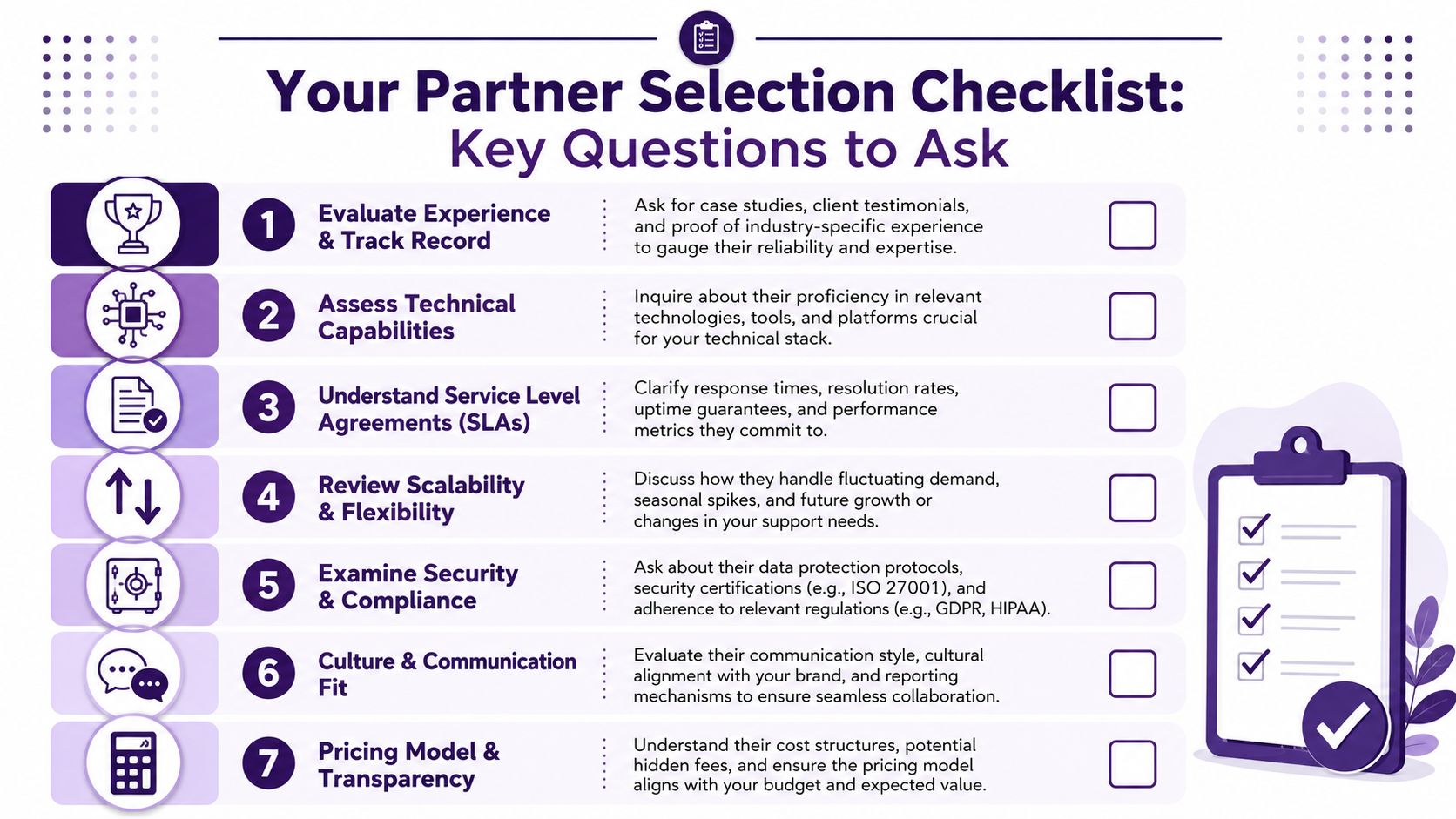
A strong partner selection process should test whether the provider can run your workflows, protect your data, communicate with your customers, and stay stable when ticket volume rises. If you’re comparing options, this guide to finding technology support companies is a useful companion to your internal shortlist process.
Start with operating fit, not branding
A polished website won’t tell you whether the team can handle Zendesk macros, Shopify order lookups, Microsoft 365 admin requests, Salesforce case workflows, or identity verification rules.
Ask direct questions such as:
- What systems do your agents already use? Look for practical familiarity with tools like Zendesk, Freshdesk, Intercom, Salesforce Service Cloud, Talkdesk, Five9, Jira, Slack, and remote support platforms.
- What does escalation look like? You want a documented path from Tier 1 to specialist review, not “our team will coordinate internally.”
- How do you train on product changes? Weekly releases, policy changes, and promotions often break support quality if training lags.
A good answer is specific. A weak answer sounds broad and reassuring.
Vet language and customer handling in the real world
Technical support is not just technical. It’s communication under pressure.
Listen for clarity, pacing, and judgment. Ask for sample calls or role-play scenarios. A customer who can’t log in before a meeting, or a shopper whose order failed twice, needs a calm explanation and competent next steps. Accent matters less than clarity, empathy, and the ability to explain a fix without jargon.
One practical test is to give vendors three mock cases:
- a simple password reset
- a billing-related access issue
- a frustrated customer with an integration failure
Then compare how they document, escalate, and communicate. That reveals more than a generic capabilities deck.
Check the SLA details most buyers skip
Don’t just ask if they have service level agreements. Ask what the SLA measures.
Review these items closely:
- Response commitments: How quickly do they acknowledge tickets by channel?
- Resolution ownership: Who owns follow-through if another team must step in?
- Queue management: How do they handle spikes, backlog, and priority routing?
- Reporting cadence: Daily dashboard, weekly review, monthly business review, or only on request?
Ask vendors to show you the exact scorecard they use with current clients. If they can’t show the operating dashboard, they probably don’t manage tightly enough.
Security needs a practical audit
Many SMBs encounter a common hurdle. They know security matters, but they don’t have a security engineering team to run formal penetration testing on every vendor.
That problem is getting harder to ignore. According to PartnerHero’s article on technical support outsourcing, there has been a 45% increase in BPO-related data breaches, and 60% of SMBs lack resources for penetration testing. That’s why your evaluation process should include non-technical audit questions, not just a checkbox asking whether the vendor is “compliant.”
Ask questions like these:
- Server environment: Is client data handled in dedicated environments or shared ones?
- Access logs: Who can review access history, and how often is it audited?
- Permission controls: Are agents given role-based access or broad shared credentials?
- Break-glass procedures: What happens if emergency access is needed?
- Incident response: Who notifies you, how quickly, and what evidence will they provide?
- Endpoint discipline: Are devices managed, monitored, and restricted for support work?
If your support process also includes hardware disposition, device refresh, or retired equipment handling, the same discipline applies when you choose the right ITAD partner. Vendor selection should cover chain of custody, process transparency, and documented controls across the full support lifecycle.
What a strong shortlist looks like
By the end of the process, your shortlist should include providers that can show:
- Relevant support experience
- Stable team management
- Clear communication standards
- Security transparency
- Flexible staffing models
- Tool compatibility
- Reporting discipline
CallZent is one example of a nearshore provider in Tijuana that offers bilingual technical support and related BPO services for North American businesses, but the core test is the same for any vendor. Can they run your operation cleanly, securely, and predictably?
If the answer isn’t obvious after diligence, keep looking.
Understanding Pricing Models and Industry Compliance
Pricing confusion causes more outsourcing friction than most businesses expect. Not because the models are complicated, but because buyers often choose a structure that doesn’t match ticket volume, complexity, or channel mix.
The easiest way to evaluate pricing is to match the model to the workload.
The pricing models most companies see
| Model | Best fit | Watch for |
|---|---|---|
| Dedicated agent | Steady volume and complex workflows | Paying for idle time if demand swings hard |
| Shared agent | Lower volume or blended queues | Less exclusivity and more process discipline required |
| Pay per ticket | Predictable ticket-based support work | Disputes over what counts as a billable ticket |
| Per minute or usage-based | Phone-heavy environments | Incentives can get misaligned if call efficiency isn’t monitored |
A dedicated agent model works like hiring an external full-time support employee. The person or team is assigned to your account and learns your systems thoroughly. This is often the best fit for businesses with recurring ticket flow, product-specific troubleshooting, or regulated workflows.
A shared agent model is closer to pooled staffing. You get support capacity without reserving one team only for your brand. This can work well for smaller businesses with intermittent support demand, but it depends on clear SOPs and good queue design.
Pay per ticket sounds attractive because it feels easy to forecast. It fits businesses with relatively clean ticket definitions and stable issue types. It becomes messy when one issue turns into multiple interactions, escalations, or cross-functional follow-ups.
Per-minute pricing is common in voice-heavy environments. It can be reasonable for straightforward call handling, but buyers should check whether the model encourages long calls instead of efficient resolution.
Compliance is operational, not just contractual
If your industry handles sensitive data, the compliance discussion should move beyond “yes, we support that standard.”
What matters is how support agents work inside those rules.
- HIPAA: For healthcare organizations, support teams may interact with patient-related information. That changes how agents verify identity, document issues, access systems, and communicate updates.
- PCI DSS: For e-commerce and retail, payment-related workflows require strict handling of card data and customer verification. Agents need process controls that prevent unsafe data exposure.
- GDPR: If you serve European customers, support teams must handle personal data with care around access, storage, deletion requests, and disclosure boundaries.
A compliant partner should be able to explain real operating controls. Who can access what. How credentials are managed. How records are logged. How incidents are escalated. For a practical nearshore view of those issues, review this page on security and compliance in MX BPOs.
Compliance language in a contract matters. Day-to-day agent behavior matters more.
The right pricing model helps you control budget. The right compliance posture protects the business while that support model scales.
Your Roadmap for a Smooth Outsourcing Transition
What separates a support outsourcing program that gains traction in 90 days from one that burns six months and still misses SLAs? The handoff.
Analysts at Straits Research in its technical support outsourcing market report project continued growth in technical support outsourcing through 2034. That means more providers, more choice, and more pressure to transition well. The companies that get value fastest usually control the rollout with discipline, clear ownership, and short feedback loops.
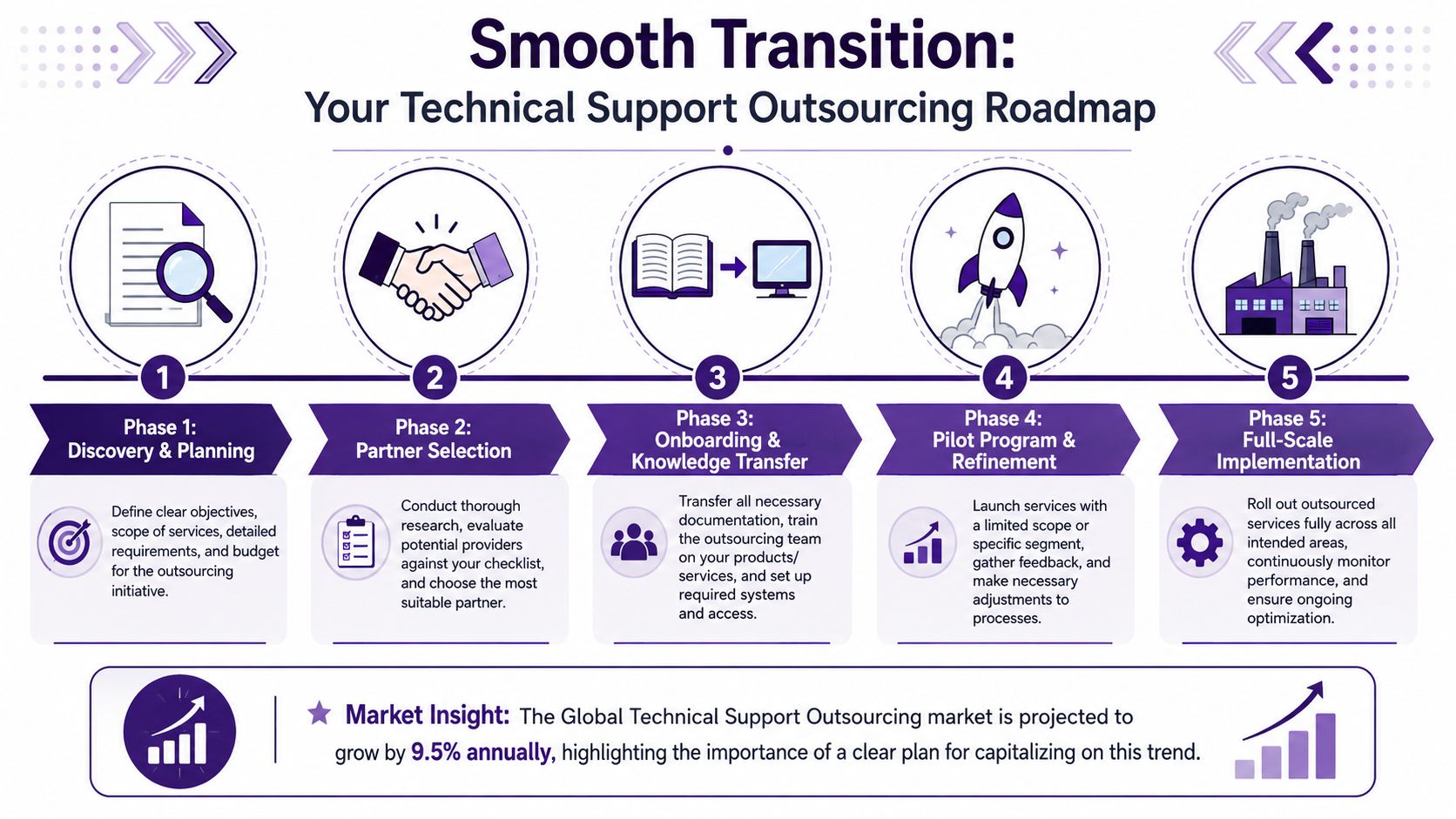
For teams shifting from a distant model to a closer-operating one, the operational advantage is often speed, not just labor savings. A nearshore partner working in a compatible time zone can shorten escalation cycles, speed QA corrections, and reduce the idle time that builds up when product, support, and engineering work on different clocks. If you are making that shift, this practical guide to a transition from offshore to nearshore shows what should move first and what should stay tightly controlled during rollout.
Phase 1 planning and scope control
Set the operating boundaries before launch.
Define which queues move first, which products are included, which channels stay in-house, and who approves exceptions. Good transition plans also spell out what “good” looks like in measurable terms, so the partner is being managed against outcomes instead of general expectations.
Capture a baseline before anything changes. Common metrics include:
- First contact resolution
- Average handle time
- Customer satisfaction
- Ticket backlog
- Escalation rate
- Reopen rate
Without that baseline, speed gains and quality losses get blurred together.
Phase 2 knowledge transfer
Knowledge transfer fails when companies hand over policies but not working context.
Agents need more than product documentation. They need to see how issues move through your operation. That includes approved language, screenshots, system rules, escalation paths, edge cases, refund logic, and examples of strong ticket notes.
A solid transfer package usually includes:
- SOPs and troubleshooting trees
- Macros, templates, and response standards
- Access matrices by role
- Escalation contacts and decision rules
- Recorded examples of common issues
- A changelog for product and policy updates
I have seen early outsourcing programs stall for one simple reason. Internal teams assumed the partner would fill in the gaps live with customers. That is expensive and avoidable.
Phase 3 pilot before full rollout
Run a pilot with real volume before expanding.
Start with one queue, one issue type, one product line, or one time block. A nearshore model tends to show its value quickly here because supervisors, trainers, and internal stakeholders can correct problems in the same business day instead of waiting overnight. That time-zone overlap is the nearshore agility premium. It shows up in faster coaching, quicker escalation handling, and fewer unresolved tickets sitting between teams.
The pilot should answer practical questions:
- Are agents documenting correctly?
- Are escalations reaching the right people?
- Are customers getting clear answers?
- Are internal teams receiving usable context?
- Are response standards realistic?
The goal is to expose friction early and fix it while the risk is still contained.
Phase 4 go live with active management
Expand in controlled layers once the pilot holds steady.
Early production needs close review. Team leads should monitor live queues, sample interactions, unresolved cases, and escalation quality every day. Managers should compare SLA performance with what customers are experiencing, because those two views do not always match in the first weeks.
A practical rollout pattern often looks like this:
| Stage | Focus |
|---|---|
| Initial launch | One channel or issue type |
| Early expansion | Additional hours or a second queue |
| Controlled scale | Added products, geographies, or languages |
| Mature operation | Full production with routine QA and optimization |
Phase 5 ongoing optimization
Go-live is the start of management, not the end of transition.
Review performance regularly. Audit quality. Update documentation as products and policies change. Recalibrate escalation rules with your internal technical team. If the partner is nearshore, use the time-zone overlap on purpose. Hold tighter calibration sessions, fix workflow issues faster, and close the gap between identifying a problem and correcting it in production.
🚀 Ready to Build a Better Technical Support Model?
CallZent helps North American businesses build bilingual nearshore technical support teams for help desk coverage, Tier 1 support, escalation workflows, customer service, and scalable BPO operations from Tijuana, Mexico.
Talk to an ExpertFAQs About Technical Support Outsourcing
What is technical support outsourcing?
Technical support outsourcing is the practice of assigning some or all technical support functions to an external team that handles customer or employee troubleshooting, ticket management, escalation, and support workflows.
Which technical support tasks can be outsourced?
Common outsourced tasks include password resets, account setup, installation help, device troubleshooting, browser issues, Tier 1 help desk requests, after-hours queue coverage, ticket triage, and escalation filtering.
What support tiers are best for outsourcing?
Tier 1 support is often the easiest to outsource because it follows repeatable processes. Some Tier 2 support can also be outsourced when documentation and escalation rules are strong. Tier 3 usually stays closer to internal engineering or infrastructure teams.
What is the difference between onshore, nearshore, and offshore technical support?
Onshore support is delivered in the same country, nearshore support is delivered from a nearby or time-zone-aligned country, and offshore support is delivered from a more distant region. Each model differs in cost, collaboration speed, oversight, and escalation timing.
Why choose nearshore technical support outsourcing?
Nearshore technical support outsourcing gives North American companies time-zone alignment, faster escalation, better real-time collaboration, bilingual support options, and lower cost compared with many onshore models.
What are the risks of technical support outsourcing?
Risks include weak day-to-day control, poor documentation, security exposure, high agent turnover, slow exception handling, inconsistent quality, and unclear escalation ownership.
How can companies reduce outsourcing risk?
Companies can reduce risk by starting with a pilot, setting clear metrics, documenting SOPs, reviewing live work weekly, controlling system access by role, and choosing vendors based on operating fit instead of price alone.
What pricing models are common in technical support outsourcing?
Common pricing models include dedicated agent pricing, shared agent pricing, pay-per-ticket pricing, and per-minute or usage-based pricing for phone-heavy support environments.
What compliance standards matter for outsourced technical support?
Compliance needs depend on the industry. Healthcare support may involve HIPAA, e-commerce and retail may involve PCI DSS, and companies serving European customers may need GDPR-aware processes.
How can CallZent help with technical support outsourcing?
CallZent helps North American businesses build bilingual nearshore technical support teams from Tijuana for help desk coverage, Tier 1 support, customer service, escalation workflows, and scalable BPO operations.
The strongest outsourcing relationships operate like one support system with shared accountability across support, operations, product, and compliance.