Skip to content
Data Entry Services
Data Entry Services Guide for Business Efficiency and Data Intelligence
Learn how modern data entry services improve accuracy, efficiency, and AI readiness. Explore workflows, industry use cases, outsourcing benefits, and how to choose the right provider.
TL;DR — Quick Takeaways
- Data entry services now go far beyond manual typing.
- Their true value comes from combining input, cleansing, validation, classification, and structured delivery.
- Good workflows reduce rework, protect downstream teams, and make data more useful for automation and reporting.
- The smartest buyers look for data intelligence, not just keyboard labor.
- Nearshore BPO models are attractive when businesses want strong communication, process discipline, and cost control.
The global data entry service market reached USD 5.2 billion in 2024 and is projected to reach USD 12.8 billion by 2033, with a 9.5% CAGR from 2025 through 2033, according to Data Horizzon Research’s data entry service market analysis. That figure tells you something important. Data entry isn’t a minor admin chore anymore. It’s infrastructure.
Most companies still treat it like typing. That’s the mistake.
When customer records, invoices, product catalogs, claims forms, and scanned documents flow through weak processes, teams lose time correcting bad inputs, reconciling mismatches, and chasing missing information. When those same inputs are captured, cleaned, classified, and validated properly, the business runs faster and makes better decisions.
Your Guide to Modern Data Entry Services
A lot of business leaders ask the wrong question. They ask, “Who can enter this data for the lowest price?” A better question is, “How do we make this data usable the first time?”
That shift changes everything. A retailer doesn’t just need product details copied into a spreadsheet. It needs clean SKUs, standardized naming, correct pricing fields, searchable attributes, and product data that syncs across systems. A healthcare provider doesn’t just need forms transcribed. It needs organized records that billing and operations teams can trust.
Data becomes valuable when people can find it, trust it, and use it without fixing it first.
Modern data entry services sit at that intersection of speed, accuracy, and usability. The work includes intake, extraction, quality checks, formatting, and often structured output for Excel sheets, CRMs, ERPs, claims systems, or document repositories. In practice, this is less about clerical labor and more about protecting operational flow.
If your business is still treating data as a liability to be handled after the fact, you’re probably paying for that decision somewhere else. Usually in customer service delays, finance exceptions, inventory confusion, or reporting errors.
Beyond Typing Understanding Types of Data Entry Services
A large share of business data still arrives in forms that systems cannot use cleanly on first pass. Scans, handwritten notes, vendor PDFs, emailed spreadsheets, and legacy exports all create friction before the data ever reaches reporting, billing, or operations. That is why data entry services now matter as a data preparation function, not just a typing task.
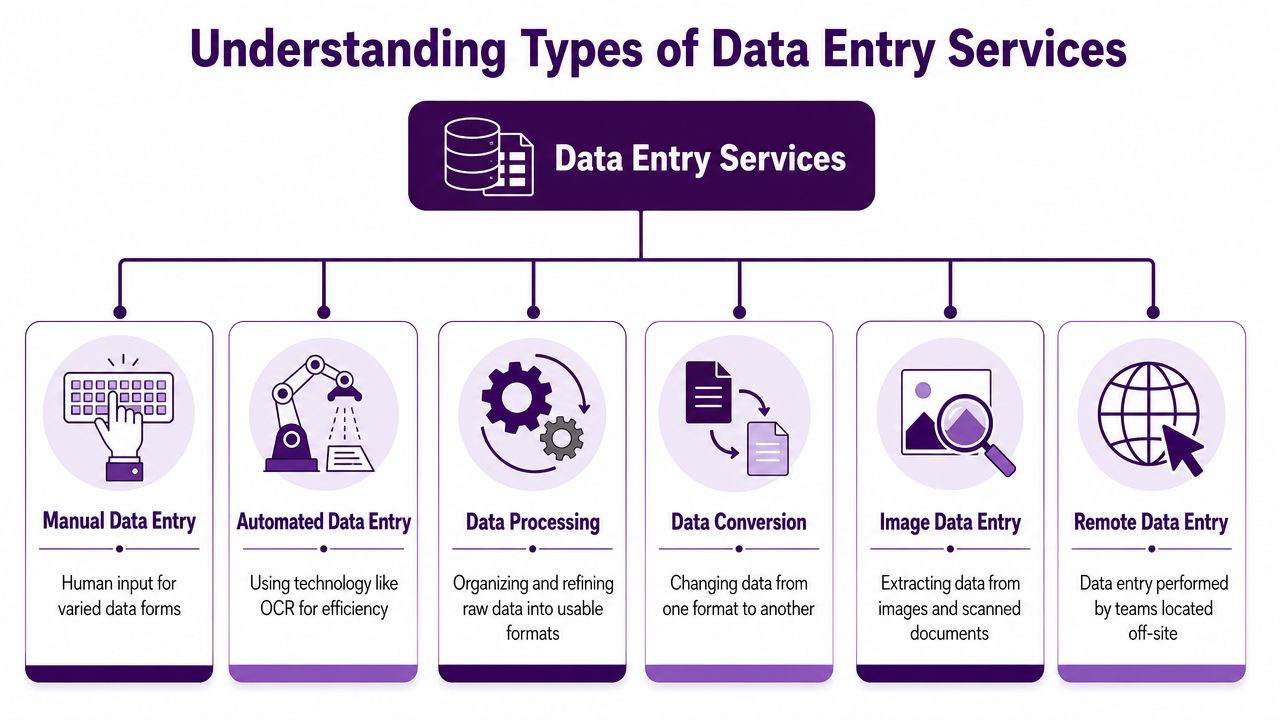
Strong providers handle capture, cleansing, standardization, indexing, classification, and review in one workflow. The business value comes from producing data that downstream systems can trust. That means fewer billing edits, fewer inventory mismatches, faster search, and cleaner inputs for automation or AI models.
Core Service Types
-
Manual data entry
Manual entry still has a clear place. It fits handwritten forms, irregular layouts, poor-quality scans, legacy PDFs, and edge cases where software cannot read context correctly. Skilled agents enter the data into Excel, databases, ERPs, CRMs, or industry systems while applying judgment on ambiguous fields. -
Data conversion
This service moves information from one format into another usable structure. Common examples include PDF to Excel, image files to searchable text, paper forms to database records, or portal exports reformatted for import into another platform. The output matters as much as the transfer. A clean conversion reduces manual rework later. -
Data cleansing
Cleansing fixes the problems that cause reporting noise and operational errors. Teams remove duplicates, standardize dates and units, correct obvious formatting issues, align naming conventions, and flag missing values for follow-up. This is one of the clearest points where data entry becomes data intelligence. -
Data classification and indexing
Classification gives records context. Indexing makes them retrievable. In practice, this means tagging documents by customer, claim type, product family, region, status, or another business rule so teams can route, search, and audit information quickly. -
Product and catalog data entry
Retailers, distributors, and marketplaces often need more than simple field population. They need SKU normalization, attribute mapping, category cleanup, pricing checks, and image or description alignment across channels. Poor catalog data creates search problems, returns, and listing errors. -
Invoice, order, and forms processing
High-volume transactional work often sits in this category. Purchase orders, invoices, application forms, claims packets, and onboarding files all require structured extraction, validation, and exception handling before they can move into finance or operations systems.
Where OCR and IDP fit
OCR converts scanned documents into machine-readable text. Intelligent document processing goes further by identifying document types, extracting target fields, and routing exceptions for review. Used well, these tools improve speed on repetitive formats. Used poorly, they pass bad data into core systems faster.
That trade-off matters.
Invoices with consistent layouts are good candidates for OCR-led workflows. Handwritten service forms, multi-format supplier documents, and poor scan quality usually need a hybrid model where automation handles first-pass extraction and people review exceptions. In my experience, the best providers do not force automation into every workflow. They choose the mix that protects accuracy and turnaround.
A typical document workflow looks like this:
| Workflow stage | What happens |
|---|---|
| Capture | Documents are scanned or uploaded |
| Recognition | OCR identifies characters and words |
| Extraction | Key fields are pulled into structured form |
| Mapping | Data is assigned to the right template or field |
| Review | A specialist checks exceptions and unclear entries |
| Final output | Files are delivered in the system or format the client needs |
Skilled work, not commodity work
Good data entry teams bring more than typing speed. They need field-level accuracy, system discipline, pattern recognition, spreadsheet fluency, and enough business context to catch errors before they spread. A finance-oriented team should notice a tax field mismatch. A product-data team should spot inconsistent units or duplicate SKUs. A healthcare support team should recognize when indexing errors can affect retrieval and compliance.
This is why data entry often overlaps with broader administrative support. Businesses hiring for these roles often browse resources like opportunities for admin professionals, especially when the work includes document handling, coordination, and system updates. That overlap is even stronger when companies combine structured data work with services such as virtual office assistant services.
Practical rule: If the work affects billing, fulfillment, compliance, reporting, or AI readiness, scope data entry as a controlled operations process with cleansing and classification built in.
How Professional Data Entry Workflows Operate
A reliable workflow is what separates professional delivery from a spreadsheet scramble. The output may look simple at the end, but the process behind it shouldn’t be improvised.
Intake and setup
The job starts with source review. Teams need to know what they’re receiving, where it comes from, what format it’s in, and what the finished output should look like. If a client sends scanned forms, invoice batches, or order sheets without field definitions, quality problems show up later.
A practical intake checklist usually covers:
- Source format such as scans, PDFs, images, spreadsheets, or portal exports
- Required fields including mandatory and optional data points
- Output destination such as Excel, CRM, ERP, or a shared database
- Turnaround rules for standard work and urgent exceptions
- Validation logic for dates, customer IDs, SKUs, or pricing fields
This is also the point where teams decide whether the project should be mostly manual, OCR-assisted, or hybrid. For repetitive high-volume files, automation may do the first pass. For handwritten or inconsistent documents, trained agents usually handle more of the work directly.
Input, validation, and exception handling
The strongest data entry teams don’t just key information. They validate it while working. If an order shows an invalid part number, a billing address that doesn’t match the customer record, or a quantity that conflicts with a known pricing table, it shouldn’t pass through untouched.
That’s where operational discipline matters. Teams often use validation rules, lookup references, and exception queues. For repetitive internal workloads, businesses can reduce avoidable handoffs by pairing document intake with process redesign and tools like automation for repetitive tasks.
Quality assurance before delivery
Quality control is where many internal teams cut corners because they’re overloaded. Professional workflows build it in.
A strong QA layer may include:
- Double data entry for sensitive fields where two specialists enter the same information and discrepancies are reviewed
- Spot audits on completed batches
- Field-level validation against real records
- Exception review for missing, conflicting, or unreadable values
- Final formatting checks before upload or export
The cheapest workflow is usually the one that avoids correction work later.
The result is a cleaner handoff to the teams that depend on the data next. Finance can process. Operations can ship. Support can answer questions without opening three systems and guessing which record is correct.
Data Entry Services in Action Across Key Industries
The value of data entry services becomes obvious when you look at the work inside real operating environments. The problems differ by industry, but the pattern is the same. Bad input slows everything down.
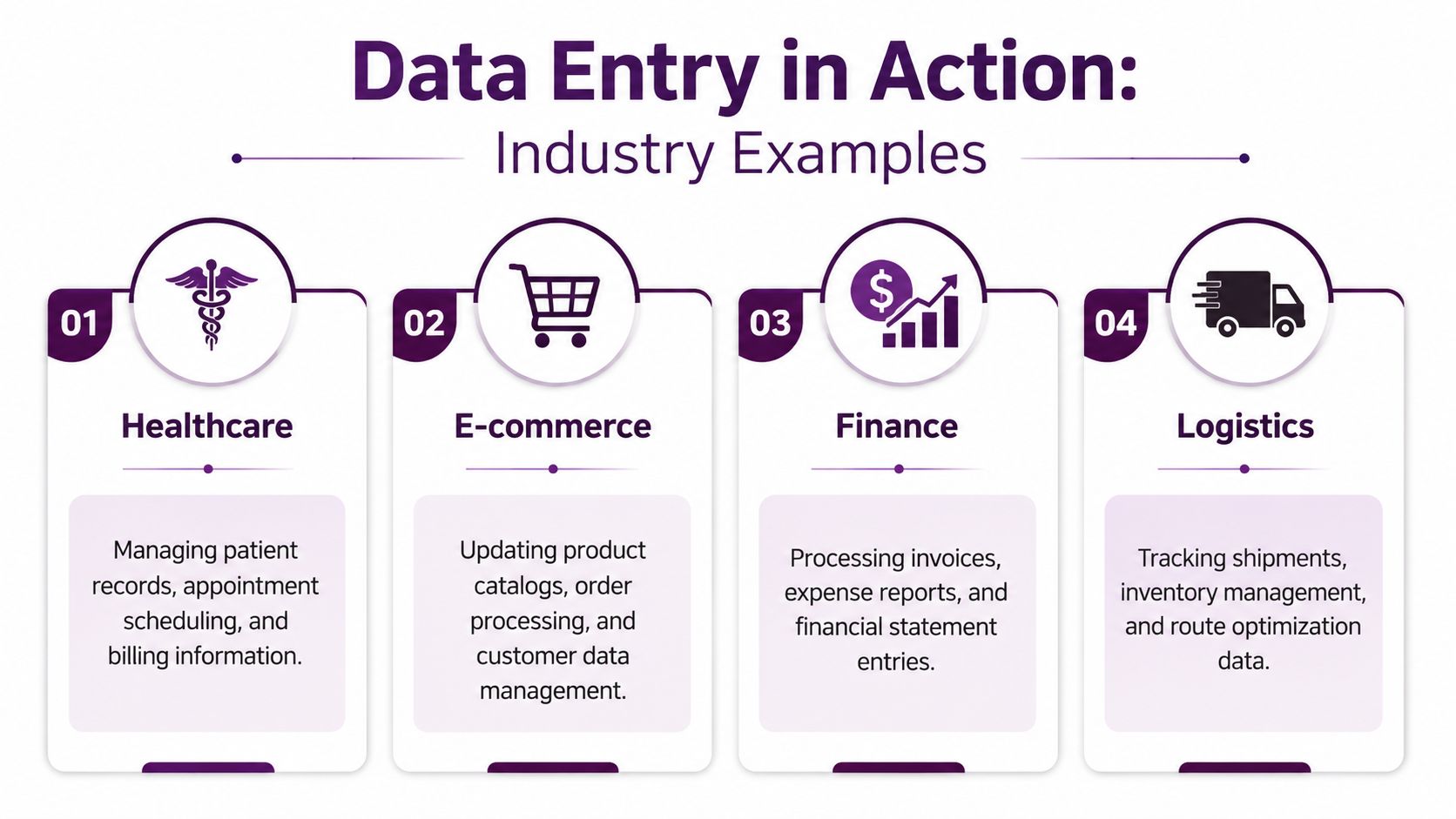
E-commerce needs clean product and order data
A growing online store may receive product information from multiple vendors. One supplier sends color names in all caps. Another leaves dimensions in a PDF. A third changes SKU formatting without warning. If nobody standardizes that data, the catalog becomes hard to search, pricing updates stall, and returns increase because listings aren’t clear.
In practice, data entry support helps with:
- Product catalog updates across titles, descriptions, specs, and attributes
- Order entry and reconciliation from forms, emails, or marketplace feeds
- Customer record cleanup so support teams see the right information
- Inventory-related data formatting that keeps systems aligned
For brands dealing with rising order complexity, structured support around order processing outsourcing services that scale often makes more sense than adding ad hoc labor every time volume spikes.
Healthcare runs on trustworthy records
In healthcare, small errors can affect care coordination, billing, and scheduling. Teams often need to digitize intake packets, update patient records, and move insurance details into systems that different departments can access.
The work isn’t glamorous, but it’s high stakes. A missing digit in a member ID or an incorrect demographic field creates avoidable delays and rework. That’s why healthcare organizations usually need disciplined indexing, field validation, and exception handling, not just fast transcription.
In healthcare, the best data entry process is the one clinicians and billing staff never have to think about because the records are already usable.
Finance depends on consistency
Finance teams deal with invoices, purchase orders, expense records, and vendor details. If invoice fields aren’t captured consistently, approvals slow down and reconciliation becomes manual. If vendor names vary across records, reporting gets messy.
A practical example is accounts payable intake. One vendor emails a PDF invoice, another sends an image, and a third uses a spreadsheet. Data entry support normalizes those inputs into one format so the accounting workflow stays predictable.
Logistics needs accurate movement data
Logistics teams live inside shipment records, proof-of-delivery documents, inventory updates, and routing information. Delays often start with missing or inconsistent entries. A warehouse can’t resolve a discrepancy quickly if the source document was captured poorly.
In that environment, good data entry supports smoother dispatching, cleaner tracking records, and fewer follow-up calls from customers asking where an order is and why the status doesn’t match reality.
The Strategic Benefits of Outsourcing Your Data Entry
Outsourcing data entry isn’t only about removing repetitive work from an internal team. Done well, it improves cost structure, quality control, and day-to-day execution.
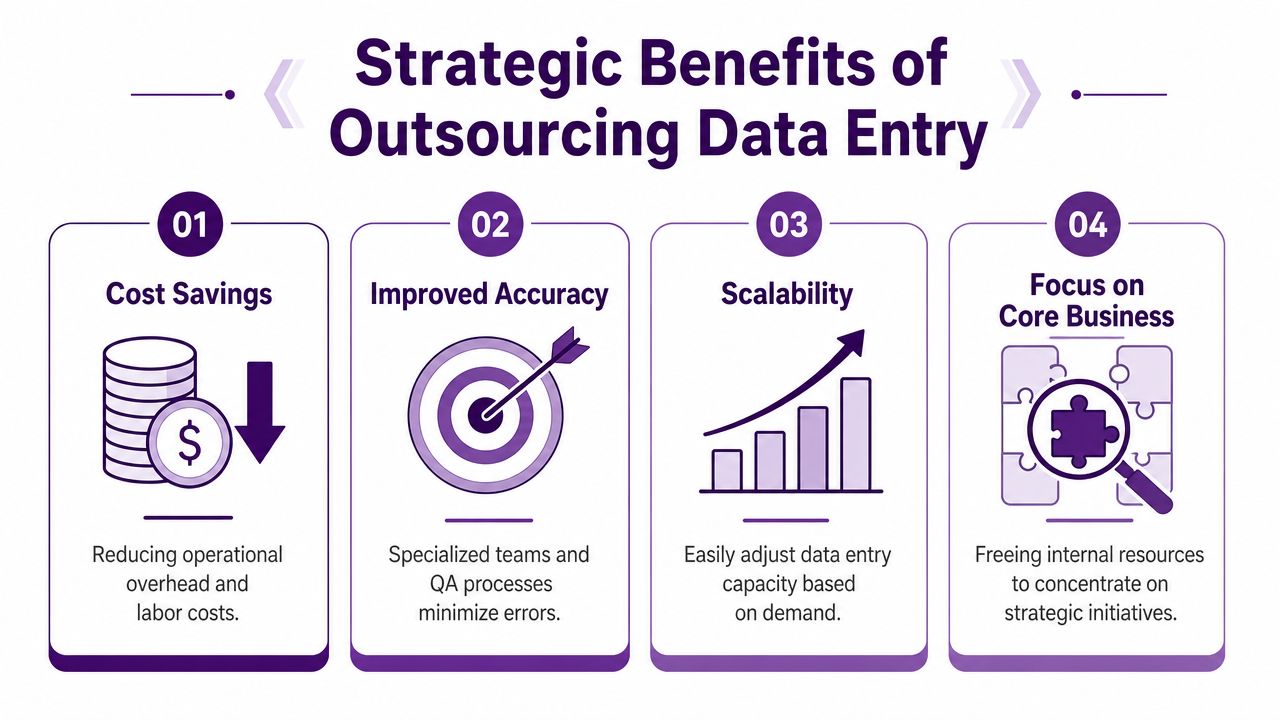
Cost efficiency without building a larger internal team
For North American companies, nearshore delivery is often attractive because it balances savings with easier communication. Tijuana call centers offer 40% to 60% cost savings compared to U.S.-based operations while maintaining high-quality customer experience, according to Saint’s analysis of nearshoring in Tijuana.
That matters for data-heavy back-office work. If an internal team is already stretched, adding more full-time headcount isn’t the only option. Businesses can shift routine input, document handling, and structured processing to specialized teams through outsourced back-office services, then keep internal staff focused on customer issues, finance review, or operations oversight.
Better accuracy and less downstream damage
Manual entry under real-world conditions degrades fast when people are rushed, interrupted, or tired. In operational settings, the cost of an error isn’t limited to the typo itself. It shows up later as billing discrepancies, shipment corrections, customer frustration, and preventable internal escalations.
A professional provider reduces that risk by using validation rules, trained specialists, and review steps that internal teams often skip when workload piles up.
Good data entry isn’t an expense; it’s an investment in operational excellence.
Scalability when volume changes
Demand rarely stays flat. Retailers hit seasonal spikes. Healthcare groups absorb form surges during enrollment periods. Finance teams get buried at month-end. Internal staffing models usually struggle with these swings because hiring and training take time.
Outsourcing gives the business room to flex capacity without redesigning the whole organization. That’s especially useful when the work is rules-based but high-volume.
More focus on work that actually grows the business
There’s a hidden cost to keeping data entry entirely in-house. Strong employees end up doing menial cleanup work. A sales coordinator fixes duplicate records instead of following up with prospects. An operations analyst reformats spreadsheets instead of improving fulfillment flow.
Here’s the trade-off in simple terms:
| Keep it all in-house | Outsource structured data work |
|---|---|
| Internal teams split time across admin and strategy | Internal teams stay focused on core responsibilities |
| Quality varies with workload and interruptions | Dedicated processes support consistency |
| Scaling usually means more hiring | Capacity can expand with demand |
Nearshore outsourcing also tends to reduce friction compared with distant offshore models. Shared time zones, easier communication, and bilingual support are practical advantages when teams need frequent coordination.
How to Choose the Right Data Entry Service Provider
Most provider comparisons start in the wrong place. Buyers look at price first, then turnaround time, then maybe security. A better sequence is to start with the business risk around the data, then evaluate who can manage it properly.
Ask whether they provide data intelligence or just labor
One of the biggest blind spots in this market is the gap between data entry and data intelligence. The industry often fails to distinguish between basic manual input and higher-value work like cleaning, classification, and AI tagging, which causes smaller businesses to outsource only the typing portion and miss the bigger value, as noted in Microsourcing’s guide to outsourced data entry services.
That’s the first question to ask a provider:
- Can they clean the data?
- Can they standardize fields across messy sources?
- Can they classify and tag records for future retrieval or AI readiness?
- Can they manage exceptions instead of dumping them back on your team?
If the answer is no, you may be buying labor while keeping the underlying operational problem.
Evaluate the provider like an operator, not a shopper
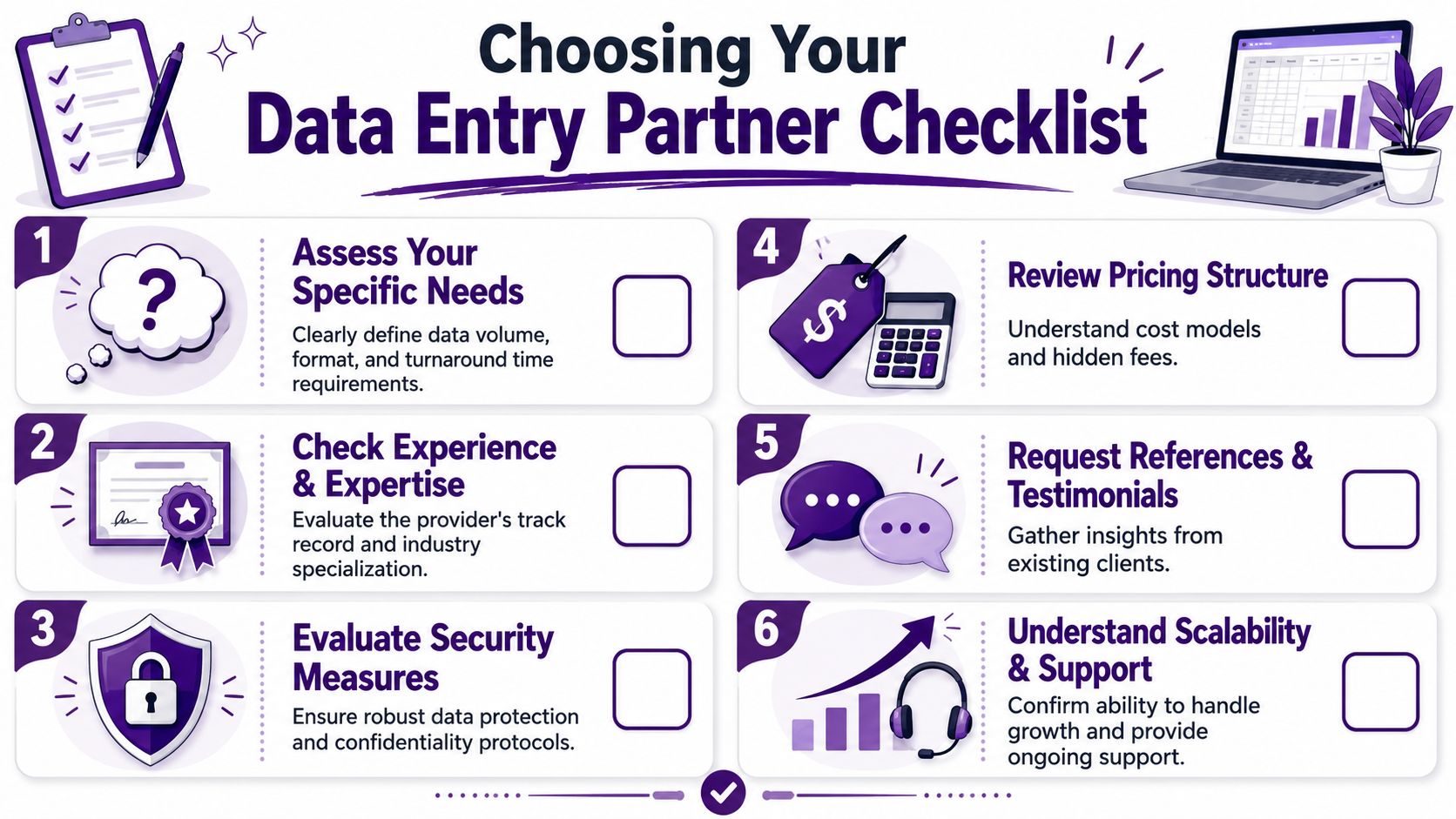
A useful checklist looks like this:
-
Security controls
Ask how they handle file access, user permissions, data transfer, and retention. If your sector has compliance requirements, ask about those directly. -
Workflow design
Ask how they validate entries, manage exceptions, and prevent repeated mistakes. Good providers have a process. Weak ones promise careful work and leave it at that. -
Output readiness
Confirm they can deliver in the format your systems and teams currently use. Clean CSV files, structured Excel templates, indexed records, and system-ready imports matter more than generic completion. -
Scalability
Ask what happens when your volume doubles for a short period. The answer should be operational, not vague. -
Communication model
Find out who owns the account, who handles daily questions, and how revisions are tracked.
For teams trying to build a more organized operational knowledge base around these workflows, it also helps to understand what knowledge management means in practice, especially when multiple departments depend on the same structured information.
Look for fit with your market and language needs
If your business serves customers across North America, bilingual capability matters. So does cultural alignment and time zone overlap. Those factors don’t show up clearly on a pricing sheet, but they affect launch speed, issue resolution, and daily collaboration.
Choose the provider that can make your data more usable, not just the provider that can process more rows.
Frequently Asked Questions About Data Entry Services
How secure is outsourced data entry?
Security comes down to controls, auditability, and discipline. A capable provider should be able to explain how files move, who can access them, how permissions are assigned, how work is logged, and when records are archived or deleted. If the answer stays at a high level, treat that as a warning sign.
For regulated work, ask about the standards that apply to your operation and how those standards show up in daily execution. Good security is not a policy document alone. It shows up in access rules, exception handling, retention practices, and documented accountability.
How long does it take to get started?
Start time depends on three things. Source quality, workflow complexity, and output definition.
A basic spreadsheet project can begin quickly if fields are clear and the destination format is already agreed. A larger engagement takes more setup, especially if the provider needs to classify documents, normalize inconsistent values, flag exceptions, or prepare structured data for import into ERP, CRM, or AI systems. In practice, the fastest launches happen when the business has already defined what accurate, usable output looks like.
What level of accuracy should a business expect?
Accuracy targets should match business risk. If the data affects invoicing, inventory, claims, compliance, or patient records, the acceptable error rate should be very tight and backed by a documented QA process. If the work supports lower-risk internal reporting, the threshold may be different.
The better question is how accuracy is produced and maintained. Ask whether the provider uses double-key verification for critical fields, sampling plans, exception queues, field-level validation, and feedback loops that reduce repeat errors over time. That is the shift from basic data entry to data intelligence. The work should not stop at capturing text. It should improve data quality, structure records for downstream use, and make the information more reliable for reporting, automation, and AI.
🚀 Ready to Strengthen Your Data Entry Operations?
CallZent helps North American businesses build bilingual nearshore support teams for data entry, document handling, back-office workflows, order processing, and scalable operational execution.
Talk to an ExpertFAQs About Data Entry Services
What are data entry services?
Data entry services involve capturing, entering, cleaning, validating, classifying, and formatting business information so it can be used accurately across systems such as spreadsheets, CRMs, ERPs, databases, and document repositories.
Are data entry services only manual typing?
No. Modern data entry services go beyond typing. They often include data cleansing, conversion, classification, indexing, validation, exception handling, OCR-assisted workflows, and structured data delivery for downstream business use.
What types of data entry can be outsourced?
Businesses can outsource manual data entry, PDF to Excel conversion, invoice processing, form processing, product catalog updates, CRM cleanup, document indexing, order entry, data cleansing, and record validation.
Why should businesses outsource data entry?
Businesses outsource data entry to reduce internal workload, improve accuracy, scale capacity during volume spikes, lower operational costs, and free internal teams to focus on higher-value work.
Which industries use data entry services?
Industries that commonly use data entry services include e-commerce, healthcare, finance, logistics, insurance, retail, professional services, real estate, and any business that depends on accurate records and structured information.
How does data entry support AI readiness?
AI tools need clean, structured, labeled, and reliable data. Data entry services support AI readiness by standardizing fields, removing duplicates, classifying records, validating inputs, and preparing information for automation or analytics.
What is the difference between data entry and data intelligence?
Data entry captures and organizes information. Data intelligence adds value by cleaning, validating, classifying, tagging, and structuring that information so it becomes more useful for reporting, decision-making, automation, and AI workflows.
How secure is outsourced data entry?
Outsourced data entry is secure when the provider uses role-based access, controlled file transfer, audit logs, retention rules, documented workflows, and compliance-aware handling for sensitive or regulated data.
Why choose nearshore data entry services?
Nearshore data entry services give North American companies cost control, time-zone alignment, easier communication, bilingual support, and stronger day-to-day coordination compared with distant offshore models.
How can CallZent help with data entry services?
CallZent helps North American businesses strengthen back-office operations with bilingual nearshore support for data entry, document handling, order processing, customer records, and scalable operational workflows.
If your team keeps correcting bad inputs, chasing missing fields, or reformatting records before they can be used, the problem is larger than typing volume. CallZent helps North American businesses strengthen back-office operations with bilingual nearshore support built for accuracy, efficiency, and scale.