
Contact Center Technology
Contact Center Technology Stack: A Practical Guide for 2026
Build a contact center technology stack that connects CCaaS, CRM, WFM, QA, analytics, security, AI, integrations, and measurable customer outcomes.
TL;DR — Quick Takeaways
- A strong contact center technology stack is an orchestrated operating system—not a collection of disconnected products.
- Begin with reliable routing, customer context, and knowledge management before adding complex automation.
- CCaaS provides the interaction core, while CRM, WFM, QA, analytics, security, and AI support the surrounding workflow.
- Map data ownership and integration requirements before selecting platforms or connectors.
- Healthcare, finance, SaaS, and e-commerce programs require different workflows, integrations, and safeguards.
- Use a phased migration and measure customer, agent, operational, and financial outcomes—not software logins.
The most common advice about a contact center technology stack is also the weakest. Teams are told to add more channels, more AI, and more dashboards, as if feature count alone will fix customer friction. In practice, that approach usually adds integration debt, more handoffs, and another layer of tools agents have to work around.
Why More Tools Do Not Mean Better Performance
A contact center doesn’t get better just because the software shelf gets longer. I’ve seen teams add chatbots, self-service flows, and a new analytics tool on top of broken routing, and the result was worse, not better. Customers still repeated themselves, agents still toggled between screens, and leaders still trusted dashboards that didn’t match what was happening in the queue.
The real failure is usually orchestration
The stack works when routing, knowledge, and metrics line up around a single operating model. If the journey breaks between channels, AI can only amplify the confusion. If the knowledge base is weak, the bot surfaces the wrong answer faster. If the metric definitions aren’t clear, teams optimize for the wrong thing and call it progress.
Practical rule: fix routing and knowledge management before you layer on more automation.
That’s the part many vendor-led guides skip. They list CCaaS, CRM, QA, WFM, analytics, and AI as if the order doesn’t matter, but the order matters a lot. A phased view of the stack, and a clear map of what each layer does, is the difference between a demo that looks polished and a production environment that helps agents.
Integration debt hides in plain sight
Integration debt doesn’t usually show up on day one. It shows up when agents rekey data, supervisors reconcile reports across systems, and IT keeps patching point-to-point links that no one owns cleanly. Every extra workaround adds time, confusion, and maintenance burden, which erodes ROI.
A better way to think about the contact center technology stack is simple. The stack should reduce the number of decisions an agent has to make, not increase them. It should move context forward, not ask people to rebuild it on every interaction. If you want a practical look at where many teams get stuck, this overview of contact center technology trends is a useful reference point.
The CCaaS Core and Its Role in Modern Architecture
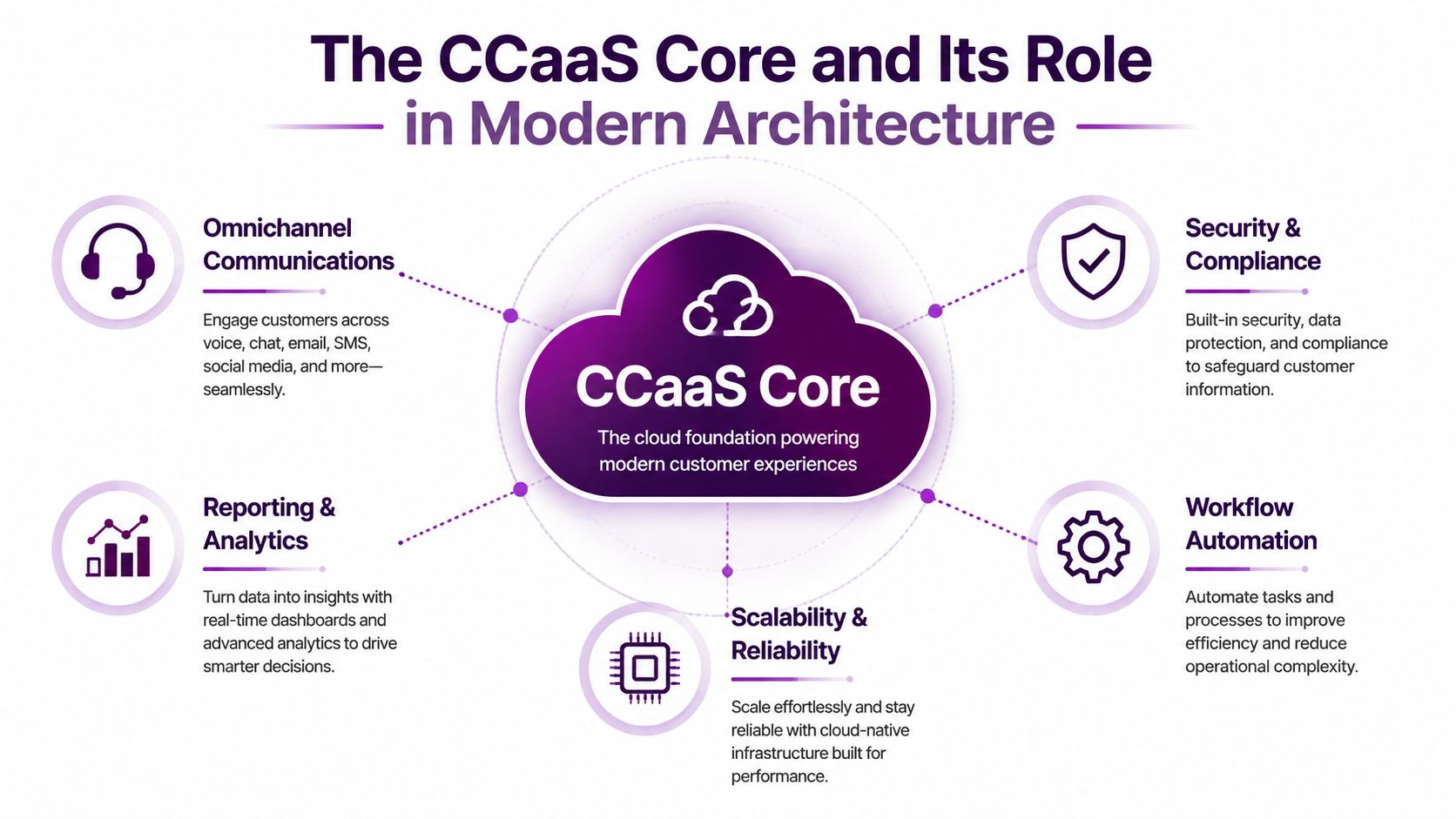
CCaaS has become the center of gravity in modern contact center architecture because it centralizes the interaction layer. The market data points in the same direction, with the global Contact Center as a Service market estimated at $7.08 billion in 2025, projected to reach $8.33 billion in 2026, and reach $30.15 billion by 2034, implying a 17.40% CAGR over the forecast period. North America’s 39.0% share in 2025 shows that cloud-based contact center infrastructure is already established in major North American markets.
CCaaS is the routing and interaction engine
At the operational level, CCaaS handles omnichannel routing, IVR, callbacks, and the interaction logic that decides where work goes next. That makes it the engine, not the entire vehicle. The rest of the stack plugs into it through APIs and native integrations, so customer context, workforce actions, analytics, and compliance controls can follow the interaction instead of sitting in separate islands.
That distinction matters when evaluating vendors. Some platforms market every adjacent feature as if they’re all equal, but an integrated stack is not the same thing as a platform that merely has lots of buttons. You need a strong routing core first, then you assess how well it supports the surrounding tools that teams use every day.
North American maturity changes the buying conversation
Because cloud infrastructure is already well established in North America, buyers there are often comparing ecosystems, not just telephony replacement. That’s where a practical evaluation framework helps. A tool can be good for a small team and still be a poor fit if it can’t support broader orchestration later.
For smaller operations, it’s worth looking at resources like best call centre software for small business to understand how platform size, workflow needs, and integration depth change the decision. That sort of comparison is more useful than a generic feature list because it forces the question, which is whether the platform can support your operating model, not just your demo.
If you want a deeper view of how the core platform layer fits into a broader migration path, this guide on Contact Center as a Service and how it’s reshaping operations is worth reading.
Core Components Beyond the CCaaS Platform
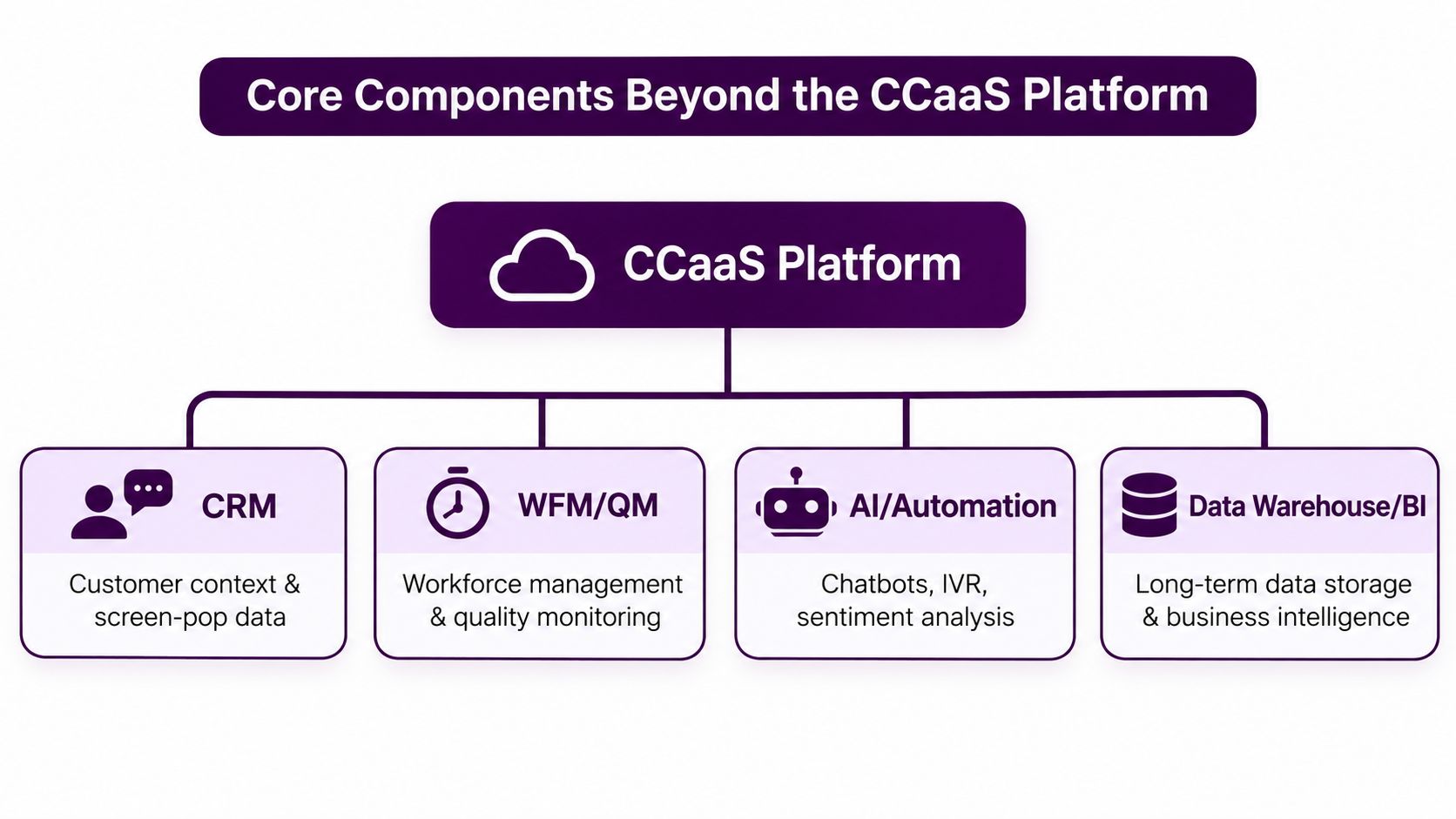
A complete contact center technology stack extends well beyond the CCaaS core. The working architecture is layered, with each layer solving a different operational problem. CCaaS handles the conversation, while the surrounding systems provide the context, control, and coaching that turn a conversation into a resolution.
The layers do different jobs
CRM gives agents customer history and screen-pop context. WFM turns demand patterns into staffing plans and intraday adjustments. QA supports coaching, calibration, and compliance review. Knowledge management reduces repeat questions by guiding agents to the right answer faster. Analytics turns interaction data into something leaders can act on. Security and compliance keep the whole system governable.
That separation is what cuts down on swivel-chair work. If the agent has customer context, policy guidance, and next-best actions in one workspace, there’s less need to bounce between tabs and hunt for answers. That’s also where first-contact resolution improves, because the agent isn’t assembling the case manually while the customer waits.
A stack only feels “simple” when the complexity is hidden from the agent, not when the organization ignores it.
A practical hierarchy beats a feature wishlist
The hierarchy matters because not every layer should be bought or implemented at once. Teams often start with a CRM integration and assume the rest will follow naturally, but the better sequence is usually closer to the operating reality. The routing core has to work, the knowledge layer has to be trusted, and then workforce and quality tools can reinforce behavior instead of fighting it.
For a more feature-focused breakdown, this page on call center software features is a useful companion. It helps separate what a feature does from what the broader architecture needs to do.
In practice, the strongest stacks keep interaction handling separate from workforce optimization and customer context, while still connecting them tightly enough that agents never have to guess. That’s the difference between software that exists on paper and software that changes outcomes.
Integration Patterns and the API Layer
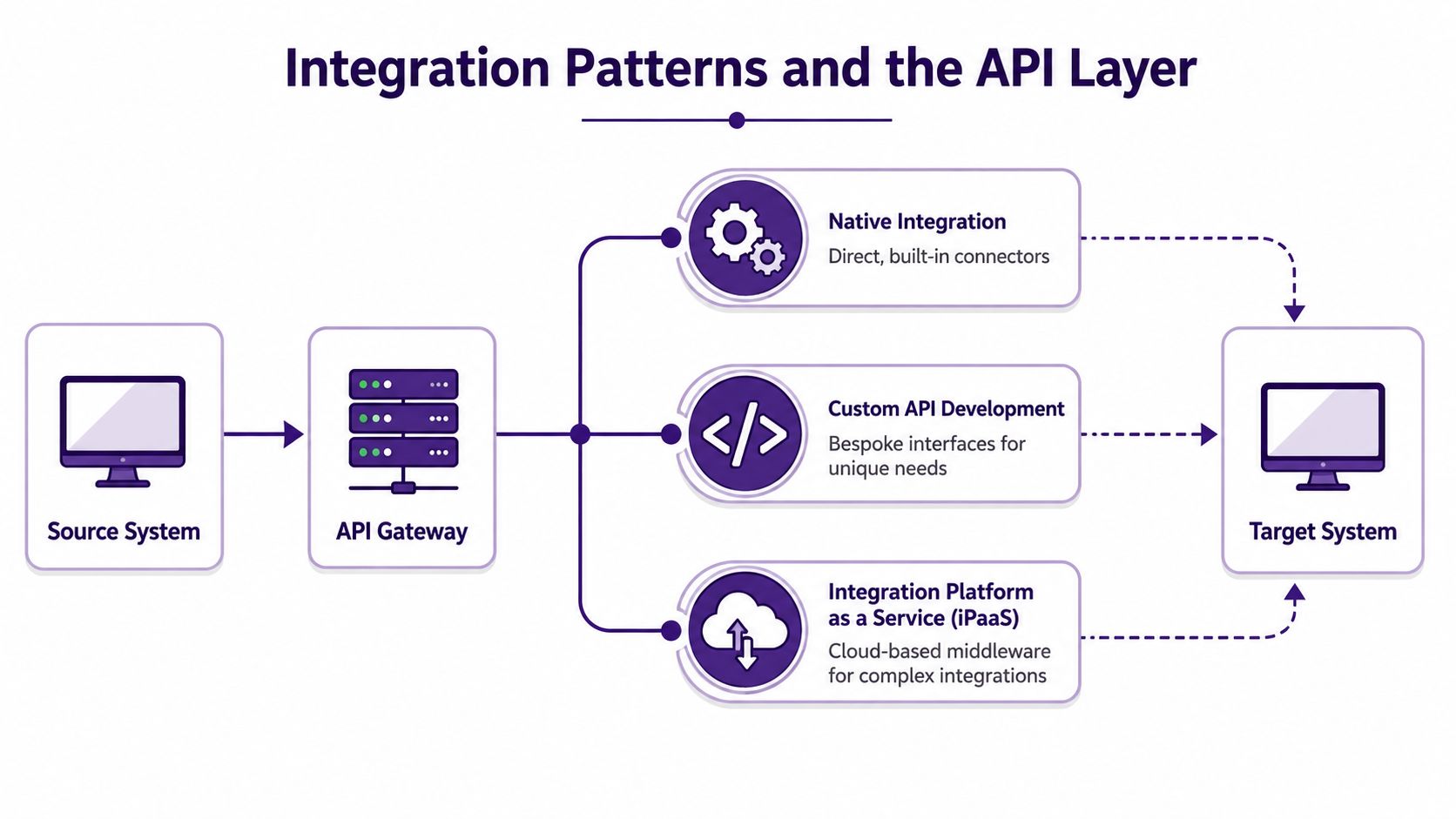
The gap between a demo-friendly stack and a production-ready stack usually shows up in the integrations. Native connectors are useful, custom APIs are sometimes necessary, and iPaaS can make sense when the environment is too complex for brittle point-to-point wiring. The key is to choose the pattern that matches your operating reality, not the one that sounds cleanest in a sales deck.
Start with data flow, not vendor logos
Map the path of a customer record, a case update, and a routing event before you commit to any tool. If the CCaaS platform creates one version of the truth, the CRM stores another, and reporting sits somewhere else again, agents end up compensating for the gaps. That’s how duplicate data entry and context switching become the default operating mode.
A good integration design usually answers four questions quickly. Where does the interaction start, where does the context live, who owns the source of truth, and what has to happen in real time versus later in batch? If those answers are fuzzy, the stack will drift into maintenance mode before it ever earns trust.
Evaluate API maturity before you sign
Vendor diligence matters. A polished integration marketplace is useful, but marketplace breadth doesn’t guarantee durability. The integration marketplace overview is a helpful lens for thinking about connector availability, but you still need to confirm versioning, latency, error handling, and support for future changes.
A short checklist helps:
- Native connectors: Confirm the connector is supported, maintained, and not just a one-time stub.
- Custom API work: Ask who owns it after launch, and how changes get tested.
- iPaaS layer: Verify whether it solves complexity or just adds another platform to manage.
- Sync timing: Know what must be live and what can tolerate delay.
- Version changes: Ask how breaking API updates are handled without disrupting operations.
Broken integrations don’t fail neatly. They create silent rework, then leaders discover the cost when adoption stalls.
If your team is exploring how support platforms, service desks, and automation layers fit together, this internal overview on smarter support solutions for SaaS help desks is a good reference point for the architectural mindset.
Industry-Specific Stack Requirements
No single contact center technology stack works the same way across every vertical. Healthcare, finance, and e-commerce all need the same broad architecture, but they weight the layers differently. The compliance rules are different, the workflows are different, and the customer expectations are different.
The stack changes with the work
Healthcare teams usually need tighter handling around patient data, appointment scheduling, and identity verification. Finance teams need stronger controls for payment interactions, fraud-sensitive workflows, and policy enforcement. E-commerce teams usually care more about order status, shipping visibility, and inventory-aware service paths.
Here’s a practical comparison.
| Industry | Compliance Requirements | Critical Integrations | Channel Priorities |
|---|---|---|---|
| Healthcare | HIPAA-aligned handling, encryption, access control | EHR, scheduling, CRM, knowledge base | Voice, secure messaging, callbacks |
| Finance | PCI-DSS-aligned payment handling, strict auditability | CRM, payment systems, fraud tools, QA | Voice, secure digital channels, callbacks |
| E-commerce | Data protection, account security, transaction visibility | Order management, inventory, CRM, analytics | Chat, voice, email, social support |
Configuring for the workflow, not the org chart
In healthcare, the stack has to support appointment flows and sensitive handoffs without forcing agents to improvise. In finance, the stack has to keep payment workflows and compliance checkpoints clean enough that supervisors can audit them later. In e-commerce, the stack works best when agents can see inventory and order movement quickly, because a customer usually doesn’t want a generic answer, they want a current one.
That’s where CallZent’s nearshore model becomes practical for some buyers. A bilingual team in Tijuana can run customer-facing operations while working inside the client’s chosen platform, which matters when process design and language coverage have to stay aligned. The value isn’t in a slogan, it’s in configuring the stack so the workflow fits the vertical.
One stack, different guardrails
The common mistake is assuming the same QA form, routing logic, and knowledge structure can be reused everywhere. It can’t. A healthcare queue needs different safeguards than an order-tracking queue, and a finance interaction needs different controls than a subscription update.
The right architecture respects that difference while still keeping the core platform consistent. That gives the business a standard operating layer without forcing every interaction into the same script.
Phased Migration Roadmap and Implementation Checklist
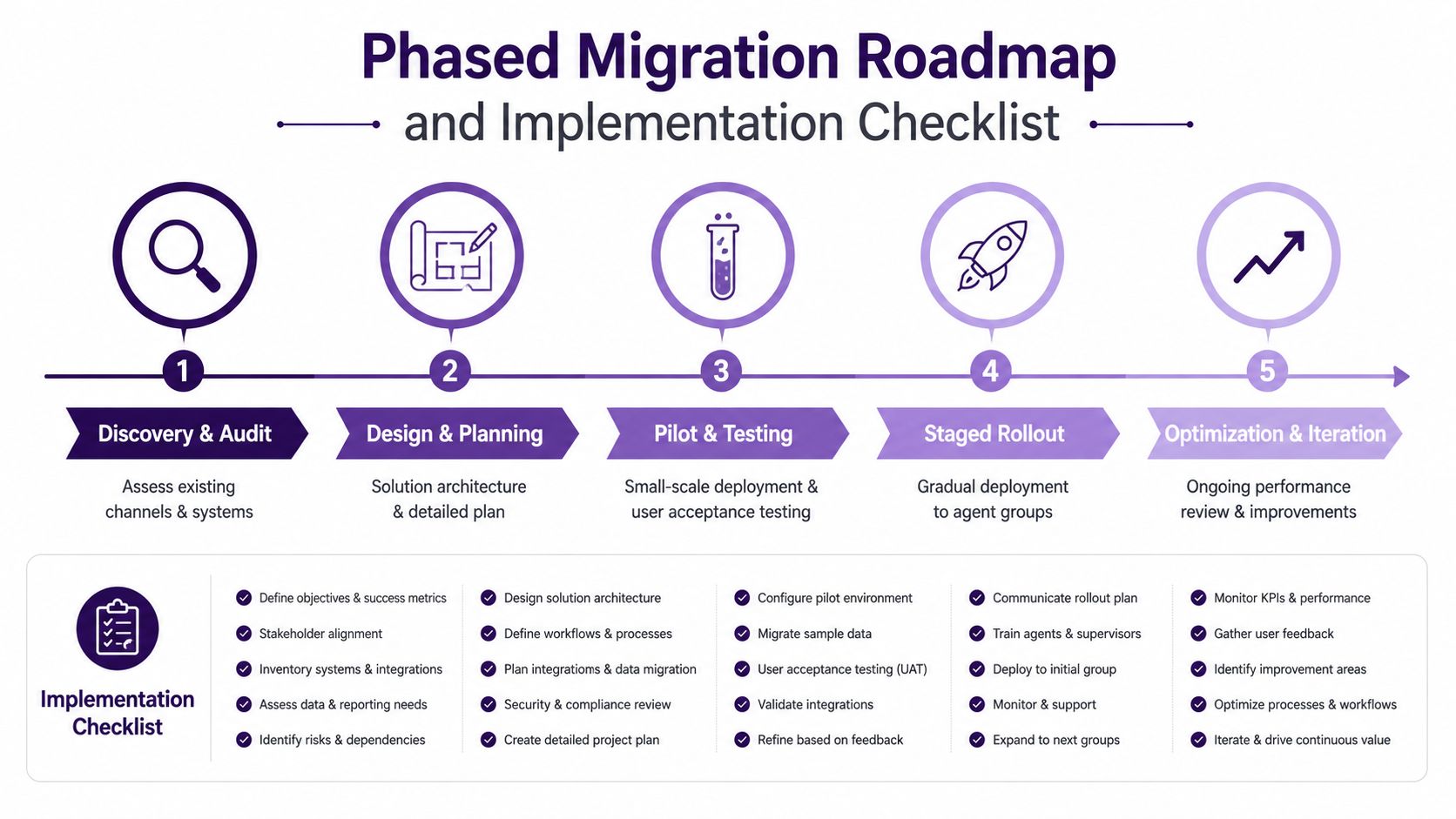
Deploying a new contact center technology stack in one big cutover usually creates more risk than value. The safer path is phased, measured, and boring in the right way. You audit first, then design, then test on a narrow slice of traffic, and only then scale.
A rollout should prove one thing at a time
Start with discovery. Map current channels, tools, and integrations. Identify redundant systems, top intents, and the journeys that create the most friction. If the current environment already has broken handoffs, don’t try to solve that by adding another layer before you understand where the break occurs.
Then move into design and pilot. Pick a limited queue and a narrow channel set, train the agents, and watch what happens to routing, containment, reporting, and adoption. The point of the pilot isn’t to show off the platform, it’s to prove the operating model.
Use a checklist that forces discipline
A practical implementation checklist keeps the project honest:
- Audit channels and systems: List every queue, connector, and manual workaround.
- Define top intents: Focus on the issues customers raise most often.
- Pilot one workflow: Keep the first rollout narrow enough to measure.
- Validate reporting: Confirm the data matches what supervisors see.
- Retire legacy tools carefully: Remove overlap only after the new flow is trusted.
- Train for the new desktop: Agents need the process, not just the login.
Measure adoption and keep iterating
The final stage is optimization, and it never really ends. Tune knowledge articles, clean up misrouted traffic, and review agent feedback regularly. If a tool isn’t changing behavior or outcomes, it shouldn’t stay in the stack just because it was expensive to buy.
The best migrations don’t feel dramatic. They feel controlled, because the team can see each checkpoint before the next one starts.
For teams that want a more metrics-focused lens on this transition, the internal page on call center reporting and metrics dashboards is a useful companion to the rollout process.
Measuring ROI and KPIs Across the Stack
A contact center investment only matters if it moves outcomes that leaders can see. The useful metrics are the ones that connect architecture to behavior, then behavior to customer experience. First-contact resolution, average handle time, containment rate, agent utilization, customer satisfaction, and cost per contact belong at the center of that conversation.
Tie each metric to a layer
If routing improves, you should see cleaner handoffs and better resolution quality. If knowledge improves, agents should spend less time searching and more time solving. If automation improves, containment should rise where it makes sense, not everywhere. If workforce management improves, staffing should be closer to demand without burning people out.
That’s also where modern analytics matters. One industry source notes that speech and interaction analytics can analyze 100% of contacts 24/7, which is a major shift from sample-based QA. TechTarget frames that as part of a broader modern CX stack, and it changes how quickly teams can see patterns in real work.
Don’t confuse tool adoption with ROI
A lot of teams celebrate login counts, bot usage, or dashboard views and call that adoption. It isn’t. Real ROI shows up when customers repeat themselves less, agents move faster without losing quality, and supervisors spend less time reconciling reports. The platform should shrink operational friction, not just redistribute it.
Cloud spend deserves the same discipline. If you don’t understand the hidden waste in a platform or integration layer, the bills can climb before the value does. This primer on hidden waste in cloud spending is a useful reminder that total cost includes more than the sticker price.
CallZent fits naturally into this model as a nearshore operating partner that can help execute a stack without overwhelming the internal team. That matters when the business needs bilingual coverage, process discipline, and day-to-day management across channels, not just another software license.
The right KPI dashboard doesn’t praise the tools, it exposes whether the stack is helping customers and agents do their jobs.
If you’re planning a stack refresh, contact CallZent to review your current workflow, identify where routing and knowledge are creating friction, and see how a bilingual nearshore team can support rollout and operations. Visit CallZent to discuss a practical path from fragmented tools to a cleaner, more manageable contact center technology stack.
Turn Your Technology Stack Into a Working Operation
CallZent can help you build a dedicated bilingual nearshore team that works within your platforms, processes, service standards, and customer experience goals.
Talk to an ExpertFrequently Asked Questions
1. What is a contact center technology stack?
A contact center technology stack is the connected collection of platforms used to route customer interactions, maintain customer context, manage agents, deliver knowledge, evaluate quality, automate workflows, analyze performance, and protect data.
2. What are the core components of a contact center technology stack?
Common components include CCaaS, CRM, knowledge management, workforce management, quality assurance, analytics, AI, workflow automation, integration tools, and security controls.
3. What role does CCaaS play in the stack?
CCaaS usually provides the interaction and routing core. It manages channels, queues, IVR, callbacks, recordings, and agent availability while connecting with customer, workforce, quality, and analytics systems.
4. Does a contact center need both CCaaS and CRM?
In many architectures, yes. CCaaS manages interactions and routing, while CRM maintains customer records, cases, account history, and lifecycle context. The two systems should be integrated so agents can access relevant information during the interaction.
5. How does AI fit into contact center technology?
AI can support self-service, interaction routing, agent guidance, summaries, quality analysis, forecasting, and workflow automation. It should be introduced after the underlying routing, data, and knowledge processes are dependable.
6. What is integration debt?
Integration debt is the growing operational and technical burden created by poorly governed connections, duplicate records, manual workarounds, fragile APIs, inconsistent reporting, and unclear system ownership.
7. How should a company choose contact center technology?
Begin with customer journeys, operational requirements, data ownership, security needs, integrations, and measurable outcomes. Evaluate platforms against the operating model rather than selecting the product with the longest feature list.
8. How long does a contact center technology migration take?
The timeline depends on the number of channels, integrations, agents, workflows, security requirements, and legacy systems involved. A phased implementation with a controlled pilot usually reduces risk compared with a single large cutover.
9. Which KPIs measure technology-stack ROI?
Relevant KPIs include first-contact resolution, transfer rate, average handle time, containment, service level, quality, customer satisfaction, customer effort, cost per contact, repeat contacts, and agent productivity.
10. Can a BPO partner use a company’s existing technology stack?
Yes. A capable BPO partner can recruit, train, and manage agents within the client’s approved CCaaS, CRM, help desk, knowledge, quality, and reporting platforms while following the client’s security and operational requirements.