Skip to content
Workforce Planning
WFM Software Call Center: A Practical Selection Guide
Evaluate forecasting, bilingual skills, shrinkage, scheduling, and intraday control with your own operating data before choosing a platform.
TL;DR — Quick Takeaways
- Plan by interval, channel, queue, and skill rather than relying on monthly headcount totals.
- Separate workload, service-goal capacity, shrinkage, and explicitly scheduled offline activities.
- Test English-Spanish coverage without counting the same agent twice.
- Compare forecasts on held-out periods, using consistent error measures and simple baselines.
- Validate intraday approvals, client permissions, exports, implementation cost, and fallback procedures.
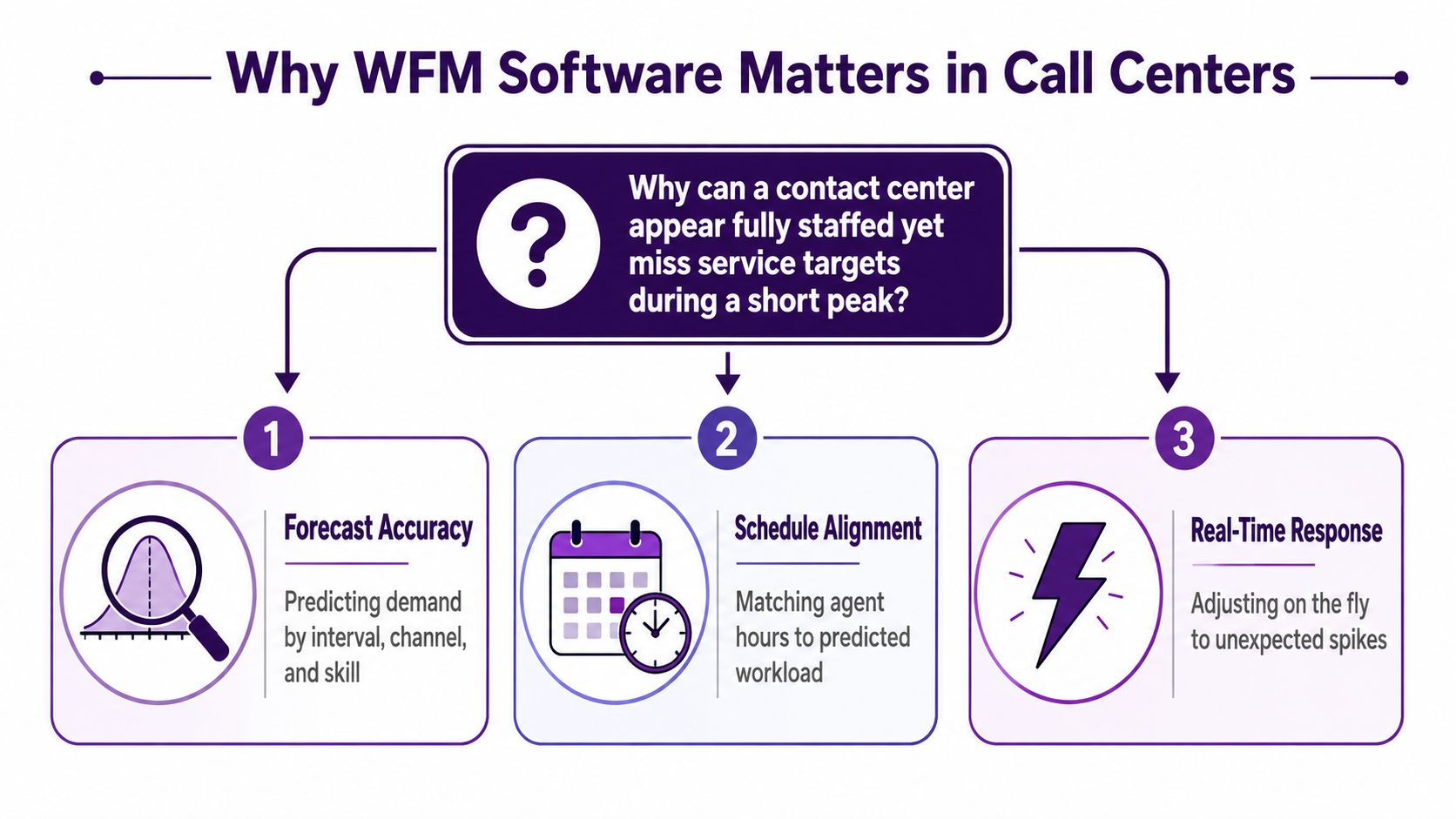
Why does a schedule that balances perfectly for the month still leave customers waiting on a Tuesday morning? Because demand doesn’t arrive evenly, skills aren’t interchangeable, and a short peak in one language queue can undo a staffing plan that looks fine in total. Good WFM software closes that gap. Bad inputs in a polished platform won’t.
Why WFM Software Matters in Call Centers
Consider a hypothetical nearshore team that starts Monday with a spreadsheet that shows enough agents for the week. By 9 a.m. a client promotion drives English calls above plan, two bilingual agents are in training, and the Spanish queue is quiet. Headcount hasn’t changed. Service still misses because the right skill isn’t available in the right interval.
That’s the practical job of workforce management software. It connects projected demand, handle time, skills, shrinkage, schedules, and real-time decisions. A monthly staffing ratio can’t do that work. Interval-level planning can expose a 30 minute gap before it becomes abandoned calls and overtime.
The value of a WFM platform comes from the decisions it supports: forecasting demand, translating it into coverage requirements, building workable schedules, and responding when the day changes. Evaluate those capabilities against your own operation rather than treating adoption statistics as a reason to buy.
Where spreadsheet planning breaks
- Averages hide peaks: A daily total can look balanced while late morning intervals are understaffed.
- Skills get blended: English, Spanish, collections, and technical support need separate supply and demand views.
- Shrinkage arrives late: Training, meetings, breaks, and absence reduce productive capacity whether the sheet names them or not.
Agree on planning ownership before configuring a platform. Operations, HR, reporting, and supervisors need consistent definitions for availability, time off, attendance, and schedule changes. The software should make those decisions traceable rather than leave each team maintaining a different spreadsheet.
Key takeaway: Buy forecast discipline first and automation second. Software can’t rescue demand data nobody trusts.
How WFM Software Supports Call Center Operations
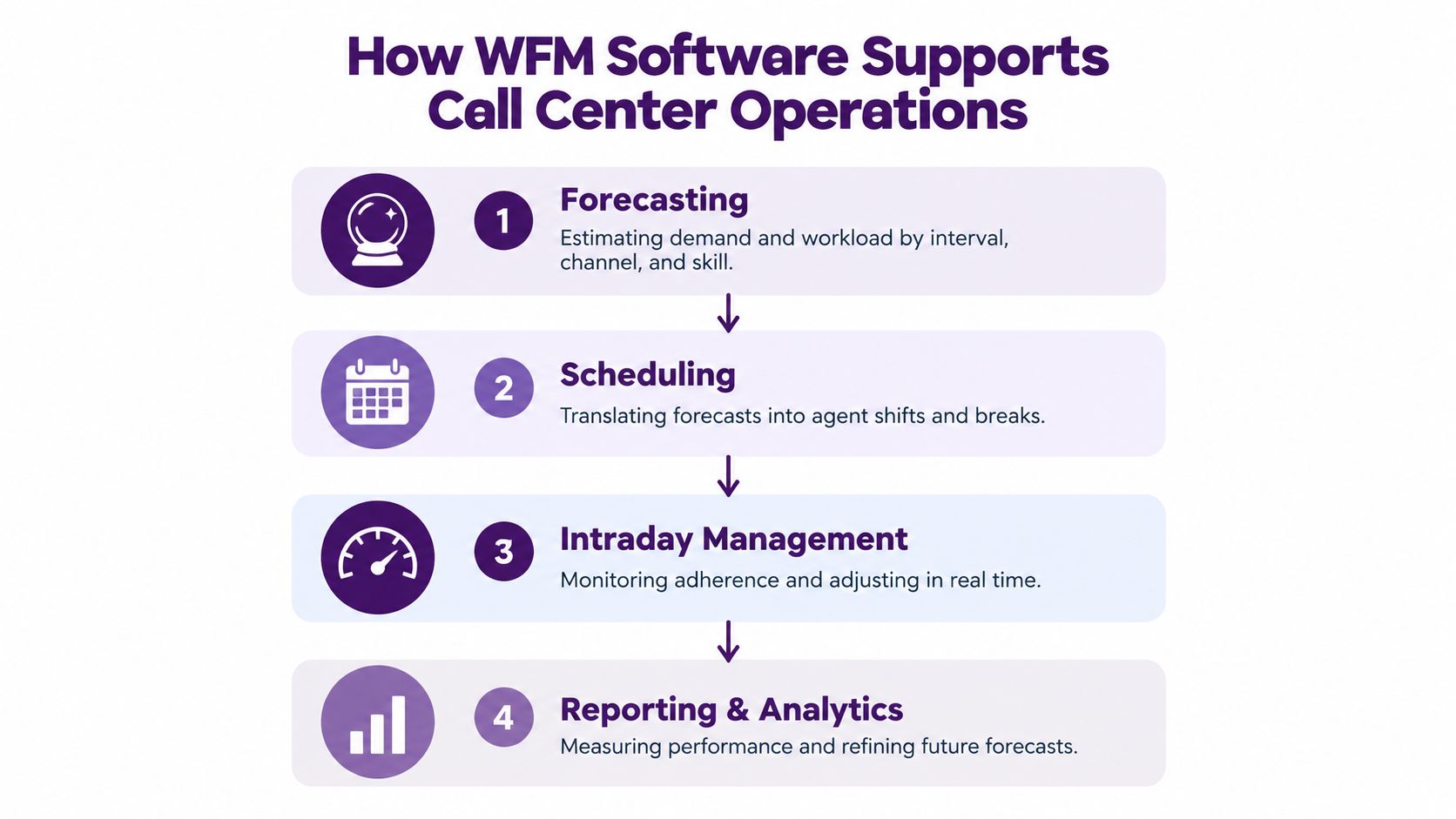
Think of WFM as a chain of decisions. Each step uses the output of the previous one, and a weak link distorts every schedule that follows.
Forecasting estimates contacts and workload by interval, channel, queue, and skill. Scheduling turns that workload into shifts, breaks, lunches, and offline time. Adherence compares planned activity with what agents do. Intraday management gives supervisors a way to propose permitted break moves, offer approved overtime, reassign qualified agents from back-office work, or reforecast when reality diverges.
Channel planning cannot stop at voice
Email, chat, and social contacts arrive differently and require different amounts of agent attention. Immediate conversations need coverage when demand arrives; deferred work also needs backlog aging and completion targets. Model chat concurrency carefully, distinguish active handling effort from elapsed conversation time, and confirm how the product handles blended work.
Align routing, customer context, and handoffs before asking WFM to staff each queue. Your wider contact center technology stack should supply dependable interaction history, agent states, skills, and schedule data. Test data refresh delays and how missing states affect adherence reports.
Shrinkage makes the schedule honest
Suppose a coverage model requires 20 concurrently available agents during an interval. A roster of 20 people does not account for training, meetings, breaks, or absence. Translate required availability into scheduled capacity using an agreed shrinkage definition, and check which activities the scheduler already places explicitly. Avoid applying an additional allowance for time already represented in the schedule.
For voice, average handle time commonly includes talk, hold, and after-contact work. If after-contact work is already included in the workload estimate, do not add it again as shrinkage. Reconcile every unavailable-time category with the platform’s definitions and the staffing model before publishing the schedule.
The AWS documentation for contact-center capacity planning scenarios illustrates the distinction between forecasts, service goals, occupancy inputs, and required staffing with or without shrinkage. Use it as a technical example, not as a recommendation for one vendor or a guarantee that another product implements the same model.
Don’t treat reporting as an afterthought either. Service level, occupancy, adherence, forecast error, and handle time belong in one review. One metric alone will mislead you.
Compare WFM Software Options by Operating Model
Start with your operating model, required decisions, and integration constraints. Compare whether WFM is maintained in a lightweight workflow, bought as a standalone product, or supplied as a module of a broader contact-center platform. Evaluate deployment and hosting separately: cloud and hybrid delivery can overlap with several product categories.
| Operating model | Potential fit | Strength to validate | Trade-off to test | Key question for a nearshore team |
|---|---|---|---|---|
| Spreadsheet or legacy workflow | Small, stable, single queue team | Low setup burden and familiar control | Manual reforecasting and weak interval detail | Who rebuilds the plan when volume changes intraday? |
| Standalone point solution | Teams needing focused WFM outside a suite | Forecasting and scheduling depth, system independence | Integration work for ACD, CRM, HR, and QA data | Can it separate clients, languages, and time zones cleanly? |
| Suite-based WFM | Centers already standardized on a CCaaS or WEM platform | Shared routing, interaction, and workforce data | Module boundaries and platform lock-in | Which forecasting or planning features require extra licensing? |
| Distributed deployment requirement | Distributed, multi client, or growing operations | Shared visibility, site-specific schedules, and client access controls | Data quality, permissions, and administration discipline | Can clients see their views without seeing another program? |
A small retailer with one support queue may get enough value from lightweight scheduling, provided supervisors review peaks manually. A growing BPO adding clients every quarter needs stronger governance, scenario planning, and role-based access. A healthcare or finance operation may accept more implementation effort because auditability and specialized skills matter.
Your staffing model should drive the software choice, so map it against flexible staffing models for variable demand before demonstrations begin. Ask vendors to identify the exact modules, supported integrations, planning limits, and administrative work included in the proposal.
A practical selection rule: choose the simplest model that can forecast by skill and channel, reforecast intraday, and export data clients can audit. Extra modules you won’t administer are shelfware, not capability.
Evaluate WFM Software With Operational Evidence
Ask each finalist to model a challenging representative week using the same inputs. Include a promotional spike, approved time off, training, and absence scenarios. Discuss total cost and implementation responsibilities early enough to avoid testing a configuration your team cannot afford or maintain.
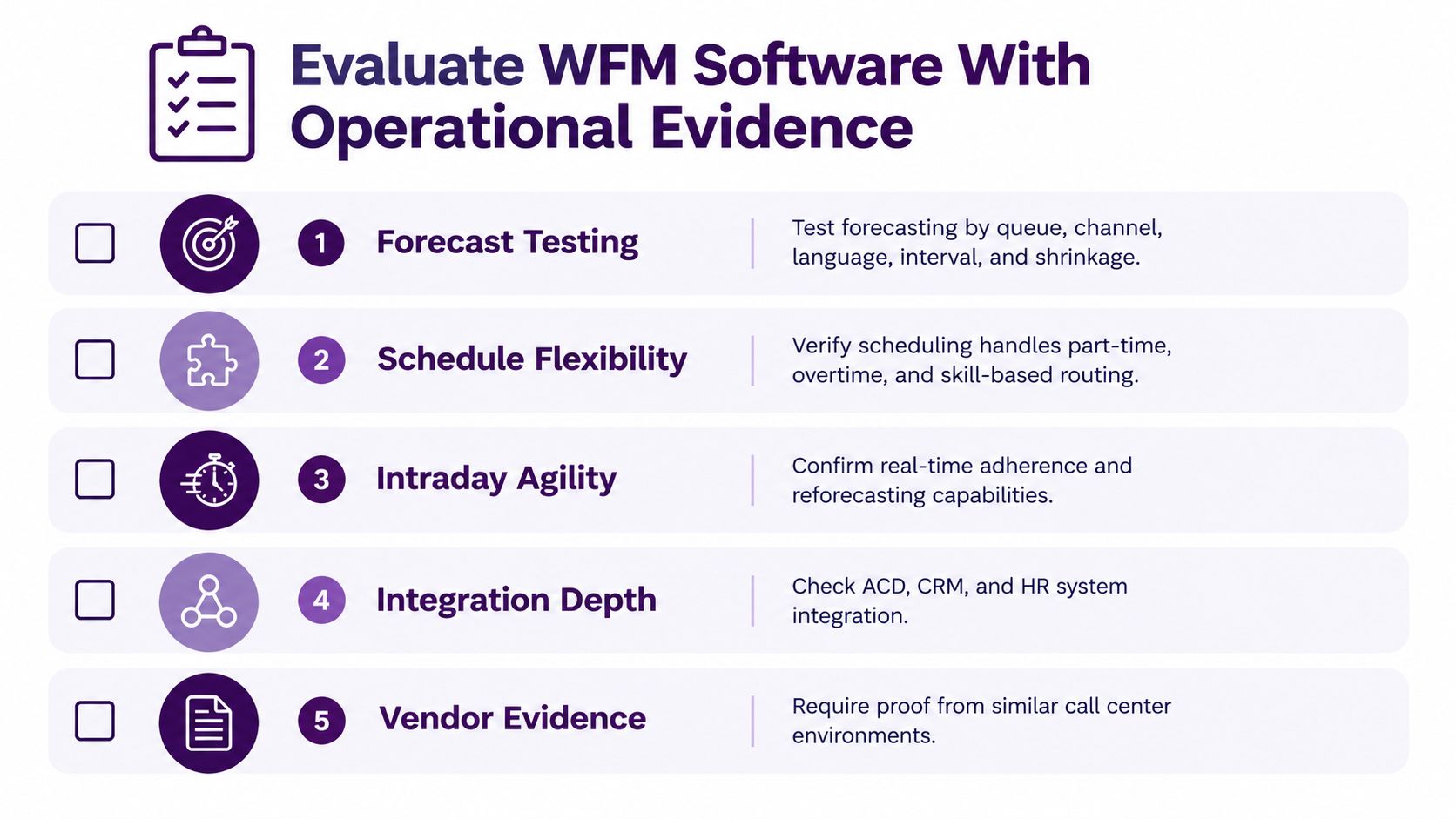
Give finalists the same permitted historical data: interval volume, handle time by channel, skill availability, operating calendars, absence history, and campaign annotations. Use enough reliable history to test the patterns relevant to your program; a year can help examine annual seasonality when available, but it is not a universal minimum. Minimize personal data and agree on access and deletion for demonstration datasets.
Score the demonstration against five operating behaviors
- Forecasting: Review error by queue, channel, language, and interval, alongside a simple baseline and signed over- or underforecasting.
- Constraint handling: Test availability, skill proficiency, breaks, training, leave, contract limits, and approved schedule rules.
- Intraday response: Trigger an absence and a demand spike, then inspect alerts, reforecasting, approval steps, and the coverage effect of proposed changes.
- Shared bilingual capacity: Check that one agent is not counted as simultaneously available in two language queues, and test the approved routing priorities.
- Reporting and cost: Reconcile source data, exports, permissions, licenses, integration work, support, and ongoing administration.
Define forecast accuracy before comparing products
Test on periods held back from fitting or tuning, using only information that would have been available when the forecast was made. The AWS guide to evaluating predictor accuracy explains backtesting and metrics including weighted absolute percentage error, or WAPE. This is a forecasting reference; a vendor’s reported metric still needs its own definition.
For nonnegative contact counts, one WAPE calculation is the sum of absolute interval errors divided by total actual volume, multiplied by 100. If actual volume totals zero, that percentage is undefined; show an appropriate absolute-error measure instead of silently reporting zero. Evaluate handle-time error separately from volume error.
Hypothetical example: Two intervals each forecast 100 contacts, while actual demand is 80 and 120. The total forecast and actual demand are both 200, but interval WAPE is (20 + 20) ÷ 200 × 100 = 20%. A correct daily total can still hide a staffing gap. Pair this measure with interval coverage and language-specific results.
Use the same documented shrinkage factor calculation and compatible activity definitions across proposals. Distinguish planned unavailable time from unplanned absence and disclose what the scheduler models directly. Compare the result with the staffing needed for the chosen service goals, rather than dividing contact workload by shift length and calling it finished.
Score the results as a system. Low forecast error paired with weak adherence still misses service, and perfect adherence to a bad schedule does the same. For a nearshore operation like CallZent, the platform worth buying is the one a planner can explain, adjust intraday, and defend to a client across time zones and languages.
Match WFM Software to Call Center Use Cases
Different operations should buy different depth. Match the tool to the staffing risk, not to the most impressive feature grid.

Small in house team
Your priority is usable forecasting, schedule templates, time off handling, and basic adherence without a dedicated WFM analyst. Overbuying shows up as unused capacity modules and reports nobody opens. Underbuying shows up when one absence forces a manager to rebuild the day manually.
Growing nearshore BPO
You need client separation, English and Spanish skill groups, channel-specific handle times, client and delivery-site holiday calendars, and permissions for client-visible reporting. Seasonal ramps also matter, so connect the platform decision to how you’ll scale seasonal customer support without losing schedule control.
Omnichannel operation
Voice can dominate staffing math because it’s immediate. Email and chat still need promised response times, concurrency rules, and backlog controls. Forecast each channel separately, then decide which agents can blend work and when blending hurts resolution quality.
AI routing doesn’t remove workload design. It changes which conversations reach people, often leaving humans with the cases that need judgment, patience, and recovery time.
For AI assisted operations, tag skills for complex and emotionally charged work, schedule coaching deliberately, and watch whether difficult contacts concentrate on a small bilingual group. A platform that only counts contacts will miss that human cost.
Implement WFM Software in a Nearshore BPO
Agree on the definitions before configuring WFM. Specify which components belong in handle time, which unavailable activities count as shrinkage, which are explicitly scheduled, how interval length is set, and who approves changes. Map the source data and reconcile totals before generating the first schedule.
Treat implementation as an operating change. Load reliable history, annotate unusual periods, and pilot a representative queue before expanding. Test client calendars, language demand, skills, permissions, and reporting. Record time zones explicitly and verify daylight-saving transitions for the actual client and delivery sites instead of assuming one U.S.-Mexico offset works year-round.
Then hold the rollout to gates, not dates.
| Gate | Pass when |
|---|---|
| Baseline | Interval volume, handle time, rosters, holidays, and campaigns reconcile |
| Pilot | Planners reforecast, supervisors act within approved rules, and agents can use permitted schedule requests |
| Scale | Named owners handle exceptions, approvals, reporting, recovery, and client notice |
Governance belongs inside disciplined outsourcing project management, not in side spreadsheets after go live. Publish who owns data quality, who can approve overtime, who moves breaks, and who calls the client when forecast error crosses an agreed threshold. Without those names, alerts become decoration.
Keep the rollout reversible
Agree on access by role, client-data separation, retention, and offboarding. Test what happens when an integration stops, forecasts fail to refresh, or schedules cannot be published. Maintain an approved fallback schedule and name the person who can pause the rollout. A client report should show only the program information that client is authorized to receive.
Choose WFM Software for a Nearshore Call Center
What should a nearshore BPO test before signing a WFM contract? Skip the interface tour. Judge the operating system underneath: how the platform builds a forecast, protects bilingual capacity, and lets a supervisor change the plan at 10 a.m. on a bad Tuesday.
A practical requirements list includes suitable deployment and scaling, interval-level forecasting, skill-based bilingual scheduling, explicit shrinkage controls, adherence monitoring, intraday reforecasting, service-level reporting, clean integrations, and client-level permissions. Everything else earns its place or gets cut.
A lightweight tool may fit a small, stable operation if supervisors can maintain coverage and resolve exceptions. Multiple clients, overlapping language skills, volatile demand, and audit requirements can justify deeper planning and permissions. Validate the benefit against implementation effort, licenses, administration, and measurable operating needs rather than assuming a larger suite pays for itself.
Don’t buy the platform that wins the demo. Buy the one that survives your worst normal week.
Run the proof of concept like an audit. Five checks, in order:
- Your data. Interval volume and handle time split by language, channel, and client.
- Your calendar. U.S. and Mexico holidays, training cycles, campaigns, planned launches.
- Your people. Proficiency levels, part-time availability, attrition backfill, coaching time, absence patterns.
- Your governance. Permissions, exports, audit trails, client-facing reports.
- Your triggers. The exact events that start a reforecast, an overtime approval, or a client notification.
Set forecast-error and coverage thresholds using your baseline and the consequences of under- or overstaffing. Keep human review in the loop, document overrides, and distinguish the original forecast from later intraday revisions. Otherwise, a repeatedly edited forecast can appear accurate while hiding how the initial plan performed.
Ask Better Questions Before Buying WFM
Ask questions that force a vendor to show operating consequences, not interface screens.
- Where’s the forecast wrong? Can we see error by interval, queue, channel, language, and client, with reasons for exceptions?
- How are bilingual skills protected? Can the system prevent Spanish capacity from being consumed by English overflow unless we choose that trade off?
- What happens at 10 a.m.? Which alert fires, who receives it, what actions are allowed, and how fast can the plan change?
- What leaves the platform? Can schedule, adherence, forecast, and service data move to payroll, QA, analytics, and client reports without manual rebuilding?
- Who owns the routine? Which roles maintain skills, holiday calendars, shrinkage, coaching time, schedule changes, and weekly service reviews?
AI deserves specific questions. If automation changes which cases reach agents, review observed handle time, issue mix, concurrency, and quality separately by language. Test whether difficult contacts concentrate on a small bilingual group, and preserve planned coaching and permitted recovery time. Do not apply an industry-wide AI adoption percentage as a staffing assumption.
Also ask what implementation help is included, what your team must configure, and which capabilities sit in separate modules. Don’t accept a generic feature count as evidence. Evaluate WFM software for a call center on forecast quality, schedule fit, intraday control, agent workload, and client trust.
Frequently Asked Questions
What is WFM software for a call center?
Workforce management software connects demand forecasts, staffing requirements, schedules, agent activities, and intraday decisions. Its value depends on reliable inputs, defined service goals, and planners and supervisors who can act on the results.
Which WFM features should a call center evaluate first?
Prioritize interval forecasting, skill-based scheduling, shrinkage treatment, adherence, intraday reforecasting, integrations, reporting, and permissions. Test the features against actual queues, channel behavior, staffing constraints, and client requirements rather than a generic demonstration.
How does WFM support bilingual English-Spanish teams?
It can help model language demand, proficiency, shifts, and routing priorities. Test the shared skill pool so one bilingual agent is not counted as available to handle two simultaneous contacts. Confirm that protecting one language queue does not silently remove necessary coverage from another.
Should after-contact work count as shrinkage?
If after-contact work is already included in the handle-time workload estimate, do not count it again as shrinkage. Reconcile activity definitions, explicit scheduled activities, and unavailable-time allowances with the platform and staffing model to avoid double counting.
How should a call center test forecast accuracy?
Compare predictions with actual demand on periods held back from fitting or tuning, using information available at the forecast date. Define the error measure, examine interval and language results, compare a simple baseline, and track signed bias as well as absolute error.
What does intraday management mean?
Intraday management compares the staffing plan with current demand and agent availability so authorized supervisors can respond. Actions may include reforecasting, approved break adjustments, qualified work reassignment, or overtime, subject to operating and scheduling rules.
Can a small call center use spreadsheets instead of WFM software?
A small stable team may manage with a maintained spreadsheet if supervisors can see interval coverage, handle changes, and preserve reliable records. Consider a platform when manual updates, overlapping skills, volatile demand, or reporting requirements exceed that process’s capacity.
What should an omnichannel WFM model consider?
Model immediate and deferred work separately, including contact volume, handling effort, response targets, chat concurrency, and backlog age. Test blending rules and avoid assuming elapsed digital conversation time equals continuous agent effort.
What should a nearshore BPO include in a WFM pilot?
Use representative queues, approved data, language skills, client and site calendars, absence scenarios, and reporting requirements. Test permissions, time zones, daylight-saving transitions, operational approvals, and a fallback schedule before expanding the rollout.
How should businesses compare the total cost of WFM software?
Include required modules, licenses, implementation, integrations, data cleanup, training, administration, support, and exit or migration requirements. Compare those costs with demonstrated operating needs and results, rather than assuming additional features guarantee savings.
Bilingual Nearshore Support
Build Coverage Around Real Customer Demand
Bring your volume patterns, English-Spanish coverage needs, service targets, and operating calendars to CallZent. Discuss a nearshore staffing program with clear responsibilities, reporting, and practical coordination.