
Live Chat Outsourcing
Your Guide to Live Chat Outsourcing in 2026
Learn how to launch live chat outsourcing with the right partner, pricing model, CRM integration plan, and SLA framework. Practical guidance for e-commerce, healthcare, and SMB teams.
TL;DR — Quick Takeaways
- Start internally first: define chat scope, coverage hours, escalation rules, and business goals before you talk to vendors.
- Choose the model carefully: nearshore often works better for North American brands that need bilingual service and tight collaboration.
- Treat integration as a launch-critical task: poor CRM access breaks chat quality fast.
- Set hard service targets: First Response Time, Average Handle Time, and CSAT need to be written into the SLA.
- Launch in phases: soft launch, transcript review, QA feedback, and weekly calibration produce a better outcome than a big-bang rollout.
Most companies don’t fail at live chat because the channel is wrong. They fail because they outsource it before deciding what the team should handle, how agents will access customer data, and what “good” looks like after launch.
That gap matters now because customers already treat chat as a primary support channel. Customer preference heavily favors live chat, with 41% of customers preferring it over email, phone, and social media for support, while businesses offering it report an average 20% increase in website conversions and an 87% positive CSAT rating according to live chat market data.
If you run an e-commerce brand, a healthcare practice, or a service business with uneven staffing, live chat outsourcing can solve real operational pressure. It can also create new problems if the provider can’t work inside your CRM, misses cultural nuance, or treats chat like email with shorter sentences.
Your Guide to Live Chat Outsourcing
The companies that get live chat outsourcing right usually answer a few uncomfortable questions early.
What should chat agents solve on their own? What should they escalate to phone, email, billing, fulfillment, or a licensed internal team? If a customer asks about a delayed order, a refund exception, or a sensitive healthcare issue, your outsourced team needs boundaries that are clear enough to act on in real time.
The decisions you need before vendor outreach
A practical setup starts with four internal choices:
- Support scope: Are agents handling pre-sales questions, order tracking, account help, technical troubleshooting, or all of the above?
- Channel purpose: Is chat there to reduce ticket backlog, lift conversions, protect revenue at checkout, or improve responsiveness?
- Coverage model: Do you need business-hours support, overflow coverage, after-hours support, or full 24/7 service?
- Escalation design: Which conversations stay in chat, and which ones must move to another team?
An online retailer, for example, might use chat to answer shipping questions, product comparisons, coupon issues, and return policy questions. A healthcare organization usually needs a narrower first phase. Appointment questions, intake guidance, and non-clinical account support can fit well, while clinical questions often need controlled escalation.
Key takeaway: Live chat outsourcing works best when you treat it as an operating model, not just a staffing purchase.
The rest of the build depends on these choices. If they’re vague, the provider will fill in the blanks, and that’s where inconsistency starts.
Laying the Groundwork for Success
A strong launch starts long before training day. It starts when your internal team decides what kind of chat operation you’re building and why the model fits your market.

Why nearshore often wins for North American chat support
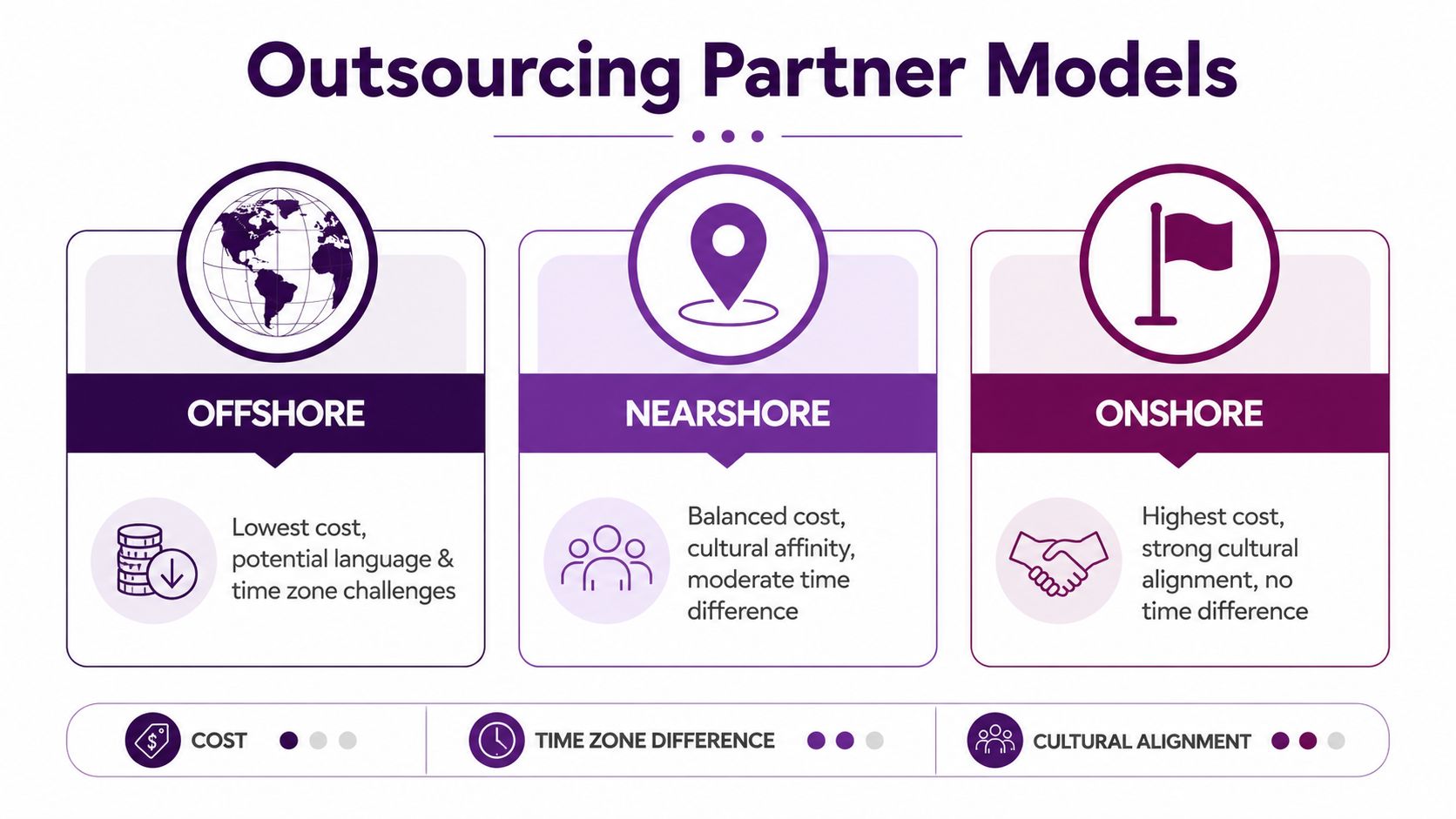
Onshore, nearshore, and offshore models can all work. The trade-off is never just hourly rate. It’s language nuance, customer expectations, time zone overlap, coaching access, and how quickly your teams can resolve ambiguity.
For North American brands, nearshore support often gives the best operational balance. The industry misses one issue over and over. Data shows that 68% of North American e-commerce customers abandon chats when agents struggle with local dialects or cultural context, a problem highlighted in this analysis of nearshore bilingual fluency in live chat outsourcing.
That shows up in ordinary moments. A customer from Texas asks whether a product is “backordered or just delayed.” A shopper in Southern California switches between English and Spanish mid-chat. A healthcare patient asks a billing question with local phrasing that doesn’t match a script. Agents need more than textbook language. They need context.
Internal prep that saves time later
Before choosing a provider, document the material agents will rely on every day:
- Policy clarity: shipping rules, returns, refund exceptions, appointment policies, verification rules
- Knowledge assets: FAQs, macros, saved replies, escalation trees, compliance notes
- Brand voice: how your company sounds in chat when a customer is upset, confused, or ready to buy
If your documentation is scattered across email threads and old PDFs, clean that up first. Teams that centralize content usually onboard faster and make fewer avoidable errors. If you’re reworking internal documentation, this overview of Redchip IT solutions for knowledge management is useful for thinking through how a searchable knowledge base should support front-line agents.
A second step is deciding when outsourcing makes sense at all. Some companies should use outsourced chat for overflow or after-hours coverage before expanding to full ownership. This guide on when companies should outsource support helps frame that decision.
Good groundwork sounds boring until launch week. Then it becomes the reason the rollout stays calm.
Choosing Your Live Chat Outsourcing Partner
Which partner can handle a Friday order spike, a Spanish language billing question, and a CRM lookup without turning chat into a queue of apologies? That is the standard to use. Vendor selection goes wrong when teams compare rate cards before they test operating fit.
A strong chat provider should be able to walk through your workflow in detail. In e-commerce, that means order status checks, return exceptions, promo code issues, and cart recovery paths. In healthcare, it means appointment requests, billing questions, escalation rules, identity verification, and clear limits on what agents can say in regulated conversations. If a provider stays at the level of “we offer 24/7 coverage,” keep pushing.
Use this shortlist during evaluation:
- Industry fit: Ask for examples from businesses with similar chat types, not just the same broad vertical.
- Written language quality: Review live chat transcripts for tone, clarity, grammar, and how agents handle abrupt topic changes.
- Bilingual depth: For North American programs, test English and Spanish in the same thread. Customers switch languages mid-conversation more often than vendors admit.
- Supervision model: Confirm who watches queues in real time, who approves response changes, and how quickly coaching happens after an error.
- Security and compliance handling: Ask how access is provisioned, how PHI or payment data is restricted, and what agents can see inside connected systems.
- Training ownership: Determine who maintains the knowledge base, macros, escalation tree, and weekly policy updates.
Transcript review matters more than slide decks.
I usually ask for three things before recommending a partner: sample QA forms, anonymized transcripts, and the actual onboarding plan for the first 30 days. That exposes how the team really operates. A provider may sound polished in sales meetings and still struggle to coach agents on refund exceptions or triage a patient billing chat correctly.
Outsourcing models compared
| Factor | Onshore (e.g., USA) | Nearshore (e.g., Mexico) | Offshore (e.g., Philippines) |
|---|---|---|---|
| Cost | Highest | Balanced | Lowest |
| Time zone overlap | Full | Strong | Often limited |
| Cultural alignment | Strong | Strong for North America | Varies by market |
| Bilingual English-Spanish support | Limited by labor pool | Often a major strength | Less natural for North American Spanish |
| Management collaboration | Easy | Easy to moderate | Can be slower across time zones |
| Best fit | Sensitive domestic-only programs | North American growth teams | Cost-led volume programs |
The model choice affects daily execution, not just budget. Nearshore teams usually give U.S. and Canadian companies better overlap for training, QA reviews, and supervisor decisions during business hours. Offshore can still work well for after-hours coverage or high-volume, lower-complexity chat, but the trade-off often shows up in slower calibration cycles and weaker Spanish support for North American customers.
That is why nearshore tends to be the practical middle ground for SMBs and multi-location healthcare groups. Teams can work in real time with operations managers, keep bilingual coverage closer to customer expectations, and avoid some of the delay that appears when every policy update has to cross a major time zone gap. If you are comparing providers, this resource on how to find and vet best call center outsourcing companies is a useful screening framework. For another market view, SMS Activate’s guide for customer service outlines the broader virtual support category.
One caution from actual launches. The wrong partner often looks acceptable until week two, when the queue gets messy and agents need judgment. An e-commerce brand sees chats pile up because the outsourced team cannot distinguish a simple “where is my order” request from a chargeback risk. A healthcare practice sees patient frustration rise because agents answer scheduling questions well but mishandle billing transfers. The vendor was not weak on staffing. The vendor was weak on process control.
Choose the team that can prove it knows how your chat operation runs minute by minute. That is usually what separates a stable launch from a rescue project.
Navigating the Costs and Proving ROI
The first budget question is simple. What will this cost per hour, per month, or per resolved interaction?
The better question is whether the outsourced team will protect revenue, reduce internal workload, and improve responsiveness enough to justify the program.
Cost ranges and pricing models
For many North American businesses, nearshore pricing lands in a workable middle band. Nearshore providers in Mexico typically charge $15 to $22 per hour, compared to $25 to $35 per hour for onshore U.S.-based agents, based on this breakdown of call center outsourcing cost ranges.
You’ll usually see one of these pricing structures:
- Hourly dedicated agents: best when chat volume is steady and you want more control over staffing
- Monthly managed team: useful when the provider is responsible for staffing, supervision, QA, and reporting
- Per-resolution or blended commercial model: can work in narrow use cases, but you need very clear definitions to avoid misaligned incentives
A retail brand with stable weekday volume may prefer dedicated agents. A healthcare group handling variable demand across locations may prefer a managed team with tighter supervision.
ROI gets lost when teams ignore integration
A cheap rate doesn’t produce ROI if agents can’t see order history, account notes, prior cases, or fulfillment status. That’s where many live chat programs stumble.
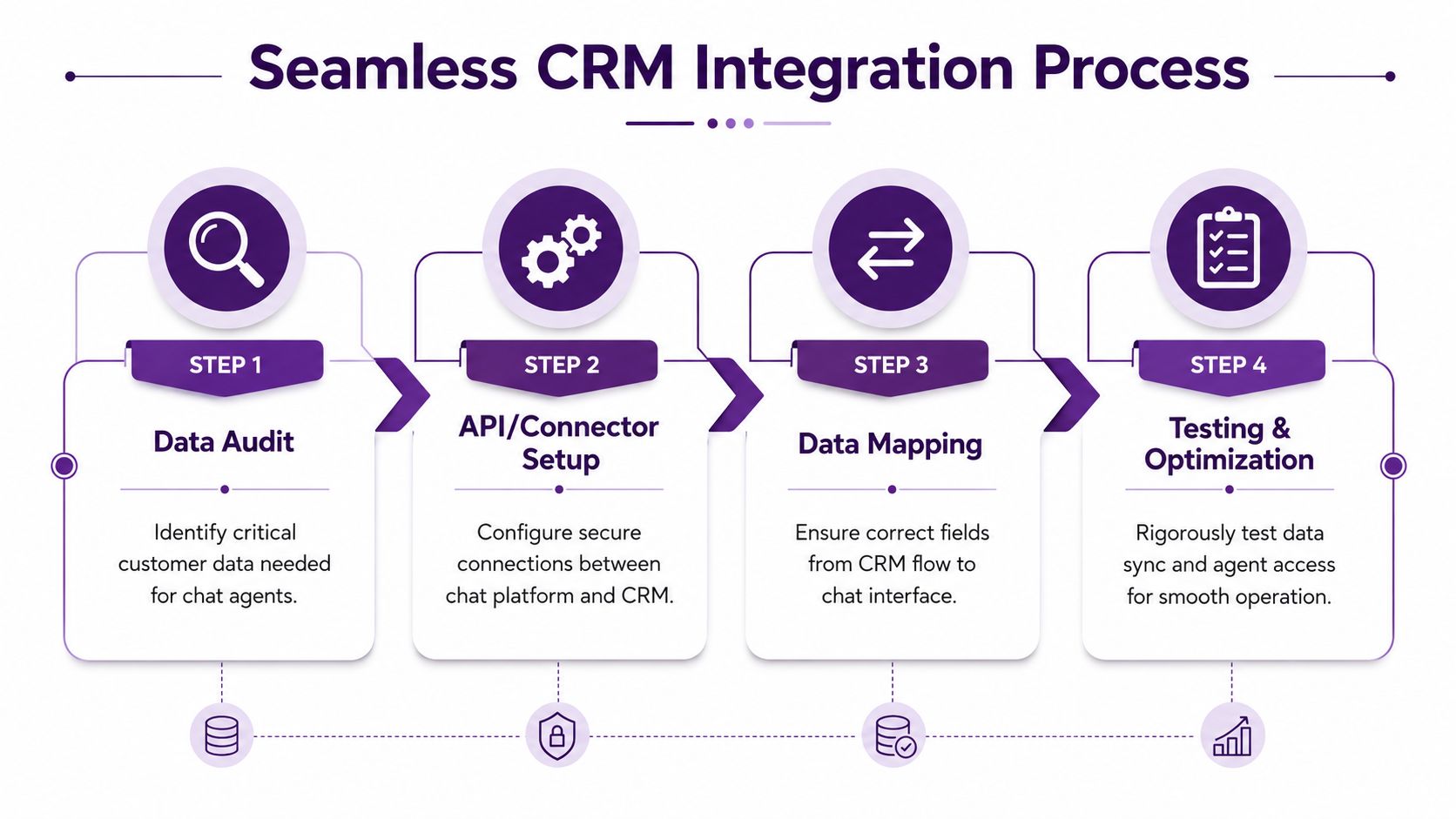
Poor integration creates repeat questions, awkward handoffs, and customer frustration. The fix is a structured integration plan before launch:
- List the systems agents need access to. CRM, order platform, help desk, scheduling tool, billing system.
- Define the exact data required in chat. Order status, recent tickets, account flags, shipping details, appointment records, approved scripts.
- Decide what should sync automatically and what should stay manual.
- Test agent workflows using real scenarios. Refund request. Prescription refill question. Lost package. Duplicate charge.
- Review access with compliance and IT before production.
Practical rule: If an agent has to ask the customer for information your systems already store, your integration plan isn’t finished.
For e-commerce, this means connecting chat with platforms like Shopify or Magento plus your help desk and fulfillment tools. For healthcare, it means far stricter role-based access and careful limits on what an outsourced agent can view or update.
Seamless Technical and CRM Integration
The fastest way to damage a new chat channel is to give agents a login but no context.
Why integration breaks live chat programs
A staggering 52% of failed live chat outsourcing contracts stem from poor CRM integration, according to this review of outsourcing partner selection and CRM friction. That problem hits especially hard in healthcare and finance, where privacy controls make third-party access more complex.
A common e-commerce example looks like this: the agent can answer shipping FAQs, but can’t see whether an order was split, refunded, or flagged for review. The customer gets a generic answer, opens an email ticket anyway, and leaves annoyed.
In healthcare, the failure is different. The agent may have enough information to route an inquiry, but not enough structured access to explain next steps confidently. That creates repeated contact and lower trust.
A simple integration checklist
Use this before launch:
- Map the customer journey: identify every point where chat should read or write data
- Audit required fields: names, order numbers, appointment status, case notes, account flags
- Confirm system ownership: who approves access, field mapping, and workflow changes
- Test escalations: make sure transcripts and case context move with the customer
- Plan for future changes: choose tools that won’t trap you in brittle custom work
API-first platforms usually make this easier because they support cleaner connections between chat, CRM, and support systems. Legacy environments can still work, but they need more planning and more testing.
Benchmarks that define good operations
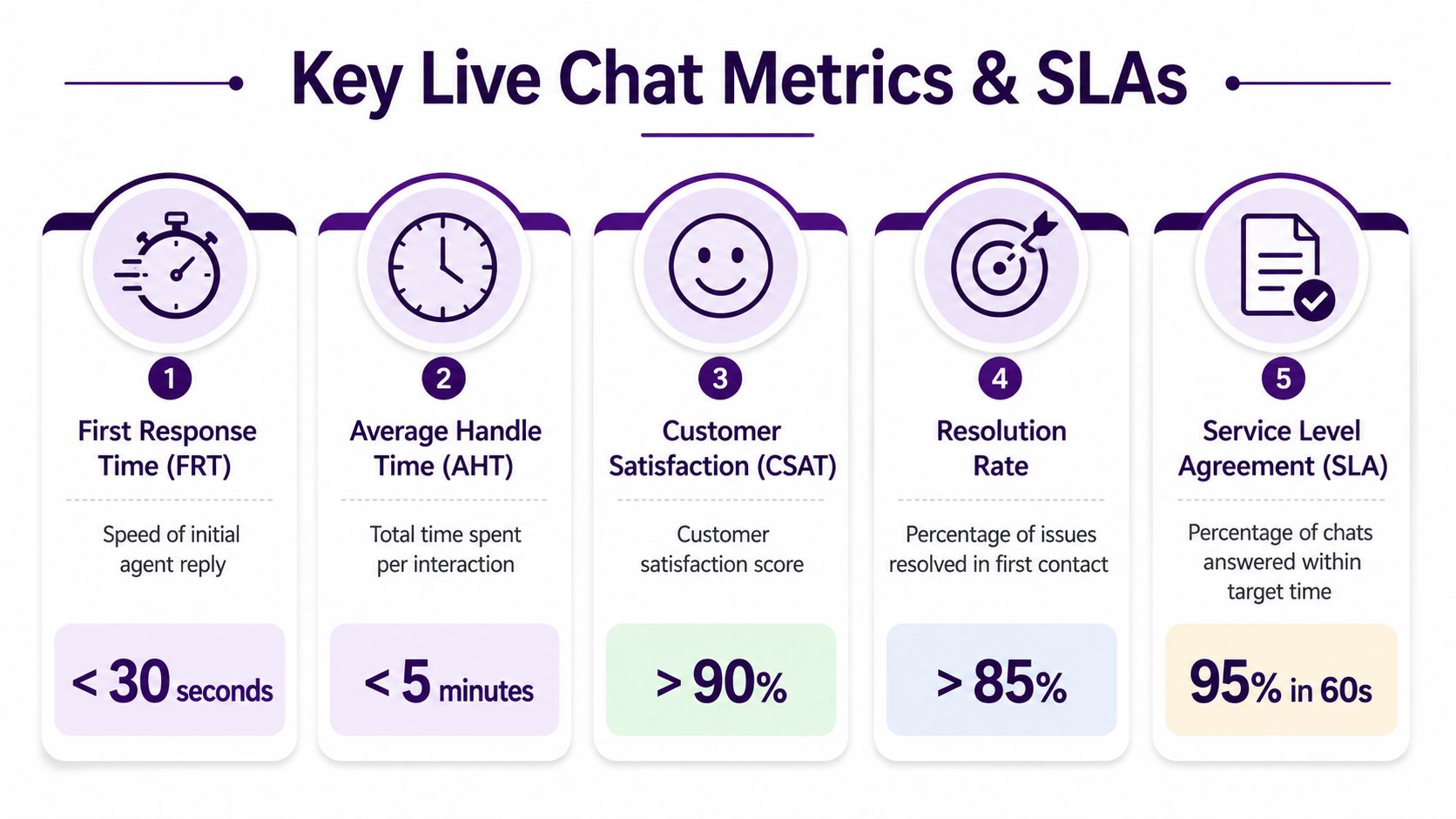
Technical integration only matters if it supports measurable service outcomes. A practical operating baseline includes First Response Time under 30 seconds, Average Handle Time between 6 and 10 minutes, and CSAT goals of 85% or higher, based on this framework for live chat outsourcing implementation and SLA planning.
That’s what “good” looks like in practice:
| KPI | Healthy target |
|---|---|
| First Response Time | Under 30 seconds |
| Average Handle Time | 6 to 10 minutes |
| CSAT | 85% or higher |
If you’re assessing software requirements for those outcomes, review these call center software features before signing with a provider.
Defining Success with Metrics and SLAs
A live chat launch gets better when both sides know what success means on day one, not after the first complaint.
What should be in the SLA
At minimum, the SLA should define coverage hours, staffing assumptions, escalation windows, QA process, reporting cadence, and core chat metrics. The most important service targets are already well established. Clear SLAs should set First Response Time under 30 seconds, Average Handle Time between 6 and 10 minutes, and CSAT goals of 85% or higher according to these service benchmarks for outsourced live chat.
Don’t stop at the numbers. Add operational rules around:
- Escalation ownership: who takes over when chat can’t resolve the issue
- Knowledge updates: how macros and approved answers are changed
- Quality review cadence: who scores transcripts and how coaching is delivered
- Brand voice control: what tone agents should use in routine, sensitive, and sales-adjacent interactions
A real-world training scenario
A mid-market e-commerce company launches outsourced chat during a peak season. The internal team is worried the agents will sound scripted and miss product nuance.
The strongest onboarding pattern is not a one-day product dump. It’s staged knowledge transfer.
Week one focuses on product lines, shipping policies, common objections, and saved replies. Agents review actual past transcripts, not just ideal scripts. Supervisors flag where customers ask vague questions like “Will this arrive before the weekend?” or “Is this item final sale if I use a promo code?”
Week two adds live shadowing, transcript scoring, and a narrow production scope. Agents start with pre-sales questions and order status chats before taking on returns and account issues.
The best knowledge transfer gives agents decision confidence, not just information.
A healthcare example follows the same principle with tighter boundaries. Agents learn scheduling workflows, insurance intake prompts, and escalation language for clinical questions. They are not told to “handle everything.” They are trained to recognize what must stay with licensed or internal teams.
That’s how metrics become useful. They stop being dashboard decorations and start reinforcing the operating model.
Your Go-Live Checklist and Path to Improvement
Launch day should feel controlled, not dramatic. If it feels dramatic, the team probably skipped calibration.
Use this checklist before you switch traffic fully to the outsourced team:
- Final knowledge check: confirm policies, macros, escalation paths, and restricted topics
- System access test: verify CRM views, chat platform permissions, transcript capture, and supervisor access
- Soft launch first: route a limited share of chats before full rollout
- Internal communication: tell sales, support, billing, fulfillment, and compliance teams what the chat team will own
- QA plan ready: review early transcripts daily and tighten weak responses fast
- Escalation contacts live: no agent should guess who to contact when a conversation falls outside scope
After launch, the work shifts from setup to refinement. Weekly reviews should focus on transcript quality, recurring friction, missed intent, and policy gaps. In e-commerce, that usually surfaces around returns, inventory timing, and checkout confusion. In healthcare, it often surfaces around scheduling language, verification steps, and what can or can’t be handled in chat.
Continuous improvement is what turns live chat outsourcing from a coverage tactic into a reliable customer experience function.
🚀 Ready to Launch Live Chat Outsourcing the Right Way?
If you are evaluating live chat outsourcing for North American customers and need a nearshore model that supports bilingual service, CRM integration, quality assurance, and measurable SLAs, CallZent is a practical place to start the conversation.
Talk to an ExpertFAQs About Live Chat Outsourcing
What is live chat outsourcing?
Live chat outsourcing is the process of hiring an external support partner to manage customer conversations through website chat, app chat, or connected messaging platforms.
When should a company outsource live chat?
A company should outsource live chat when internal teams cannot consistently manage response times, coverage hours, customer demand, bilingual support, or chat quality without slowing down other business priorities.
Is live chat outsourcing good for e-commerce?
Yes. E-commerce brands often use outsourced live chat for product questions, cart recovery, order tracking, return questions, coupon issues, and peak-season support.
Can healthcare organizations outsource live chat?
Healthcare organizations can outsource live chat for non-clinical workflows such as appointment questions, intake guidance, billing support, account help, and routing. Clinical or sensitive issues should follow strict escalation and compliance rules.
Why is CRM integration important for outsourced live chat?
CRM integration gives agents access to customer history, order details, account notes, appointment status, and prior cases. Without that context, agents may ask repeat questions and create frustrating handoffs.
What should be included in a live chat outsourcing SLA?
A live chat outsourcing SLA should define coverage hours, staffing assumptions, first response time, average handle time, CSAT goals, escalation windows, QA review cadence, reporting, and knowledge update processes.
What are healthy live chat outsourcing benchmarks?
Healthy live chat benchmarks often include first response time under 30 seconds, average handle time between 6 and 10 minutes, and CSAT goals of 85% or higher, depending on the industry and workflow.
Is nearshore better than offshore for live chat outsourcing?
Nearshore is often better for North American brands that need bilingual English-Spanish support, cultural alignment, time-zone overlap, and faster collaboration with supervisors and operations teams.
How should companies choose a live chat outsourcing partner?
Companies should evaluate industry experience, transcript quality, bilingual depth, supervision model, CRM integration ability, security controls, training process, QA standards, and the first 30-day onboarding plan.
How can CallZent help with live chat outsourcing?
CallZent helps North American companies launch live chat outsourcing with bilingual nearshore teams, CRM-aware workflows, agent training, QA, reporting, and flexible support models designed around each client’s brand standards.
If you’re evaluating live chat outsourcing for North American customers and need a nearshore model that supports bilingual service, CRM integration, and measurable SLAs, CallZent is a practical place to start the conversation.