
HEALTHCARE BPO
Patient Appointment Reminder Service
for Healthcare Practices in 2026
Learn how to implement a patient appointment reminder service using SMS, email, and live calls to reduce no-shows, improve efficiency, and protect revenue.
TL;DR — Quick Takeaways
- A patient appointment reminder service reduces no-shows and protects revenue.
- SMS, email, and phone calls work best when combined strategically.
- Bilingual outreach improves confirmation rates and patient experience.
- ROI comes from recovered appointments and reduced staff workload.
Missed appointments are expensive, but the bigger problem is that most practices still treat them like a front-desk nuisance instead of an operations issue. In the US, missed appointments cost the healthcare system over $150 billion annually, and the average loss per missed appointment is $200 to $300 according to DoctorConnect’s reminder service analysis.
A good patient appointment reminder service does more than send alerts. It protects revenue, keeps provider schedules fuller, reduces manual confirmation work, and helps patients follow through. The strongest setup usually isn’t automation alone. It’s a blended workflow that uses SMS and email for scale, then adds live outreach where trust, language, or access barriers get in the way.
Why Missed Appointments Are Costing Your Practice More Than You Think
Missed visits drain more than visit revenue. They disrupt staffing plans, lower provider productivity, and make access look tighter than it really is.
In practice, the schedule takes the first hit. A slot stays blocked until the patient no-shows or cancels late. By then, the front desk has little chance of filling it with the right patient type, insurance type, and visit length. What looks like one missed encounter often turns into unused clinical capacity, overtime pressure later in the day, and extra outbound work for staff.
That is why no-shows belong in operations review, not only at the front desk.
The cost isn’t only the missed visit
A practice manager usually sees the issue in template gaps, reschedule backlogs, and staff time spent chasing confirmations. Clinical leadership feels it in lower throughput and uneven days. Finance sees preventable revenue leakage. It is the same problem showing up in three different reports.
When assessing a patient reminder workflow, track the effects that change margin and access:
- Lost revenue per open slot: As noted earlier, a missed appointment can cost a practice a few hundred dollars, depending on specialty and visit type.
- Staff time spent chasing confirmations: Manual outbound calls pull people away from check-in, eligibility, prior auth follow-up, and patient service.
- Provider utilization: A full template with weak attendance still produces idle clinical time.
- Patient access delays: Patients who would have taken an earlier opening stay on the schedule longer because the slot was never released in time.
For a broader operational perspective, this guide to reducing client no-shows is useful because it treats reminder performance as a scheduling and follow-up process, not just a message delivery problem.
Reminder systems fail when they ignore how patients actually respond
Practices often start with software features. The better starting point is patient behavior. Which patients miss because they forgot? Which miss because they did not understand prep instructions? Which never respond to text because they share a phone, change numbers often, or prefer to speak in Spanish with a live person before confirming?
Those distinctions matter. Automation handles volume well, but it does not solve the digital divide. In many clinics, the patients most likely to miss are also the least likely to complete a text-based workflow without support. Older adults, Medicaid populations, patients with limited English proficiency, and households with unstable phone access often need live outreach to confirm, ask questions, or reschedule before the slot is lost.
That is where a blended model earns its keep. Use SMS and email to cover the broad base. Add bilingual phone outreach for high-risk appointments, complex visits, and patient groups that do not respond reliably to automated prompts. Nearshore teams such as CallZent can do that work at a cost structure many practices can support, while giving patients a human interaction automation cannot provide.
A practical reminder program should answer four questions:
- Which appointment types hurt most when they go unfilled?
- Which patient segments respond to digital reminders, and which need a live call?
- When should a staff member or partner step in instead of sending another automated reminder?
- How quickly can a cancellation be captured and released back to the schedule?
If your team is tightening this workflow, CallZent’s article on how to reduce patient no-shows is a useful reference because it focuses on operational fixes, bilingual outreach, and recovery of appointments that automation alone often misses.
Empty slots reduce revenue, but they also waste clinical capacity your practice already staffed, scheduled, and paid for.
Selecting the Right Mix of SMS, Email, and Phone Reminders
A single channel rarely works well across an entire patient population. Younger patients may respond quickly to text. Some established patients prefer a phone call. Others won’t notice an email until it’s too late. The right patient appointment reminder service uses more than one channel and staggers them on purpose.
The strongest evidence supports a blended setup. A review found that automated reminders reduce non-attendance by 29%, while manual phone calls reduce it by 39%. The same review also found that phone calls reach fewer people successfully, with contact rates of 30% to 60%, which is why SMS still matters for coverage according to the systematic review in PMC.
Patient Reminder Channel Comparison
| Channel | Typical Open Rate | Best For | Considerations |
|---|---|---|---|
| SMS | High open rate | Short-notice reminders, simple confirmations, fast replies | Best when messages are brief and action-oriented |
| Qualitatively lower and less immediate than text | Longer instructions, location details, prep reminders | Easy to ignore if the subject line is weak or timing is off | |
| Live phone call | Not an open-rate format | High-risk appointments, older patients, rescheduling support, trust-building | Strong impact, but staff-intensive and harder to complete at scale |
What each channel does well
SMS is your speed tool. It’s best for concise reminders and simple actions like confirming or requesting a callback. It works especially well close to the appointment time.
Email is your detail channel. Use it when the patient needs prep instructions, forms, or office logistics. It supports the process, but it usually shouldn’t carry the whole reminder strategy by itself.
Live phone calls are your recovery channel. Use them for specialist visits, high-value appointments, patients with a pattern of missing visits, and people who may need help rather than just a reminder.
A practical reminder cadence
Many practices do better with a staggered sequence instead of one reminder blast. A workable model looks like this:
- Several days ahead: Send email with time, date, location, and prep instructions.
- Closer to the visit: Send SMS with a clear confirmation prompt.
- For selected patients: Place a live call if the visit is high value or the patient hasn’t confirmed.
That kind of sequence gives patients multiple chances to respond without overloading your staff. It also matches the evidence better than choosing one channel and hoping it fits everyone.
Practical rule: Use automation to cast a wide net. Use live calls where a missed appointment creates the most financial or clinical disruption.
If your operation already uses scheduling tools across multiple channels, it helps to review how reminders fit into your wider reservation management systems. Reminder performance is usually tied to schedule design, not messaging alone.
Bilingual communication also matters more than many practices expect. If a patient understands the date and time but not the prep instructions, they may still miss or abandon the visit. English and Spanish coverage closes that gap in a practical way.
Integrating Reminders Securely with Your EHR and Booking Systems
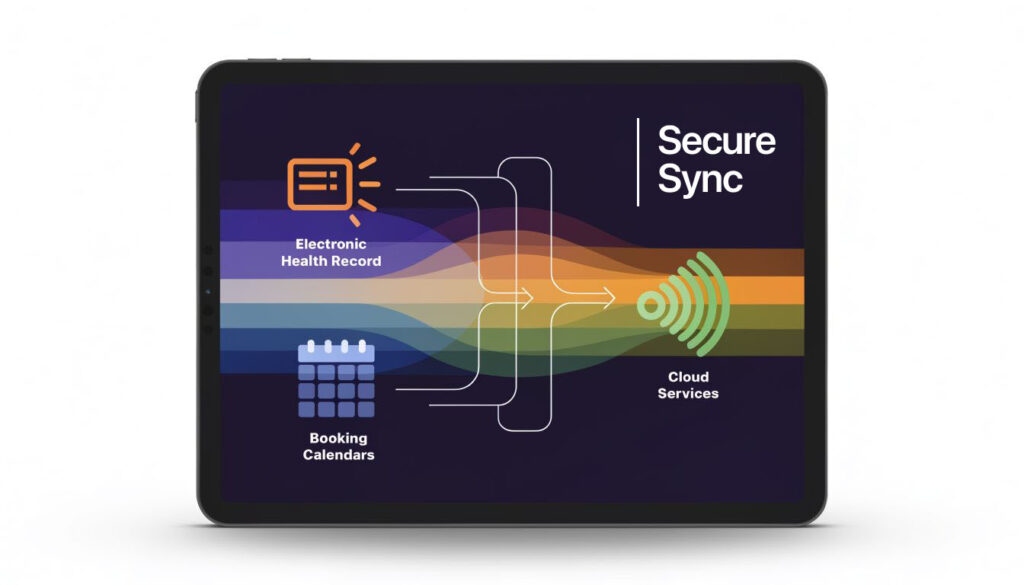
A reminder platform that doesn’t sync cleanly with your scheduling system will create manual work almost immediately. Staff end up checking multiple screens, correcting appointment status by hand, and calling patients the software should’ve handled.
That is why integration matters as much as message delivery. Your patient appointment reminder service should fit into the systems your staff already use every day.
What to confirm before rollout
Ask vendors direct questions. If they answer vaguely, expect trouble later.
- Data sync method: Does the platform support a reliable two-way connection with your EHR or practice management system?
- Status updates: When a patient confirms, cancels, or asks to reschedule, does that flow back into the schedule without staff re-entering it?
- Security controls: How is patient data protected in transit and at rest?
- Business Associate Agreement: Will the vendor sign a BAA and explain its HIPAA responsibilities clearly?
- Message design controls: Can your team limit message content to avoid unnecessary PHI exposure?
A useful mental model comes from other appointment-driven businesses too. This practical guide for gym owners isn’t about healthcare, but it does show a simple truth that applies here as well: scheduling software only helps when it connects cleanly to the rest of the workflow.
Keep compliance simple and operational
HIPAA conversations get abstract fast. On the operations side, keep the rule straightforward. Send only what’s needed to help the patient act. Avoid stuffing reminders with clinical detail.
For example, your team should know:
- A reminder should identify the appointment clearly enough for the patient to respond.
- It shouldn’t include unnecessary medical information.
- Voicemail, text, and email templates should be reviewed before launch.
- Agents handling outreach need documented scripts and escalation rules.
If live outreach is part of your program, a partner with healthcare-specific processes matters. For teams assessing that side of execution, a HIPAA-compliant call center setup is the baseline, not a nice extra.
The most common reminder failure isn’t the message. It’s the manual workaround that starts after a weak integration.
Crafting Reminder Scripts That Patients Actually Respond To
Most reminder messages are too vague, too long, or too passive. Patients shouldn’t have to guess what to do next. A good script tells them what the appointment is, when it is, and what action to take.
The highest-performing messages tend to be short and direct. They also make it easy to confirm or reschedule without friction.

What good reminder scripts have in common
Use this checklist when writing templates:
- Clarity first: State date, time, and practice name plainly.
- One action: Ask the patient to reply YES, call back, or click to reschedule. Don’t offer too many choices.
- Short length: Keep SMS especially tight so the action stands out.
- Warm tone: Sound helpful, not robotic.
- Language fit: Offer English and Spanish when your patient base needs both.
Even small writing choices matter. If your team also sends reminder emails, this article on email subject line capitalization is a useful reminder that readability starts before the patient opens the message.
Copy and use templates
SMS in English
Hi [First Name], this is a reminder of your appointment with [Practice Name] on [Day] at [Time]. Reply YES to confirm or CALL to reschedule.
SMS en español
Hola [Nombre], le recordamos su cita con [Practice Name] el [Día] a las [Hora]. Responda SÍ para confirmar o LLAME para reprogramar.
Email in English
Subject: Appointment reminder for [Day]
Hello [First Name],
This is a reminder of your appointment with [Practice Name] on [Day] at [Time]. If you need to make a change, please call us at [Phone Number]. We look forward to seeing you.
Email en español
Asunto: Recordatorio de cita para [Día]
Hola [Nombre],
Le recordamos su cita con [Practice Name] el [Día] a las [Hora]. Si necesita hacer un cambio, llámenos al [Número]. Con gusto le ayudaremos.
Live call script for higher-risk appointments
A live call should sound human, not read like software.
Phone script in English
Hello, may I speak with [First Name]? This is [Agent Name] calling from [Practice Name]. I’m calling to remind you about your appointment on [Day] at [Time]. Can I confirm that you’ll be able to attend, or would you like help rescheduling?
Phone script en español
Hola, ¿puedo hablar con [Nombre]? Le habla [Agent Name] de [Practice Name]. Le llamo para recordarle su cita el [Día] a las [Hora]. ¿Me puede confirmar si asistirá o prefiere ayuda para reprogramarla?
A script library helps with consistency. If your team wants a stronger structure for phone handling, CallZent’s call center script resource is useful for standardizing openings, confirmations, and rescheduling language.
Why Automated Reminders Fail Underserved Patient Groups
Automation works well when patients have stable phone access, consistent digital habits, and enough trust in the sender to respond. Many practices assume that applies to everyone. It doesn’t.
In underserved populations, digital reminders can underperform badly. One study in a safety-net system found that even with 63% patient portal activation, automated reminder confirmations were rare at less than 15%. The same report found that adding model-driven live telephone outreach was required to significantly reduce no-show rates in minority subgroups according to HIMSS Idaho’s review of missed-appointment strategies.

Why this happens in real operations
The gap usually isn’t about patient motivation. It’s about access and fit.
- Digital friction: Portal use, text response, and email checking aren’t equally reliable across populations.
- Language mismatch: Automated reminders often default to English or awkward translations.
- Trust issues: A generic notification doesn’t answer concerns about transportation, paperwork, or what happens if the patient is late.
- Complex barriers: Some patients need problem-solving, not just a reminder.
What works better
A blended model performs better because live outreach can uncover the reason behind the likely no-show. An agent can ask whether the patient needs directions, wants to reschedule, or didn’t understand the appointment details.
That human layer is especially useful when the practice serves mixed-language communities. In those cases, bilingual customer support isn’t a branding feature. It’s part of attendance management.
Automation is efficient when the barrier is forgetfulness. It is weak when the barrier is access, language, or trust.
How to Measure the ROI of Your Patient Reminder Service
Most reminder programs are easy to justify operationally. The better question is how to prove value in financial terms your leadership team will trust.
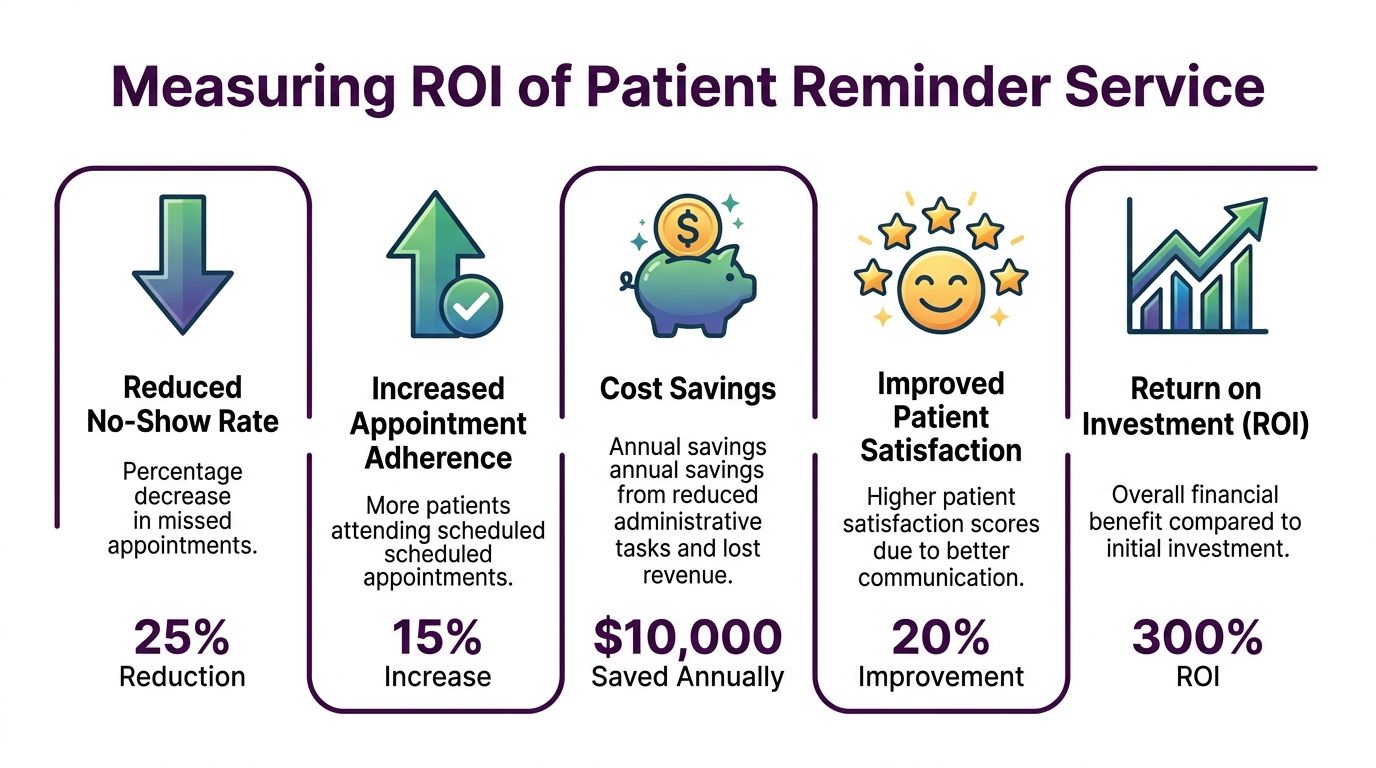
A systematic review of 29 studies found that patient appointment reminders produce a weighted mean relative reduction in non-attendance of 34%, and Adelante Healthcare reduced its average no-show rate by 35%, dropping from 20% to 13% for specialist treatments according to Dialog Health’s summary of appointment reminder statistics.
Track these numbers first
You don’t need a complex dashboard on day one. Start with a small set of operating metrics:
- No-show rate by provider or appointment type
- Confirmation rate by channel
- Reschedule capture rate
- Recovered appointments filled after cancellations
- Staff time no longer spent on manual reminder calls
A simple way to calculate value
Use a before-and-after comparison over a consistent period. Then connect attendance improvement to dollars and labor.
- Pull your baseline no-show rate.
- Track reminder confirmations, cancellations, and reschedules after launch.
- Count how many appointments were saved or refilled.
- Estimate the revenue recovered from those kept visits.
- Add labor savings from reduced manual outreach.
- Subtract the service cost.
That gives you an operating ROI view that leadership can understand quickly.
A patient appointment reminder service isn’t a cost center. It’s a revenue protection tool that also gives staff time back.
One projection cited in the market points to very high first-year returns in the right environment, but even without leaning on a headline ROI number, most practice managers can make the case with recovered appointments, cleaner schedules, and less manual work alone.
What to watch after launch
Don’t stop at the first month. Some programs look fine at first because staff are paying close attention. The critical test is whether the workflow still performs once it becomes routine.
Review these questions regularly:
- Are confirmations improving across all patient groups, or only the easiest-to-reach ones?
- Are high-value appointments getting the right level of human follow-up?
- Are unconfirmed visits being escalated quickly enough?
- Are bilingual patients receiving reminders in the right language consistently?
Your Vendor Selection Checklist
Choosing a patient appointment reminder service is less about buying messages and more about buying a workflow your staff can run. A polished demo doesn’t matter if the vendor can’t support your patient mix, your compliance standards, and your scheduling reality.
Use this checklist when comparing options:
-
- Compliance readiness: Ask whether they sign a BAA and how they handle healthcare messaging controls.
- Integration depth: Confirm whether confirmations, cancellations, and reschedules sync back into your existing system.
- Channel flexibility: Make sure they support SMS, email, and live phone outreach rather than forcing one method.
- Bilingual capability: If your patient base includes Spanish speakers, verify real English-Spanish support.
- Escalation model: Ask what happens when automation gets no response.
- Reporting quality: You need visibility into confirmations, no-shows, and operational follow-up.
- Operational fit: Check whether their team can work within your scheduling rules, call windows, and patient-service standards.
🚀 Reduce No-Shows and Improve Patient Scheduling
CallZent combines automation with bilingual live outreach to help healthcare providers reduce missed appointments and improve efficiency.
Schedule a CallThe right partner should feel like an extension of the front office, not another tool the front office has to babysit.
If your practice needs a patient appointment reminder service that combines automated outreach with bilingual live support, CallZent offers phone, SMS, and email reminder workflows along with nearshore agent support that can help fill the gap when automation alone isn’t enough.