Skip to content

KNOWLEDGE MANAGEMENT
What Is Knowledge Management? How Support Teams Turn Information Into Business Efficiency
Learn what knowledge management really is, why it matters in customer support and BPO operations, and how to build a system that improves speed, consistency, onboarding, and service quality.
TL;DR — Quick Takeaways
- Knowledge management is the structured process of capturing, organizing, sharing, and using company knowledge.
- In customer support, knowledge management helps agents find the right answer faster without guessing, escalating unnecessarily, or relying on tribal knowledge.
- Poor knowledge management creates real operational costs: longer resolution times, inconsistent answers, slower onboarding, and more supervisor interruptions.
- A strong KM system depends on four pillars: people, process, technology, and governance.
- The goal is not to store more information. The goal is to make accurate knowledge easy to find, trust, and apply during live customer work..
Your team probably already has a knowledge management problem. It just may not look like one yet.
It looks like agents asking the same question in Slack. It looks like one supervisor who always knows the workaround. It looks like onboarding that depends on shadowing the right person. It looks like inconsistent answers to customers because the process lives in five places and none of them are fully current.
In customer support and BPO environments, scattered information becomes an operating risk fast. The more channels, products, policies, and customer scenarios you handle, the more expensive that chaos gets. That’s why businesses asking what is knowledge management are usually asking a more practical question: how do we stop losing time, quality, and customer trust because the right answer isn’t easy to find?
Your Best Agent Just Quit Now What
When a top agent leaves, the loss isn’t just emotional or operational. It’s informational.
That agent knows which billing exceptions are allowed, which troubleshooting sequence works for a device that fails in a specific way, and how to calm down a frustrated customer without escalating the call. Some of that knowledge is written down. A lot of it isn’t.
The real cost of hero-based operations
A lot of support teams run on “hero knowledge.” One or two people carry the operation because they’ve seen everything before. That works until they take PTO, move to another department, or resign.
Then the cracks show:
- Resolution times stretch out: Newer agents spend longer hunting for answers or escalating avoidable issues.
- Answers become inconsistent: One customer gets the correct policy. Another gets an outdated version.
- Supervisors get dragged into repeat questions: Instead of coaching or planning, they become human search engines.
- Training gets shaky: New hires learn from whoever is available, not from a shared standard.
Operational truth: If your process depends on memory, you don’t have a process. You have a dependency.
Knowledge management stops being an abstract business term and becomes a continuity tool. It protects the business from turnover, growth, and complexity.
What businesses usually miss
Most companies think they need better documentation. Sometimes they do. But documentation alone won’t fix the problem if nobody owns it, updates it, or uses it during live work.
Knowledge management solves a bigger issue. It turns know-how from individual people into reusable team assets. In support operations, that means the next agent can solve the same issue without starting from zero.
That shift matters even more in outsourced or distributed teams. If you’re working across locations, languages, shifts, or departments, shared knowledge is what keeps the customer experience stable.
What Is Knowledge Management Really
Knowledge management is the process of identifying, organizing, storing, and disseminating information within an organization, according to IBM’s overview of knowledge management. IBM also notes that KM systems are often built around a centralized knowledge base to improve operational efficiency. The same source says the global knowledge management market is projected to grow from $773.6 billion in 2025 to $2.1 trillion by 2030, which shows how far KM has moved from a side project to a core business capability.
In plain English, knowledge management is your company’s shared, searchable brain.
It helps people find the right answer without guessing, waiting, or recreating work that already exists. In a support team, that could mean a policy article, a refund workflow, a product troubleshooting guide, a call handling script, or a note explaining when a case really should be escalated.

The three kinds of knowledge that matter
Most support leaders already deal with three types of knowledge, even if they don’t label them that way.
| Knowledge type | What it means in practice | Example |
|---|---|---|
| Explicit | Clearly documented information | SOPs, refund rules, product specs |
| Implicit | Know-how built into how work gets done | How an experienced rep uses the CRM flow efficiently |
| Tacit | Personal judgment and experience | Knowing which questions uncover the real issue on a tense call |
The role of KM is converting as much implicit and tacit knowledge as possible into explicit, reusable knowledge.
That doesn’t mean every useful instinct can be turned into a document. It means the business should capture repeatable decisions, recurring fixes, and proven ways of handling common situations before they disappear.
What knowledge management is not
It’s not a dusty intranet no one trusts.
It’s not a shared drive full of files with names like Final_v3_Updated_UseThisOne.
It’s also not just software. A knowledge base platform helps, but software without ownership and upkeep usually becomes a content graveyard.
Good knowledge management doesn’t just store information. It helps the team use the right information at the right moment.
Why Knowledge Management Is a Competitive Advantage
Poor knowledge access wastes labor in plain sight. According to this knowledge management statistics summary, employees spend 1.8 hours per day searching for information, which is nearly 25% of the workday, or 9.3 hours per week. The same source cites a McKinsey finding that effective KM can reduce search time by up to 35% and improve overall organizational productivity by 20 to 25%.
Those aren’t soft benefits. They affect staffing, service levels, and customer experience.
Where the advantage shows up first
In support operations, strong knowledge management changes the economics of daily work.
- Onboarding gets cleaner: New agents learn from a reliable system instead of piecing together tribal knowledge.
- Quality becomes more consistent: Customers hear the same policy and process across agents and channels.
- Escalations drop: Frontline teams solve more issues with confidence when the answer is easy to retrieve.
- Supervisors get time back: They coach performance instead of repeating answers all day.
A well-run support organization doesn’t win because it has more information. It wins because agents can use that information quickly.
For teams evaluating outsourcing models, this matters even more. The difference between a fragile BPO relationship and a strong one often comes down to operational discipline. Clear knowledge flows, paired with customer service measurement, are what keep service stable as volume shifts. That’s also why tracking the right customer service KPIs matters alongside your knowledge program.
Key takeaway: Knowledge management turns support from a people-dependent cost center into a repeatable operating system.
Speed without structure creates new problems
Many teams try to solve knowledge issues by dumping everything into one platform and calling it self-service. That usually creates a bigger search problem.
The better approach is structured access. Content should be written for use, not just stored for recordkeeping. If you’re thinking through the broader advantages of modern content management, the same principle applies here: teams perform better when information is organized, governed, and easy to retrieve in context.
A deployment problem is not the same as an adoption win
The same statistics source notes that in companies with 500 or more employees, only 45% of employees were using their implemented KM systems. That point matters. Buying a platform isn’t the finish line. If the team doesn’t trust the content, can’t search it well, or doesn’t see it as part of the workflow, usage stays low.
That’s why the strongest KM programs focus on behavior, ownership, and fit with daily operations, not just tool rollout.
The Four Pillars of a Strong KM System
A strong knowledge management system stands on four pillars: people, process, technology, and governance. Nearshore support teams feel the weakness fast when one of those pillars is missing. Articles go stale, agents stop trusting the knowledge base, and customers get different answers depending on who picks up the case.

People
KM succeeds or fails at the team level.
In call centers, agents share what they know when the culture rewards accuracy, speed, and reuse. They hold back when documentation feels like extra admin work or when hard-won knowledge is treated as personal job security. I have seen both. The stronger operation is the one that makes contribution part of daily performance, not volunteer work.
That means clear expectations. Agents should flag missing content, suggest edits after edge cases, and capture recurring customer objections in a usable format. Team leads should coach for knowledge quality the same way they coach for QA scores.
Process
Good KM process fits inside live operations. It does not sit off to the side as a cleanup project for later.
The practical model is simple:
- Capture in the moment: Record the issue, fix, and conditions while the case is still fresh
- Refine after pattern confirmation: Turn rough notes into a reusable article once the team sees the issue repeat
- Standardize the article structure: Use consistent fields for problem, cause, steps, exceptions, and escalation triggers
- Review on a schedule: Recheck content tied to policies, pricing, compliance rules, or product changes
Many outsourced teams struggle with effective knowledge management. They assign content work to whoever has spare time, then wonder why the knowledge base becomes unreliable. Mature teams assign ownership and make article maintenance part of operating rhythm.
Technology
Technology should reduce search time and decision time.
For support environments, that usually means one searchable source of truth with tagging, version history, permissions, and direct links to CRM or ticketing workflows. APQC’s guidance on knowledge management maturity also emphasizes that stronger KM programs rely on defined roles, standard methods, and tools that support reuse instead of just storage.
Tool choice matters, but tool fit matters more. A complex platform with poor search logic or weak workflow integration will lose agent trust quickly. A simpler system that delivers the right article inside the case flow often performs better.
For teams adding automation, the useful question is how knowledge connects to AI agent use cases in service operations. Automation works best when the source content is current, approved, and structured for retrieval.
Governance
Governance keeps KM from collapsing under growth.
This pillar defines who owns each article, who can approve changes, what review cycle applies, and how the team handles duplicate, outdated, or conflicting guidance. In a nearshore call center, governance also protects consistency across shifts, sites, and bilingual teams. Without it, local workarounds start replacing official process.
If your operation is already buried in tickets, chats, PDFs, call notes, and transcripts, the first challenge is often transforming business data into a structure people can use. Governance keeps that structure accurate after the first cleanup.
A knowledge base becomes reliable when the business defines ownership, review rules, and what “correct” means in day-to-day operations.
How Knowledge Flows The KM Process in Action
In support, knowledge management isn’t a filing exercise. It’s a loop tied to real customer work. Atlassian’s ITSM guidance describes it as a continuous cycle of identifying valuable knowledge from incidents, capturing it during resolution, refining it into usable articles, then storing and tagging it so the team can reuse it.
That model fits contact centers well because the best knowledge often shows up in live problem-solving first.
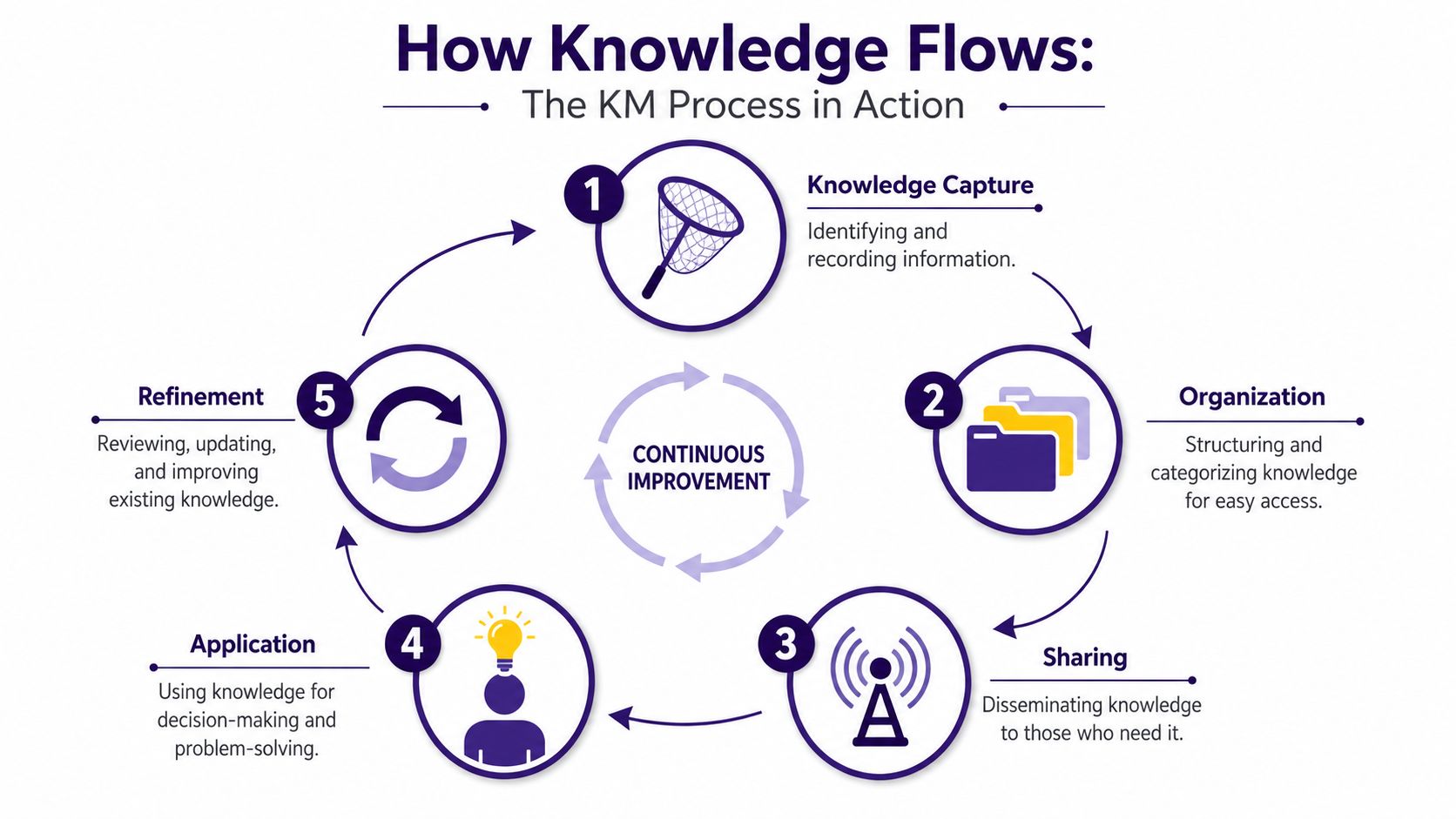
A support example that makes this tangible
A customer calls about a service feature failing after an account update. The frontline agent tries the usual steps, but they don’t work. A senior agent spots the underlying issue: a specific account flag wasn’t syncing correctly after the change.
That moment creates useful knowledge.
-
Capture
The team records the symptom, root cause, workaround, and any system conditions that matter. -
Organize
A lead or knowledge owner rewrites the notes into a clean article with tags, affected product names, customer-facing language, and escalation rules. -
Share
The article becomes available inside the support environment so agents can find it during similar cases. -
Apply
The next agent facing the same issue uses the article instead of escalating. -
Refine
If agents notice edge cases or better wording, the article improves again.
Where teams get stuck
Most organizations don’t struggle to create knowledge. They struggle to operationalize it.
Common breakdowns include:
- Messy capture: Notes are too vague to help the next person
- Weak search logic: Tags don’t match how agents look for answers
- No feedback loop: Articles stay unchanged even when the issue evolves
- Overwritten nuance: Simplifying too much removes the judgment agents need
That’s where AI can help if it’s used carefully. A practical guide to future AI workflow tools can help teams think through when automation should assist with search, drafting, routing, or summarization.
In live operations, AI works best when it supports agents with context. It’s especially effective when paired with tools like real-time agent assistance that surface guidance during the interaction, not after it.
Implementing Knowledge Management Without the Headaches
Most KM failures don’t start with bad intentions. They start with a tool purchase and no operating model.
That’s why APQC’s guidance on knowledge management is so useful. It frames KM as primarily a culture-and-governance problem, not a technology one. APQC says success depends on understanding current culture, gaining executive sponsorship, and reinforcing participation with clear ownership.

Start smaller than you think
A common mistake is trying to document everything at once. That creates backlog, slows decisions, and fills the system with half-finished content.
A better rollout looks like this:
- Pick one business area: Start with one queue, one product line, or one class of recurring issues
- Define ownership early: Every content area needs a named owner, not a shared assumption
- Use a simple template: Problem, cause, steps, exceptions, escalation path, review date
- Build contribution into work: Agents should be able to suggest updates from live cases
- Review what gets used: Prioritize the content agents search for most often
Make participation realistic
People won’t contribute consistently if the process feels bureaucratic. They also won’t trust the system if low-quality content gets published too easily.
The practical balance is simple:
| If you want speed | If you want control |
|---|---|
| Let agents suggest changes quickly | Require owner approval before final publication |
| Use lightweight drafting templates | Enforce naming, tagging, and review rules |
| Capture rough notes from live work | Convert rough notes into polished content later |
Practical rule: Make contribution easy. Make publication disciplined.
What to ask before outsourcing support
If you’re choosing a partner to handle customer service, technical support, or back-office work, don’t just ask about staffing and coverage. Ask how they manage knowledge.
Look for answers to questions like:
- Who owns process documentation?
- How are updates approved and communicated?
- How do new agents learn policy changes?
- What happens when customer scenarios change suddenly?
- How is frontline feedback turned into better content?
Training also matters. A strong operation connects KM to coaching, nesting, and quality assurance. If you’re reviewing options, look at how the provider approaches agent training programs as part of knowledge adoption, not as a separate activity.
Putting Knowledge Management to Work for Your Business
Your support operation gets tested at the edges, not on routine contacts. A refund exception in retail. A coverage question in insurance. A billing dispute in telecom. A process change in healthcare that went live this morning. In each case, the business needs the same thing. One accurate answer, delivered consistently, by every agent on every shift.
That is why knowledge management becomes operational infrastructure in mature support environments, especially in nearshore call centers where speed, bilingual delivery, and process discipline all have to work together. The goal is not to store more information. The goal is to reduce variation, shorten ramp time, and protect the customer experience when volume rises or policies change.
The pattern shows up across industries. Retail and e-commerce teams need current product details, shipping exceptions, returns rules, and promotion logic. Finance and insurance teams need clear handling for policy nuance, eligibility questions, and regulated language. Telecom teams need repeatable troubleshooting paths that help agents diagnose issues without guessing. In healthcare, governance matters even more because outdated guidance creates compliance and service risk fast.
What mature knowledge management looks like
A mature KM system is easy to describe in business terms. Agents know where to find the answer. Team leads know which articles create confusion. Process owners know what needs approval. Operations leaders can see whether content quality is improving handle time, accuracy, and customer confidence.
That only happens when governance is built into daily work.
In practice, strong KM usually includes a single source of truth, clear ownership for each content area, version control, review schedules, and a feedback loop from frontline teams to content owners. In a nearshore BPO model, culture matters as much as tooling. Agents have to trust the content. Supervisors have to coach from it. Clients and partner teams have to agree on who can change what, how updates are approved, and how urgent changes reach the floor.
A simple test
Ask three agents how they would handle the same unusual customer request.
If the answers vary, the business has a knowledge problem. The issue is rarely effort or attitude. It is usually unclear ownership, weak review discipline, or content that was written once and never maintained.
High-performing support teams treat that as an operating issue, not a documentation issue. They use KM to protect consistency across in-house teams, outsourced teams, and hybrid models. They also get better results from tools that support automation in customer service because automation depends on current, structured knowledge to produce accurate answers and workflows.
Strong knowledge management gives businesses faster answers, fewer preventable errors, and less dependence on tribal knowledge.
🚀 Build a More Dependable Support Operation With CallZent
CallZent helps North American businesses scale bilingual customer service, technical support, back-office workflows, and nearshore BPO operations with clear processes, agent training, QA, and operational discipline.
Talk to an Expert
If your business is scaling support, expanding coverage, or trying to reduce inconsistency across teams, CallZent can help you build a more dependable operation. As a nearshore bilingual call center and BPO in Tijuana, CallZent supports businesses that need customer service, technical support, and back-office execution backed by clear processes, strong agent training, and operational discipline. Explore the site to see how the team approaches industry-specific support solutions and scalable service delivery.