Skip to content

SAAS DEVELOPMENT & OPERATIONS
Develop Software as a Service Guide for Founders and Operators
Learn how to develop software as a service from idea validation to launch, security, pricing, and scalable support with a practical SaaS roadmap.
TL;DR — Quick Takeaways
- Validate the problem first: the best SaaS ideas solve operational pain customers already try to manage manually.
- Build a focused MVP: successful SaaS products launch with the smallest feature set that proves customer value.
- Security and support matter early: onboarding, compliance, ticket handling, and escalation workflows are part of the product experience.
- Nearshore support helps SaaS companies scale: bilingual customer operations improve onboarding, support coverage, and customer retention.
Most founders think the hard part is building the product. It usually isn’t. The harder question is this: if you develop software as a service, who will support customers, process edge-case requests, handle onboarding friction, and keep service quality high when growth starts to strain your team?
That gap is where many promising SaaS products stall. The code ships, demos look polished, a few early users sign up, and then the ongoing work begins: bug triage, account questions, billing confusion, failed imports, setup help, feature requests, and support coverage outside your team’s working hours.
A SaaS company is part software business, part service operation. If you treat support and back-office execution like a late-stage add-on, you create churn risk from day one.
Your End-to-End SaaS Development Roadmap
If you’re trying to develop software as a service, start with the full business model, not just the app. SaaS became the dominant software delivery model because customers can subscribe over the internet instead of installing software locally, and vendors handle infrastructure, maintenance, upgrades, and security updates. By 2024, it was described as the most common public cloud service, large businesses used an average of 131 SaaS applications, and the market was projected to reach USD 819.23 billion by 2030 according to IBM’s SaaS overview.
That market size is the opportunity. The operational complexity is the price of entry.
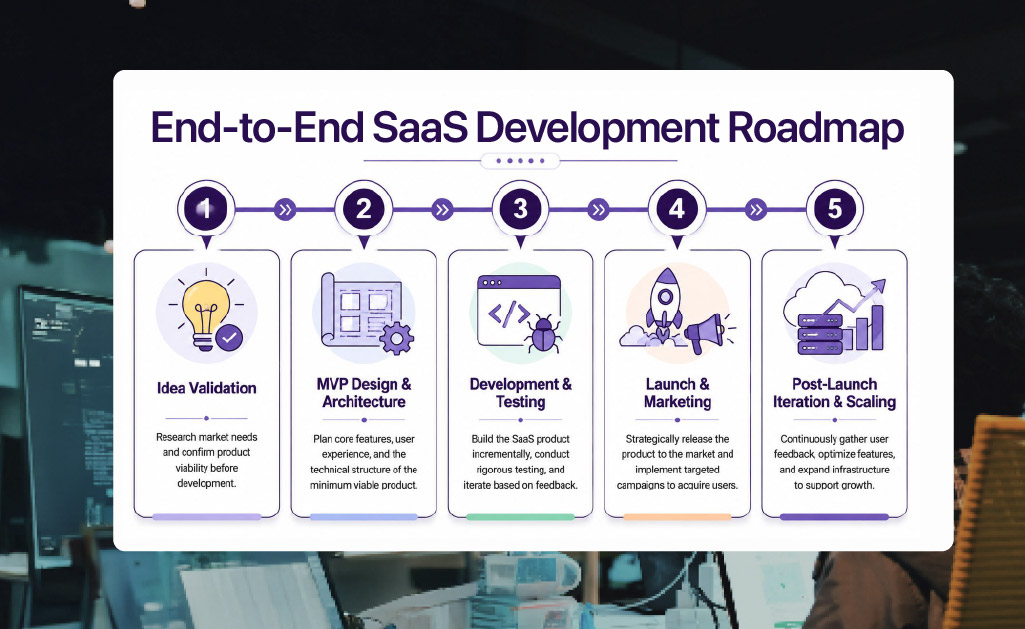
Here’s the full lifecycle at a glance.
What the roadmap looks like in practice
A founder with an idea for appointment automation might assume the job is to build calendars, reminders, and online payments. In practice, the actual roadmap is broader:
- Validate demand with interviews and workflow observation.
- Design an MVP that solves one painful scheduling bottleneck well.
- Build and test the product in small releases.
- Launch with simple onboarding and a clear pricing model.
- Scale support, account management, and maintenance as customer volume grows.
Practical rule: If your launch plan has feature milestones but no support workflow, you don’t have a launch plan yet.
Post-launch reliability matters as much as pre-launch build quality. Teams that want a cleaner handoff from engineering into operations should also think early about maintenance ownership, bug triage, and support escalation paths. That’s the difference between shipping software and running a SaaS business. A useful reference point is this guide to application maintenance and support planning.
Finding Your Niche and Validating Your SaaS Idea
The fastest way to waste money in SaaS is to build a broad product for a vague audience. “Small businesses” is not a niche. “Operations managers at multi-location dental practices struggling with insurance verification handoffs” is getting closer.
Recent commentary on micro-SaaS points to a useful truth: the best opportunities often sit inside overlooked workflow gaps, especially for buyers who are too complex for basic tools and too small to justify heavyweight enterprise software. That niche-first logic is captured well in this micro-SaaS perspective from FullScale.

Stop chasing categories and study workflows
A strong SaaS idea usually starts with a recurring operational headache, not a trendy label. Good examples include:
- Manual handoffs: a clinic moves requests from email to spreadsheet to phone call before anything gets scheduled.
- Fragmented approval paths: a finance team can’t track who approved what across shared inboxes and chat threads.
- Repetitive customer communication: an e-commerce brand answers the same post-purchase questions all day.
- Data cleanup pain: staff spend hours reformatting imports before they can use another system.
Those are useful starting points because they reveal a buyer’s current behavior. If a team already spends time patching the problem manually, they may pay for a cleaner system.
A practical validation checklist
Use a simple three-part test before writing code.
- Competitor gap review: Study existing products in the category. Don’t just list features. Look for complaints in reviews, weak onboarding, poor reporting, missing integrations, or pricing mismatches for smaller teams.
- Keyword intent check: Search the problem language your buyer uses. You’re not looking for vanity traffic. You’re looking for signs that people actively seek solutions, comparisons, templates, or workarounds.
- Customer interviews: Talk to potential users who currently feel the pain. Ask them how they handle the task now, where delays happen, what breaks, and what they’ve tried before.
A founder exploring software for insurance brokers, for example, shouldn’t ask, “Would you use my platform?” That question gets polite answers. Better questions are:
- What does your current process look like from intake to completion?
- Where do requests stall?
- Which steps require phone calls or manual follow-up?
- What errors create the most rework?
- Who owns the problem internally?
- What would make switching worth the disruption?
Broad markets attract attention. Narrow workflow pain attracts budget.
What validation should produce
You don’t need perfect certainty. You need enough evidence to answer four questions clearly:
| Question | What a solid answer sounds like |
|---|---|
| Who is this for? | A specific role inside a specific business type |
| What problem matters most? | One repeated operational pain with business consequences |
| Why now? | A trigger such as growth, compliance pressure, or service inconsistency |
| Why you? | Access to users, domain insight, or a clear implementation advantage |
If those answers stay fuzzy, keep interviewing. Founders usually don’t fail because they picked a small niche. They fail because they picked an audience that didn’t feel enough pain to change behavior.
Designing Your MVP and Core SaaS Architecture
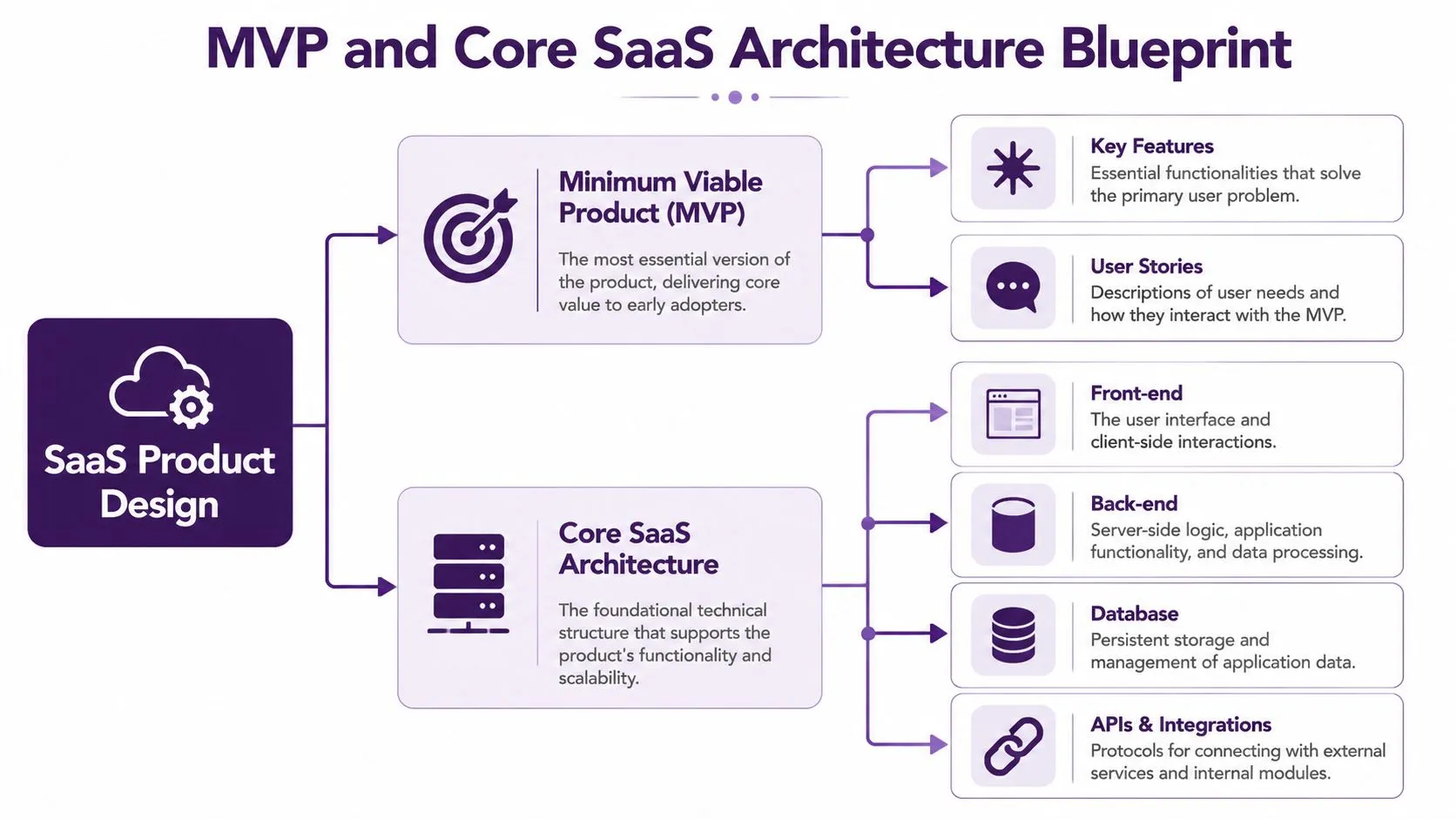
An MVP isn’t a cheap version of the final product. It’s a focused test of whether your core promise holds up to actual use.
If your pitch is “we help field service teams close jobs faster,” the MVP doesn’t need every dashboard, role type, mobile feature, and integration on day one. It needs the smallest set of capabilities that proves crews can receive work, complete tasks, and move job status forward without confusion.
Scope the MVP around one decisive outcome
Start with the user action that matters most. Then remove anything that doesn’t directly support it.
For example, if you’re building a SaaS tool for reservation teams, your first release might include:
- account setup
- user login and role permissions
- booking workflow
- customer notifications
- simple reporting
- admin controls for exceptions
That first version probably does not need advanced analytics, custom branding, AI summaries, or a marketplace of add-ons.
Key takeaway: Your MVP should answer one business question fast. “Will this make a customer’s work materially easier?” Not “Can we ship a lot of features?”
Use user stories before feature lists
Founders often jump straight to screens. User stories force better thinking.
Examples:
- A support manager wants to assign incoming requests by language so bilingual agents can respond faster.
- A billing administrator wants to see failed payments and trigger follow-up without checking multiple systems.
- A clinic coordinator wants an audit trail of schedule changes so disputes can be resolved quickly.
Those stories shape product decisions better than abstract feature requests like “build a dashboard” or “add reporting.”
Pick a multi-tenant model early
Most SaaS products need multi-tenancy. The simplest way to think about it is an apartment building.
You own one building, but many tenants live in separate units. They share the structure, utilities, and maintenance systems, but each tenant’s space stays distinct. In SaaS, the shared structure is your application infrastructure. Each customer account is its own protected tenant space with its own users, permissions, records, and settings.
That design matters because the SaaS market generated about USD 399.1 billion in 2024 and is projected to reach USD 819.23 billion by 2030, according to the earlier IBM projection noted above. Growth at that scale rewards products that can onboard customers efficiently without rebuilding the system each time.
Architectural choices that deserve early attention
A good core design usually includes these decisions up front:
- Front end: Web app first, mobile first, or responsive hybrid. Pick based on where users do the work.
- Back end: Define core business logic, background jobs, and access control before edge features.
- Database model: Plan for tenant separation, data retention, and search requirements early.
- Integrations: Identify which external systems are mission critical versus nice to have.
- Admin tooling: Internal support screens save huge amounts of time later.
A common mistake is skipping operational screens because they don’t feel like product work. Then support teams need engineers for every minor account issue. That’s expensive and slow.
Make the first experience usable
A functional MVP can still fail if setup is confusing. Founders should test the first fifteen minutes of user experience with obsessive attention:
- sign-up flow
- account creation
- initial import or setup
- first successful action
- error handling
- help content inside the app
If users need a sales call to complete basic setup, your MVP may be too complex or too broad.
How to Develop Software as a Service with the Right Tech
Tech stack debates waste a lot of founder energy. React or Vue. Node or Python. PostgreSQL or another database. Containerized from day one or later. These are real choices, but the right answer depends less on trends and more on your product constraints, hiring options, and release speed.
The safer question is not “What stack is best?” It’s “What stack lets this team ship, maintain, and improve the product without avoidable friction?”
Choose for the team you actually have
A practical stack decision usually balances four things:
| Decision factor | What to ask |
|---|---|
| Speed | Can the team build the first production version quickly? |
| Maintainability | Will new developers understand and extend it easily? |
| Scalability | Can it support your likely usage patterns without heroic rewrites? |
| Hiring | Can you realistically recruit or contract talent for it? |
If your engineers are strongest in TypeScript, using React on the front end and Node on the back end may simplify hiring and context switching. If your product relies heavily on data workflows, Python may fit better for internal logic and future AI features. PostgreSQL remains a practical default for many SaaS products because it handles common relational needs well.
What doesn’t work is choosing niche tools because a founder saw them in a conference talk and assumed novelty equals advantage.
Build in increments, not in one dramatic launch
For SaaS delivery, the most reliable implementation pattern is iterative and risk-managed. Small releases, continuous feedback, and adaptation are more dependable than locking scope and disappearing into a long build cycle, as explained in this methodology guidance from Orases.
That matters in everyday product work. Suppose you’re developing software for customer service teams. Don’t wait to release the entire platform with routing, QA scoring, analytics, CRM sync, automation, and multilingual support all at once. Release core ticket handling first, then add workflow automation, then improve reporting based on actual use.
Release a useful slice, watch where users struggle, then ship the next improvement. That’s how SaaS gets better without breaking trust.
Set up a basic delivery engine early
You don’t need enterprise process overhead, but you do need a disciplined build pipeline.
Use a simple operating rhythm:
- Version control: Git with clear branch and review rules.
- CI workflow: automated tests and linting on every pull request.
- CD pipeline: controlled deploys so fixes don’t wait on manual heroics.
- Issue tracking: Jira, Linear, or another system that keeps requirements visible.
- Monitoring: error tracking and uptime alerts before customers report issues.
Teams often underestimate how much confidence CI/CD creates. When deploys are repeatable, you can fix bugs faster, release smaller changes, and avoid the all-hands stress that comes with giant batches of code.
A founder building internal ops software for small merchants might start with a web app, API layer, PostgreSQL, GitHub Actions, and a cloud host. That isn’t glamorous. It is practical. It gets the product into users’ hands while keeping future changes manageable.
For founders also modernizing internal workflows, this roundup of small business automation tools is useful for spotting integration ideas and operational gaps your product may need to address.
Embedding Security and Compliance from Day One
Security isn’t a feature for later. It’s part of the product contract.
If you’re asking customers to trust you with employee data, payment details, patient information, or internal process records, they need confidence that your system controls access, records actions, and supports investigation when something goes wrong. That expectation gets sharper in healthcare, finance, insurance, and any business with sensitive customer interactions.
Auditability matters more than flashy features
For enterprise-grade SaaS, especially when AI enters the product, buyers care less about generic intelligence claims and more about whether the system can prove what happened and why. That requires auditability and observability from the start, as noted in SiliconANGLE’s discussion of service-as-software control requirements.
In plain terms, that means your product should answer questions like:
- Who changed this record?
- When was it changed?
- What triggered this action?
- Which policy or permission allowed it?
- Can an admin review the event history?
If your app can’t answer those questions, enterprise buyers will hesitate, and rightly so.
Build trust into the system design
Founders should treat these controls as baseline decisions:
- Encryption: protect data in transit and at rest.
- Access control: enforce role-based permissions so users only see what they should.
- Logging: record meaningful events, not just system noise.
- Session management: reduce the risk of unauthorized access.
- Retention rules: define how long data and logs are stored.
- Administrative oversight: give internal teams ways to review, investigate, and intervene.
A healthcare scheduling tool, for instance, needs more than a smooth interface. It needs careful permission handling, clear records of edits, and processes for dealing with sensitive information. A billing platform in financial services needs the same discipline for account activity, changes, and exception handling.
Compliance starts before the first enterprise sale
Many founders delay compliance thinking until a larger prospect asks for it. That’s backward. The expensive part isn’t filling out a questionnaire. The expensive part is rebuilding product logic and internal process after the product has already spread.
Buyers in regulated industries don’t just ask what your software does. They ask whether your system can withstand scrutiny.
Security also affects support operations. Agents who handle tickets, resets, account updates, and exception requests need controlled access and clear procedures. That’s where product architecture and operational design meet. If you’re tightening both, this guide on data security and compliance practices is a useful operational reference.
Launching and Growing Your New SaaS Business
A launch doesn’t fail because the landing page was weak. It fails because the pricing was confusing, onboarding took too long, messaging was generic, or nobody owned follow-up once users signed up.
Founders who develop software as a service need a go-to-market plan that matches product complexity. A self-serve tool for freelancers launches differently from a workflow product sold to healthcare administrators or telecom operations teams.
Pick a pricing model that fits buyer behavior
Three pricing models show up often because they solve different sales realities.
| Pricing model | Works well when | Watch out for |
|---|---|---|
| Freemium | Users can experience value quickly without handholding | Free users can consume support time without converting |
| Tiered pricing | Customer needs vary by team size, features, or admin controls | Too many tiers create confusion |
| Usage-based | Value scales with transactions, seats, messages, or processing volume | Bills can feel unpredictable if customers don’t understand the meter |
A support-heavy SaaS product often benefits from simple tiers early on. Buyers understand them quickly, and internal teams can forecast support needs more easily. Usage pricing can work well when the value metric is obvious, such as processed requests or completed transactions.
Acquire the first customers manually
The first 100 users rarely come from polished automation. They usually come from direct effort.
Good early tactics include:
- Targeted outreach: email specific operators with a clear problem statement and a short demo ask.
- Community participation: answer questions in niche groups where your buyers already spend time.
- Founder-led demos: watch prospects use the product and note where explanations are required.
- Helpful content: publish practical material tied to the workflow problem, not generic thought leadership.
- Referral prompts: ask early satisfied users who else in their network has the same issue.
A SaaS product for customer support leaders, for example, could publish setup templates, queue design checklists, or onboarding workflows that solve immediate operational problems. That kind of content attracts better leads than broad articles about “digital transformation.”
For launch execution details, a structured product launch guide can help teams keep messaging, onboarding, support readiness, and rollout tasks aligned.
Sales and support should share the same feedback loop
Many early-stage teams separate these too soon. They shouldn’t.
Sales hears objections. Support hears friction after signup. Product sees usage patterns. Put those three views together every week and you’ll spot:
- features prospects assume exist
- onboarding steps users skip
- pricing confusion
- integration requests that repeat
- support issues that should become product fixes
That loop is one reason lead qualification matters so much. If you want a stronger top-of-funnel process while building that motion, this page on lead generation for tech companies offers a useful operational angle.
Scaling Operations with a Strategic Nearshore Partner
Most SaaS companies hit the same wall. Engineering keeps shipping, sales keeps pushing for growth, and customer operations starts to crack under the weight of tickets, onboarding calls, account updates, billing questions, retention outreach, and multilingual support needs.
At that point, support is no longer a side function. It’s part of the product experience.
What founders get wrong about scaling service delivery
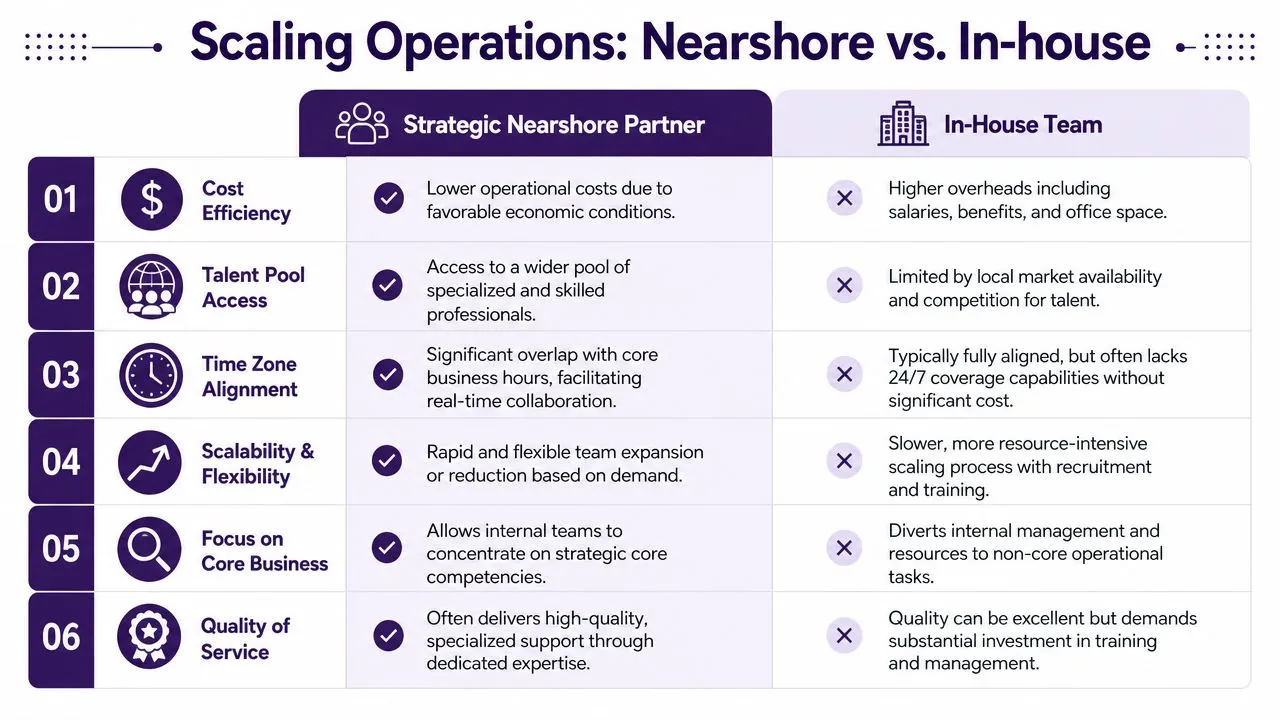
A lot of teams assume they should keep everything in-house until much later. That sounds disciplined, but it often creates bottlenecks:
- support queues grow faster than hiring
- engineers handle tickets they shouldn’t touch
- onboarding quality becomes inconsistent
- response coverage drops outside core hours
- back-office work steals time from product teams
The issue isn’t just cost. It’s management bandwidth. Every new internal role requires recruiting, training, QA, scheduling, supervision, and process design.
Why nearshore operations fit SaaS well
Nearshore support gives SaaS companies a middle path between building a large internal team and going fully offshore with less alignment. For North American companies, a nearshore model often makes collaboration easier because of overlapping work hours, language coverage, and closer operational coordination.
This matters most when your SaaS business needs a mix of functions, such as:
- Customer service: handling account questions, billing issues, and general support
- Technical support: triaging common product issues before engineering escalation
- Onboarding assistance: helping customers complete setup and adopt workflows
- Back-office processing: data entry, account maintenance, order handling, and verification work
- Lead qualification: supporting outbound follow-up and inbound conversion workflows
One option in that model is nearshore outsourcing to Mexico, where bilingual teams can support both English and Spanish customer bases while maintaining closer time-zone alignment with U.S. operations.
Software creates the promise. Support proves it.
When to bring in a partner
You don’t need to wait for chaos. The right moment is usually when one or more of these signals show up:
- customer questions repeat in predictable categories
- your founders still handle support directly
- onboarding requires live help
- technical issues need structured triage
- seasonal volume swings are hard to staff internally
- expansion into bilingual service is becoming urgent
A good operational partner should work from your SOPs, integrate with your CRM or help desk, follow escalation paths, and report quality trends clearly. The point isn’t to “outsource customer experience.” The point is to build a scalable service layer around the product so your internal team can focus on roadmap, sales, and strategic accounts.
Why Most SaaS Companies Struggle After Launch
Many founders assume the hardest part of SaaS is building the product.
Usually, it is not.
The harder challenge begins after launch:
- Customer onboarding questions
- Billing confusion
- Technical troubleshooting
- Failed imports
- Account setup friction
- Feature requests
- Support coverage outside normal hours
A SaaS company is never just software.
It is also a service operation.
Founders who ignore customer operations early often create churn risk before the product has even stabilized.
Businesses evaluating application maintenance and support planning frequently discover that operational reliability matters just as much as product features.
If your launch plan only covers engineering milestones and ignores customer operations, you do not have a real SaaS launch plan yet.
The uploaded source material emphasizes that SaaS growth depends on both software quality and scalable operational support. :contentReference[oaicite:0]{index=0}
Validate a Real SaaS Problem Before Writing Code
The fastest way to waste money building SaaS is targeting a broad audience with a vague problem statement.
“Small businesses” is not a market strategy.
Strong SaaS products usually begin with a narrow operational pain point that customers already attempt to solve manually.
Look for Workflow Friction
The best SaaS opportunities often appear where businesses rely heavily on:
- Spreadsheets and manual tracking
- Email chains and fragmented approvals
- Repeated customer communication
- Operational workarounds and duplicate entry
Examples include:
- A healthcare office manually confirming appointments across multiple systems
- An insurance team struggling with fragmented claims approvals
- An e-commerce brand answering the same customer questions repeatedly
The uploaded document highlights that recurring workflow pain is often a stronger validation signal than broad market size alone. :contentReference[oaicite:1]{index=1}
How to Validate Demand Practically
Before building:
- Interview users directly
- Review competitor complaints and gaps
- Analyze search intent around the workflow problem
- Map where delays and errors occur operationally
Founders should ask:
- Where does the workflow break down?
- What currently wastes the most time?
- What creates the most rework?
- Why would someone switch solutions?
Broad categories attract attention. Specific operational pain creates purchasing urgency.
Build an MVP That Solves One Important Problem Well
An MVP should not be a smaller version of a giant future platform.
It should be a focused test of whether the product solves a meaningful workflow problem.
Focus on the Core User Outcome
If the product promise is:
“We help customer service teams reduce onboarding delays.”
Then the MVP should focus on:
- User authentication
- Task routing
- Status visibility
- Basic notifications
- Minimal reporting
It probably does not need:
- Advanced AI features
- Complex dashboards
- Marketplace integrations
- Custom white-label options
The uploaded roadmap stresses that SaaS products should ship in small, testable increments instead of one massive release cycle. :contentReference[oaicite:2]{index=2}
Use User Stories Instead of Feature Lists
Feature requests often create bloated products.
User stories create workflow clarity.
Examples:
- A support manager needs bilingual ticket routing.
- A billing coordinator wants failed payment visibility without checking multiple systems.
- An operations lead needs audit trails for workflow changes.
These stories define operational value much more clearly than generic feature requests.
Your MVP should answer one critical business question quickly: does this product make the user’s workflow meaningfully easier?
Choose Technology That Supports Long-Term Operations
Most SaaS technology debates focus too heavily on trends instead of operational practicality.
The right stack is usually the one that:
- Allows fast iteration
- Supports maintainability
- Matches the hiring market
- Scales without constant rewrites

Core SaaS Architecture Decisions
- Frontend framework: React, Vue, or another maintainable option.
- Backend architecture: API logic, workflows, permissions, and background processing.
- Database structure: multi-tenant organization and search requirements.
- CI/CD pipeline: repeatable deployment and automated testing.
- Operational admin tooling: internal support visibility and account management.
The uploaded source strongly emphasizes that operational admin tooling is often overlooked during early SaaS development but becomes critical for scalable support later. :contentReference[oaicite:3]{index=3}
Ship in Small Releases
Large, infrequent launches create unnecessary risk.
Strong SaaS teams usually:
- Release smaller updates continuously
- Monitor customer friction actively
- Adjust based on usage patterns
- Fix operational bottlenecks quickly
This reduces deployment risk while improving learning speed.
Reliable SaaS products evolve through disciplined iteration, not giant feature dumps.
Build Security and Compliance Into the Product Early
Security cannot wait until enterprise customers request it.
The expensive part is not answering a compliance questionnaire.
The expensive part is rebuilding architecture after the product already scales.

Core Security Requirements
- Role-based permissions
- Encryption at rest and in transit
- Session management
- Audit logging and visibility
- Retention and deletion policies
- Administrative oversight workflows
The uploaded article highlights that enterprise buyers increasingly evaluate auditability and operational visibility rather than generic software claims alone. :contentReference[oaicite:4]{index=4}
Support Operations Need Security Too
Security is not limited to engineering.
Support teams handling:
- Password resets
- Billing changes
- Account verification
- Customer escalations
must operate inside controlled workflows with proper permissions and supervision.
Companies evaluating stronger operational governance should also review data security and compliance best practices.
Customers do not just evaluate features. They evaluate whether your system can be trusted operationally.
Launch Your SaaS Business With Operational Readiness
Many SaaS launches fail because onboarding and customer operations were treated as secondary concerns.
Strong launches require:
- Clear onboarding workflows
- Practical pricing models
- Support ownership
- Customer communication plans
- Operational escalation paths

Choose Pricing Carefully
Common SaaS pricing models include:
| Pricing Model | Best Use Case | Common Risk |
|---|---|---|
| Freemium | Fast adoption and product-led growth | High support load without conversion |
| Tiered Pricing | Different team sizes and feature levels | Pricing confusion |
| Usage-Based | Transaction-heavy platforms | Unpredictable bills |
Customer Acquisition Starts Manually
Most SaaS companies do not acquire early customers through automation alone.
The first users usually come from:
- Founder-led demos
- Targeted outbound outreach
- Niche communities
- Operational content marketing
- Referral requests
Businesses exploring scalable acquisition workflows may also benefit from reviewing lead generation for tech companies.
Early SaaS growth usually comes from operational learning and customer conversations, not from perfect automation.
Scale SaaS Operations With Nearshore Support
Most SaaS companies eventually hit the same operational wall.
Engineering continues shipping features while support queues, onboarding requests, and account management work expand rapidly.
That is usually the moment when support becomes part of the product experience itself.
Why Nearshore Support Fits SaaS Growth
Nearshore operational support provides:
- Bilingual customer service coverage
- Technical support and ticket triage
- Customer onboarding assistance
- Back-office operational support
- Shared North American business hours
The uploaded article notes that SaaS growth often breaks operationally before it breaks technically because customer service and onboarding demands scale faster than founders expect. :contentReference[oaicite:5]{index=5}
Companies evaluating scalable operational coverage often benefit from nearshore outsourcing to Mexico for bilingual customer operations and faster collaboration.
When SaaS Companies Usually Need Operational Partners
- Founders still handle support directly
- Onboarding requires live assistance
- Technical tickets repeat predictably
- Customer communication becomes inconsistent
- Bilingual support becomes necessary
- Internal teams lose focus due to operational overload
Software creates the promise. Customer operations prove whether the experience actually works at scale.
🚀 Scale Your SaaS Operations With CallZent
CallZent helps SaaS companies and North American businesses scale customer support, onboarding, lead generation, and back-office operations through bilingual nearshore teams built for long-term growth.
Talk to an ExpertIf you’re building a SaaS company and need the service side to scale with the product, CallZent provides bilingual nearshore customer support, technical assistance, lead generation, and back-office operations for North American businesses. It’s a practical option for founders who want stronger coverage, cleaner customer communication, and more operational capacity without building every support function from scratch.