Skip to content

Support usually doesn’t break in one dramatic moment. It slips when a four-person team is already answering chats, checking shipping emails, and replying to Instagram DMs, then a second follow-up lands unanswered and turns into a complaint. If that sounds familiar, the question isn’t whether you need more help, it’s whether the help should be human, AI, or a mix that can keep up.
Meta title: How to Hire a Virtual Assistant for Customer Service
Meta description: Learn how to hire a virtual assistant for customer service, compare in-house, nearshore, offshore, and AI-only models, and set up SLAs, onboarding, and ROI tracking that work.
TL;DR: A virtual assistant for customer service works best when the role is tightly scoped, the SOPs are clear, and escalation rules are written before launch. AI can now resolve a large share of routine support on its own, but human judgment still matters for exceptions, bilingual handoffs, and customer moments that carry revenue risk. The strongest operating model isn’t “bot versus person,” it’s a flexible support layer with the right mix of automation, nearshore coverage, and weekly management.
Why Customer Service Coverage Breaks Before the Team Does
A small Shopify store can look healthy on paper and still be drowning in support. Forty orders a day sounds manageable until the same two people are trying to answer shipping questions, fix address changes, and calm down customers who expect a reply before the end of the workday. The failure point usually is not product quality, it is that no one owns the second message, the third channel, or the bilingual follow-up.
A virtual assistant for customer service becomes a practical staffing decision when coverage hours, ticket volume, and language mix no longer fit inside the founder’s day. Teams usually reach that point after they have already stretched internal staff across chat, email, social, and post-purchase follow-up. A nearshore setup changes the math because it gives North American companies real overlap for live support, while keeping response quality closer to the customer’s tone and expectations than a far-off queue often can. For teams trying to build that kind of coverage without creating chaos, this guide to scaling customer support without chaos is a useful operational reference.
Practical rule: if customers are waiting for answers after the person who posted the order has already gone home, the problem is coverage design, not effort.
The category has also changed because routine work is now handled differently. Independent 2026 reporting says conversational AI bots now independently resolve 72% of standard support conversations from start to finish, while other industry analyses put that figure at 69% of customer inquiries resolved end-to-end by AI (2026 virtual assistant trends report). That is a major shift from simple FAQ deflection. Order status, account lookups, and password resets can now be handled without a human touching every ticket.
The lesson is operational. Customer service coverage breaks when the team is forced to react channel by channel instead of running one support queue with clear ownership. A virtual assistant, whether human, AI, or a blend, gives the business a way to protect response quality before missed messages start turning into refunds, churn, and public complaints.
What a Virtual Assistant Actually Handles by Industry
Generic task lists make this decision harder than it needs to be. The useful question is not “Can a virtual assistant help?” It’s “Which ticket types should it own on day one, and what system does it need access to?”
E-commerce and retail
For e-commerce, the core work is usually order status, return requests, shipping follow-up, and ticket triage inside tools like Shopify, Zendesk, or shared inboxes. In retail, the same assistant often handles peak-season overflow, after-hours questions, and simple product availability requests. A live-chat and AI-assistant setup is reported to deflect more than 50% of routine e-commerce queries at the first response stage (LiveAgent use-case summary), which is why the first line of defense should usually be repetitive questions, not complex exceptions.
Healthcare and finance
Healthcare needs a different staffing model because the work is less about speed and more about accuracy, privacy, and bilingual intake. A customer service virtual assistant in that environment commonly handles appointment scheduling, reminders, and patient intake, while escalation rules protect anything clinical or sensitive. Finance leans toward FAQ automation and document follow-up, and the same use-case summary lists FAQ automation in financial services at roughly $0.50 per conversation versus $6 to $12 for a human-handled interaction (LiveAgent use-case summary). That cost spread is useful, but only if the workflow is narrow enough to stay compliant.
A good scoping exercise starts with your top 20 ticket types, not your wishlist. If the same five issues show up every week, that’s where the assistant should start.
Before any vendor call, map the systems, languages, and exceptions behind those top ticket types. The closer your list gets to real tickets, the easier it is to decide whether a human assistant, AI workflow, or blended team can absorb the workload. For readers comparing service models, the nearshore versus offshore trade-offs are worth reviewing alongside your use case, and CallZent’s nearshore versus offshore outsourcing guide is a useful companion if you’re weighing live support coverage.
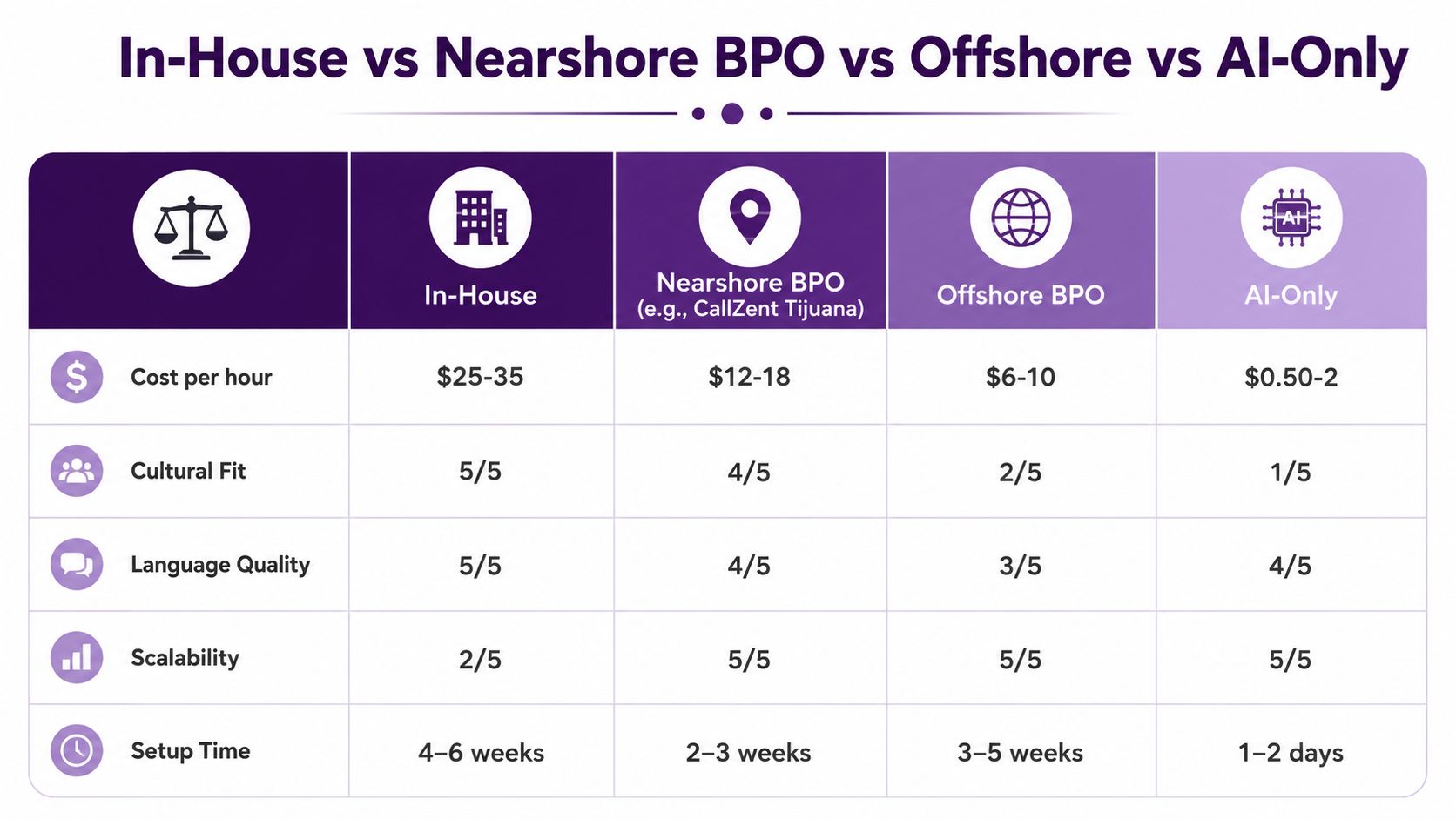
In-House, Nearshore BPO, Offshore, or AI-Only
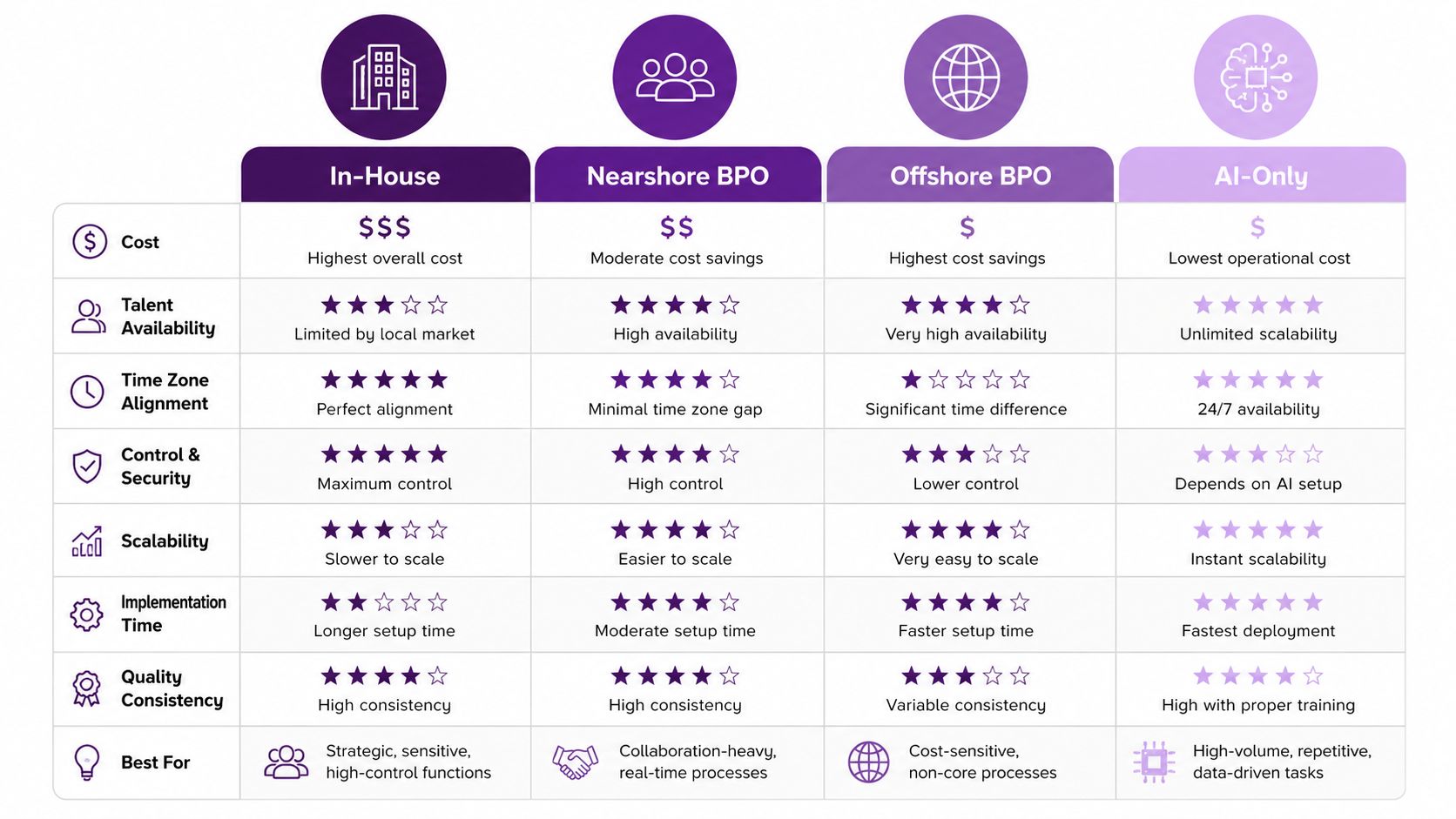
The decision usually comes down to control, language quality, and how much management you can absorb. In-house support gives you the most direct oversight, but it also demands recruiting, training, QA, scheduling, and coverage coverage decisions you can’t ignore. AI-only can be fast for narrow workflows, but it breaks down when customers ask for exceptions, clarifications, or empathy.
Nearshore BPO sits in the middle, and that middle matters. A bilingual team in Tijuana can keep overlap with North American hours while staying close enough for easier coordination, faster feedback, and better handoff quality than many offshore setups. If you’re looking for a resource on how AI fits into the smaller-business side of that mix, conversational AI for SMBs is a helpful reference point for understanding where automation helps and where it should stop.
How the four models differ
- In-house: strongest control, but the highest management burden. It works when the ticket load is steady and the business can absorb hiring and supervision.
- Nearshore BPO: strong for bilingual service, time-zone overlap, and faster collaboration. It fits companies that need coverage without building a full support department.
- Offshore BPO: can work for repetitive queues and longer coverage windows, but language nuance and live coordination can be harder to manage.
- AI-only: useful for highly structured tasks like password resets or order tracking, but it’s not a complete answer for escalations, complaints, or regulated service.
Market growth supports the shift toward broader outsourcing and automation. Grand View Research estimated the global intelligent virtual assistant market at USD 2.48 billion in 2022 and projected it to reach USD 14.10 billion by 2030, a 24.3% CAGR from 2023 to 2030 (Grand View Research market summary). A separate market summary put the AI customer service market at USD 15.12 billion in 2026, with a projection of USD 47.82 billion by 2030 at 25.6% annual growth (Grand View Research market summary). Those forecasts help explain why support teams are no longer choosing between “hire more people” and “hope the inbox slows down.”
For a small Shopify store, in-house may still be the simplest answer if the queue is light and the owner wants direct control. For a larger healthcare or retail operation, nearshore usually offers a better balance of coverage and coordination. AI-only makes sense first when the workflows are narrow, repetitive, and easy to measure. For a deeper look at operational trade-offs, CallZent’s outsourcing cost-benefit analysis gives a practical frame for deciding when the savings are real.
Choosing the Right Virtual Assistant Provider
Picking a provider based on a sales deck is where a lot of support projects go wrong. The pitch sounds polished, the demo looks smooth, and then the team discovers the vendor never defined how bilingual handoffs work, who handles escalation, or what happens when the queue spikes.
The questions that should be in every RFP
Ask each provider how they handle scope, channels, escalation, QA, coverage hours, tool access, bilingual quality, supervision, security documentation, and disaster recovery. Those answers tell you more than any promise about service quality. If a provider can’t show how an assistant handles written tone in both English and Spanish, that’s not a minor detail, it’s a delivery risk.
During the pilot call, watch for red flags. Beware of vague answers about supervisor access, weak examples of past ticket handling, poor listening comprehension, overpromising on compliance, and any reluctance to discuss handoff rules. I also look closely at whether the vendor can explain how they staff overlap hours, because a virtual assistant for customer service is only useful if someone can answer when your customers are active.
Documents and proof to request
Before signing, ask for these four items:
- SOC 2 or an equivalent security posture summary
- BAA documentation for healthcare workflows
- PCI attestation if the role touches retail payments
- Disaster recovery plan that explains continuity during outages
Bilingual quality isn’t just accent. It’s comprehension, speed, and written tone under pressure. If the message sounds technically correct but emotionally flat, customers feel it.
If you want a second opinion while building your vendor shortlist, CallZent’s vendor evaluation criteria is a practical internal reference for comparing providers against the same scoring rubric. The goal is simple, choose the partner that can explain how they work, not just how they sell.
Defining SLAs and KPIs That Predict Customer Satisfaction
Most SLAs miss the point because they track speed without tracking service quality. A team can reply fast and still leave customers frustrated if the answer is incomplete, the handoff is sloppy, or the issue comes back the next day. The numbers need to reflect outcomes, not just activity, especially when one virtual assistant team is covering email, chat, and overflow voice at the same time.
The metrics worth watching
For a virtual assistant for customer service, the core metrics are first response time, average handle time, CSAT, first-contact resolution, escalation rate, and QA score. If you need a starting point, use each one to set a practical target instead of a vanity number. The right benchmark depends on channel and industry, but the goal is steady measurement that shows whether the coverage model is helping or creating noise.
A simple SLA can look like this:
| Channel | Coverage | What to measure |
|---|---|---|
| Business hours plus overflow | First response time, backlog aging, QA score | |
| Chat | Live during staffed hours | First-contact resolution, escalation rate, CSAT |
| Voice | Scheduled or overflow coverage | Handle time, transfer quality, abandonment risk |
| After-hours | Limited scope, clear escalation | Callback speed, urgent-case routing |
Those targets need different language by workflow. Healthcare should protect HIPAA-sensitive work, retail needs clean payment handling, and finance often needs wording around disclosures and approval paths. A single SLA template rarely fits every department without adjustment, and that is where coverage looks fine on paper but breaks in practice.
For teams that want a clean reference point, the internal guide on call center service level agreements is useful for shaping response windows, escalation rules, and ownership by channel. Leaders also need a way to find revenue risk in customer data, because service failures usually show up later in churn, repeat contacts, and lost accounts. That is the part leadership cares about, not just how fast the inbox moved.
A strong reporting cadence is weekly QA and weekly escalation review, plus a monthly summary for leadership. Keep three numbers on the executive dashboard, CSAT, first-contact resolution, and escalation rate. That is enough to show whether the assistant is reducing friction or just moving the bottleneck somewhere else.
Onboarding Your Virtual Assistant in 30, 60, and 90 Days
The first 90 days decide whether the role becomes a real service layer or just another inbox. I’ve seen support projects fail because access was late, the knowledge base was outdated, or the team expected the assistant to learn the business by reading old tickets in spare time. Clean onboarding fixes more than people expect.
A workable ramp plan
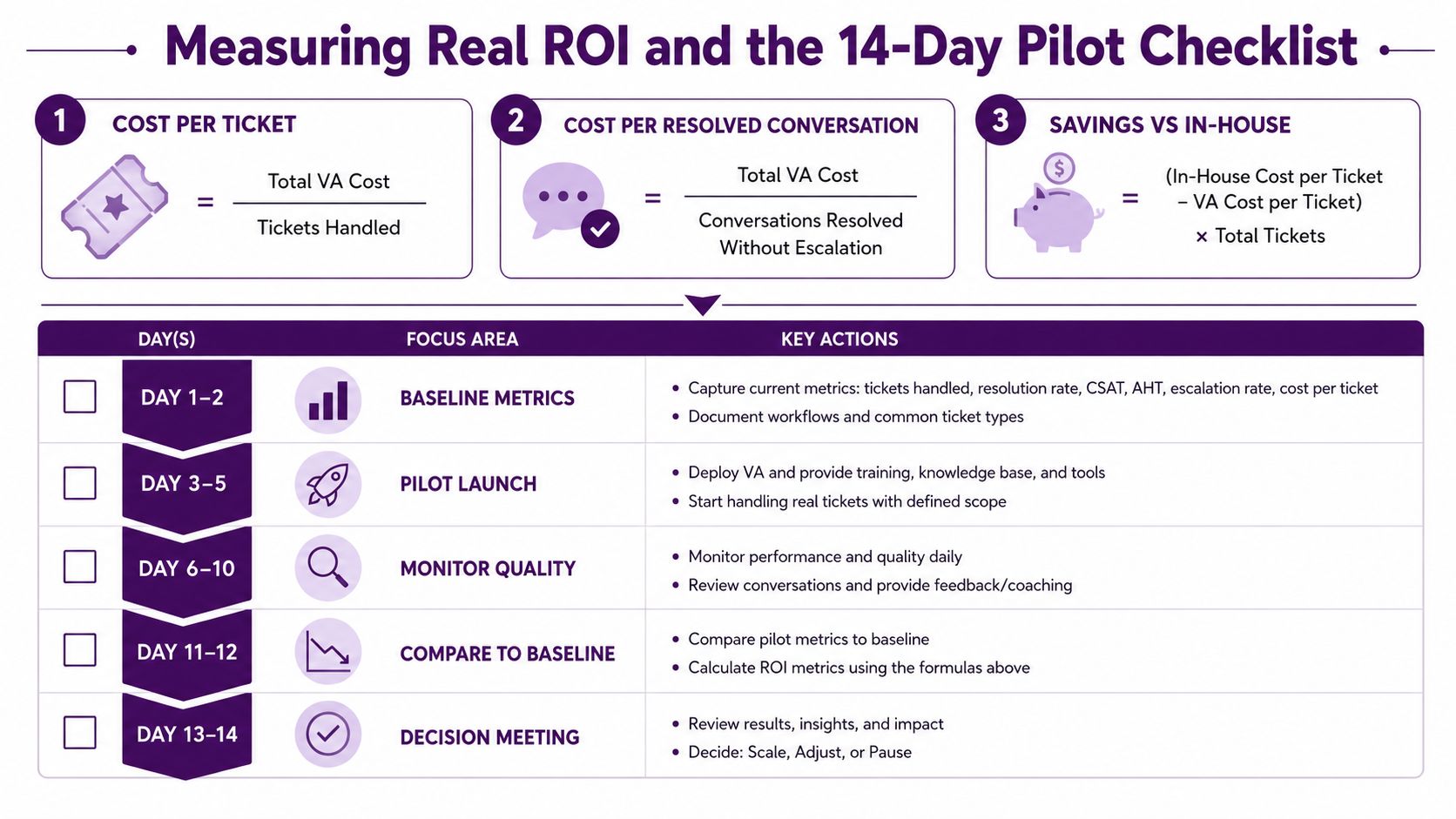
Week one should cover access, knowledge-base handoff, and shadowing. Week two moves into live ticket handling with a senior reviewer watching replies before they go out. Week three adds overflow or after-hours coverage. Week four is the first QA calibration, where the team reviews tone, accuracy, and escalation decisions together.
A good knowledge base doesn’t need to be fancy. It needs to answer the repeated questions, show the exception path, and keep the language simple enough that a new team member can use it without guessing. For the top five ticket types, write one standard reply, one escalation example, and one note about what the assistant should never promise.
What to review at each checkpoint
- 30 days: containment, CSAT, and how fast the assistant is ramping
- 60 days: ticket mix, escalation patterns, and staffing adjustments
- 90 days: ROI, workload fit, and whether the operating model should stay the same
Keep the first month boring. Boring onboarding means fewer surprises, fewer reversals, and better quality when volume picks up.
The strongest teams also use a simple escalation matrix. That matrix should say who gets the ticket, what triggers escalation, and which cases stay with the assistant. Once that’s written, the assistant can work with less guesswork and the manager can review real patterns instead of chasing isolated mistakes.
Measuring Real ROI and the 14-Day Pilot Checklist
The ROI conversation gets messy when buyers only count speed and ignore the management burden. A virtual assistant can lower workload, but it also creates costs in QA time, internal tooling, security reviews, and supervision. Those hidden costs matter because a cheap setup that needs constant correction is still expensive.
The simplest calculations are worth running before you sign anything. First, calculate cost per ticket. Then calculate cost per resolved conversation. Finally, compare that with your in-house baseline instead of assuming the outsourced number tells the whole story. For a deeper framework on those trade-offs, CallZent’s outsourcing cost benefit analysis is useful when you’re comparing support models on more than just hourly rates.
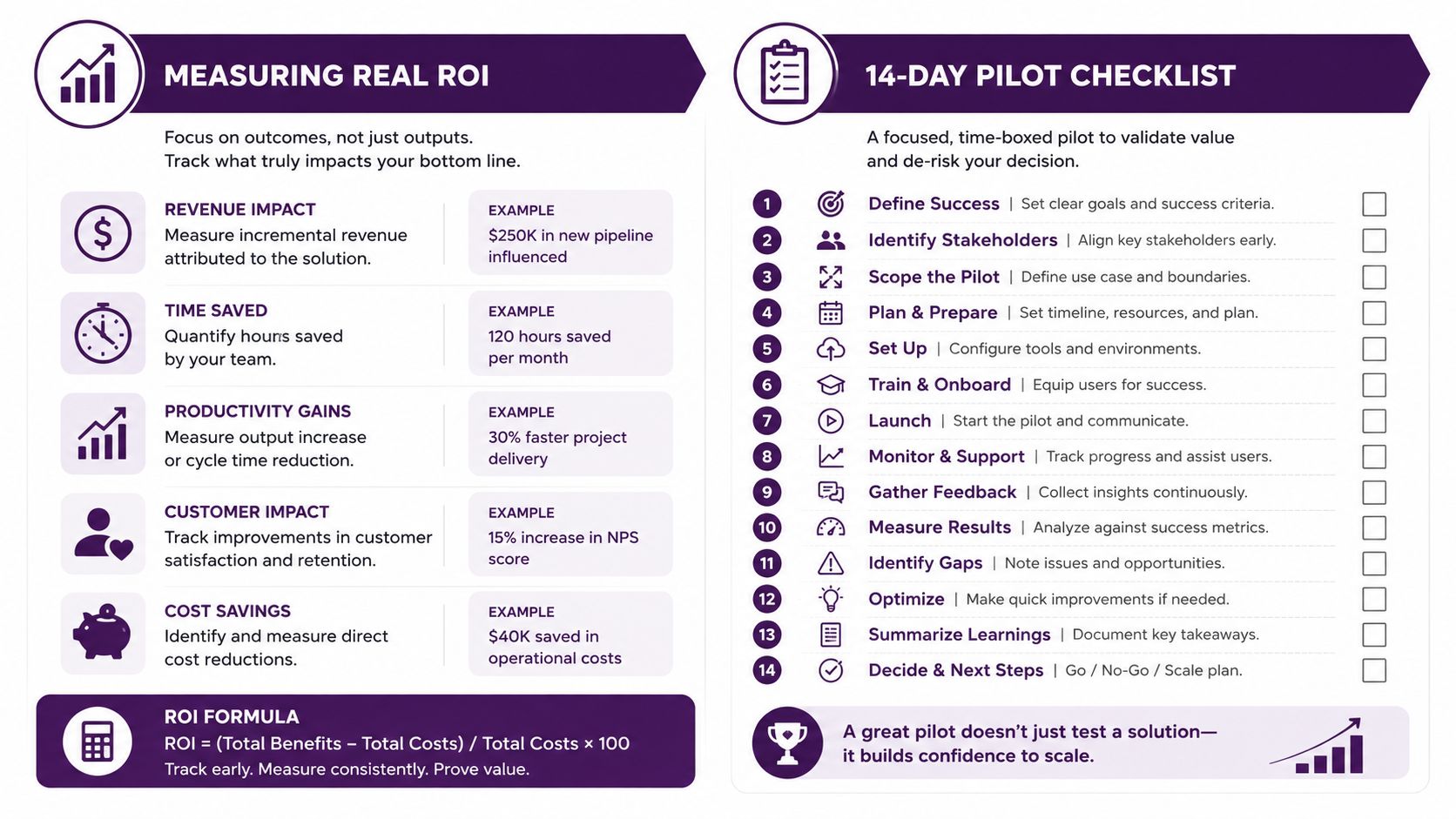
A workable pilot this quarter can stay short and still be useful. Define five ticket types, agree on SLAs, run one week of shadowing, score resolution and CSAT, then compare the pilot against the baseline. If the assistant helps without creating more handoffs, you’ve got a model worth scaling.
The strongest long-term setup is flexible. As AI takes on more routine volume, bilingual nearshore support stays valuable for exceptions, handoffs, and the customer moments that need judgment. That mix gives you room to grow without locking the business into one rigid staffing model.
🚀 Add Customer Service Capacity Without Adding Chaos
CallZent helps North American businesses build bilingual nearshore customer service teams that combine human judgment, flexible coverage, clear SLAs, and AI-ready workflows.
Talk to an ExpertCallZent provides bilingual nearshore customer support and virtual assistant coverage from Tijuana for businesses that need practical service operations, not just extra hands. If you’re deciding between AI-only automation, in-house hiring, or a flexible support team, visit CallZent to see how a nearshore model can fit your ticket mix, language needs, and coverage goals.