Skip to content

TL;DR — Quick Takeaways
- Start with frequent, rules-based tasks such as inbox triage, scheduling, CRM updates, data entry, and routine customer support.
- Keep strategy, regulated decisions, sensitive negotiations, and high-risk customer situations with the appropriate internal owner.
- Document the trigger, steps, source of truth, decision limits, quality check, and escalation path for each delegated workflow.
- Choose a freelancer for narrow work with direct management; choose a managed nearshore team when coverage, bilingual service, supervision, and continuity matter.
- Give the assistant only the access required for assigned work and review permissions as responsibilities change.
- Pilot one to three workflows, establish a baseline, and measure speed, accuracy, resolution, backlog, and recovered internal time.
- A strong virtual assistant relationship delegates ownership of repeatable work—not an endless stream of disconnected tasks.
You are answering customer emails at midnight, missing calls while handling a delivery issue, and postponing strategic work because the inbox keeps filling up. If that sounds familiar, the problem probably is not a lack of effort. The business has reached the point where routine work needs an operating model—not more hours from the founder.
A virtual assistant can take ownership of recurring administrative, customer-facing, sales-support, and back-office responsibilities. But the value does not come from sending random tasks to someone online. It comes from matching the right work to the right delivery model, establishing clear rules, and creating enough visibility to manage outcomes without micromanaging every step.
This guide explains how to use a virtual assistant in a controlled, practical way—from selecting the first workflow to evaluating a freelancer or nearshore BPO partner and measuring the return.
Recognize When the Business Has Hit a Capacity Ceiling
The warning sign is rarely one dramatic failure. It is usually a pattern. An eCommerce founder spends the morning answering order-status questions, misses a valuable lead during lunch, and stays late to reconcile customer records. A healthcare office manager handles appointment changes manually while the front desk waits for answers. A growing home-services company has plenty of demand, but prospects wait too long for a response.
That pattern creates a dangerous trade-off. The owner remains busy, but the business stops moving forward. Product improvements, sales conversations, vendor negotiations, training, and planning are delayed because routine requests feel urgent.
Operational symptoms that deserve attention
- Repeated questions: Customers ask about pricing, delivery windows, appointment availability, return policies, or account updates that follow a predictable answer.
- Delayed follow-up: Leads wait hours or days because nobody clearly owns the queue.
- Founder dependency: Employees return ordinary decisions to the owner because the instructions live in one person’s head.
- Administrative drift: Records, calendars, tickets, notes, and follow-up reminders become inconsistent during busy periods.
- Interrupted strategic work: Important projects stop whenever a call, email, or message arrives.
- Inconsistent coverage: Work pauses when one employee is absent or focused on another priority.
Practical rule: If a task happens often, follows recognizable rules, can be measured, and does not require senior judgment, it deserves a delegation review.
The goal is not to remove leadership from the business. It is to protect the work only leadership can do. Pricing strategy, hiring decisions, major customer recovery, partnerships, product direction, and sensitive compliance judgments usually remain internal. A trained assistant can prepare information, organize the queue, follow approved procedures, complete routine actions, and escalate exceptions.
Decide Which Tasks to Delegate First
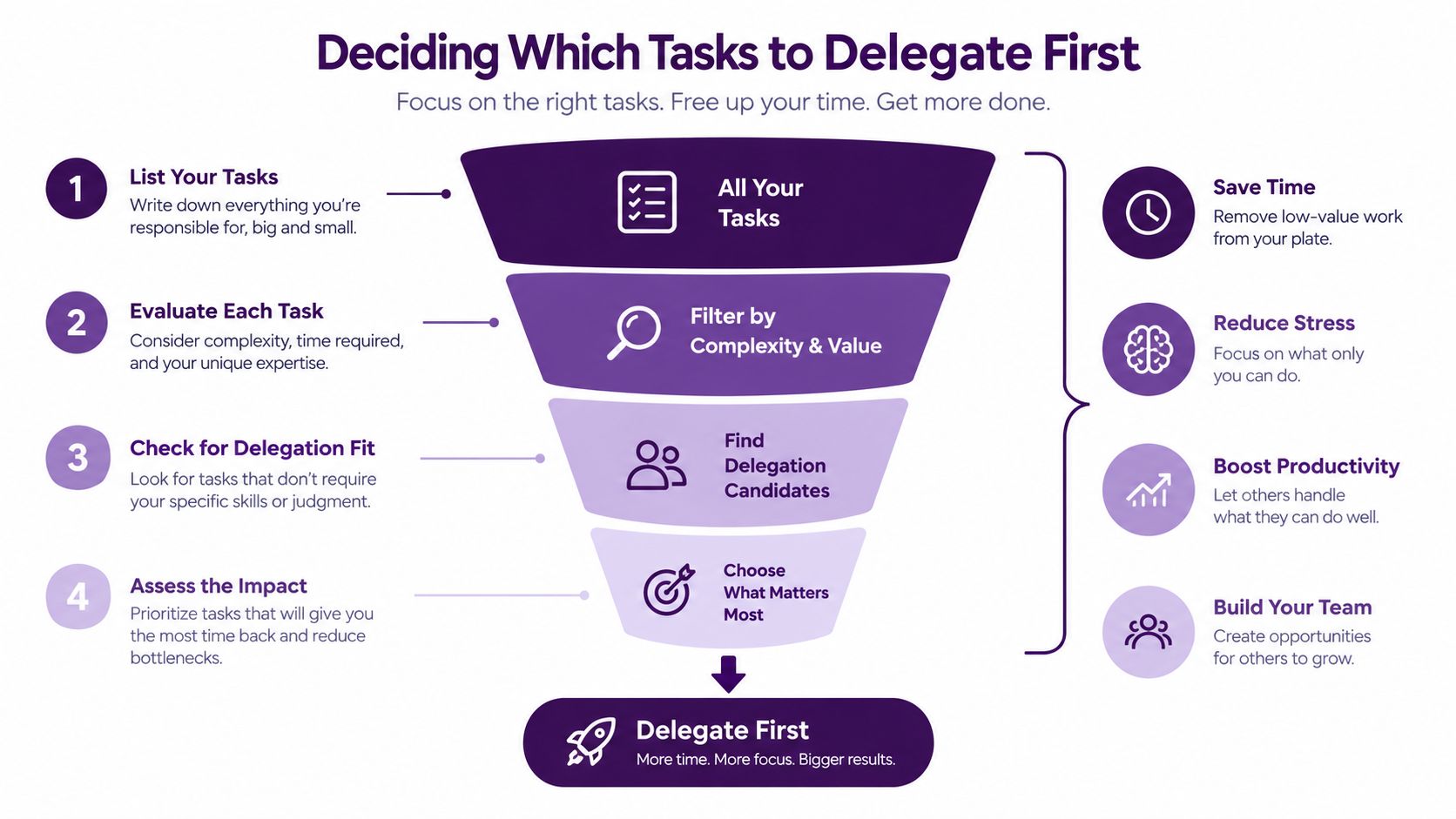
The first delegation mistake is choosing work simply because it is annoying. The better approach is to choose work because it is frequent, teachable, measurable, and low in judgment. A task that frustrates the founder may still be strategically important. A task that feels minor may consume the most capacity.
Map the work across four dimensions: frequency, rules, risk, and business impact. Then assign it to one of three categories—delegate, delegate with approval, or keep in-house.
| Decision | Work Characteristics | Examples | Control Needed |
|---|---|---|---|
| Delegate | Frequent, documented, reversible, and low risk. | Scheduling, inbox triage, CRM updates, data entry, order status, routine follow-up. | SOP, access limits, completion standard, exception list. |
| Delegate with approval | Repeatable preparation with financial, customer, or policy impact. | Refund preparation, proposal drafts, account research, retention options, payment follow-up. | Approval threshold, named reviewer, audit trail, turnaround target. |
| Keep in-house | Strategic, regulated, irreversible, highly sensitive, or dependent on senior judgment. | Legal interpretation, medical judgment, major negotiations, executive escalation, pricing strategy. | Internal ownership; the VA may organize information but should not decide. |
Start with the repeatable queue
Inbox triage is often a strong starting point. A virtual assistant can label messages, identify urgent cases, send approved replies, and route complex requests. Scheduling works similarly: the assistant can confirm availability, book appointments, send reminders, and flag conflicts without controlling the underlying business decision.
Data entry, CRM updates, lead-list cleanup, order-status communication, document organization, reporting, and routine customer service can also work well when the rules are clear. In an online store, for example, the assistant might answer “Where is my order?” inquiries using current shipping data and approved language, then escalate damaged shipments, charge disputes, or repeat complaints.
CallZent’s nearshore virtual assistant services cover administrative support, customer communication, scheduling, CRM management, research, sales follow-up, reporting, and other recurring operational work.
Design the Virtual Assistant Role Before Hiring
“Help with operations” is too vague to screen, train, or manage. A useful role definition identifies the queue, tools, work schedule, language needs, customer type, reporting cadence, decision limits, and expected outcomes.
Write the role around recurring ownership instead of a miscellaneous task list. “Own appointment confirmations and rescheduling from 8 a.m. to 5 p.m. Pacific” is clearer than “help with the calendar.” “Maintain complete CRM records for qualified leads and escalate pricing questions to sales” is easier to manage than “assist with leads.”
A strong VA role description defines
- The recurring responsibilities and work that is explicitly excluded.
- Required English, Spanish, written, verbal, and industry vocabulary skills.
- Working hours, coverage expectations, holidays, and backup arrangements.
- Systems used and the level of access each responsibility requires.
- Actions the VA may complete independently and those requiring approval.
- Performance measures, reporting rhythm, and quality-review process.
Screen for judgment, not only language
Professional English and Spanish fluency matter for bilingual work, but language ability alone does not create a reliable customer experience. Ask candidates to respond to a realistic customer message, summarize a short policy, categorize a set of requests, update a sample record, and explain when they would escalate.
- Written clarity: Can the person communicate without creating ambiguity?
- Process discipline: Do they follow instructions and document work consistently?
- Customer judgment: Can they distinguish a routine request from a sensitive one?
- Tool confidence: Can they navigate unfamiliar systems without inventing shortcuts?
- Coachability: Do they understand and apply feedback?
If you are still defining the role, CallZent’s guide to choosing a virtual assistant outsourcing company explains what to evaluate in management, coverage, technology, security, pricing, and service structure.
Build Clear Workflows and SOPs
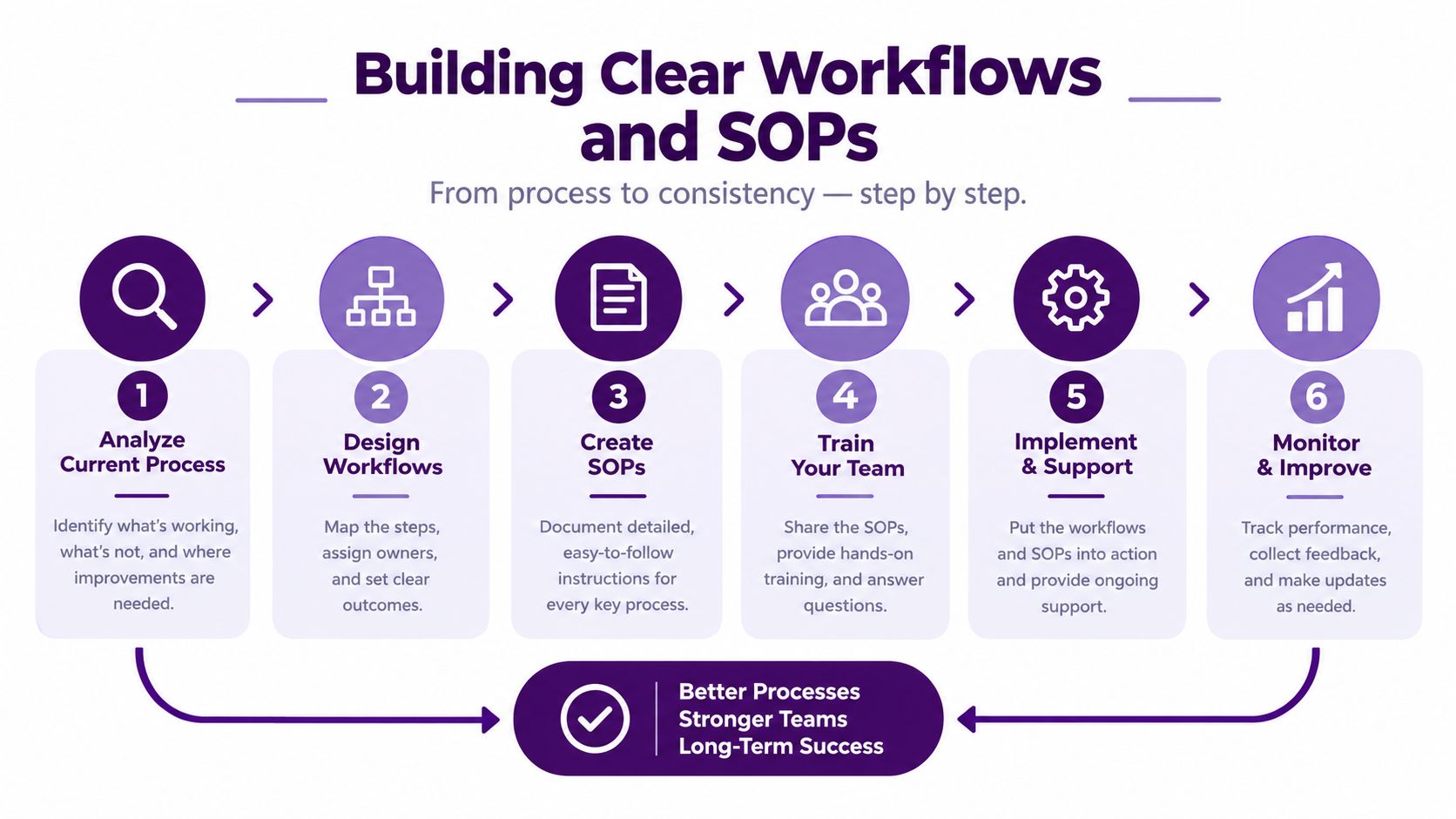
A virtual assistant cannot compensate for a process that changes every day. If the founder gives different answers depending on stress, time, or memory, the assistant will reproduce that inconsistency. The operating system has to come before scale.
Start with one workflow and write it as if a capable new hire must use it without interrupting you. A useful standard operating procedure identifies the trigger, required information, steps, approved response, decision boundary, quality check, and escalation point.
Turn instructions into decisions
“Answer customer emails quickly” is not an SOP. “Open the shared inbox, apply the order-status label, verify the order record, send Template A when the shipment is in transit, and escalate damaged or missing orders” gives the assistant a process they can execute and a manager can evaluate.
| SOP Element | Question It Must Answer | Example |
|---|---|---|
| Trigger | What starts the task? | A new scheduling request arrives in the shared inbox. |
| Source of truth | Where is the approved information? | CRM account record and current scheduling calendar. |
| Action | Which steps must be completed? | Verify identity, offer approved times, book, document, and confirm. |
| Decision limit | What may the VA decide without approval? | Reschedule within the published window; no fee waiver. |
| Exception path | When and where should the task escalate? | Route urgent or policy-exception cases to the named manager. |
| Quality check | How is correct completion verified? | Required fields completed and confirmation sent from the approved template. |
Tools can remain simple. A help desk, CRM, shared calendar, task platform, and maintained knowledge base can support a strong workflow when the team agrees on ownership and naming conventions. More software will not repair unclear decisions.
Organize knowledge around the question the assistant is likely to ask at the moment of work. “Cancel an order,” “change an appointment,” and “update billing information” are more useful categories than folders named after internal departments. Strong knowledge management keeps policies, scripts, product details, and escalation rules current and accessible.
Onboard the Assistant Around Real Work
Give the new assistant access to a controlled training environment before opening the full queue. Provide product information, approved response templates, examples of strong and unacceptable interactions, tool instructions, escalation rules, and a short list of common exceptions.
A practical onboarding sequence moves from observation to supervised execution. First, the assistant studies representative work. Next, they practice with historical or simulated cases. Then they complete low-risk tasks while a supervisor checks the results. Finally, they own a defined queue with regular quality reviews.
| Phase | Focus | Readiness Evidence |
|---|---|---|
| Week 1: Understand | Business context, tools, policies, examples, terminology, and security. | Knowledge check and correct classification of sample requests. |
| Week 2: Practice | Simulations, templates, documentation, approval rules, and exceptions. | Accurate completion of controlled scenarios. |
| Week 3: Nest | Low-risk live work with close review and fast coaching. | Stable quality, documentation, and escalation behavior. |
| Week 4: Own | Defined recurring queue with normal reporting and QA. | Target performance without excessive corrections or manager intervention. |
Use AI as an assistant—not an uncontrolled decision-maker
AI tools can summarize conversations, organize information, draft responses, or suggest categories. A human should still verify customer commitments, confidential information, refunds, regulated guidance, and messages where a wrong interpretation could cause material harm. Define approved tools, prohibited data, required review, and responsibility for the final action.
Protect Access and Business Information
Delegation requires access, but access should match the task. The assistant who schedules appointments may not need full billing records. The VA updating CRM notes may not need export permissions. The person replying to order-status questions may need shipment visibility without the ability to issue unrestricted refunds.
The NIST principle of least privilege recommends limiting users to the minimum access necessary for assigned work. Applied to a virtual assistant, that means role-based permissions, individual accounts, multifactor authentication, appropriate logging, and prompt removal of access when responsibilities or personnel change.
When evaluating a provider, ask how it manages devices, passwords, identity, network access, incidents, confidentiality, employee departures, and client data. ISO/IEC 27001 provides a recognized framework for establishing and continually improving an information security management system across people, policies, technology, and risk.
A standard alone does not make every workflow appropriate. The business must still define what information the assistant needs, which actions are allowed, how activity is reviewed, and which regulatory or contractual requirements apply to its industry.
Choose Between a Freelancer and a Nearshore BPO Partner
A founder preparing to delegate bilingual customer support faces a practical choice: hire one freelancer or build coverage through a nearshore BPO partner. The freelancer provides direct access and flexibility. The managed provider adds supervision, staffing depth, quality checks, operational continuity, and a defined path for growth.
Start with the operating responsibility you want to keep. One independent professional may fit calendar management, research, or a narrow administrative queue. A company handling customer conversations in English and Spanish may need a managed team, scheduled coverage, escalation support, and someone accountable for daily execution.
| Factor | Freelance VA | Nearshore BPO Partner |
|---|---|---|
| Management | Usually managed directly by the client. | Supervisor, coaching, and QA can be included. |
| Language coverage | Depends on the individual. | Can support structured English-Spanish coverage. |
| Continuity | Absence may interrupt the workflow. | Team structure can reduce reliance on one person. |
| Scalability | Capacity depends on one person’s availability. | Agents, schedules, or workflows can expand through a managed operation. |
| Technology | Client commonly provides and administers tools. | Provider may support telephony, reporting, workflow, and administration. |
| Best fit | Focused, lower-complexity work with direct oversight. | Customer operations and repeatable workflows requiring coverage and accountability. |
A freelancer can work well when the task is narrow and the client has time to train, review, and cover absences. The hidden burden appears when availability changes, the process evolves, or quality issues return to the founder for correction.
A BPO partner requires more structured implementation at the beginning. In return, the business can assign responsibility for staffing, coaching, reporting, schedule coverage, and continuity. For U.S. companies, a nearshore team in Tijuana can provide bilingual talent and real-time collaboration during overlapping work hours.
Do not compare only the hourly rate. Compare the total management effort, technology, coverage, quality control, rework, security, and cost of interrupted service. CallZent’s call center pricing calculator can help create an initial cost range before a detailed operational review.
Track Performance and Prove ROI
A virtual assistant creates value only when the business can explain what changed. A cleaner inbox is useful, but the operating question is whether customers receive faster answers, errors decline, work stops falling behind, and internal leaders recover time for higher-value responsibilities.
Set the scorecard before the pilot begins. Record current performance, then compare the same measures after the assistant takes ownership. Match each metric to the assigned workflow.

| Workflow | Useful Measures | Quality Guardrail |
|---|---|---|
| Inbox and customer support | First response time, resolution, reopen rate, backlog, CSAT. | Accuracy, tone, documentation, correct escalation. |
| Scheduling | Booking time, confirmation rate, no-shows, conflicts. | Correct customer, service, location, time, and instructions. |
| CRM and data | Records completed, cycle time, backlog, rework. | Required-field completion, duplicate rate, source verification. |
| Lead follow-up | Speed to lead, contact rate, meetings set, next steps completed. | Approved messaging, qualification accuracy, consent rules. |
| Administrative support | Completion time, on-time rate, internal hours recovered. | Error rate, confidentiality, version control, approvals. |
Measure value beyond labor cost
Include recovered founder or specialist time, faster lead response, fewer repeat contacts, reduced rework, improved coverage, and customer experience. A cheaper process that creates more escalations is not efficient. Compare results with the complete cost of internal coverage, including training, supervision, absence coverage, technology, and interruption time.
Hold regular reviews using specific examples. Ask which instructions create hesitation, which requests fall outside the SOP, and where the assistant needs better system access or training. Productivity data explains how much work is completed; quality reviews and customer feedback explain whether it was completed correctly.
The most effective virtual assistant strategy starts with task design, then adds people, tools, controls, and measurement around it.
Frequently Asked Questions
Using a Virtual Assistant: FAQs
What does a virtual assistant do for a business?
A virtual assistant can manage recurring administrative, customer-service, sales-support, and operational tasks such as scheduling, inbox management, CRM updates, data entry, research, reporting, lead follow-up, and routine customer communication.
What should I delegate to a virtual assistant first?
Begin with one to three frequent, documented, measurable, low-risk workflows. Inbox triage, appointment confirmation, CRM maintenance, order-status communication, and recurring reports are common starting points.
Which tasks should not be delegated to a VA?
Keep strategic, regulated, irreversible, and highly sensitive decisions with qualified internal owners. A VA may prepare information or execute approved administrative steps without making the final legal, medical, financial, or executive decision.
How do I create an SOP for a virtual assistant?
Document the trigger, required information, source of truth, exact steps, approved response, decision limit, exception path, quality check, and owner. Test the SOP with routine cases and exceptions before launch.
How long does it take to onboard a virtual assistant?
A narrow, well-documented workflow may begin controlled production within a few weeks. Complex responsibilities, specialized knowledge, security reviews, or multiple systems may require a longer training and nesting period.
Should I hire a freelance VA or use a BPO company?
A freelancer may fit a narrow workload when the business can provide direct management and absence coverage. A BPO may fit customer-facing or bilingual work requiring supervision, quality assurance, scheduled coverage, staffing depth, and scalable capacity.
What are the benefits of a nearshore virtual assistant?
A nearshore VA in Mexico can provide overlapping U.S. business hours, English-Spanish support, cultural proximity, and easier real-time collaboration while adding external administrative and customer-service capacity.
How do I protect company data when using a virtual assistant?
Use individual accounts, multifactor authentication, role-based permissions, least-privilege access, secure devices and networks, confidentiality requirements, activity logging, periodic access reviews, and prompt offboarding procedures.
How do I measure virtual assistant performance?
Choose metrics that match the workflow, such as response time, completion time, accuracy, backlog, first-contact resolution, reopen rate, appointments booked, CRM completeness, quality score, and internal hours recovered.
Can a virtual assistant support customers in English and Spanish?
Yes. A bilingual virtual assistant can support calls, email, chat, scheduling, follow-up, and administrative workflows in English and Spanish when trained on the same policies, tools, vocabulary, quality standards, and escalation rules.
Delegate Better. Protect Your Focus.
Build a Virtual Assistant Role Around Your Workflow
CallZent provides dedicated bilingual virtual assistants in Mexico for administrative support, customer communication, scheduling, CRM management, sales follow-up, reporting, and recurring operational work.
e