Startup Support Operations
Startup Customer Support: A Practical Playbook for Scaling Teams
Turn founder-led conversations into a dependable support operation with clear ownership, useful metrics, controlled automation, and the right coverage.
TL;DR — Quick Takeaways
- Centralize requests and assign an owner before adding channels or automation.
- Use contact demand, complexity, and customer commitments to plan capacity.
- Compare in-house, offshore, and nearshore delivery using equivalent scope and full costs.
- Define metrics and service hours before publishing response targets.
- Test AI boundaries and add bilingual or after-hours support when the workflow requires it.
You’ve just closed your biggest customer deal. Instead of celebrating, you’re answering Slack DMs at midnight, searching Gmail for old explanations, and joining one-off Zoom calls because nobody knows where support begins or who owns the next reply. Startup customer support rarely fails with one dramatic incident. It breaks through small operational gaps that become impossible to hide once revenue depends on a reliable customer experience.
The fix isn’t another chatbot purchased in a hurry. It’s a support operating model that matches your funding stage, customer expectations, risk profile, and coverage needs. This playbook shows how to build that model from pre-seed through Series B, when to keep support in-house, when to use AI, and when a bilingual nearshore team becomes a practical extension of the support operation.
Founder rule: If customers can’t tell who owns their problem, your support operation is already too complex.
When Startup Customer Support Becomes a Bottleneck
Consider an illustrative Series A SaaS startup: its founder closes an enterprise contract that should change the company’s trajectory. The sales team hands over a list of users, administrators, billing contacts, and implementation questions. The founder expects onboarding to be busy for a few weeks. Instead, every customer chooses a different route: one sends a Slack DM, another replies to an old Gmail thread, and a third books a Zoom call with whoever introduced them.
There’s no shared queue, no consistent priority system, and no dependable history. The founder writes answers personally because the first answer matters, but that decision creates a second problem. Customers now believe the founder is the support channel.
Three warning signs founders usually dismiss
The first warning sign is response time creep. Messages that once received an answer the same morning now wait until the next day, then longer. Customers don’t need a formal complaint to signal the problem. A delayed reply, a repeated explanation, or an unanswered escalation tells them the company has outgrown its operating habits.
The second is founder-owned resolution. A founder can handle unusual questions well, but personal involvement doesn’t scale. It also hides demand. If every request is solved privately, nobody can see which issues repeat, which documentation is missing, or where the product creates avoidable confusion.
The third is a change in customer language. Feedback stops saying only “the product is difficult” and starts mentioning support, follow-up, or ownership. That distinction matters. A product issue can be prioritized by engineering. A support issue signals that the company’s promise after the sale is weakening.
Measure workload instead of user count
Support becomes a bottleneck when the team cannot reliably track, assign, and resolve incoming requests. Monthly active users alone are a weak staffing guide: a small enterprise customer base can generate more complex work than a large self-service audience.
Use your own contact volume, issue complexity, backlog age, and founder time to identify the gap. Funding stage can provide context, but it does not determine a standard support-team size.
Match support maturity to the work. Early teams need customer learning and visible ownership. Growing teams need repeatable workflows, capacity, and escalation. More complex operations need shift coverage, specialist access, and reporting that reflects the customer experience.
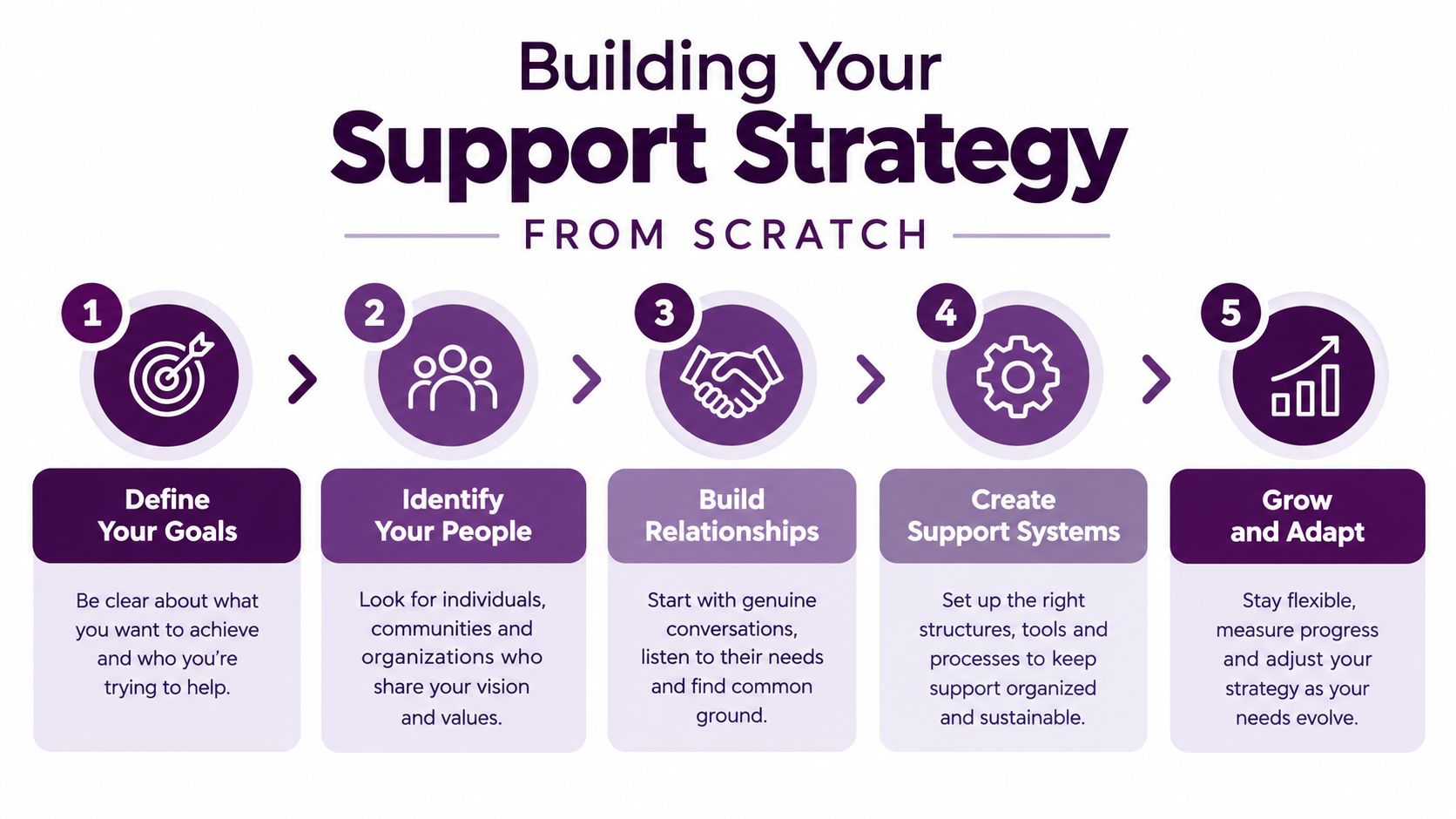
Building Your Support Strategy from Scratch
Don’t start with a helpdesk demo. Start by deciding what your customers need, what your team can promise, and which problems require human judgment.
Map the customers before mapping the channels
Write down your customer segments, geography, buying motion, language, and risk profile. A U.S.-only developer product may begin with English email and Slack. A company selling into the United States and Mexico needs to decide early whether English-Spanish support is part of the customer promise or merely an internal aspiration.
Language affects more than translation. It changes escalation quality, tone, billing explanations, and the way agents recognize urgency. A bilingual program should include bilingual macros, QA standards, product terminology, and clear rules for transferring a conversation without making the customer repeat the story.
Choose channels deliberately
Start with the channels your customers need and your team can staff. Define first-response and resolution expectations separately, publish service hours, and review actual performance before expanding the promise.
A sensible sequence looks like this:
- Shared inbox first. Centralize support@, assignments, internal notes, and ownership.
- Live chat second. Add it when the team can staff it consistently. Display availability and offer an asynchronous route when live agents are unavailable.
- Phone when the use case requires it. High-impact or phone-first journeys may need voice support from launch. Define ownership, callbacks, authentication, and escalation before opening the channel.
A practical support plan also needs a clear guide to building a customer service team, especially when hiring and outsourcing decisions will happen at different funding stages.
Design tiers before you design automations
Tier 0 is self-service. It includes a searchable knowledge base, onboarding guidance, status information, and clear troubleshooting steps.
Tier 1 handles routine questions, account navigation, basic configuration, and documented workflows. Agents should resolve these without waiting for engineering or a founder.
Tier 2 owns technical, billing, security, and other escalations. Tier 2 needs approved access, stronger documentation, and a named escalation owner. Security incidents and regulated matters may require separate specialist teams. For a payment issue, Tier 1 can authenticate the customer and collect approved details, while an authorized billing owner handles exceptions beyond the agent’s scope.
Put the promise on one page
Your support charter should name the mission, scope, response-time targets, service hours, escalation rules, and out-of-scope requests. Keep it short enough for sales, product, engineering, and support to use.
The charter prevents a common startup failure: sales promises 24/7 phone support, product assumes support will write implementation documentation, and engineering receives every question marked urgent. A written boundary protects customers because agents can route issues consistently instead of negotiating ownership in every conversation.
In-House, Offshore, or Nearshore BPO
Once founders stop handling every ticket, staffing becomes a strategic choice. The right model depends on brand sensitivity, language requirements, coverage windows, technical complexity, and how much management capacity the company can spare.
| Dimension | In-House (U.S.) | Offshore BPO (Asia) | Nearshore BPO (LatAm) |
|---|---|---|---|
| Hourly cost per agent | Internal labor plus management, tools, and coverage | Quote-dependent; compare full delivery cost | Quote-dependent; compare equivalent scope |
| U.S. time zone overlap | Depends on contracted shifts and location | U.S. shifts can be staffed; confirm supervisor access | Regional overlap; confirm all required shifts |
| English-Spanish bilingual depth | Depends on hiring market | Program-specific; verify tested language coverage | English-Spanish programs available; verify capacity |
| Ramp time | Recruiting and internal onboarding | Vendor-dependent | Vendor-dependent, with regional proximity |
| Control over training | Direct control | Requires detailed governance | Requires shared playbooks and client governance |
| Data-residency risk | Review access, hosting, subprocessors, and retention | Requires careful review | Review access, hosting, subprocessors, and contracts |
In-house keeps the brand close
A two-person team in Austin gives a startup direct control over tone, product context, and customer relationships. It works well when the company is still learning what customers need and every conversation should influence product decisions.
The weakness appears when demand becomes continuous. A small internal team can cover normal business hours, but it struggles with vacations, evenings, language coverage, and sudden enterprise incidents. The team also becomes vulnerable to a single knowledgeable employee leaving.
Offshore requires clear coordination
An offshore BPO can provide staffing capacity and agreed coverage windows. Evaluate the actual site, language proficiency, technical training, shift design, and supervisor availability. Geography alone does not establish service quality or cost.
Any outsourced program needs documentation, QA, escalation design, and a reliable product-update process. For a product that changes weekly, compare how quickly each provider incorporates changes into agent training and approved answers.
Nearshore balances proximity and elasticity
A nearshore BPO in Mexico, Colombia, or Central America provides closer U.S. time-zone alignment and a practical path to English-Spanish coverage. For U.S.-facing startups, the model can preserve much of the operational control of an internal team while avoiding the recruiting drag of building every shift yourself.
Nearshore operations also support in-person collaboration when needed. Tijuana, for example, offers proximity to the U.S. market and same-day travel possibilities for teams that need workshops, calibration, or leadership meetings.
Compare an internal team and a provider using the same service scope. Include recruitment, supervision, tools, QA, onboarding, specialist time, minimum commitments, and exit costs. A labor-rate comparison alone cannot establish savings or operational control.
Decision rule: Preserve direct customer learning while moving repeatable support execution into a documented, accountable workflow.
The Lean Startup Support Tech Stack
Your stack should grow by headcount and workflow complexity, not by logo collection. A startup doesn’t need an enterprise platform because it has raised funding. It needs a reliable system of record, clear ownership, and enough automation to protect human attention.
The following is an illustrative maturity framework, not a mandatory stack or staffing plan. Select products and plans after checking current capabilities, access controls, integrations, and pricing.
| Operating Stage | System of Record | Knowledge and Channels | Quality and Automation |
|---|---|---|---|
| Early customer learning | Shared inbox or lightweight helpdesk with an owner per case. | Approved FAQ and the channels customers actually need. | Manual review; human-approved drafts. |
| Repeatable support | Helpdesk with queues, tags, permissions, and reporting. | Maintained knowledge base and explicitly staffed channels. | Scorecards, calibration, and tested routing. |
| Multi-agent operations | Controlled integrations with CRM, product, and billing context. | Governed knowledge and documented specialist handoffs. | Demand forecasting, scheduling, and monitored assistance. |
| Extended or specialized coverage | Cross-shift history, escalation tracking, and access governance. | Language-specific coverage and on-call specialist routes. | Reporting by shift and language; approved automation boundaries. |
Pre-seed needs visibility, not sophistication
A shared inbox, public FAQ, and simple phone option can work when the founder or one support generalist owns the queue. Use tags for account, issue type, urgency, and product area. Store approved answers where the whole team can find them.
Use structured intake forms for bug reports, implementation questions, and billing concerns. Ask only for necessary information, avoid secrets or payment-card details in open text, and explain how customers can provide sensitive information securely.
Seed introduces repeatability
As workflows repeat, configure a helpdesk, maintained knowledge base, and shared QA process. The goal is to make every conversation assignable, searchable, and reviewable. Funding alone does not require a particular vendor or plan.
Create an integration map with the helpdesk at the center. Approved CRM and product integrations provide the minimum context agents need, with role-based access. Telephony, email, and chat act as channels. QA and reporting sit above the workflow.
Series A adds operational control
Once several agents handle support, add QA tooling, workforce management, billing integration, and product analytics. AI earns its place in intent classification, duplicate detection, routing, summarization, and draft replies.
Set approved boundaries for AI before granting access to customer information or account actions. The NIST Generative AI Profile discusses risks including confabulation, privacy, and information security. In support, these concerns justify testing answer quality, restricting permissions, logging actions, and assigning a human escalation owner.
KPIs and SLAs That Actually Scale
A support dashboard should show whether customers receive complete answers, feel satisfied, get timely replies, and can resolve issues without excessive effort. It should also show the cost of each resolution and how often product improvements prevent contact altogether.
Track the operational core
Start with First Contact Resolution, CSAT, median first response time by channel, Average Handle Time, Cost Per Resolution, and Ticket Deflection Rate. FCR shows whether the team solved the issue without another interaction. Average Handle Time reveals effort, but using it as a speed target can reward rushed, incomplete answers.
Start with a small dashboard and add measures when someone can act on them. Review response, quality, backlog age, repeat contacts, and cost together. Compare issue types and customer segments before attributing changes to staffing or automation.
Report median first response time alongside a slower-tail measure, such as the 90th percentile, and the share missing the target. A median can look healthy while some customers wait much longer. Separate channel and priority, and specify business-hour versus elapsed-time clocks.
Define the measurement before setting the target
For FCR, define eligible cases, what counts as the same issue, and the repeat-contact window. For CSAT, report response rate as well as the score. For cost per resolution, include the agreed labor, tools, supervision, and handling costs and divide by a consistently defined resolution count.
Do not count an abandoned chatbot session as a successful resolution. Track confirmed outcomes, handoffs, repeat contacts, and sampled quality. Deflection estimates need a documented baseline; a knowledge-base view alone does not prove that a ticket was prevented.
Google’s service-level framework distinguishes an indicator, its target, and an agreement with consequences for missing the target. Although developed for technology reliability, the distinction helps structure support commitments. Keep internal targets separate from contractual SLAs.
Set priority by impact
The following targets are hypothetical planning examples, not universal benchmarks or published CallZent commitments. Validate staffing and specialist availability before adopting them:
- P0: A critical incident such as widespread service loss, suspected data exposure, or a serious safety issue. An example acknowledgment target is 15 elapsed minutes, supported by an actual on-call process.
- P1: Major customer impact with no acceptable workaround. An example first-response target is one business hour.
- P2: A standard escalation with limited impact. An example first-response target is four business hours.
- P3: A routine request or information gap. An example first-response target is the next business day.
Acknowledgment is not resolution. Document who investigates, who updates the customer, and how often updates are due. Put these categories in the support charter. If every ticket becomes P0, the on-call system will fail and agents will stop trusting the priorities.
Translate workload into coverage
Illustrative workload calculation: 400 weekly contacts at 10 minutes of active handling each represent about 66.7 handling hours. If each person supplies 25 productive handling hours per week, the workload represents about 2.7 agent equivalents. These are hypothetical assumptions, not a hiring recommendation. Account for arrival peaks, channel concurrency, leave, training, and the required shifts before setting headcount.
Give every metric an owner
Review the six KPIs weekly, but give each metric to someone who can change its outcome. Product can own deflection when a confusing workflow creates contacts. Support can own FCR. Operations can own Cost Per Resolution, while Finance validates the cost model. At Series A, this ownership makes bilingual and 24/7 staffing decisions easier to defend because coverage can be tied to demand, resolution quality, and revenue protection rather than intuition.
Review failures by priority and channel. Use the findings to adjust schedules, specialist access, documentation, or the customer promise. Do not publish faster targets than the team can consistently support.
Speed, Trust, and the Bilingual 24/7 Question
Fast replies matter, but speed alone doesn’t create durable loyalty. A customer who receives an instant generic answer to a billing dispute may feel dismissed. A customer who waits briefly for a knowledgeable agent but receives a clear explanation, ownership, and next step may keep trusting the company.
Treat timely communication, accurate answers, and dependable ownership as complementary goals. An instant acknowledgment should explain the next step rather than imply that the issue is solved.
Let AI handle volume
AI can assist with documented how-to questions, approved order-status retrieval, classification, and drafts. Account-access changes, including password recovery, still need the approved authentication and authorization workflow. It can classify intent, identify missing details, draft a response, and route the issue to the right queue.
Humans should own billing disputes, cancellations with revenue risk, health and safety escalations, and any case involving potential legal exposure. The AI can collect context, but it shouldn’t decide the final answer in a high-stakes interaction just because the request resembles a previous ticket.
An automated acknowledgment can confirm receipt and describe the next step. Measure it separately from a substantive response. Make the route to human assistance visible and preserve context when the conversation transfers.
Add bilingual coverage at the right moment
Add language and after-hours coverage when customer demand, contractual obligations, unresolved-contact patterns, or incident risk justify it. There is no universal monthly-active-user threshold. Review inbound volume by language and time interval, including contacts that arrive while the team is closed.
A nearshore program can provide agreed English-Spanish support and shared working hours with U.S. teams. Confirm agent proficiency, shift staffing, training, specialist access, and security controls in the proposal. Extended coverage should be explicitly scoped rather than assumed from the provider’s location.
Treat 24/7 as a contract feature. Publish coverage windows for email, chat, phone, and emergency escalation separately. If live chat is staffed only during business hours, say so. Clear limits build more trust than a vague promise that no team can consistently honor.
Sample Scripts, Macros, and a 12-Month Growth Timeline
Founders don’t need a library of polished language. They need a few dependable macros that help agents show empathy, collect the right facts, and move the issue to the correct owner.
Greet a new user
Macro: WELCOME-NEW
“Welcome to [Product]. We’re glad you’re here. Tell us what you’re trying to accomplish, and we’ll point you to the fastest next step. Our support team responds during [published hours], and we’ll keep this conversation updated.”
The empathy line is simple, but the operational detail matters. Capture the account email, plan tier, onboarding stage, and the task the user is trying to complete. If the user is blocked during implementation, route the conversation to onboarding rather than leaving it in a general queue.
Triage a billing dispute
Macro: BILLING-REVIEW
“I’m sorry this charge wasn’t clear. I’ll review the account and explain what happened. Please use [approved secure channel] to confirm the account and provide the invoice or order ID and charge date. Our billing team will review the charge and explain any available options and the next update time.”
Use policy-controlled decisions and appropriate human authorization for billing exceptions. Do not let generated text invent refund eligibility, amounts, or deadlines. The billing owner should verify the account, document the decision, and communicate the timeline. Add a CSAT trigger after closure, but don’t use a survey to replace ownership.
Escalate a bug report
Macro: BUG-HANDOFF
“Thanks for documenting this. I’m sending it to our product team with the details below so they can investigate without asking you to repeat everything.”
Capture the device, browser, product version, reproduction steps, expected behavior, actual behavior, account impact, and severity; redact secrets and personal data from screenshots or logs. Link the support case to the engineering record. Assign an owner for customer-facing updates even when engineering owns the fix.
Teams that need a broader library can use these call center script examples as a starting point, then adapt the language to product terminology and brand tone.
Close the loop
Macro: CLOSE-RESOLUTION
“We’ve completed the fix or account change described above. Please try the workflow again and tell us whether it’s working as expected. If anything still looks wrong, reply here and we’ll reopen the issue with the existing history.”
A close message should confirm the resolution, invite a response, and record the outcome. For product defects, send the learning to product management. For repeated how-to questions, update the knowledge base instead of asking another agent to write the same explanation.
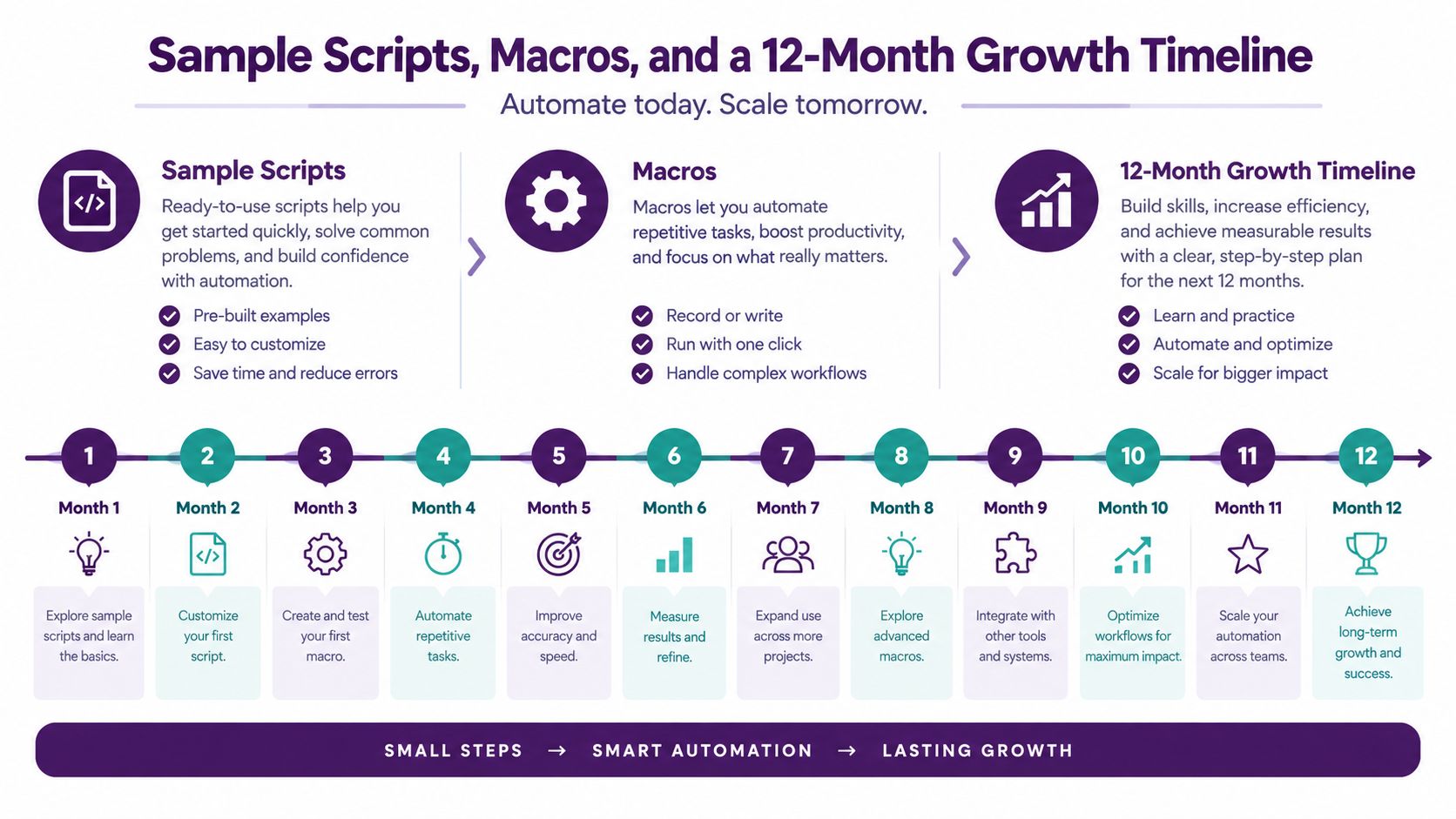
An illustrative 12-month planning sequence
The timing below is a planning example. Advance when the operating trigger appears; the calendar and funding round do not require a specific hire, channel, or tool.
| Timing | Operating milestone | Decision trigger |
|---|---|---|
| Month 1 | Assign a support owner and centralize requests | Every request needs an owner and searchable history |
| Month 3 | Shared inbox and basic knowledge base | Repeated questions justify macros and articles |
| Month 6 | Assess a bilingual hire or nearshore pilot | International demand or language-specific volume becomes material |
| Month 9 | Assess coverage gaps and strengthen QA | Customers need dependable after-hours escalation |
| Month 12 | Evaluate controlled triage, specialist capacity, and reporting | Volume and complexity require controlled automation and executive visibility |
The timeline shouldn’t run on the calendar alone. Tie each move to ticket volume, annual recurring revenue, customer concentration, or support headcount. If one enterprise account represents a large share of revenue, create escalation discipline earlier. If customers use the product casually and support demand stays low, keep the stack lean longer.
Early-stage teams need to learn directly from customers, and outsourcing before documenting recurring work can weaken that connection. As routine execution starts delaying product work or customer replies, centralize the queue and assign dedicated capacity. Founders can continue reviewing themes, strategic accounts, and critical escalations.
Support also deserves a revenue model. Track retained accounts, expansion signals, prevented cancellations, and referrals connected to service interactions. Don’t claim a revenue lift without clean company-specific evidence. Instead, build your own comparison by cohort, segment, plan tier, and support experience. A customer who stays because a billing problem was handled well has a measurable commercial value, even if the support platform labels the interaction as “resolved.”
The boldest move is not automating every ticket. It’s protecting human judgment for the tickets where trust, revenue, safety, or reputation is at stake.
Before signing with a BPO, ask three questions:
- Who owns training and product updates? Require a named owner, a change-control process, and a way to test new macros before they reach customers.
- How will you prove quality across languages and shifts? Ask for QA scorecards, calibration sessions, escalation samples, and reporting that separates English and Spanish performance.
- What happens when demand changes? Confirm ramp capacity, after-hours coverage, overflow rules, minimum commitments, and your rights to the operational data.
For a U.S.-facing startup, a bilingual nearshore partner can become the counterweight to AI automation. AI absorbs routine volume. A trained human team protects the moments that determine whether a customer renews, expands, recommends the product, or walks away.
Frequently Asked Questions
What should a startup set up first for customer support?
Start with a shared queue, a named owner for each request, published service hours, basic priority rules, and an approved knowledge source. Choose channels around customer needs and the capacity to staff them.
When should founders stop handling every support request?
Add dedicated capacity when routine work creates missed commitments, growing backlogs, or repeated interruptions to product and commercial work. There is no universal ticket or user threshold. Keep founders involved in learning, critical escalations, and strategic accounts.
How should a startup choose between in-house and outsourced support?
Compare product complexity, customer learning needs, languages, coverage, specialist access, security, and management capacity. Evaluate equivalent service scope and full delivery costs, and use a defined pilot before expanding an outsourced program.
Which support metrics should a startup track?
Track defined measures of first-contact resolution, customer satisfaction, first response, backlog age, repeat contacts, quality, and cost per resolution. Review response distributions and segment results by channel, priority, language, and issue type.
Can AI replace a startup’s customer support team?
AI can assist with classification, approved information retrieval, summaries, and drafts. It needs tested boundaries, appropriate access controls, monitoring, and human escalation. Sensitive account actions and exceptions should follow approved authorization processes.
When does bilingual or 24/7 support make sense?
Add coverage when language demand, customer commitments, after-hours contacts, or incident risk justify it. Scope channels, shifts, specialist availability, and escalation separately. Continuous intake does not automatically mean continuous live resolution.
Bilingual Nearshore Customer Support
Build Support Around Your Next Stage of Growth
Discuss your customer volume, language needs, coverage windows, and escalation requirements with CallZent. Define a support scope that fits your team and customer commitments.