Skip to content
Technical Support & Customer Experience
Technical and Customer Support: Teams, Tiers, and Better Handoffs
Connect frontline service and technical expertise through clear ownership, useful knowledge, reliable handoffs, and shared performance measures.
TL;DR — Quick Takeaways
- Customer support manages the service relationship; technical support addresses product or system faults.
- Assign one coordinating owner while defining each team’s decision authority.
- Choose tiers based on complexity, risk, access, and capacity—not volume alone.
- Pass relevant context securely so customers do not have to repeat completed troubleshooting.
- Measure resolution, repeat contacts, quality, and open backlog alongside response speed.
Your customer just got locked out after an update, can’t pay an invoice, and has already explained it twice. Is that a customer support problem, a technical problem, or a handoff problem? In most operations, it’s all three, and that’s where cases stall. One team owns the relationship, the other restores the service, and the customer judges you on whether those two teams act like one. Good technical and customer support isn’t two separate scorecards. It’s one workflow measured by repeat contacts, customer effort, and first-contact resolution.
Where Technical and Customer Support Overlap
Say a customer is locked out of a billing portal after a software update. The first agent checks identity, account status, and whether a payment is at risk. That’s customer support work. Then someone checks the error code, the device version, and whether the update broke authentication. That’s technical work. Finally, someone confirms the customer can log in, pay, and doesn’t need a workaround. Skip that last step and you’ve created a repeat contact, even if the technical fix was correct.
Technical and Customer Support at Intake
Most contacts start in the same queue, so intake performs the essential sorting. A generalist who asks the right two questions early can resolve a plan change on the spot or route a sync failure with useful evidence attached. Evaluate that moment through routing accuracy and the usefulness of the information captured, alongside handling time.
Customer support vs technical support at a glance
| Dimension | Customer support | Technical support |
|---|---|---|
| Typical question | How do I change my plan? Where is my order? | Why does sync fail after the last update? |
| Main goal | Customer feels helped and stays with the brand | Service restored; root cause investigated separately when needed |
| Who handles it | Generalist agents with service training | Specialists with product or systems training |
| Typical tools | CRM, order system, chat, email | Ticketing system, logs, remote diagnostics, knowledge base |
| Common channels | Phone, chat, email, social media | Phone, ticket portal, chat with screen share |
| Key metric | CSAT, first response, retention | First-contact resolution, reopen rate, mean time to resolution |
| Typical escalation | Billing disputes, policy exceptions | Engineering, vendor or data fixes |
Practical rule: Name one owner for every case at intake, even when two skill sets touch it.
The owner does not have to perform every step. They coordinate the next action, keep the customer informed, and make sure the receiving team accepts responsibility. When planning support with CallZent, define which English-Spanish tasks frontline agents can complete and which require a qualified specialist.
Staffing and Tiering Models Compared
Tiers help when everyone knows what each team can finish. In one common model, Tier 0 provides self-service, Tier 1 handles approved frontline procedures, Tier 2 supplies deeper product expertise, and Tier 3 connects to engineering or a vendor. These labels are illustrative; responsibilities and specialist authority vary by organization.
Say a SaaS company handles about 6,000 monthly contacts in a hypothetical planning example. Password and billing requests stay at Tier 1 because the steps are known and verifiable. Sync failures and API errors move to Tier 2 under an agreed severity-based target, with relevant, appropriately redacted evidence attached. Staffing follows that mix. Generalists absorb volume, specialists provide depth, and a cross-trained bench covers peaks without pulling a specialist into password resets all day.
How Technical and Customer Support Tiers Get Staffed
Coverage hours matter as much as headcount. Plan English-Spanish coverage around actual demand and specialist availability. A nearshore location may offer useful working-hour overlap, but it does not guarantee every required shift or technical skill. The Tier 2 support guide explains how a specialist lane can support frontline agents.
Support models and where each one fits
| Model | How work is routed | Best fit | Main risk |
|---|---|---|---|
| Single generalist queue | All contacts handled by one team | Low volume and simple products | Technical cases stall with agents who lack depth |
| Two-tier (Tier 1 and Tier 2) | Frontline resolves scripted issues; specialists take escalations | Mixed volume with recurring fixes | Tier 1 becomes a message relay when knowledge is thin |
| Three-tier (adds Tier 3 engineering) | Defects and outages route to engineering or a vendor queue | Products with defects requiring engineering or vendor access | Slow handoffs when severity rules are unclear |
| Split queues by intent | Billing, account and technical contacts routed separately | High volume with distinct problem types | Compound issues bounce between queues |
| Embedded specialist pod | Dedicated technical agents sit with the customer-facing team | Complex products needing close specialist collaboration | Dependence on a small number of specialists |
Compound issues expose weak models fast. A failed payment caused by an authentication bug needs both lanes, and split queues will bounce it unless one queue owns it end to end. Simple products are the opposite. One generalist queue with strong self-service can beat a tiered model that adds transfers nobody needed. Let ticket mix and severity rules set the number of tiers, not the org chart.
Tooling and Knowledge Management That Keep Answers Consistent
Agents need a searchable, governed source of approved answers tied to the customer’s product context. The KCS v6 Practices Guide describes capturing, structuring, reusing, and improving knowledge as part of support work. Apply those principles by documenting useful resolutions, checking existing articles during cases, and correcting content when gaps appear.

What a Technical and Customer Support Article Must Contain
Treat the article as the unit of work. Every article should state symptoms, probable causes, verification steps, safe remediation, escalation triggers, and required evidence such as logs or screenshots. Collect only necessary information through approved channels, redact sensitive fields, and never request passwords or authentication tokens. Add metadata that prevents drift, including last reviewed date, product version, and approved bilingual terminology, so English and Spanish answers match.
- Decision trees: Guide the agent to the next safe step instead of a long prose explanation.
- Error-code mappings: Connect the exact code the customer sees to causes and fixes.
- Escalation triggers: State when to stop, what evidence to collect, and who receives the case.
The stack around that article stays practical. You need a ticketing system for ownership, a CRM for account history, telephony and IVR for routing, remote diagnostics where policy allows, and a governed knowledge base that makes approved answers easy to find inside the help center workflow. Our overview of what knowledge management involves covers the governance side in more detail.
Define scripts, knowledge resources, escalation paths, and interaction guidelines with the provider before launch. These should reflect the client’s brand voice, workflows, and decision boundaries. Review unsuccessful searches, articles associated with reopens, and procedures with unusual handling times. Investigate the cause before assuming the article or agent is responsible.
For regulated sectors, make access and changes auditable with named content owners, approval workflows, and role-based permissions. Measure search success, article usage, FCR, escalation rate, repeat-contact rate, resolution time, and CSAT. Page views alone tell you almost nothing.
Handoffs That Stop Customers Repeating Themselves
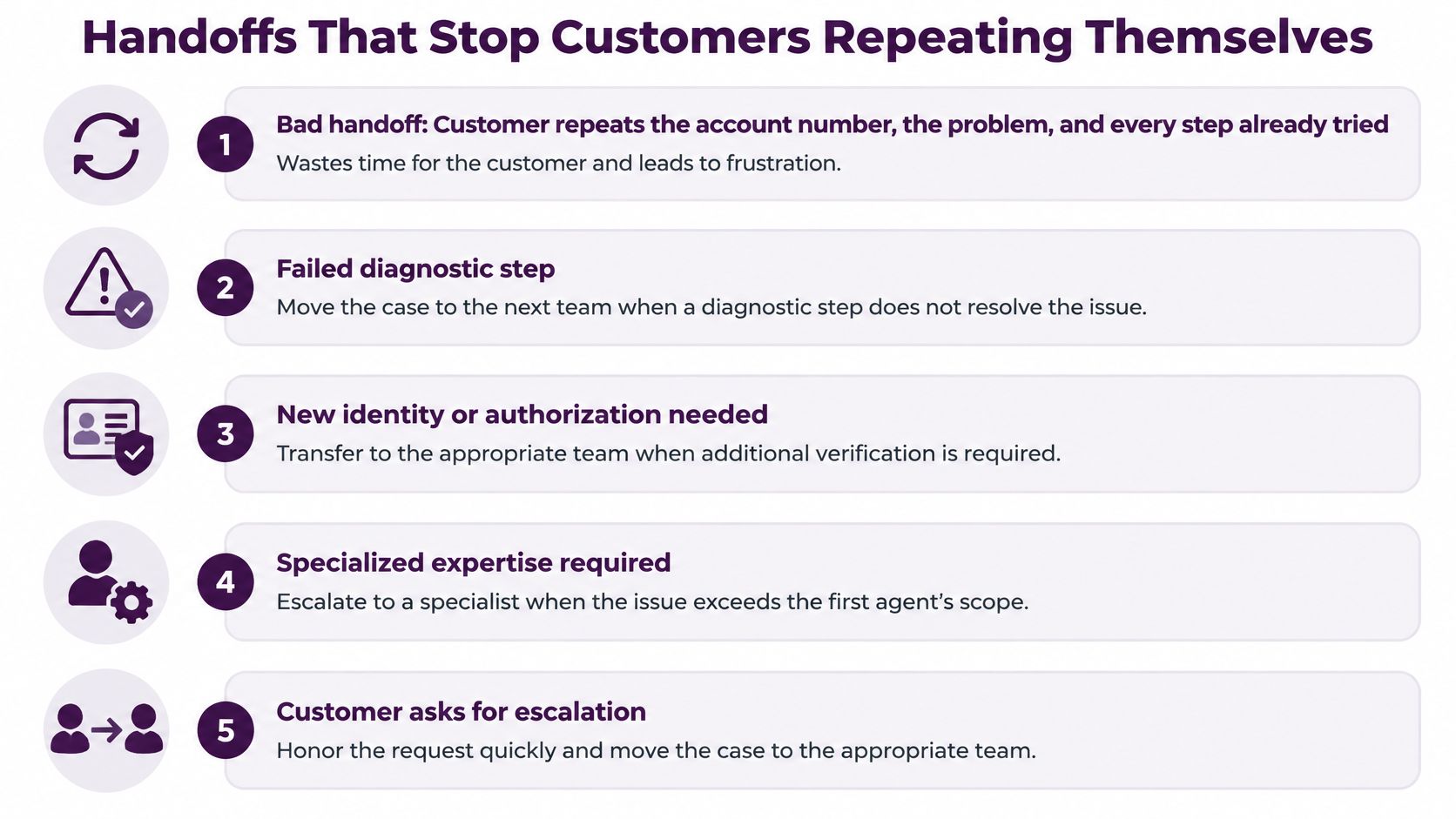
A customer reports the same router fault to customer support, then explains it all again when technical support takes over. That second explanation is avoidable work, and it makes the customer do the coordination your teams should handle. Judge the handoff by whether the next agent can continue the case, not by whether the transfer itself was completed.
Automation needs the same discipline. If an assistant cannot resolve a request, it should recognize its limits and pass relevant context to an appropriate person. Keep an accessible route to human assistance and review whether automated interactions create avoidable repeat contacts.
Triggers for Moving Technical and Customer Support Cases
Set clear triggers so frontline agents do not have to negotiate each transfer. Move a case when approved diagnostic attempts fail, the request exceeds agent authority, the customer needs human assistance, or severity exceeds the frontline threshold. Security or safety triggers may require immediate escalation without completing routine diagnostics. Each team should know when it owns the next action.
The receiving agent needs a usable handoff record:
- Identity and context: Account identifier, product, version, and language preference.
- Work already done: Steps attempted, their results, and timestamps.
- Evidence: Approved, access-controlled log or screenshot links, with unnecessary sensitive information removed.
- One-line summary: The current blocker and the next action.
A warm transfer briefs the receiving agent before connecting the customer. An asynchronous handoff can also work when the record is complete, the next team accepts ownership, and the customer knows what happens next. For example, a Spanish-speaking Tier 2 agent should receive the router diagnostic history and continue from the relevant failed step instead of asking the customer to start again.
CallZent develops escalation paths with clients to reflect their workflows and service expectations. Its escalation management approach should fit the agreed process for transferring ownership and relevant case context.
After hours, urgent cases need an approved, monitored escalation route and a defined fallback if the on-call resource does not respond. A routine callback is not a substitute for an urgent response. For nonurgent cases, agree a callback window, name the owner, and record the commitment. For major service incidents, the Google SRE incident-response guidance illustrates separate coordination, operational, and communication responsibilities; adapt that structure to incidents rather than treating every support ticket as a major event.
SLAs and Metrics That Fit Each Type of Support
A quick acknowledgment does not mean the service has been restored. Define separate targets for meaningful first response, customer updates, restoration or workaround, and final resolution where appropriate. Set targets by severity, operating hours, available authority, and contractual commitments rather than assuming one response time fits every channel or case.
A useful service-level agreement states when each clock starts, whether it runs in business or elapsed hours, how pending time is handled, and what happens when a target is missed. Distinguish an automated acknowledgment from a substantive response. Document client, provider, engineering, and vendor dependencies so customers receive realistic expectations.
First-Contact Resolution in Technical and Customer Support
Define first-contact resolution (FCR) using eligible issues, a clear meaning of first contact, and a same-issue repeat-contact window. Calculate eligible issues resolved at first contact divided by eligible first-contact issues, multiplied by 100. Document how transfers, callbacks, and specialist actions affect eligibility and results. A necessary specialist escalation can be the correct outcome even when the issue does not qualify as FCR.
A shared measurement framework for both support teams
| Metric | Definition to agree | What it helps reveal |
|---|---|---|
| First-contact resolution | Eligible issues resolved at first contact / eligible first-contact issues × 100; define the repeat window | Whether suitable issues finish without another contact |
| Same-issue repeat contact | Share of a defined case cohort contacting again within the agreed window | Incomplete fixes, missing updates, or unclear instructions |
| Transfers and escalation | Count and rate by reason, destination, and case type | Necessary specialist work versus avoidable queue movement |
| Reopen rate | Previously closed cases reopened under the agreed rules | Premature closure or recurring faults |
| Resolution time and backlog age | Median and upper-percentile resolution time; age of still-open cases | Slow complex cases hidden by averages |
| Quality and customer effort | QA results plus clearly defined customer feedback measures | Accuracy, communication, and unnecessary customer work |
Set targets from a documented baseline and compare similar case types, languages, and channels. Review closed-case cohorts alongside open backlog age so unresolved work remains visible. Investigate changes in volume, complexity, data quality, and staffing before changing routing. Use recurring reviews to assign a correction, owner, and follow-up measure rather than reacting to an isolated weekly result.
How to Run an Integrated Support Workflow
Run technical and customer support as one procedure from first contact to closed case. Team leadership and day-to-day operational coordination keep the program aligned with the customer’s workflows, expectations, and service requirements, but the steps below are what agents feel on every contact.
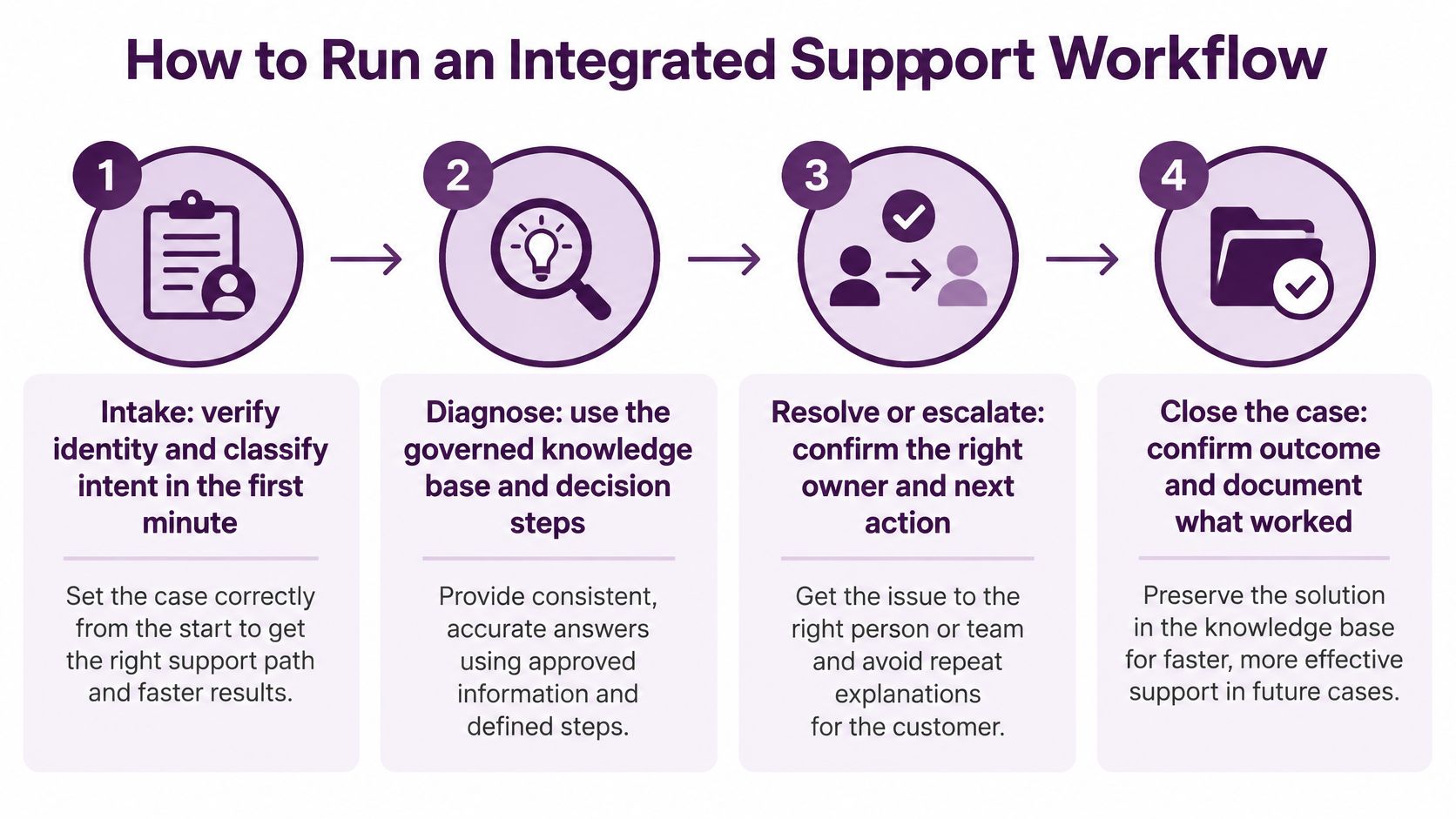
The Technical and Customer Support Workflow in Seven Steps
- Intake: Apply the approved verification process before disclosing protected account information, then classify the request. Common slip, skipping verification and exposing account data.
- Route: Send the contact by intent, severity, and language to the matching queue. Common slip, routing by arrival order, which buries bilingual technical cases.
- Resolve at the first tier: Use scripted diagnostics and the knowledge base, with a time limit on each step. Common slip, letting one step run while the customer waits.
- Escalate: Move the case when the limit expires or a trigger fires, with the necessary, appropriately protected handoff record. Common slip, a cold transfer.
- Confirm: Ask the customer to verify the fix works before closing. Common slip, closing on transfer, which inflates resolution rates.
- Close and tag: Record the confirmed cause when known, or mark it unconfirmed, along with the resolution and knowledge article used. Common slip, untagged tickets that hide trends.
- Review weekly: Review a manageable set of recurring issues and assign each to a knowledge owner or product team with a due date. Common slip, reviewing the list without assigning an owner.
Three roles sustain the cycle: a team lead monitors queues, a knowledge owner maintains procedures, and a quality reviewer samples cases for accurate resolution and documentation. The same ownership should follow a case that starts in chat and continues by phone. Define a documented closure policy for customers who cannot be reached; do not label a case resolved solely because it was transferred.
A transfer is a change of responsibility, not proof of resolution. Verify the outcome with the customer when possible and apply documented closure rules when confirmation is unavailable.
Choose the Support Model Your Work Requires
There’s no single winner. There’s a fit between your contact mix and the cost of getting a handoff wrong.
A generalist queue may suit straightforward work with approved procedures and clear specialist access. A two-tier model may help when recurring issues need deeper expertise. Engineering access, product complexity, risk, and internal capacity can justify additional tiers or an embedded specialist team. Industry and volume alone do not determine the design. Match English-Spanish staffing and coverage hours to your actual customers.
Five Questions Before You Change Technical and Customer Support
- Repeat share: What share of contacts are repeat issues you could resolve once?
- Queue movement: How often do cases move between queues before resolution?
- Handoff cost: What does a bad handoff cost in repeat contacts, refunds, or lost accounts?
- Language and hours: Which languages and hours do customers need?
- Knowledge ownership: Who owns the knowledge, by name?
Compare actual proposals using training, supervision, specialist availability, systems, and follow-up costs. Track cost per resolved issue over a consistent cohort, with clear allocation of cross-team work. A low contact price can conceal expensive repeat contacts, but a higher specialist rate is not automatically better value either.
Start with a representative sample of recent contacts, segmented into account, billing, technical, and compound issues. Identify the skills, permissions, language coverage, and escalation paths each segment requires. When discussing a nearshore support team in Tijuana with CallZent, confirm platform compatibility, security requirements, staffing, training, and ownership before choosing a pilot scope.
Frequently Asked Questions
What is the difference between technical support and customer support?
Customer support handles service questions, account needs, expectations, and communication. Technical support diagnoses and addresses product or system faults within approved authority. Many cases need both, so shared context and a named owner matter as much as the distinction.
Can one team provide both technical and customer support?
Yes, when the work fits the team’s skills, training, permissions, and capacity. Generalists can handle approved procedures, while deeper troubleshooting or restricted decisions should go to appropriately qualified specialists. Cross-training does not eliminate the need for escalation.
What do Tier 1, Tier 2, and Tier 3 mean?
In a common model, Tier 1 handles known frontline procedures, Tier 2 provides deeper product expertise, and Tier 3 connects to engineering or vendors. These are organizational labels rather than universal standards. Document responsibilities and authority for your own program.
When should a frontline agent escalate a technical issue?
Escalate when the issue exceeds approved authority, diagnostic steps fail under the agreed procedure, or severity requires specialist action. Security and safety triggers may require immediate escalation. Define the receiving team, required evidence, and ownership rules in advance.
What information belongs in a support handoff?
Include the permitted account reference, product context, language, issue summary, diagnostic steps and results, relevant timestamps, and the next action. Share only necessary information through approved access-controlled channels. Do not include passwords, authentication tokens, or unnecessary sensitive data.
How do you calculate first-contact resolution?
Divide eligible issues resolved at first contact by eligible first-contact issues and multiply by 100. Define eligibility, what counts as first contact, the same-issue repeat window, and the treatment of transfers or callbacks. Compare like-for-like case types and channels.
Which metrics should technical and customer support share?
Use defined measures for resolution, same-issue repeat contacts, reopens, escalation, quality, customer effort, and backlog age. Separate first response from final resolution. Compare similar case types and review open work alongside closed-case results.
What should a technical support knowledge base include?
Useful articles describe symptoms, applicable product versions, diagnostic checks, approved fixes, limits, and escalation triggers. Assign content owners and review dates. Keep bilingual terminology consistent and make it easy for agents to flag missing or outdated information.
Does bilingual support require bilingual technical specialists?
Specialist language coverage depends on the cases and operating hours. A bilingual frontline team alone may not be enough when customers need direct specialist conversations. Confirm language proficiency, technical capability, available shifts, and an appropriate handoff plan for each support lane.
Can a nearshore partner support an integrated service model?
A nearshore partner can support an agreed combination of frontline and technical tasks when skills, systems access, security, supervision, language coverage, and escalation responsibilities are scoped. Confirm actual capabilities and dependencies rather than assuming location guarantees the full service.
Bilingual Nearshore Support in Mexico
Connect Your Frontline and Technical Support
Discuss your support mix, English-Spanish coverage, specialist needs, and escalation workflows with CallZent. Define a pilot with clear ownership, practical handoffs, and measurable service outcomes.