

VIRTUAL ASSISTANT SERVICES
Scaling Your Business With Virtual Assistant Services for Smarter Growth
Learn how to use virtual assistant services strategically, choose the right service model, onboard effectively, and improve ROI with nearshore support.
TL;DR — Quick Takeaways
- Virtual assistant services now support customer service, operations, marketing, and back-office workflows — not just calendars and inboxes.
- The right service model depends on whether your business needs dedicated support, shared coverage, or project-based execution.
- Nearshore virtual assistant teams improve communication, response times, and operational flexibility for North American companies.
- The best ROI comes from reclaiming leadership time, improving customer responsiveness, and creating scalable workflows.
Many business owners arrive at the same realization without noticing it initially. The calendar is full, the inbox never clears, customer requests continue to stack up, and the work that grows the company gets pushed to tomorrow. Then tomorrow turns into next week.
That’s usually when virtual assistant services stop being a nice idea and start becoming an operational necessity.
The mistake I see most often is treating virtual assistant support like a quick patch for overload. Serious businesses get better results when they treat it as a process decision. The question isn’t just who can help with tasks. It’s how to move repeatable work into a reliable operating model without creating new risk, bottlenecks, or management headaches.
Is Your To-Do List Running Your Business?
If you’re still approving every calendar invite, chasing updates, responding to routine customer questions, and cleaning CRM records yourself, your business is probably being managed by task volume instead of priorities. That’s common. It’s also expensive in ways that don’t always show up on a payroll report.
Virtual assistant services work best when they free leaders to do the work only they can do. That includes sales conversations, hiring, client strategy, and fixing operational problems before they become costly. If you already know your team should delegate tasks effectively, the next step is building a structure that makes delegation stick.
Strategic delegation isn’t about getting rid of work; it’s about reclaiming your time to build your future.
The strongest programs are built around documented workflows, clear ownership, and measurable outputs. They’re also easier to improve over time because the work is visible. That’s one reason more operators are trying to boost conversion rates through data instead of relying on gut feel. Once your support work is organized, you can spot where leads stall, where customers wait too long, and where admin friction is costing you revenue.
What Virtual Assistant Services Actually Include
Many buyers still hear “virtual assistant” and think of a single person handling email and scheduling. That’s outdated. Modern virtual assistant services can cover administrative support, customer communication, marketing coordination, reporting, and back-office production work.
The market itself reflects that shift. Job postings for human virtual assistants increased by 35% over the previous year, and about 40% of surveyed virtual assistants offer specialized services such as digital marketing, social media management, and bookkeeping, according to the Virtual Assistant Institute statistics. The same source projects the VA market will reach USD 44 billion by 2025, with potential cost savings of 78% compared with traditional in-house staffing.
If you need a basic primer on roles and definitions, CallZent also has a helpful overview of what a virtual assistant is.
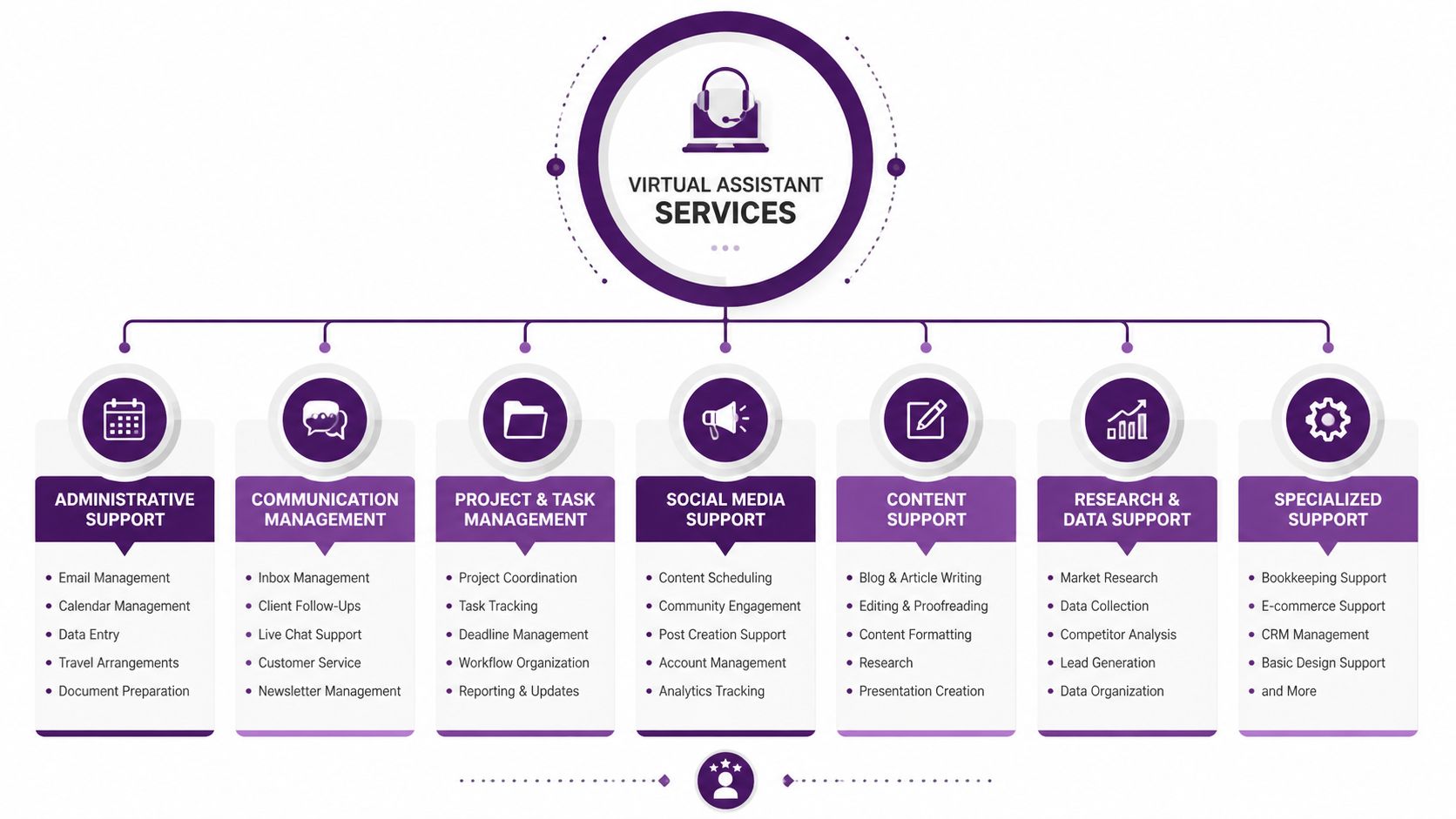
Administrative and back-office virtual assistant services
Most companies start here for good reason. These tasks are frequent, necessary, and usually process-driven.
Common examples include:
- Calendar control: Scheduling meetings, confirming attendance, rescheduling conflicts, and protecting executive time
- Inbox triage: Flagging priority items, drafting replies, routing requests, and organizing folders
- Data entry and cleanup: Updating CRMs like HubSpot or Salesforce, formatting spreadsheets, and maintaining records
- Document handling: Preparing reports, organizing shared drives, and managing recurring admin paperwork
A practical example is a professional services firm that gets lead forms from a website, calls from referrals, and follow-up requests after consultations. A VA can standardize intake, log everything in the CRM, and make sure no prospect disappears into someone’s inbox.
Customer-facing virtual assistant services
This category matters more than many companies realize. A virtual assistant can support the customer journey before and after the sale.
That often includes:
- Inbound message handling: Email, chat, contact forms, and support ticket routing
- Appointment setting: Booking consultations, reminders, and follow-ups
- Order and account support: Status checks, returns coordination, billing questions, and basic issue resolution
- Lead capture: Initial qualification and routing to sales or account management
This is especially valuable when a business has inconsistent peak times. A team-based support setup can absorb demand without forcing internal staff to jump between sales, service, and admin.
Marketing and technical support tasks
Specialized virtual assistant services can also support growth work, as long as the tasks are well defined.
Examples include:
- Social scheduling: Loading content into Buffer, Hootsuite, or Meta Business Suite
- Light website updates: Product page edits, blog formatting, and content uploads in WordPress or Shopify
- Reporting: Weekly campaign summaries, list management, and dashboard updates
- Content repurposing: Turning call notes, webinars, or demos into usable assets
For instance, sales teams that record discovery calls often sit on valuable content they never reuse. Tools and workflows that show how ProdShort converts demos into clips can pair well with a VA who tags segments, organizes footage, and feeds the marketing calendar.
The best virtual assistant services don’t just remove tasks. They create repeatable flow between systems, people, and deadlines.
Choosing Your Virtual Assistant Service Model
Not every business needs the same setup. Some need one person who learns the business thoroughly. Others need flexible coverage across shifts, channels, or fluctuating workloads. Picking the wrong model is one of the main reasons VA programs feel disappointing.
A simple way to think about it is this. Dedicated support works like adding a consistent operator to your team. Shared support works like accessing a managed bench. Project-based support works like bringing in specialized capacity for a defined outcome.
Virtual assistant service models compared
| Model | Best For | Cost Structure | Key Benefit |
|---|---|---|---|
| Dedicated Assistant | Ongoing workflows, executive support, relationship-based tasks | Usually fixed monthly capacity or assigned hours | Strong continuity and business familiarity |
| Shared Assistant | Customer support queues, multi-channel intake, extended coverage | Pooled time or service package | Flexibility and easier scaling |
| Project-Based Assistant | Migrations, research projects, cleanup work, short campaigns | Defined scope, milestone, or temporary hourly block | Fast deployment for targeted needs |
Dedicated virtual assistant services
This model fits businesses with recurring, context-heavy work. Think executive calendars, recurring client coordination, vendor communication, or CRM upkeep tied to a specific sales process.
The biggest advantage is continuity. One person learns your tools, preferences, and edge cases. The trade-off is concentration risk if there’s no backup plan. That’s why managed support matters more here than freelance arrangements with no coverage.
Shared virtual assistant services
This is often the better fit for companies that need range more than familiarity. If your workload moves across email, chat, call handling, order follow-up, and after-hours requests, a shared model can smooth out volume spikes.
A nearshore BPO can be useful in this setup because the team structure supports staffing flexibility without the communication lag that often comes with far-off time zones. Businesses evaluating those trade-offs should look closely at nearshore vs offshore outsourcing costs risks and ROI.
Practical rule: If success depends on one person knowing your style, start dedicated. If success depends on reliable coverage and queue management, start shared.
Project-based virtual assistant services
This model works when you need progress on a defined initiative but don’t need a long-term seat yet. A common example is cleaning a neglected CRM, migrating customer records, standardizing SOPs, or building a prospect list for an outbound campaign.
Creative and marketing teams use this model often. If your internal team needs overflow capacity for design coordination, asset organization, or campaign support, an on-demand creative infrastructure platform can complement a project-based VA setup by keeping production from bottlenecking around one internal manager.
What doesn’t work is forcing a project-based resource into a long-running operational role without changing the engagement model. Temporary support can solve a defined problem. It won’t replace a stable operating rhythm.
How Virtual Assistants Drive Growth in Your Industry
The value of virtual assistant services becomes clearer when you look at actual workflows. Not generic task lists. Real operational pressure points.

E-commerce and retail
An online store usually feels the pain first in customer communication. Order status questions, exchange requests, shipping issues, coupon confusion, and inventory updates pile up quickly, especially during promotions or holiday periods.
A well-run VA team can handle:
- Order support: Checking order status, confirming shipment details, and escalating exceptions
- Returns coordination: Sending return steps, updating records, and tracking resolution
- Catalog maintenance: Product descriptions, image uploads, and collection organization in Shopify
- Loyalty support: Points inquiries, membership questions, and promo-code troubleshooting
In practice, this means your in-house team spends less time answering “where is my order?” and more time on merchandising, supplier issues, and margin management.
Healthcare
Healthcare is one of the clearest examples of where structured virtual assistant services can add value. The workflows are repetitive, rules-based, and sensitive enough that discipline matters.
According to healthcare virtual assistant statistics from VA Masters, common responsibilities include appointment scheduling, insurance verification, and EHR/EMR data entry. The same source cites 15 to 20% no-show reduction and 2 to 3x productivity gains when AI tools are embedded into VA workflows.
That matters because the workflow chain is obvious. Appointment reminders reduce missed visits. Insurance verification lowers friction before service. Documentation support gives providers time back.
A clinic example looks like this:
- Before the visit: Confirm appointment, verify insurance details, flag prior authorization needs
- During intake: Update patient data and route records correctly
- After the visit: Support follow-up scheduling and documentation workflows
The key is not to hand over sensitive work loosely. It’s to assign tasks inside a compliant process with clear escalation rules.
Finance and insurance
Insurance agencies and financial service teams deal with high volumes of repetitive but time-sensitive work. Quote intake, policy changes, billing questions, claims triage, and review scheduling all compete for attention with licensed or senior staff work.
Virtual assistant services help by absorbing standardized interactions so licensed professionals can focus on advice, risk review, and closing business. A practical example is a brokerage that receives inbound policy service requests all day. Instead of tying up producers or account managers with every request, a VA team can route the case, collect required information, schedule follow-up, and make sure nothing stalls in a shared inbox.
Service businesses with mixed channels
Home services, telecom support teams, reservation-heavy businesses, and multi-location operators often struggle because customer demand arrives through too many places at once. Calls, web forms, SMS, social messages, and email all compete for response time.
That’s where integrated VA support becomes useful. A bilingual, nearshore team can centralize intake, standardize routing, and keep records aligned across channels. Businesses comparing options across industries can explore operational use cases through CallZent’s industry solutions.
Growth usually doesn’t break because of one big failure. It breaks when routine work overwhelms response times, follow-up discipline, and customer visibility.
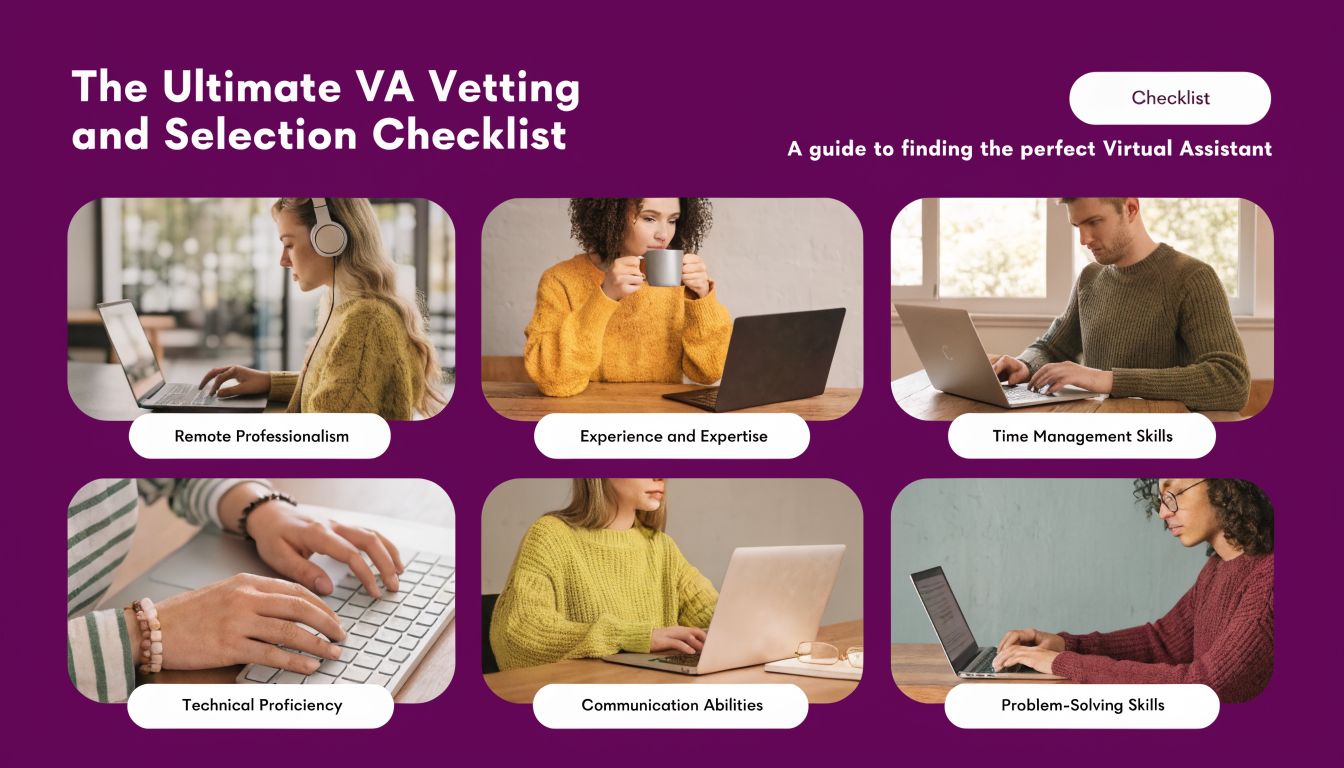
The Ultimate VA Vetting and Selection Checklist
Selecting virtual assistant services involves more than just hiring help. It is the process of choosing a workflow partner who has access to your systems, customer interactions, and internal processes. Because of this, the actual screening criteria are typically different from what you encounter on freelance marketplaces.
A major issue in the market is that security often gets vague treatment. As noted by Vanta Staff’s discussion of regulated-work concerns, many VA service pages talk about flexibility and task breadth but don’t answer the harder due-diligence questions around customer data and business continuity. That gap matters most in healthcare, finance, insurance, and any business handling sensitive records.
What to ask before you sign
Use this checklist when evaluating any provider.
- Technical fit: Ask which tools they already use well. Look for real familiarity with systems like HubSpot, Salesforce, Zendesk, Shopify, Google Workspace, Microsoft 365, and your project tools.
- Communication quality: Test response clarity, not just friendliness. If the role touches customers, ask for sample written replies or call handling standards.
- Process discipline: Ask how tasks are documented, updated, and reviewed. Strong operators use SOPs, QA reviews, and escalation paths.
- Security controls: Ask who gets access, how access is limited, how credentials are managed, and what happens when a team member leaves or changes roles.
- Backup coverage: Ask what happens if your assigned person is sick, on leave, or unavailable during a critical period.
Green flags and red flags
Some signs show up early.
Green flags
- They ask detailed workflow questions: That usually means they care about outcomes, not just task volume.
- They talk about permissions and access levels: Good sign for businesses with customer data exposure.
- They can explain handoffs clearly: That matters when multiple people or departments touch the same workflow.
- They offer managed support options: Coverage and supervision reduce operational fragility.
Red flags
- Everything depends on one person: That creates avoidable continuity risk.
- Security answers are vague: “We take privacy seriously” isn’t an operating control.
- No clear reporting rhythm: If there’s no regular review process, small issues will hide until they become expensive.
- They promise they can do anything: Broad enthusiasm without process depth usually turns into rework.
Why bilingual and nearshore fit matters
For North American businesses, language and timing affect execution more than many buyers expect. If the work involves customer interaction, scheduling, sales support, or back-and-forth clarification, alignment matters every day.
A bilingual nearshore team can reduce those small frictions. The benefit isn’t just translation. It’s smoother call handling, easier collaboration during business hours, and less delay when priorities shift quickly.
Onboarding and Integrating Your Virtual Assistant Team
A good hire can still fail during onboarding. Most breakdowns don’t happen because the assistant lacks skill. They happen because the company transfers tasks without transferring process, context, or decision rules.
That’s why the first phase should focus on integration, not just access.
Build the operating foundation first
Start with a short list of repeatable tasks. Don’t begin with your most chaotic workflow.
Use three layers:
-
Document the task
Write SOPs for the work you want handled first. Include screenshots, examples, naming rules, quality standards, and escalation steps. -
Grant the right access
Give only the permissions needed for the task. Email, CRM, calendar, ticketing, and shared drives should follow role-based logic. -
Define the reporting rhythm
Daily check-ins work for active launches. Weekly scorecards work for stable recurring workflows.
A support operation that needs stronger process consistency can borrow training ideas from how to create a customer service training program. The same discipline applies to virtual assistant teams.
What strong integration looks like
For high-volume businesses, VAs perform best when they’re plugged into the actual intake system instead of floating outside it. A Sonant insurance operations guide notes that agencies using virtual assistants report overhead cost reductions of up to 78% when VAs absorb repetitive but latency-sensitive work inside omnichannel systems, enabling 24/7 coverage and improving response times.
That principle applies beyond insurance.
A practical onboarding setup often includes:
- Channel ownership: Who handles calls, who handles chat, who triages email, and how cases move between them
- Service levels: How fast a lead gets acknowledged, how quickly a support case gets routed, and when escalation starts
- Exception rules: What requires manager review, what can be resolved independently, and what must be logged for compliance
- KPI visibility: Shared dashboards for response handling, queue status, completion rates, and backlog
A VA becomes useful fast when the workflow is clear. They become valuable long term when they’re integrated into the same systems and standards as the rest of the operation.
Common onboarding mistakes
The most common mistakes are easy to avoid:
- Dumping too much work at once: Start narrow, then expand
- Using verbal instructions only: If it isn’t documented, it will drift
- Skipping quality review: Early QA catches process gaps before they scale
- Assuming context transfer happens automatically: It doesn’t. Business nuance has to be taught
Calculating ROI and The Nearshore Advantage
Most companies calculate virtual assistant services too narrowly. They compare hourly rates and stop there. That neglects the underlying economics.

The better approach is to ask four questions:
What time did leadership get back
If founders, managers, or sales leaders stop doing low-value repeat work, that recovered time can be reassigned to revenue, hiring, account growth, and process improvement. That return often matters more than the wage comparison.
What operational drag got removed
Look at where requests used to stall. Missed follow-ups, slow quote routing, support backlogs, and inconsistent recordkeeping all carry a cost. A good VA program reduces that friction.
What service quality became more consistent
When response handling, scheduling, and data updates follow a repeatable process, the customer experience usually becomes steadier. That improves confidence internally too, because fewer issues depend on one overloaded employee remembering everything.
What model gives you the fewest management headaches
Nearshore support often provides distinct advantages. Time-zone alignment improves handoffs. Cultural familiarity helps with customer interaction. Bilingual capacity matters if your customer base spans English and Spanish. And collaboration is easier when your external team is working while your internal team is working.
The market trend supports the idea that this is no longer an edge tactic. The global Intelligent Virtual Assistant market is projected to grow from USD 20.7 billion in 2024 to USD 27.9 billion by 2025, representing a 35.1% CAGR, according to Electro IQ’s intelligent virtual assistant market statistics. The same source notes adoption across business functions including administration at 37.7% and customer service at 6.3%.
For companies serving North America, a nearshore model also solves a practical problem that offshore setups often struggle with. Real-time collaboration. If you need same-day decisions, rapid adjustments, bilingual customer communication, and easier supervision, proximity matters. Businesses exploring that model can review the nearshore advantage.
CallZent offers virtual assistant support as part of its nearshore BPO model, alongside customer service and back-office operations, which is useful for businesses that want one operating partner across multiple support functions.
The right virtual assistant program should lower cost, reduce operational friction, and make your business easier to run. If it only saves money on paper, it’s not designed well enough.
🚀 Build a Smarter Support Operation With CallZent
CallZent helps North American businesses scale customer service, back-office operations, and virtual assistant services through bilingual nearshore support teams designed for real operational growth.
Talk to an ExpertIf your team is stretched thin and routine work is crowding out growth, it may be time to redesign the workflow instead of asking your staff to work harder. CallZent helps North American businesses build bilingual nearshore support programs for customer service, back-office operations, and virtual assistant services that fit real operating needs.