
Contact Center Technology & Operations
What Is Contact Center Technology? A Practical Guide
Understand the tools, integrations, and operating controls that give customers continuity and agents the context to resolve issues.
TL;DR — Quick Takeaways
- Contact center technology connects communication channels, routing, CRM records, workflows, quality, analytics, and staffing.
- A collection of tools becomes an effective system only when customer identity, case context, permissions, and outcomes stay connected.
- IVR gathers information; ACD and skills-based routing direct calls toward the right team.
- AI depends on reliable data, current knowledge, clear permissions, and a human escalation path.
- Measure resolution, customer effort, transfers, service levels, and quality alongside speed.
- Choose between building, buying, connecting existing tools, or partnering based on the workflow and your capacity to operate it.
A customer calls about a billing problem, gets transferred three times, repeats the same explanation to every agent, and still leaves without a resolution. In the background, each agent is searching through a CRM, phone system, ticketing tool, and spreadsheet that don’t share the same customer record. That experience isn’t a people problem first. It’s a technology design problem.
So, what is contact center technology? It’s the integrated communications and operations stack that connects voice, IVR, automatic call distribution, digital channels, CRM data, routing, recording, analytics, quality management, and workforce planning. The important word is integrated. A long feature list won’t help if the systems can’t share identity, history, permissions, and outcomes.
Why Customer Service Breaks Between Systems
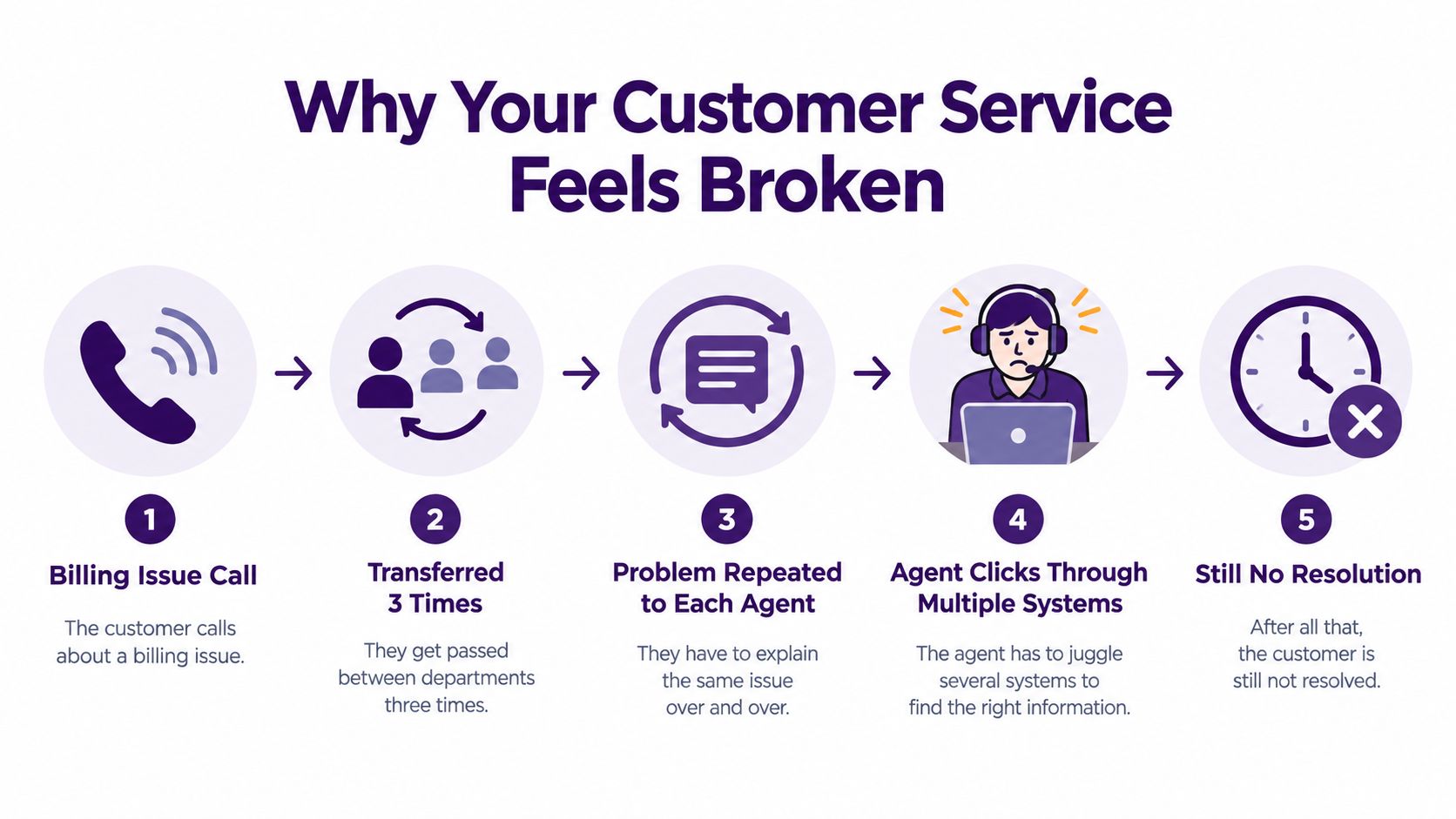
The customer starts with a simple billing question. The first agent can see the call but not the latest account note, so the interaction moves to billing. The billing agent can access the account but not the earlier explanation, and the customer repeats the issue. A third transfer follows because the account requires a specialist. By then, the customer is frustrated, the agents are guessing, and nobody owns the resolution.
An integrated contact center changes the sequence. The caller’s number can help locate a possible customer record, appropriate verification confirms identity before sensitive information is disclosed, and the CRM displays authorized account context and prior contacts, and routing considers the issue type, language, and available skills. The agent begins with context instead of asking the customer to rebuild the case from memory. If the case needs another team, the system passes the reason, notes, and promised next step with it.
The difference between a call center and a contact center
A call center focuses primarily on telephone interactions. A contact center coordinates voice, SMS, email, chat, and other digital channels while preserving the customer record across those interactions. Both can support inbound service, outbound campaigns, appointment scheduling, technical support, and back-office workflows, but the contact center has a broader operating model.
That distinction matters for a growing business. Adding a chatbot or email inbox doesn’t create an omnichannel operation if those channels produce separate customer records and disconnected queues. The technology works when the customer journey, not the individual channel, becomes the unit of management.
For practical guidance on removing friction from service operations, see how to improve customer service. The same principle applies whether your team operates internally or through a nearshore partner in Mexico. Proximity and bilingual coverage help, but agents still need reliable customer context and clear escalation rules.
Core Components of Modern Contact Center Technology
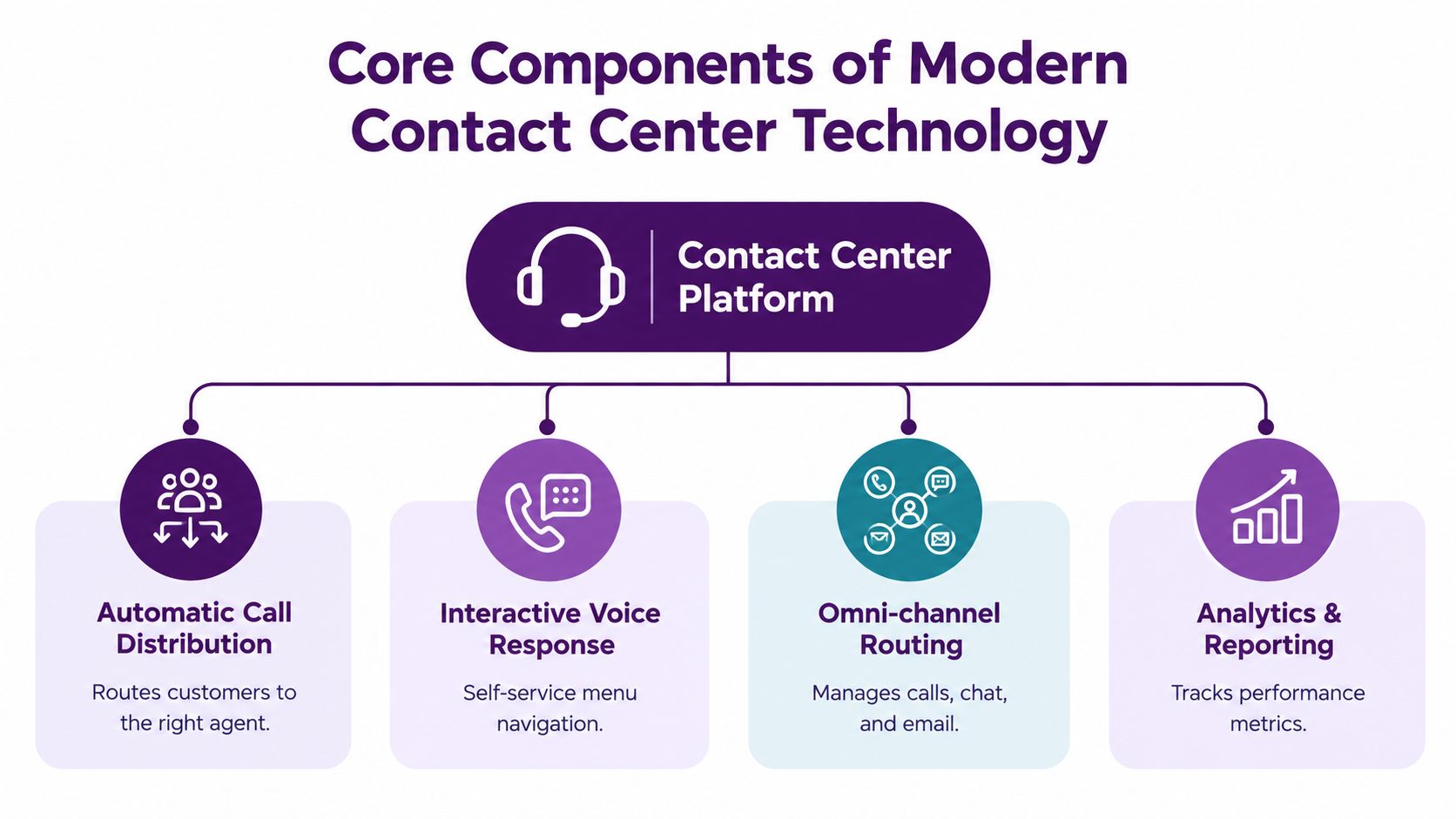
A modern platform has several layers. Evaluate them as a connected system, not as isolated features.
1. Communication and interaction handling
Voice connectivity remains important, but it sits beside SMS, email, chat, and social messaging. Telephony infrastructure may run on premises, in a private or public cloud, or in a hybrid environment. Cloud architectures centralize routing and applications, which can support geographically distributed and work-from-home agents, while hybrid designs can preserve selected legacy systems.
Interaction recording supports quality review, coaching, and compliance checks. It also creates a record that analytics tools can transcribe and classify, provided the business applies appropriate consent, retention, and access controls.
2. Routing and self-service
Interactive voice response, or IVR, collects information before an agent answers. Automatic call distribution, or ACD, places the interaction with an available agent or queue. Skills-based routing can consider language, account priority, issue type, and agent capability.
The best routing decision isn’t always “send the call to the next available person.” A billing dispute may need a trained specialist, while an order-status request may be suitable for self-service. Poor routing creates transfers. Good routing reduces unnecessary handoffs and gives the agent a realistic chance to resolve the issue.
3. Customer data and workflow
CRM integration gives agents account details, previous contacts, notes, and open cases. A workflow layer can create tickets, trigger identity verification, assign deadlines, and escalate a case when a rule is breached. Knowledge bases and agent-assist tools then help employees apply the approved process consistently.
A channel is only useful if the related record follows the customer. Use this contact center software features guide to assess features in the context of routing, data access, reporting, and daily agent work.
4. Workforce, quality, and analytics
Workforce-management software forecasts demand and aligns schedules with expected arrival patterns. Quality tools review interactions, identify compliance language, and help supervisors coach agents. Analytics connects operational activity with outcomes such as resolution, transfers, abandonment, service level, and customer satisfaction.
Ask vendors to demonstrate the full path: a customer arrives, the system identifies the record, routing selects a queue, the agent receives context, the interaction is recorded, the outcome updates the CRM, and the report reflects what happened. If the demonstration stops at the dashboard, you haven’t tested the operating system.
The Integration Gap Most Businesses Miss
Buying AI features doesn’t automatically modernize a contact center. In a September 2026 survey of 400 contact center operators conducted by SuccessKPI with CMSWire, 53% of contact centers report their data isn’t organized or centralized enough for AI, and 52.25% have limited or nonexistent integration across reporting and analytics systems. Only 23.25% report a fully unified omnichannel journey. These self-reported survey findings appear in SuccessKPI’s contact center maturity survey.
| Integration Metric | Survey Responses |
|---|---|
| Data not organized or centralized enough for AI | 53% |
| Limited or nonexistent integration across reporting and analytics systems | 52.25% |
| Fully unified omnichannel journey | 23.25% |
Why fragmented data limits AI
An AI assistant can summarize an interaction, recommend a response, or classify intent. It can’t reliably use information that lives in incompatible systems, contains conflicting identities, or lacks current permissions. A model may produce fluent language while still offering the wrong refund policy because the knowledge base is outdated or the CRM record is incomplete.
The practical work involves identity resolution, API coverage, data ownership, knowledge-base governance, and event synchronization. When a customer changes from chat to voice, the platform must connect the conversations to the same person and case. When a customer opts out of outreach, that event must reach every system that could initiate another contact.
Three practical responses to the gap
A small business doesn’t always need an expensive all-in-one platform. It may need to connect an existing CRM, telephony system, help desk, and reporting layer through controlled integrations. Another organization may benefit from consolidation, especially when duplicate records and manual exports consume supervisor time.
A third option is to outsource a defined workflow while retaining control of customer data and reporting. For a broader customer-journey view, review omnichannel customer experience and seamless support.
Practical rule: Don’t ask whether a vendor has AI. Ask which customer records the AI can read, which actions it can take, and how a supervisor can audit both.
Where AI Helps Agents—and Where Human Judgment Matters

Evaluate AI by the work it improves. Interaction summaries, knowledge retrieval, intent classification, and routine self-service can support agents when the underlying data is accurate and the workflow is controlled. Staffing decisions should follow measured demand, resolution quality, and workload rather than assumptions about automation.
The work changes before headcount does. A virtual agent can handle a routine status request, then transfer an exception to a human. An agent-assist tool can suggest a policy, prepare a summary, or surface the next workflow step. The employee still owns judgment, empathy, and escalation.
Human work becomes more specialized
AI suits repetitive classification, summaries, knowledge retrieval, and routine self-service. It carries more risk with ambiguous complaints, vulnerable customers, regulated decisions, or incomplete records. Bilingual nearshore operations need the same controls in both languages. Supervisors should test whether the assistant preserves meaning, applies the correct policy, and escalates uncertainty rather than inventing an answer.
Integration determines how much value teams get from these tools. If CRM records, knowledge articles, and interaction history are fragmented, a capable model may still produce incomplete guidance. Nearshore teams should confirm that agents receive consistent customer context across channels and that supervisors can review the handoff when automation stops.
Measure augmentation, not automation volume
Separate AI-only, human-only, and blended interactions in reporting. Examine resolution quality, customer effort, transfers, repeat contacts, compliance findings, and employee workload. A system that handles more conversations but causes more escalations has not improved the operation.
Use CallZent’s software features guide to evaluate automation alongside routing, integrations, reporting, and agent workflows. For a nearshore team, a practical design gives agents better context, reduces repetitive after-contact work, and preserves human override.
Measuring Performance, Quality, and Operational Controls
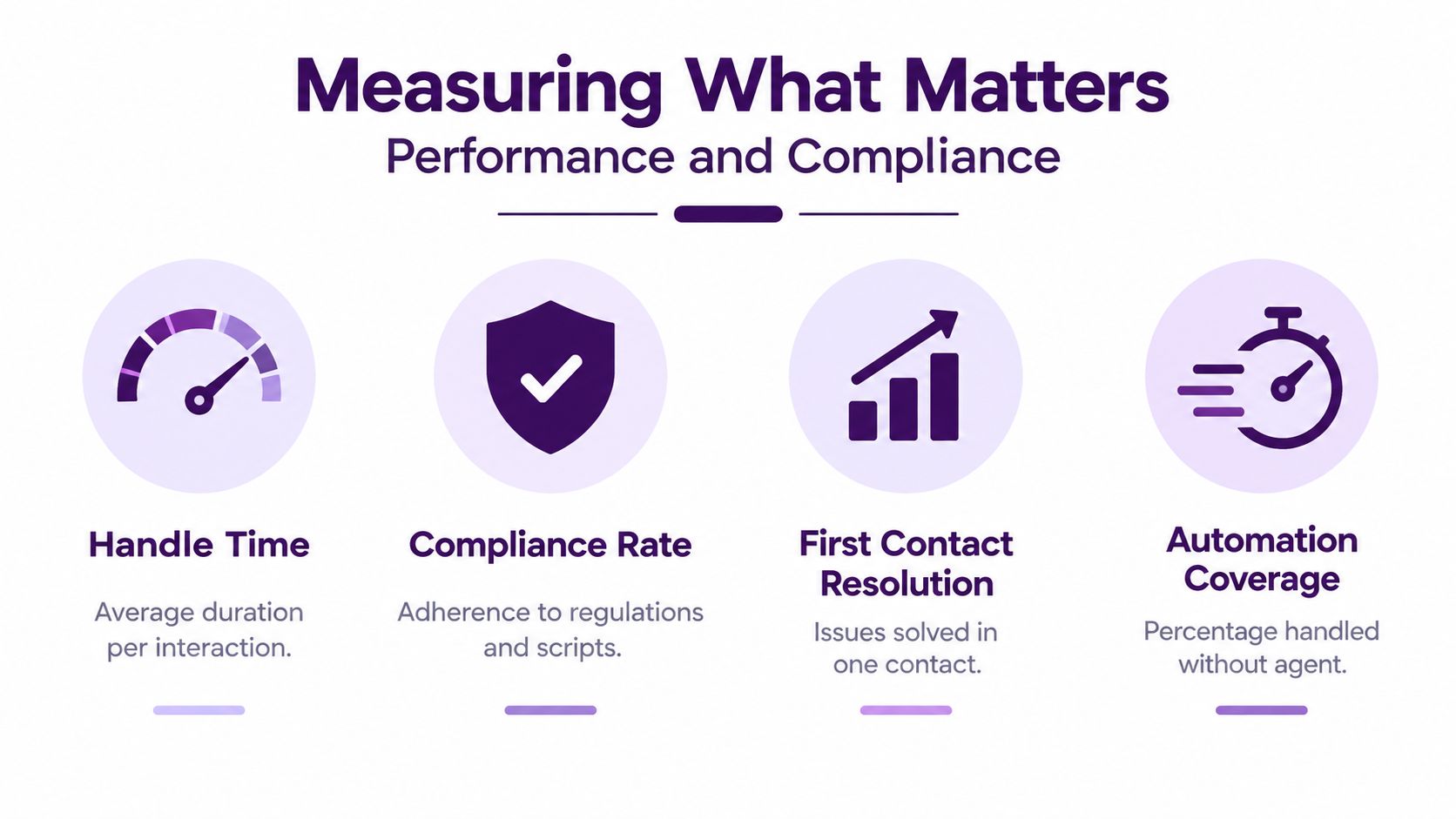
A dashboard can look impressive and still hide operational failure. Managers need to connect automation, staffing, agent behavior, and customer outcomes in the same measurement system.
Conversational IVR and self-service can resolve routine requests before they reach an agent. Speech and text analytics can transcribe interactions, detect intent and sentiment, identify compliance phrases, and expand quality monitoring beyond manually selected calls. Workforce management forecasts demand and aligns schedules with expected arrival patterns. Under-forecasting raises wait time and abandonment, while overstaffing creates idle labor cost.
Use benchmarks as reference points, not promises
Set performance targets by queue, channel, language, and customer need. An 80/20 voice service-level target means answering 80% of eligible calls within 20 seconds, according to the agreed calculation. It is an example of a service standard, not a universal requirement. Define how short abandons, transfers, and measurement intervals are handled before comparing reports.
Track the operating picture with:
- First-contact resolution: Whether the customer received a resolution without another contact.
- Average handle time: How long the interaction and related work take, interpreted alongside quality.
- Service level: Whether the operation answers within its defined response standard.
- Abandonment: How often customers leave before reaching an agent.
- Transfer rate: Whether routing and knowledge support are working.
- Adherence: Whether schedules match the planned coverage.
- Customer satisfaction: Whether the customer considers the interaction successful.
Compliance belongs in the same workflow
Outbound programs need a documented contact-permission process, suppression controls, and an audit trail. Configure the technology around the applicable rules for the campaign, channel, message, and jurisdiction. Keep the operational settings aligned with current requirements approved by your legal and compliance teams.
A campaign should record the source and scope of contact permission, apply the appropriate calling windows, maintain suppression lists, and log opt-outs. Check those controls again before an interaction is initiated, including for records already waiting in a dialing queue. Test how a change reaches the CRM, messaging platform, and dialer.
For a practical KPI framework, use CallZent’s best call center KPIs. The strongest measurement system protects both efficiency and trust.
Build, Buy, Integrate, or Partner: Choosing Your Implementation Path
A custom build gives you control, but control comes with responsibility. Your team must maintain integrations, authentication, failover, reporting logic, security policies, release cycles, and documentation. The first version may fit your workflow closely, but every new channel, CRM change, compliance rule, and routing exception adds maintenance work.
A bought platform delivers tested components faster, but its workflows may not match your business. Vendor lock-in, limited API access, inflexible data retention, and expensive customization can create a different form of technology debt. An all-in-one suite isn’t automatically integrated if the modules share a brand but not a reliable customer identity.
Compare the choices against operational risk
| Path | Works well when | Main trade-off |
|---|---|---|
| Build | Your workflows are differentiated and your technical team can maintain them | Greater control, but ongoing ownership remains internal |
| Buy | Your requirements fit established contact center patterns | Faster deployment, but configuration and vendor limits matter |
| Connect existing tools | Your current systems work separately but have usable APIs | Lower disruption, but integration quality becomes critical |
| Use a nearshore BPO | You need experienced agents, operating processes, and technology access | Less direct control over daily execution, requiring clear governance |
Before choosing, test API coverage, tenant isolation, telephony redundancy, latency, identity synchronization, and data-retention controls. Ask how the platform behaves when a CRM is unavailable, an agent loses connectivity, or a customer record appears in two systems.
A nearshore BPO can be practical when the business needs bilingual coverage, flexible staffing, and operational expertise without building every capability internally. The contract should define data ownership, escalation authority, quality reporting, consent controls, and how the partner integrates with the existing CRM and help desk.
Implementation Roadmap From Planning to Launch
Start with the customer journeys that create the most transfers, repeat contacts, or manual work. Document the current systems, owners, data fields, routing rules, escalation points, and reporting gaps before selecting technology.
Follow a controlled sequence
- Set the outcome. Choose a specific business problem, such as billing resolution, appointment scheduling, technical support, or lead qualification.
- Map the records. Identify where customer identity, consent, account status, interaction history, and case outcomes live.
- Test integrations. Confirm that CRM, telephony, digital channels, workforce management, analytics, and suppression data can synchronize.
- Design human oversight. Define which interactions AI can complete, which require an agent, and when a supervisor must review the result.
- Train by workflow. Teach agents how to use routing context, knowledge tools, summaries, escalation rules, and manual override.
- Pilot before scaling. Test representative interactions, failure paths, bilingual conversations, reporting, recording, and access controls.
- Launch with daily review. Compare AI-only, human-only, and blended outcomes, then correct routing and knowledge issues quickly.
Contact-permission changes need special attention during testing. Define how the team records the request, determines its applicable scope, updates the relevant systems, and prevents further contacts that are no longer permitted. Include records already queued for outreach in the test.
If a customer replies “stop” after entering a dialing queue, the platform should record the request, prevent affected outreach, synchronize the appropriate suppression status across connected systems, and preserve the request time. Keep the account record and any required audit history according to the retention policy. Automation should enforce compliance at the point of dialing, not depend on an agent remembering every rule.
How to Get Started With Contact Center Technology
Begin with an honest inventory. List every channel, application, customer record, queue, manual export, and report your team uses. Then follow one customer journey from first contact through resolution and note every moment when an agent has to search, re-enter, transfer, or ask the customer to repeat information.
Prioritize the gap that affects both customer effort and operating workload. That might be CRM synchronization, skills-based routing, bilingual knowledge management, workforce forecasting, quality analytics, or outbound consent controls. Don’t replace a functioning system just because a newer platform has more features. Connect or consolidate where the evidence shows that fragmentation is creating avoidable work.
For small businesses, healthcare providers, financial services teams, e-commerce companies, insurers, and telecommunications firms, the right model may combine internal ownership with a specialized operating partner. A nearshore team in Mexico can support English and Spanish interactions, work closely with North American stakeholders, and operate within the client’s existing CRM and communication environment. The technology still needs governance, training, reporting, and secure data handling, but the business doesn’t have to build every capability alone.
The best investment isn’t the platform with the longest feature list. It’s the architecture that gives customers continuity, gives agents usable context, gives supervisors reliable controls, and gives leadership evidence of what improves. Treat contact center technology as a workforce and accountability system, not an automation purchase.
Frequently Asked Questions
What is contact center technology?
Contact center technology is the connected set of communication, routing, customer-data, workflow, recording, quality, analytics, and workforce tools used to manage customer interactions and service outcomes.
How is a contact center different from a call center?
A call center primarily handles phone conversations. A contact center also coordinates digital channels such as chat, email, and SMS. An omnichannel setup connects those interactions to shared customer and case context.
What do IVR and ACD do?
IVR collects information or provides self-service before an agent answers. ACD distributes calls to agents or queues. Routing rules can use language, skills, availability, and issue type to select the appropriate destination.
Why does CRM integration matter?
CRM integration can give authorized agents customer details, prior contacts, open cases, and relevant account history. It also helps record outcomes and pass context during handoffs. Identity verification remains a separate requirement for sensitive actions.
Can AI replace the need for contact center agents?
AI can support routine self-service, summaries, classification, and knowledge retrieval. Complex, sensitive, or ambiguous cases still need a defined human path. Evaluate the technology through resolution quality, customer effort, and agent workload.
Can a nearshore BPO work with existing contact center tools?
A nearshore BPO can operate agreed workflows within compatible CRM, help desk, and communication systems. Confirm integrations, permissions, data ownership, reporting, language coverage, and escalation rules before launch.
Bilingual Nearshore Contact Center Operations
Connect Your Technology With the People Who Make It Work
Discuss a bilingual nearshore program in Mexico built around your customer workflows, CRM, communication tools, quality standards, and coverage needs.