Skip to content
Healthcare BPO & Patient Support
Healthcare Provider Solutions: A Practical 90-Day Guide
Compare healthcare provider solutions for patient access, revenue cycle management, HIPAA compliance, EHR integration, and nearshore support.
A surprising amount of healthcare technology fails before a clinician ever uses it. The problem usually isn’t a lack of features. It’s the gap between a vendor’s workflow and the way a clinic answers calls, verifies insurance, schedules care, documents encounters, and collects payment.
That gap is expensive. Provider-focused healthcare IT spending was estimated at about US$279.5 billion in 2025, while one estimate placed the U.S. healthcare IT market at US$206.47 billion in 2025, with projected growth to US$396.82 billion by 2030 at a 14.0% CAGR. Those figures from Healthcare IT industry market analysis show the scale of the opportunity, but they don’t tell a practice which healthcare provider solutions will work inside its existing operation.
After two decades deploying bilingual nearshore support from Tijuana for North American businesses, I’ve learned to judge a solution by a less glamorous standard: Does it remove work from staff, connect cleanly to the current stack, and produce a measurable operational result within the first 90 days?
Why Most Healthcare Provider Solutions Fall Flat
Healthcare organizations don’t need another buying committee presentation full of feature grids. They need fewer disconnected tasks for schedulers, billers, nurses, and front-desk teams.
Cost is the first warning sign. Eighty-four percent of hospital executives cite cost as a barrier, while 66% identify poor integration with EHRs and billing systems as a problem, according to provider digital-health coverage from Alexander Group. Security, compliance, training, and user adoption add more friction. A platform can look impressive in a demo and still become a daily burden if employees must copy information between systems or ask patients the same questions repeatedly.
The financial environment makes that failure harder to absorb. Hospital margins were expected to decline by 1% to 2% in 2025, and the same provider coverage points to a projected gap of just under 80,000 full-time registered nurses. When teams are already stretched, a complicated rollout doesn’t merely consume IT time. It takes attention away from patient care and revenue-producing work.
The dashboard problem
A new dashboard rarely fixes a broken handoff. If a referral arrives by phone, the scheduler enters it into one system, insurance details live somewhere else, and the billing team later discovers missing documentation, analytics only makes the failure easier to observe.
The better question is operational: Which task creates the most avoidable work, and where does information get lost? Start there. A scheduling workflow may need bilingual coverage and better escalation rules. A revenue-cycle workflow may need eligibility validation before a claim reaches the payer. A telehealth program may need technical support rather than another patient-facing app.
Practical rule: If a solution adds a login, a queue, or a manual reconciliation step, it must remove more work than it creates.
Providers should document the current workflow before purchasing. Count handoffs, identify duplicate entry, list the systems involved, and define the result that should change inside 90 days. CallZent’s business process improvement services can be relevant when the core issue is process design rather than a missing software feature.
The right healthcare provider solution is the one that fits the operation already serving patients, not the one with the longest feature list.
Core Solution Categories Every Provider Should Know
Think of a provider technology stack as a hospital floor. Each solution has a job, and the wiring between rooms determines whether the floor functions as one system or a collection of isolated stations.
The clinical chart and the financial desk
The electronic health record, or EHR, is the chart at the bedside. Clinicians use it to review history, document care, enter orders, and coordinate treatment. The United States moved from fewer than 10% of non-federal acute care hospitals using EHRs in 2008 to 99% adoption by 2018, according to the Office of the National Coordinator’s EHR adoption timeline. That transition created the foundation for analytics, telehealth, interoperability, and automated revenue workflows.
Revenue cycle management, or RCM, is the billing desk. It supports eligibility, coding, claim submission, payment posting, denial management, and patient financial communication. Its failure mode is often upstream: incomplete registration or weak documentation creates rework later.
The remote consult room and front door
Telehealth is the remote consult room. It can expand access, but the patient still needs help with scheduling, device readiness, reminders, check-in, and follow-up. A virtual visit doesn’t solve access if the patient can’t reach the practice or receives unclear instructions.
Patient access is the front door. It includes appointment scheduling, intake, reminders, referral coordination, insurance verification, and call handling. In practice, this layer often produces the quickest visible improvement because every missed call or inaccurate booking can delay care.
The dashboard and the wiring
Analytics is the operations dashboard. It should answer practical questions, such as which queues create delays, where appointments are lost, and which payer or documentation issues produce rework.
Interoperability is the wiring. HL7 FHIR is an API-focused standard for representing and exchanging health information among providers, patients, caregivers, payers, and researchers, as described in HL7’s FHIR overview. The operational value is straightforward: a shared resource model can reduce the need for endless point-to-point interfaces.
Before selecting software, identify the room with the largest queue and inspect the wiring around it. Providers dealing with public complaints, access failures, or reputational incidents may also benefit from reviewing crisis response for healthcare practices as part of a broader patient-service plan.
Revenue Cycle Automation and the Denial Problem
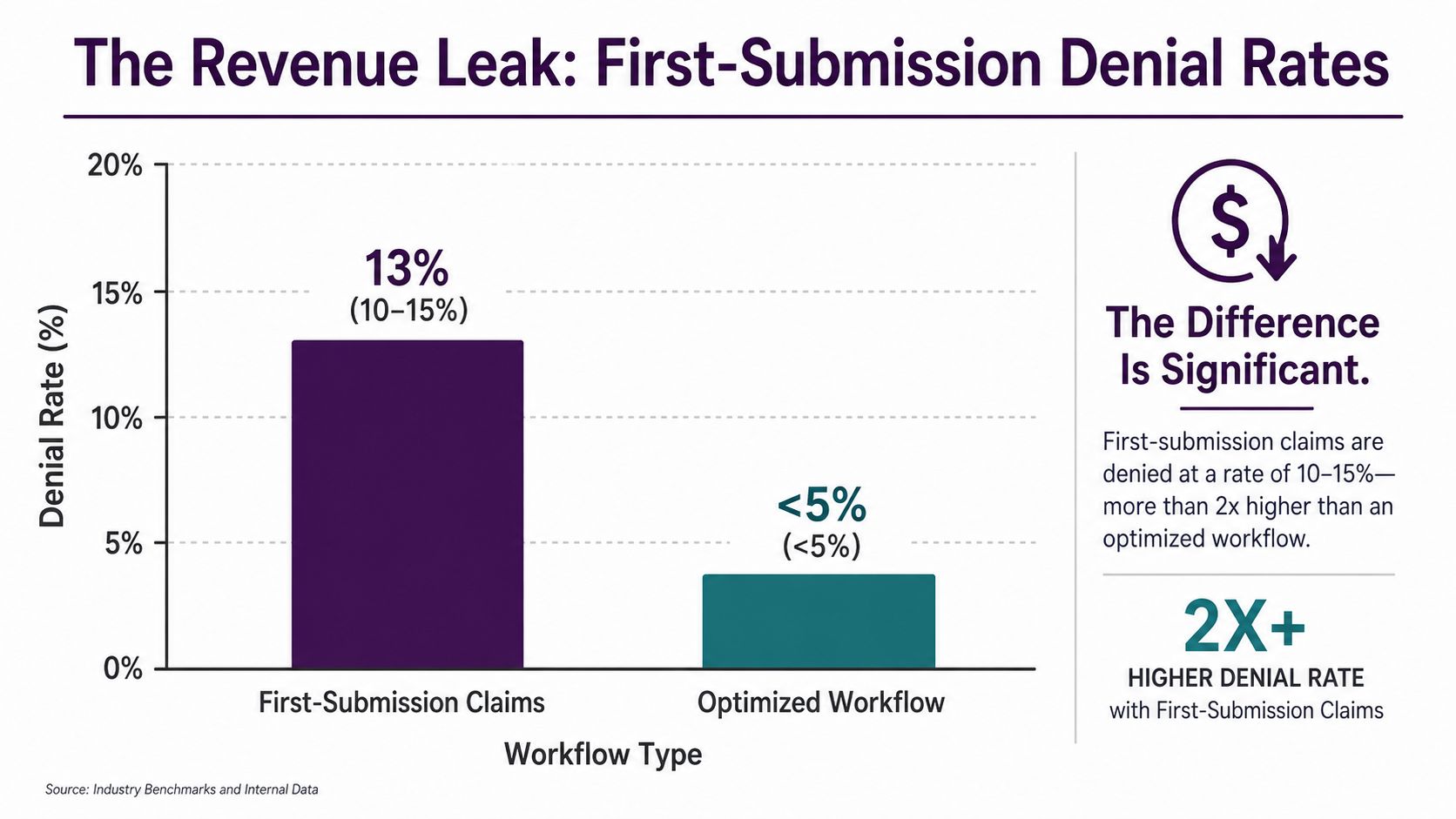
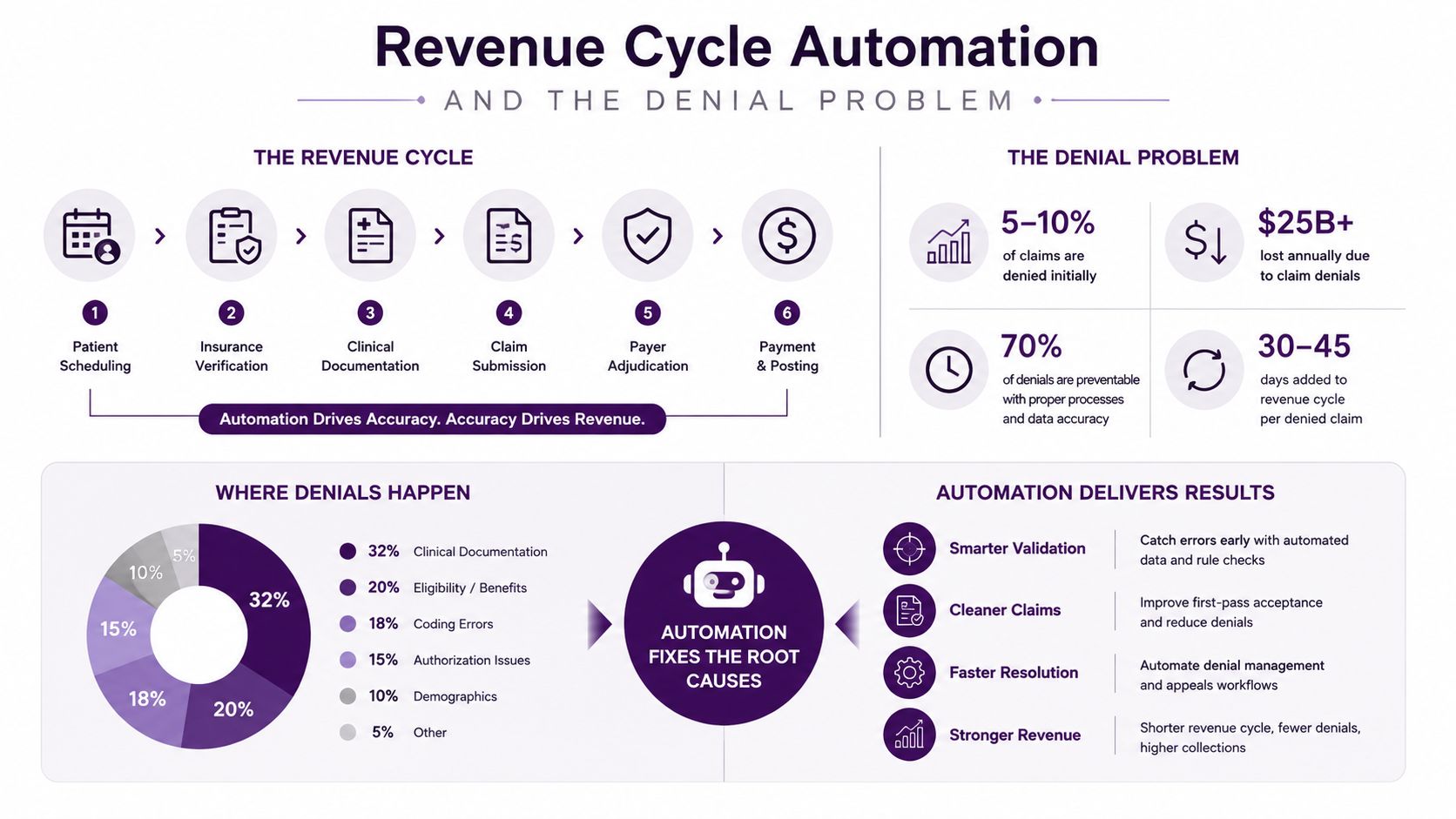
Revenue-cycle automation earns its place when it prevents a predictable error before the claim leaves the building. First-submission claim denial rates commonly run at 10% to 15%, according to SCNSoft’s analysis of AI in revenue cycle management. Every denial creates more than a payer issue. Staff must investigate, correct, resubmit, document, and sometimes explain the balance to the patient.
The most useful automation sits at the front of the workflow. AI-supported eligibility verification can flag coverage problems before the visit. Documentation and coding checks can identify missing or inconsistent information before submission. The same source reports denial-rate reductions of up to 42% in practice when these capabilities support pre-submission validation.
The clean-claim chain
The logic is simple:
- Correct eligibility: Confirm coverage before the appointment or procedure.
- Complete documentation: Match the clinical record to the service being billed.
- Accurate coding: Detect issues while staff can still correct them.
- Validated submission: Send claims with fewer avoidable defects.
- Focused human work: Reserve specialists for appeals and exceptions.
A clinic should connect automation to a baseline denial report, not a vague promise of efficiency. Review the reasons for first-submission denials, isolate those caused by eligibility or documentation, and measure whether those categories change after deployment. A targeted medical practice revenue cycle management program can support that work when the provider needs operational assistance alongside technology.
Where people still win
Automation shouldn’t handle every account. Complex appeals, payer-specific exceptions, unusual clinical documentation, and patient financial counseling require judgment and empathy. A human reviewer can recognize when a technically correct claim still needs a provider clarification or when a patient needs a clear explanation rather than an automated message.
Use automation to stop repeatable errors, not to hide unresolved process problems.
HIPAA and Compliance Beyond the Obvious
HIPAA doesn’t begin when a patient speaks with a nurse. It applies to call centers when agents handle, transmit, or access protected health information on behalf of a covered entity. Phone calls are covered whenever an agent discusses, accesses, or transmits information related to a person’s health status, treatment, or payment, as explained in this HIPAA guide for healthcare call centers.
That includes routine work. An agent changing an appointment may view identifying and care-related information. An insurance-verification specialist may access payment and coverage details. A bilingual intake coordinator may collect symptoms, medications, or referral information. Calling these activities “customer service” doesn’t remove their compliance obligations.
Treat routine calls as protected workflows
A practical compliance design starts with the task, not the department name.
- Appointment changes: Verify identity according to the provider’s approved procedure before discussing visit details.
- Insurance verification: Limit access to the information needed for the transaction and document the result.
- Prescription requests: Route clinical questions to authorized staff instead of allowing agents to interpret medical information.
- Lab callbacks: Follow approved scripts and escalation rules, especially when the patient asks for clinical guidance.
- Patient intake: Capture only required information, store it in approved systems, and avoid informal notes.
Agents need more than a policy document. They need role-based access, approved scripts, escalation paths, secure systems, recurring training, and quality reviews that check both accuracy and privacy.
Compliance belongs in the operating model
A provider should ask whether an outsourced team can support the required agreement structure, training records, access controls, incident procedures, and audit evidence. The answer must be visible during vendor evaluation, not discovered after a complaint or breach.
For a practical framework, review CallZent’s healthcare outsourcing compliance guide and use it to organize questions for internal stakeholders, vendors, and compliance counsel.
If a conversation touches care, treatment, health status, or payment, build the workflow as a HIPAA-sensitive interaction from the start.
Vendor Selection Checklist for Healthcare Provider Solutions
A vendor demo is not an implementation test. Ask the vendor to prove that the solution can operate inside your environment, with your staff, your patient mix, and your escalation rules.
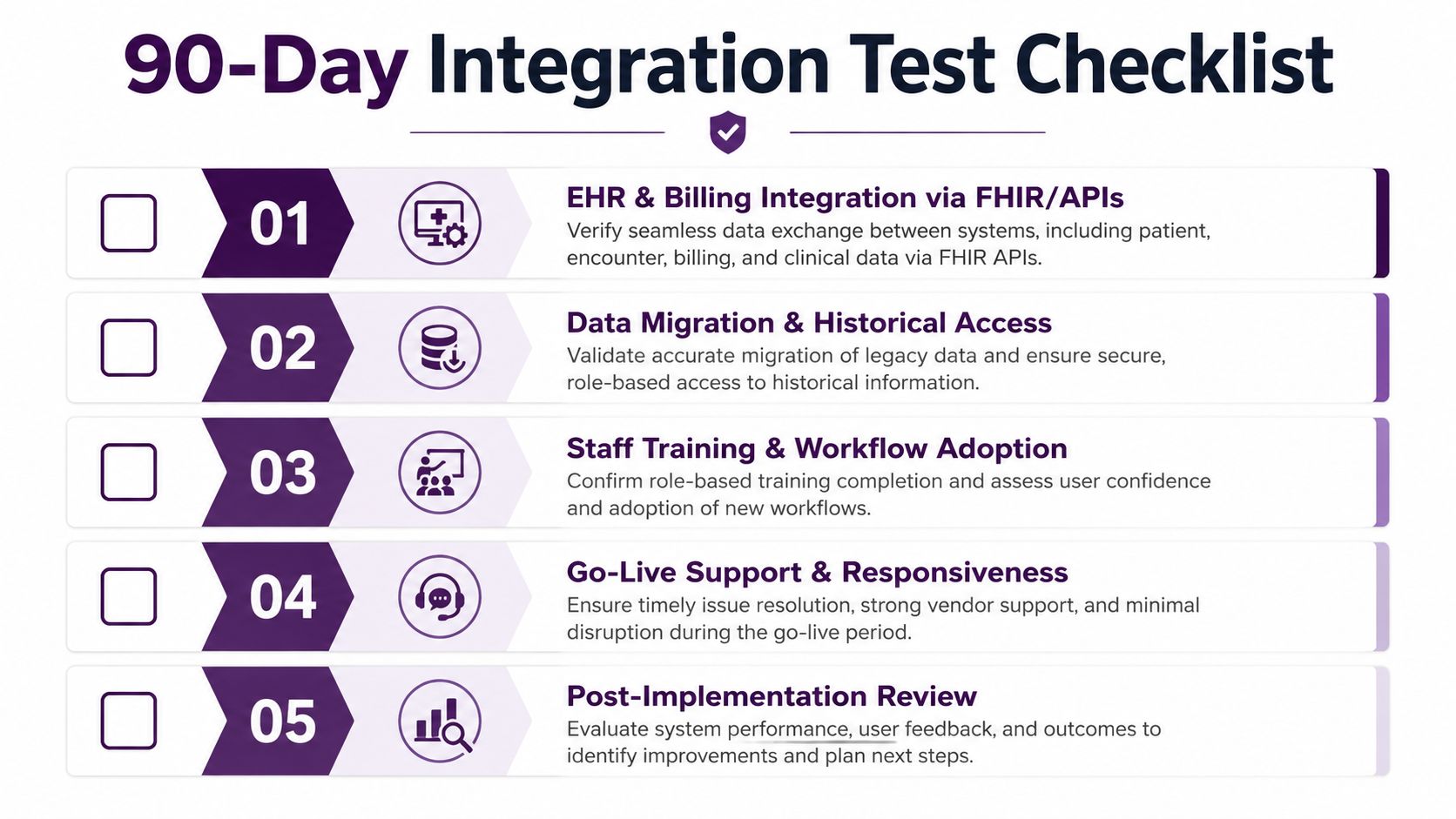
Five filters for the first 90 days
-
EHR and billing integration: Ask the vendor to demonstrate the exact data exchange using FHIR or documented APIs. Don’t accept a generic statement that the platform “integrates with major systems.”
-
Data migration and historical access: Confirm how staff will reach prior records, notes, appointments, and billing context. A new platform that strands historical information forces employees to maintain parallel workarounds.
-
HIPAA program: Request evidence of business associate agreements, workforce training, access controls, audit logs, and incident-response procedures. The vendor should explain who sees which data and why.
-
Workflow adoption: Ask staff to test the actual process, not a polished demo path. A scheduler should complete a real appointment scenario, an intake agent should follow the bilingual script, and a biller should review an exception.
-
Go-live support and exit path: Define response ownership during launch, escalation timing, reporting, data export, and migration assistance. A provider shouldn’t become dependent on a system it can’t leave.
Make the demo uncomfortable
Ask the vendor to show what happens when an insurance record is incomplete, a patient speaks Spanish, a clinician doesn’t answer an escalation, or a claim fails validation. Those moments reveal more than a standard workflow.
Providers comparing external partners can use this guide to find a healthcare agency as an additional reference point, but the decision should remain grounded in operational fit. CallZent’s vendor evaluation criteria can also help procurement teams convert broad promises into testable requirements.
Where a Bilingual Nearshore BPO Fits In
A mid-size U.S. clinic group may have a solid EHR and a capable billing team, yet still lose access at the front door. Calls arrive after hours, Spanish-speaking patients need support, front-desk employees are already checking in visitors, and clinicians become the unofficial escalation desk.
The answer isn’t necessarily to replace the EHR or buy a new RCM platform. A bilingual nearshore BPO can sit around the existing stack and handle defined patient-access work.
A representative operating design
Start with scheduling integration. The external team receives approved access to the scheduling workflow, follows clinic rules, and books only the visit types it’s authorized to book. The practice retains control of templates, provider availability, scheduling restrictions, and clinical escalation.
Next, create bilingual intake scripts that match the clinic’s protocols. The script should guide the agent through identity verification, reason for the call, insurance information, appointment requirements, and escalation triggers. It shouldn’t encourage agents to diagnose, interpret symptoms, or improvise clinical advice.
The escalation path matters more than the script. If a patient reports a concern that requires clinical attention, the agent needs a clear route to the on-call clinician or designated practice team. If nobody responds, the workflow must define what the agent documents, what instructions are approved, and how the patient receives follow-up.
Finally, build a quality loop. Supervisors review calls for scheduling accuracy, language quality, privacy handling, documentation, and escalation compliance. The clinic receives recurring findings and adjusts rules when agents encounter a repeated source of confusion.
Why nearshore changes the equation
Tijuana-based nearshore coverage offers geographic proximity to U.S. operations and bilingual English-Spanish capability without forcing the provider to redesign its core systems. It can support appointment management, reminders, intake, insurance verification, telehealth assistance, and records workflows when those tasks are clearly scoped and access is controlled.
The service layer becomes a force multiplier for existing investments. It absorbs call volume, reduces front-desk interruption, and gives patients another reliable path to care. It also works better when the provider measures outcomes, rather than treating outsourced coverage as a simple headcount substitute.
The strongest nearshore deployment doesn’t compete with provider software. It makes the software easier for patients and staff to use.
KPIs and ROI Metrics That Actually Matter
A call center can answer quickly and still fail patients. If agents transfer calls repeatedly, book the wrong appointment type, or leave patients without a resolution, average speed of answer becomes a vanity metric.
Published healthcare call-center benchmarks list first-call resolution at 52%, average speed of answer at 30 to 60 seconds, call abandonment at 7%, and customer satisfaction at 78%, according to CloudTalk’s healthcare call-center benchmarks. These figures provide reference points, but the provider still needs to connect each measure to a specific workflow.
Pair every KPI with a lever
| KPI | What it reveals | Operational lever |
|---|---|---|
| First-call resolution | Whether patients finish the interaction without another contact | Give agents accurate scheduling, intake, and escalation authority |
| Average speed of answer | How quickly a patient reaches the team | Match staffing to demand patterns |
| Abandonment rate | How many callers leave before receiving help | Adjust coverage, queue design, and callback handling |
| Appointment conversion | Whether inquiries become correctly booked care | Align scripts, eligibility questions, and scheduling rules |
| Transfer rate | Whether the first agent can complete the task | Improve knowledge access and role permissions |
| Patient satisfaction | How patients experience communication and responsiveness | Review call quality, resolution, and follow-up |
A clinic that lowers abandonment without improving conversion may be losing fewer callers into an inaccurate scheduling process. A clinic that raises first-call resolution while documentation quality declines has shifted the problem downstream.
Measure the full patient journey
Patient experience also extends beyond the phone. The HCAHPS framework includes nurse communication, doctor communication, staff responsiveness, medication communication, and discharge information, as outlined in patient experience metrics guidance. Contact-center leaders should therefore connect access metrics to handoffs, reminders, follow-up, and discharge communication.
Use customer service KPI guidance to build a scorecard, then assign an owner to each number. A KPI without an owner is only a report.
Putting It Together in the First 90 Days
Providers should treat the first 90 days as an integration sprint, not a technology festival. The goal is to improve a small number of operational outcomes while protecting the clinical team from unnecessary change.
Days one through thirty
Lock down the data flow and compliance model first. Map how appointment details, insurance information, intake notes, and escalations move between the EHR, billing environment, call center, and clinical staff. Remove duplicate entry where possible, define access permissions, and approve the scripts agents will use.
Choose one patient-access workflow for the first launch. Appointment scheduling is often a practical starting point because the team can define rules, exceptions, escalation paths, and reporting without attempting to redesign the entire organization.
Days thirty-one through sixty
Deploy one revenue-cycle automation with a clear denial objective. Focus on eligibility verification or documentation and coding checks when those issues appear in the provider’s baseline review. Keep human reviewers involved for exceptions, appeals, payer-specific questions, and financial counseling.
At the same time, stand up bilingual coverage for the access gaps that staff can’t reliably absorb. The nearshore team should use the provider’s systems and protocols, not create a parallel patient record.
Days sixty-one through ninety
Review the operating evidence. Look at answered calls, abandonment, first-call resolution, transfer patterns, appointment conversion, scheduling accuracy, clean-claim performance, and staff feedback. Keep the workflow that reduces effort and produces a defensible result. Redesign or stop the workflow that adds complexity without measurable value.
Defer advanced AI analytics, broad platform replacement, and ambitious digital-front-door projects when staffing, broadband, interoperability, or budget constraints remain unresolved. Rural and under-resourced providers face interoperability gaps of 67%, budget limitations of 81%, broadband constraints affecting 34% of independent rural physician practices, and AI analytics adoption of only 8% in critical access and rural hospitals, according to Black Book Research coverage.
The underserved question isn’t “How do providers adopt AI?” It’s “Which provider solutions work when staffing, broadband, interoperability, and budget limits arrive together?” The answer is usually pragmatic: clean interfaces, disciplined RCM validation, bilingual patient access, secure human support, and reporting tied to care and cash.
Strengthen Your Healthcare Support Operation
CallZent provides bilingual nearshore support for scheduling, patient intake, appointment management, insurance verification, reminders, telehealth assistance, and other carefully defined healthcare workflows.
Talk to an ExpertCallZent provides bilingual nearshore call center and BPO support for healthcare workflows, including scheduling, appointment management, patient intake, insurance verification, reminders, telehealth support, and records-related assistance. Visit CallZent to discuss a healthcare provider solution that fits your current systems and targets measurable access improvements in the first 90 days.