Help Desk Operations & Customer Support
Level 1 Support: Roles, Scope, and Reliable Escalation
Define frontline responsibilities, approved fixes, escalation targets, and resolution measures that keep customers moving toward a useful outcome.
TL;DR — Quick Takeaways
- Level 1 owns useful intake, approved actions, documentation, and coordinated handoffs.
- Every workflow needs permissions, a stopping point, and a named escalation destination.
- Track original waiting time and acceptance of each handoff, not just notifications sent.
- Separate first-level resolution from first-contact resolution and report metric eligibility.
- Preserve bot history and language preference while validating facts and verification status.
When a customer can’t log in, complete a payment, or find an order, who owns the first useful answer, especially after a chatbot has already failed? Level 1 support should establish ownership, complete approved actions, and preserve context when a specialist is needed.
What Level 1 Support Is and Why It Matters
Say a customer calls because an order confirmation never arrived. The agent needs to identify the account, check the order, explain its status, and decide whether an approved fix is available. Sending the customer elsewhere without those checks isn’t useful intake.
Level 1 support is the first human support tier for incidents and service requests across phone, chat, and email, often following self-service or automation. An incident means something isn’t working. A service request asks for something, such as an account reset, booking update, or explanation of a feature.
That distinction matters for ecommerce, healthcare, telecom, finance, retail, and insurance operations. A customer asking about delivery and a patient asking about a diagnosis both deserve a useful answer, but the agent’s authority should be very different.
First-level resolution measures issues resolved within Level 1 without higher-tier work, even if several contacts are needed. First-contact resolution measures issues resolved during the first contact under a documented definition and same-issue repeat window. Specify how transfers, consultations, and callbacks are treated; organizations and platforms differ. A desk can improve one measure without improving the other.
Consistency across locations and languages
For distributed businesses, shared procedures help prevent each location from inventing its own answers. Assign owners to policies, approved fixes, and language versions. Keep customer language preference visible through every handoff and validate that English and Spanish instructions communicate the same approved process.
When discussing a CallZent program, make the operating decisions concrete: define eligible work, permissions, coverage hours, specialist access, escalation targets, and reporting. Location is one input; the quality of the workflow determines whether a customer receives a useful next step.
Level 1 Support Roles, Tools, and Daily Workflows
Give agents both a task list and a clear authority boundary. A password-reset script won’t help if nobody knows who approves an exception or accepts a failed verification.
Assign ownership before opening the queue
- Frontline agents: Verify identity, classify tickets, and complete approved requests.
- Team lead: Manage queue health and approve permitted exceptions.
- QA reviewer: Check ticket accuracy, procedure compliance, and tone.
- Tier 2 and Tier 3 specialists: Accept escalations requiring deeper expertise or access.
- Incident manager: Coordinate major incidents and enforce the escalation clock.
The tools should support those responsibilities. Use a help desk with required fields, a searchable knowledge base labeled Level 1 eligible or specialist only, and approved verification and password-reset tools.
Add remote-support software with logged sessions, a CRM for account and order history, and a status dashboard for known outages. Link permitted recordings or transcripts through approved access controls and retention rules. Use remote support only with required authorization and safeguards; do not request passwords or authentication codes outside approved verification flows.
Prioritize searchable instructions, named article owners, and a clear review process over a large library nobody maintains. The KCS v6 Practices Guide describes capturing, structuring, reusing, and improving knowledge during support work. Apply those practices by recording useful context and flagging or correcting outdated instructions.
Make routine work repeatable
Daily workflows commonly include password resets and account access, order or booking updates, and how-to answers drawn from approved articles.
For example, a new hire answers a shipping-delay question in Spanish using the knowledge base. The agent explains the carrier status, records an English operational summary in the same ticket, confirms the customer understands the next step, and closes the case without a transfer.
Practical rule: Every approved workflow needs a stopping point, not just a list of actions.
Which Level 1 Support Requests Stay Front Line
What level 1 support resolves or escalates
| Request | Level 1 may do | Escalate when |
|---|---|---|
| Password or account unlock | Verify identity and reset with an approved tool | Verification fails or phishing is suspected |
| Single-user application access | Check connectivity, error text, and known outages | Admin rights or a code change are required |
| Widespread or checkout outage | Capture impact, check known incidents, and activate the approved incident route | Critical impact or incident triggers require immediate specialist coordination |
| Order or reservation change | Make permitted changes after approved verification and explain the policy | A payment dispute or fraud flag appears |
| Clinical, insurance, or payment data change | Collect only fields the script allows | Privileged access or regulatory judgment is required |
| Chatbot or IVR failure | Take over with transcript, authentication status, and steps already tried | The unresolved issue exceeds Level 1 authority or a supervisor must recover ownership |
Use this table as an illustrative runbook boundary, not blanket authorization. Each row needs a matching procedure, approved tool, stopping point, and named destination. Missing bot context calls for recovery and ownership; it does not automatically justify sending an otherwise simple issue to Tier 2. Security or safety triggers can require immediate escalation without routine troubleshooting.
Atlassian’s incident management guidance describes a workflow that includes logging, categorization, prioritization, response, and closure. Apply that structure to active intake: categorize the issue, assess impact and urgency, document symptoms, and resolve common incidents through established procedures. Forwarding a ticket without that work leaves the next team doing the original interview again.
Work an application-access ticket
Say an employee can’t open a company application. The agent verifies identity before discussing account details, then asks whether the application fails to launch or launches but rejects access.
Next, check basic connectivity and whether other approved applications work. Capture the exact error text, the time it appeared, and the affected application. Check the status dashboard before asking the employee to repeat troubleshooting during a known outage.
If an approved procedure restores access, confirm the employee can complete the original task. A successful login isn’t enough if the required screen still fails.
If the fix requires administrator rights or a code change, stop. Send the evidence to the appropriate specialist and inform the employee who is responsible for the next action. Don’t experiment with higher access to improve a closure metric.
Match staffing to the work, not just the queue size
Coverage hours, contact complexity, arrival patterns, language skills, supervision, and time spent on knowledge maintenance all affect staffing. A ticket-per-agent figure from another organization cannot establish what your desk should handle.
Review workload by interval where relevant, and account for handling, follow-up, training, breaks, and absence. Match staffing to work the team is authorized and trained to perform, while preserving capacity to document and learn. A continuously available desk and a business-hours queue may need different designs at the same monthly ticket volume.
On an ecommerce Saturday, a shipping-status question can close at the front line once the agent checks the order and explains the published delivery information. A checkout outage is different: apply the approved priority matrix and activate the major-incident route when its criteria are met, establish how many shoppers are blocked, and attach necessary, appropriately redacted screenshots and error details for the authorized incident team.
The agent should not promise a restoration time that the incident owner has not approved. Instead, give the customer the next update time and keep related reports attached to the incident.
Apply tighter boundaries to sensitive requests
On a clinic Monday, appointment reminders can stay on script. A request to change medical details requires the approved verification, access, and authorization process, while diagnosis or treatment questions belong with appropriately qualified clinical staff. Urgent concerns must follow the approved clinical or emergency escalation route. Agents should document the reason for referral without collecting unnecessary health information.
For finance, a cardholder asking why a charge posted may receive an authorized status explanation. A request to change the payout account should wait for step-up verification and the required approval. Similar wording from the customer doesn’t make those requests equally safe.
CallZent works with clients to develop scripts, knowledge resources, escalation paths, and interaction guidelines that reflect their brand voice, workflows, and customer-service expectations. When mapping technical and customer support responsibilities, define both what the agent can complete and what the agent must leave untouched.
Staffing insight: Count work the desk is authorized to resolve before deciding how many people it needs.
Low-complexity, high-volume work calls for strong knowledge articles and reliable reset tools. Regulated work calls for narrower permissions and may justify a lower front-line closure share. Mark every knowledge-base article Level 1 eligible or specialist only, then analyze eligible and specialist-only demand together before hiring. Both create intake, documentation, or handoff work, even when only one group can close at Level 1.
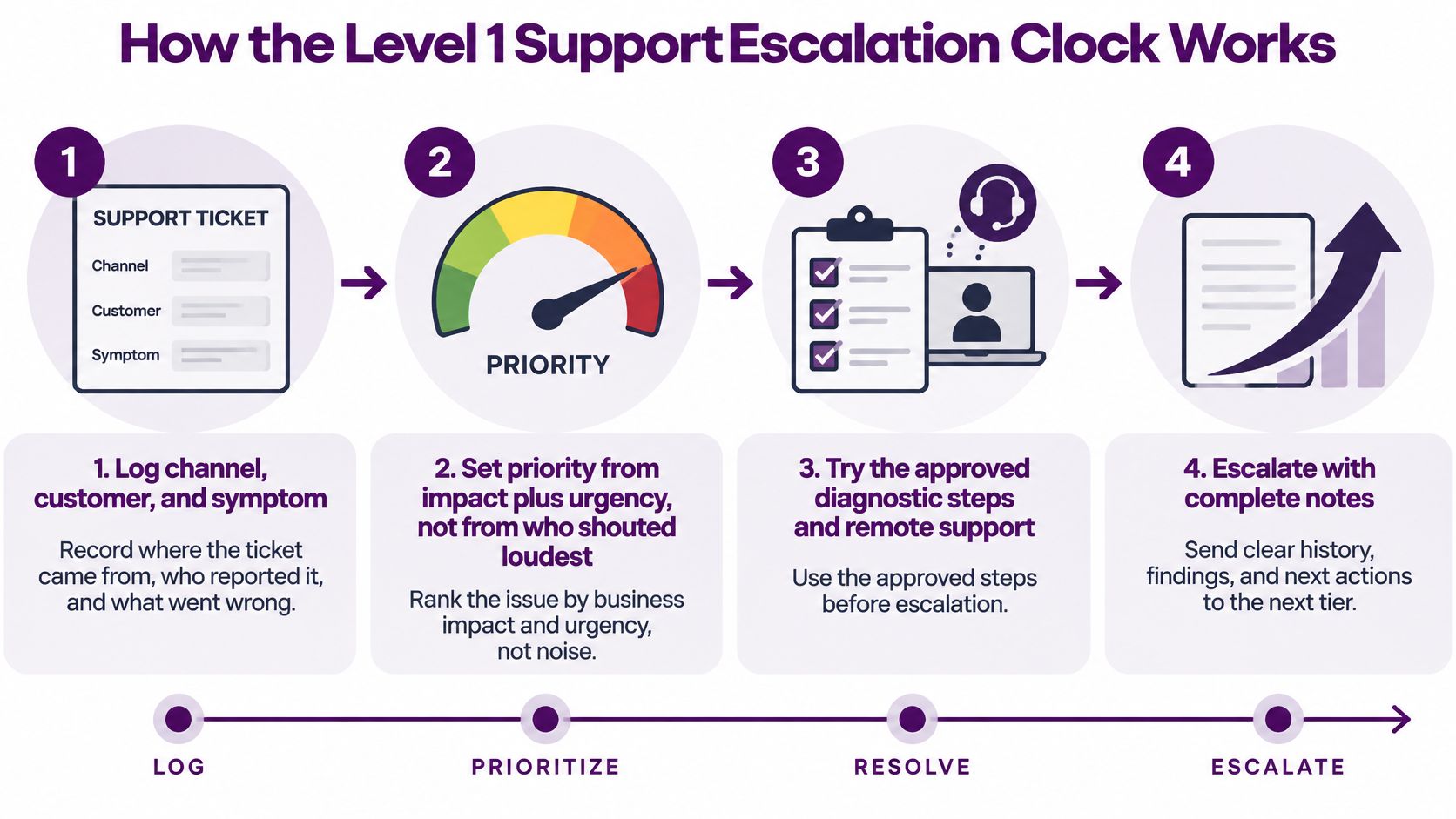
How the Level 1 Support Escalation Clock Works
An escalation clock measures more than how long a ticket sits in a queue. It tracks whether the next owner accepts the work and whether the customer knows what will happen next.
Move the ticket through a timed workflow
- Log the channel, customer, and symptom. Record where the request arrived, who reported it, and what stopped working. Keep the original contact time if the customer changes channels.
- Set priority from impact and urgency. Identify the affected service, who is blocked, and what business activity cannot continue. A forceful complaint alone does not make a ticket urgent.
- Apply approved actions or escalate immediately. Record each action and result. Stop at permission, safety, security, or procedure limits; urgent triggers can bypass routine diagnostics.
- Escalate when the owner does not respond. Set a response deadline in the runbook and name the backup owner if the primary contact is unavailable. Urgent incidents may need to bypass the usual queue.
- Record acceptance at each handoff. Keep the ticket history and identify who accepted the next action. An unanswered notification is not acceptance.
Give priority a measurable meaning
Illustrative priority framework for Level 1 support
| Priority | When it applies | Response target | Resolution target |
|---|---|---|---|
| Priority 1 | Critical business service unavailable or other major-impact trigger | Set in the service agreement | Set in the service agreement |
| Priority 2 | Significant service degradation or a time-sensitive business function blocked | Set in the service agreement | Set in the service agreement |
| Priority 3 | Limited-impact issue with an acceptable workaround | Set in the service agreement | Set in the service agreement |
| Priority 4 | Low-impact how-to or an issue with no urgency | Set in the service agreement | Set in the service agreement |
These priority labels and examples are illustrative, not a universal standard. Separate meaningful first response, specialist acceptance, customer update, restoration or workaround, and final resolution where appropriate. Define each clock’s start, business or elapsed hours, permitted pauses, and breach escalation. Restoration does not always establish the root cause or complete the permanent fix.
For example, a checkout outage blocking shoppers should take priority over a low-impact question about changing a software setting. The distinction is business impact, not who reports the issue most forcefully.
Configure ticket timers to alert a supervisor before a service target is missed. For Tier 2 support handoffs, define who must accept the ticket and what information must travel with it. Close the loop with a handoff packet containing the identity result, impact, steps tried, exact error text, and next owner.
Level 1 Support KPIs That Show Real Resolution
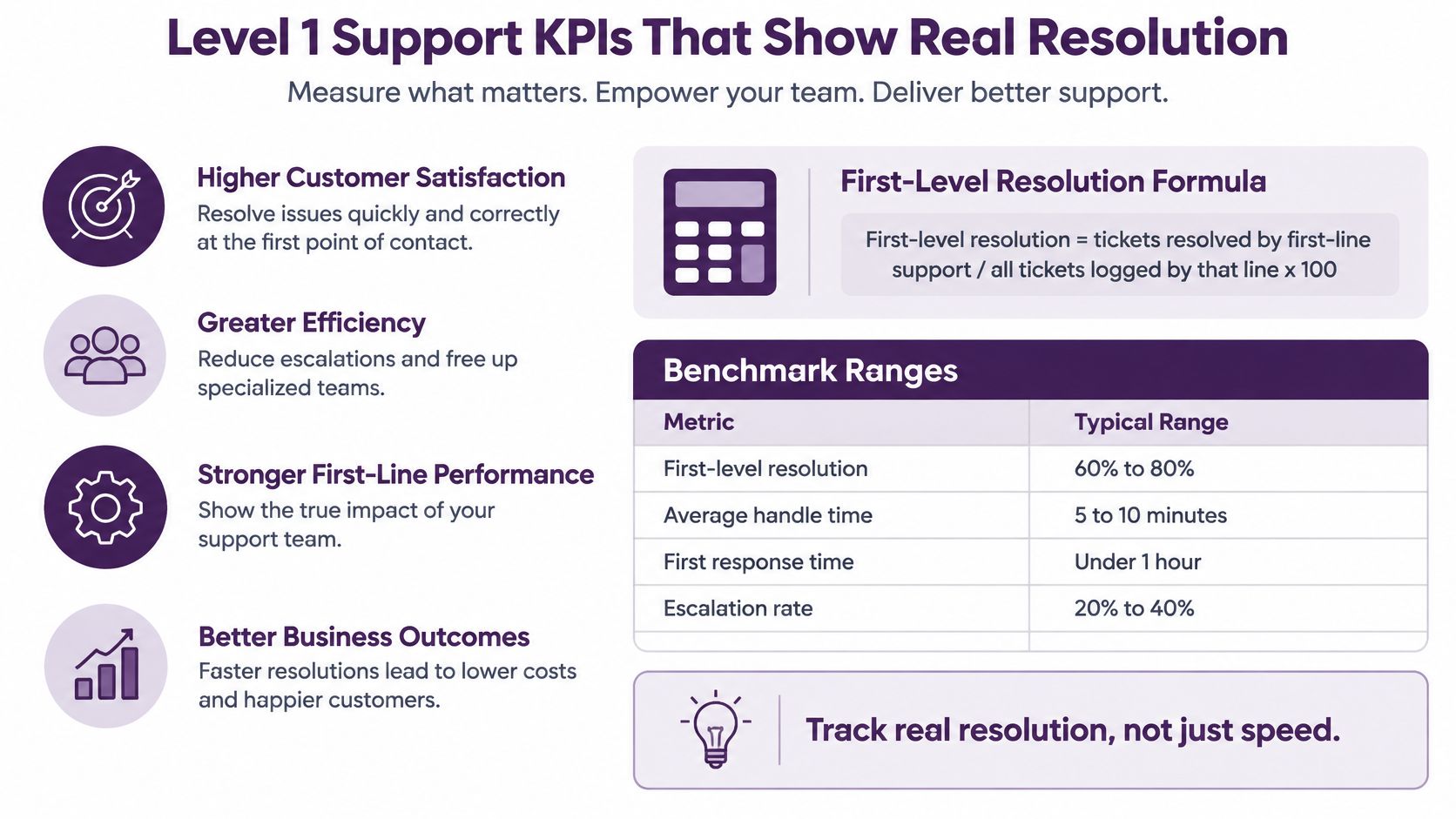
First-level resolution = issues resolved within Level 1 ÷ issues logged by Level 1 × 100. Define the case cohort, follow-up window, and what counts as higher-tier work before reporting the result. Do not count a transfer or an unverified closure as proof that the customer’s issue was resolved.
Set targets from your own baseline and approved scope. A desk handling restricted financial or clinical requests may appropriately escalate more work than a desk answering routine order questions. Compare similar issue types and permissions rather than treating a historical industry average as a quota.
Compare Definitions Before Comparing Performance
A practical Level 1 measurement framework
| Measure | Definition to document | Use alongside |
|---|---|---|
| First-level resolution | Issues resolved by Level 1 without higher-tier work / issues logged by Level 1 × 100; use a defined cohort | Reopens, complexity, and specialist-only demand |
| First-contact resolution | Eligible first-contact issues resolved during that contact / eligible first-contact issues × 100; define a same-issue repeat window | Repeat contacts, QA, and customer confirmation |
| Eligibility-adjusted resolution | Resolution within a predefined eligible group; report exclusions and denominator changes | Gross results and the share excluded |
| Handoff acceptance | Time from escalation trigger to acceptance by the required owner | Context completeness, customer updates, and overdue escalations |
| Backlog and resolution time | Age of open issues plus median and upper-percentile resolution time for a defined cohort | Priority, language, channel, and issue type |
Eligibility rules should be defined before scoring, applied consistently, and reviewed when scope changes. Report the excluded share so an improving adjusted rate does not conceal work being removed from the denominator. Review open backlog alongside resolved cohorts so unresolved cases remain visible.
Check whether closure actually lasted
A fast, incorrect close improves the dashboard while leaving the customer’s problem unresolved. Pair resolution rates with:
- Reopened tickets and repeat contacts: Did the customer need help again?
- SLA attainment: Did the team meet its service commitments?
- CSAT and QA: Was the answer useful, accurate, and safe?
- Escalation rate: Did specialists receive appropriate work?
For bilingual programs, separate English and Spanish results, channel results, and incidents from service requests. Use a consistent first-call resolution measurement method and a documented repeat-contact window.
A healthcare or finance desk may accept a lower closure rate rather than authorize unsafe actions. Correct resolution matters more than a high percentage.
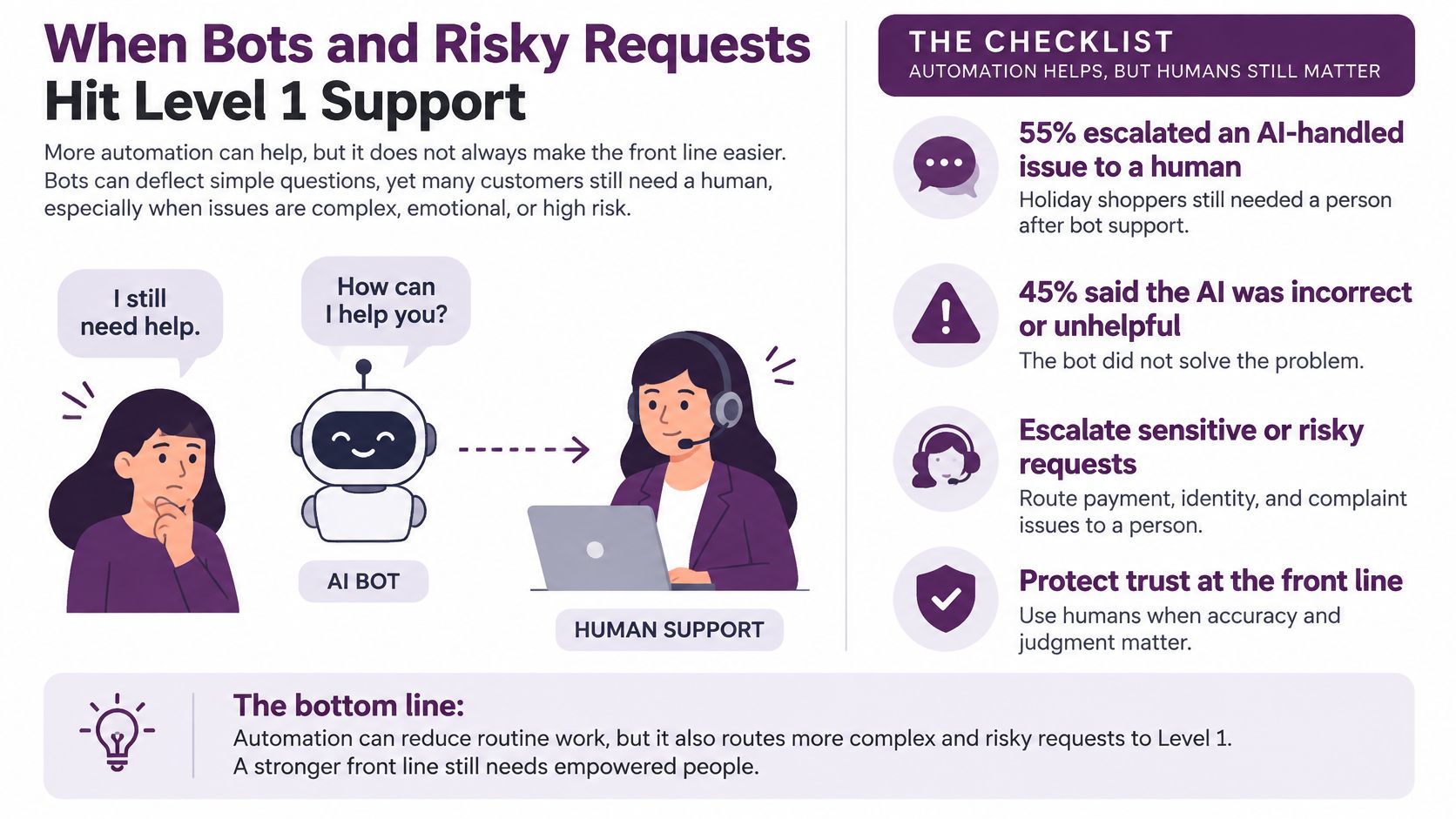
When Bots and Risky Requests Hit Level 1 Support
What happens when a bot says a task is complete, but the customer still has the problem? The handoff to Level 1 should carry the conversation forward, not make the customer start over.
A conversational AI support workflow needs a clear route to a human when automation fails, loses context, or reaches a request that requires authorization. The receiving agent should see what the customer asked, what the bot tried, and what remains unresolved.
Make the human takeover usable
A useful handoff preserves:
- Conversation history: Keep the original exchange and label any summary clearly.
- Customer language: Record the preferred language and keep English and Spanish notes together in the ticket.
- Verification status: Show what was checked, what succeeded, and what remains unverified.
- Attempted actions: Include diagnostic results, failed transactions, and unanswered questions.
- Human ownership: Assign the next owner and record the human-handoff trigger and apply the agreed response timer.
Keep the original contact timestamp alongside any handoff timer; whether a separate clock starts depends on the service agreement. Restarting the timer without retaining the first timestamp can hide how long the customer has already waited.
Track whether escalations arrive with complete context, how long they take to reach human ownership, and whether customers contact support again after the handoff. Deflection alone cannot show whether a customer got help or gave up.
Treat security pauses as part of the service
Some requests need an authorized human, not a faster bot response. Route suspected account takeover, fraud review, clinical judgment, sensitive payment or medical changes, and privileged-access requests through the approved human workflow. A bot can explain the next step without carrying it out.
Level 1 can handle low-risk how-to questions and standard resets under approved controls. Requests involving ownership changes, payment visibility, or health details may require step-up verification, restricted screen access, and documented approval. Suspected compromise calls for immediate escalation.
Authentication and recovery procedures should be designed by the responsible security team. NIST’s digital authentication guidance is a technical reference for authentication assurance and account recovery; it is not a ready-made script or a substitute for program-specific controls.
For example, a Spanish-speaking customer asks to replace the bank account used for payouts. The agent can preserve the explanation in Spanish, add an accurate English operational summary, and route the request to an authorized reviewer. That keeps the customer’s meaning attached to the ticket without asking the next person to reconstruct it from memory.
Set call-recording, retention, and cross-border access rules before the queue opens. Sensitive details should not go into an unrestricted transcript just because a specialist may need context.
A prompt, controlled escalation is better service than an unauthorized action taken to improve a closure metric.
In finance, healthcare, insurance, and telecom, a security pause can be the correct escalation path, but the issue remains open until the defined outcome or closure policy is met.
 Build or Outsource Your Level 1 Support Desk
Compare in-house, outsourced, and hybrid support through scope, control, skills, coverage, and total cost. Rapidly changing knowledge or restricted access may favor keeping some tasks internal, while a properly scoped partner may provide additional coverage and bilingual capacity. A hybrid model can retain sensitive decisions internally and assign approved repeatable tasks to an external desk.
Steady volume also matters. An internal operation needs enough work to support supervision, QA, training, and after-hours coverage, not just agents answering contacts.
Compare the operating model, not the hourly rate
Include recruiting, supervision, software, training, absence coverage, security controls, and rework in the internal cost. Compare that with a current provider quote for the same channels, languages, hours, ticket types, and specialist dependencies.
A low hourly rate can hide costly repeat contacts and incomplete handoffs. Evaluate cost per resolved issue using a defined cohort and consistent treatment of cross-team work. Keep quality and customer effort visible beside cost.
For a nearshore operation, confirm actual working-hour overlap, English-Spanish proficiency, systems access, supervision, coaching, and reporting. Check specialist coverage on each shift rather than assuming a bilingual frontline team can complete every escalation.
If live chat is included, test whether the platform preserves context, separates unverified bot claims from confirmed records, and gives customers a practical route to a qualified person. Tool selection should support the ownership design.
Pilot a defined queue
When discussing Level 1 support with CallZent, define eligible help-desk tasks, required product knowledge, approved access, ticket ownership, training, and specialist handoffs. Validate compatibility with your CRM, help desk, and communication systems before launch, along with security requirements and the ramp plan.
Technical support, overnight coverage, compliance requirements, and custom integrations can change the final rate. Define those needs before comparing quotes.
- Write the boundary: List eligible requests and mandatory escalation conditions.
- Set the clock: Assign priority targets and backup owners.
- Pilot one queue: Review accuracy, handoffs, and repeat contacts before expanding.
Bring that scope to a Tijuana support-desk scoping conversation before moving the whole operation.
Frequently Asked Questions
What is Level 1 support?
Level 1 is the first human support tier for common incidents and service requests, often after self-service or automation. It establishes ownership, performs approved verification and actions, documents results, and routes work that needs deeper expertise or authority.
What is the difference between Level 1 and Level 2 support?
Level 1 handles tasks within documented frontline procedures and permissions. Level 2 provides deeper product expertise or additional authorized access. The exact boundary is defined by the organization, not by a universal job title or ticket volume.
Which issues can Level 1 support resolve?
Examples include approved account-access recovery, order updates, booking changes, and how-to questions. Each task needs an authorized workflow, suitable training and tools, verification requirements, and a clear stopping point. A task is not eligible merely because it appears simple.
When should Level 1 escalate a ticket?
Escalate when the next step exceeds permissions or expertise, approved attempts fail, a priority threshold is met, or an owner misses an acceptance deadline. Security, clinical, or safety triggers may require immediate specialist action without routine troubleshooting.
What information belongs in an escalation handoff?
Include the issue, impact, urgency, permitted account reference, language preference, verification result, steps tried, relevant redacted evidence, commitments, and next action. Record the receiving owner’s acceptance and retain the original contact timestamp. Do not include secrets or unnecessary sensitive data.
Is first-level resolution the same as first-contact resolution?
No. First-level resolution concerns completion within Level 1 without higher-tier work and may involve several contacts. First-contact resolution concerns completion during the first contact under defined rules and a same-issue repeat window. Specify how consultations, transfers, and callbacks are treated.
What is a good Level 1 resolution target?
Set a target from the eligible workload, permissions, complexity, baseline, and service commitments. Compare similar cases and report exclusions. A high closure rate is not useful if reopens, repeat contacts, or unsafe actions increase.
How should Level 1 handle a failed chatbot interaction?
Review the original conversation and clearly labeled summary, validate important facts and verification status, and continue from the relevant point. Preserve language preference, attempted actions, and waiting history. Recover missing context without automatically sending a routine issue to a specialist.
Can Level 1 support handle healthcare or financial requests?
It can perform specifically authorized administrative or service tasks with suitable training, access, and safeguards. Clinical advice, restricted decisions, suspected compromise, and sensitive account changes need the appropriate qualified or authorized resource. A generic script does not confer professional authority.
Can a nearshore partner provide bilingual Level 1 support?
A properly scoped partner can provide agreed English-Spanish support, coverage, and ticket handling. Confirm proficiency, product training, systems compatibility, security, supervision, and specialist availability. Pilot a defined queue and review quality, accepted handoffs, and repeat contacts before expanding.
Bilingual Nearshore Support in Mexico
Build Level 1 Support With Clear Ownership
Discuss your ticket scope, English-Spanish coverage, permissions, and specialist handoffs with CallZent. Define a Level 1 pilot with trained agents, clear escalation targets, and measurable service outcomes.