
Multichannel Contact Centre
Your Guide to a Multichannel Contact Center in 2026
Learn how a multichannel contact center works, where it breaks down, which technology matters, and how nearshore staffing helps growing teams scale support without losing context.
TL;DR — Quick Takeaways
- A multichannel contact center lets customers contact you through multiple channels such as voice, email, chat, SMS, and social.
- It improves accessibility and customer choice.
- It often breaks down when conversations move between channels and agents lose context.
- The fix is not just better software. It is channel design, routing rules, SOPs, and agent training.
- For growing businesses, a nearshore BPO model can reduce the staffing and training burden while keeping service quality high.
A customer starts on web chat, explains the problem clearly, then calls five minutes later and has to repeat the whole story to a different agent. If that sounds familiar, your issue usually isn’t a lack of channels. It’s the gap between them.
A multichannel contact center gives customers more than one way to reach your business. That’s useful. It’s also where many support teams create new friction by adding email, chat, SMS, voice, and social without building the operating model behind them. More doors don’t help if every door leads to a different room.
Introduction Are Your Customer Conversations Getting Lost in Translation?
A practical way to think about a multichannel contact centre is this. It’s a toolbox with several tools for customer communication. Phone for urgent issues. Email for detailed follow-ups. Chat for quick questions. SMS for updates. Social for public-facing service. The problem starts when each tool works well on its own, but the team has no consistent way to carry context from one tool to the next.
Key takeaway: Modern customer service isn’t just about being available everywhere. It’s about being consistent everywhere.
Growing companies usually hit the same wall. They add channels because customers want flexibility, but operations still run in silos. One supervisor manages calls. Another watches email backlog. Chat gets staffed when agents are free. Nobody owns the full journey. That’s why so many support leaders are rethinking how customer communication should work across the entire stack, a shift that’s also reflected in the broader evolution of customer communication channels.
If you’re scaling support, the goal isn’t to be present on every channel. The goal is to support the right channels well, without forcing customers or agents to do extra work.
What Exactly Is a Multichannel Contact Center
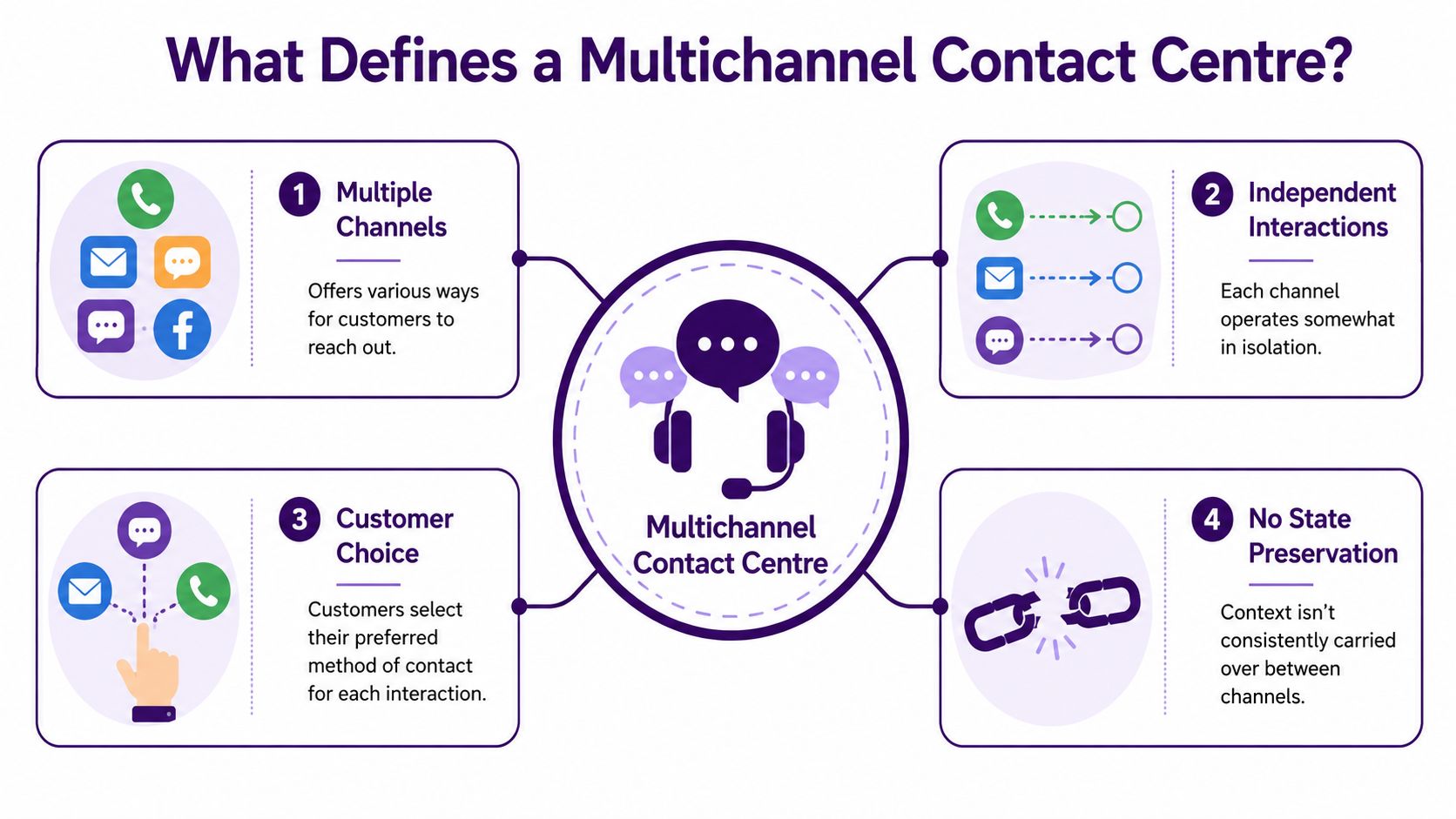
A multichannel contact centre gives customers several ways to reach your team. That usually includes voice, SMS, email, chat, and social. The core benefit is simple. Customers can choose the method that fits the moment.
But there’s an important operational catch. A multichannel setup can place those channels inside one agent dashboard while still keeping them separate behind the scenes. As GetVoIP’s definition of a multichannel contact center puts it, a multichannel contact center integrates distinct communication channels into a unified agent dashboard, yet those channels operate independently with limited backend integration, which creates disconnected touchpoints across platforms.
The house-with-many-doors problem
A multichannel contact centre is like a house with many front doors. Customers can choose whichever entrance is easiest. One door is chat. One is phone. One is email. One is SMS.
The problem is that each door may lead to a different room with no hallway connecting them.
A customer might start a return request in chat because it’s quick, then call because they need a refund approved faster. In a standard multichannel setup, the phone agent often sees only the call queue and whatever notes were manually entered. If the chat transcript didn’t transfer cleanly, the customer starts over.
Where multichannel works well
Multichannel can be the right fit when you need broader access fast and don’t want to force every customer into the same support path.
- Voice handles urgency: Billing disputes, technical outages, and sensitive issues usually need real-time discussion.
- Email supports detail: Customers can attach screenshots, documentation, or order histories.
- Chat lowers friction: It’s efficient for simple questions, order checks, and guided troubleshooting.
- SMS keeps updates short: Appointment reminders, shipping alerts, and callback coordination fit naturally there.
- Social catches public issues: Customers already complain or ask questions on the platforms they use daily.
Where multichannel breaks down
The weak point is continuity.
| Customer need | What multichannel often does |
|---|---|
| Start on one channel and continue on another | Treats it like a new interaction |
| Preserve conversation history | Requires manual note-taking |
| Route to the right agent with full context | Depends on fragmented systems |
| Keep service consistent across channels | Varies by queue, tool, and team |
Customers like choice. They don’t like repeating themselves.
That distinction matters more as you grow. Offering multiple channels is easy compared with managing the handoffs between them.
Multichannel vs Omnichannel The Critical Difference
A lot of teams use these terms interchangeably. They shouldn’t.
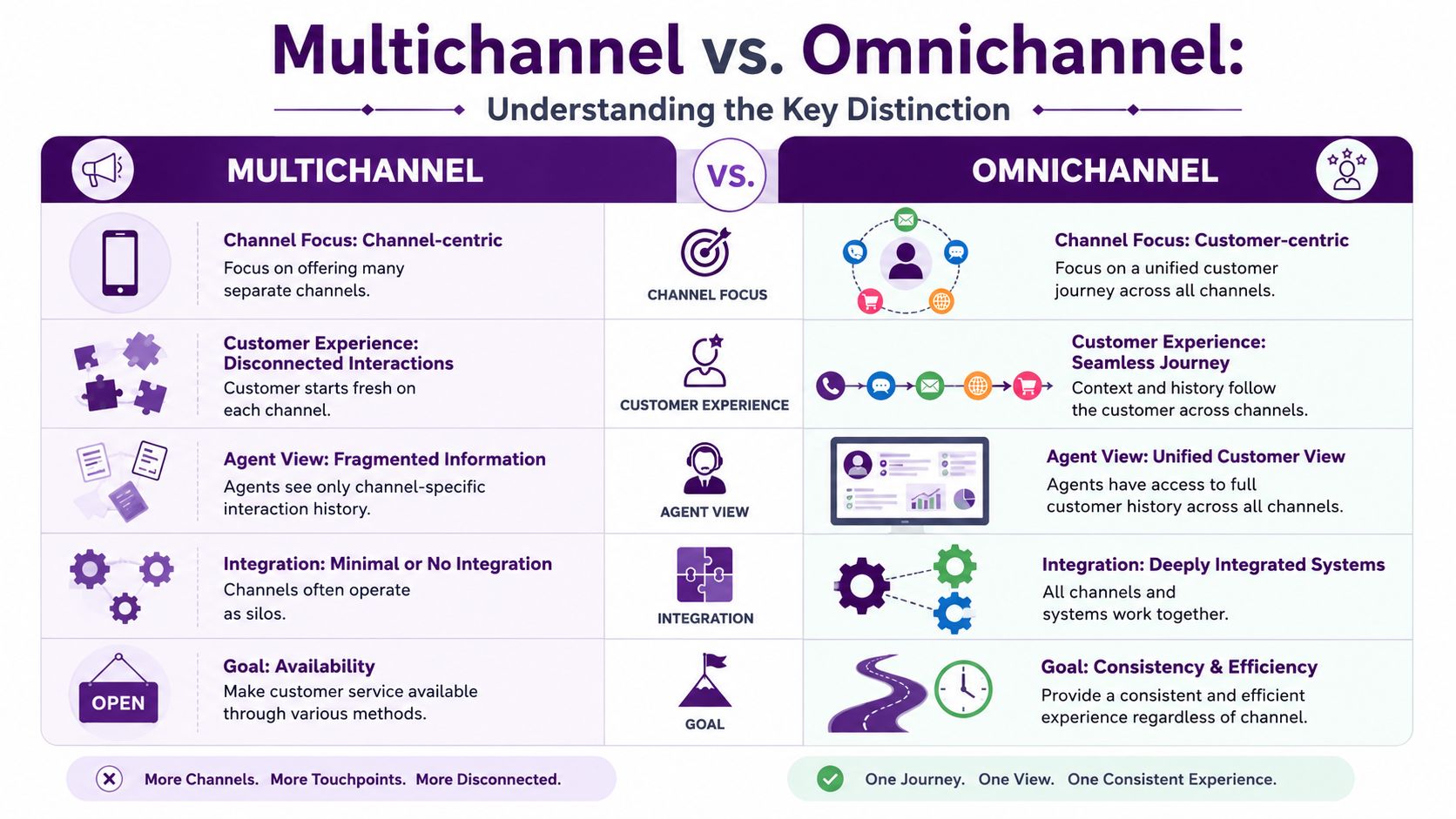
Multichannel means your business supports several communication channels. Omnichannel means those channels are connected into one continuous customer journey. The difference isn’t cosmetic. It changes how customers experience service and how agents do their jobs.
The difference shows up during channel switching
Take a common scenario. A customer emails about a delayed order. Later they receive an SMS update that doesn’t answer the question, so they call.
In a multichannel setup, the call agent may see the phone number and maybe a CRM profile, but not the complete thread. The agent asks for the order number, asks what happened, and rebuilds the case manually. The customer hears that as inefficiency.
In an omnichannel setup, the call lands with full interaction history attached. The agent sees the original email, the outbound SMS, and the current order status. The conversation starts where the last one ended.
That gap is still huge across the industry. CMSWire notes that only 7% of contact centers deliver truly seamless cross-channel transitions. That’s the line between offering many channels and effectively connecting them.
Think in two layers
Most operators make the mistake of looking only at channels. The effective comparison has two layers:
Communication layer
This is what the customer sees.
- Phone
- Chat
- SMS
- Social messaging
- Self-service
If you stop here, you have access. Not continuity.
System layer
This is what your team works inside.
- CCaaS platform
- CRM
- Ticketing or helpdesk
- Knowledge base
- QA tools
- Workforce management
If these systems don’t share data properly, agents work from fragments. That’s why multichannel often feels better on a vendor demo than it does on a busy Monday.
Which model should a growing business choose
Not every business needs full omnichannel maturity on day one. Some should start with a clean multichannel structure and fix channel discipline first. Others already have enough volume, customer complexity, or compliance sensitivity that disconnected channels cost too much in repeat effort.
A simple rule helps.
Practical rule: If your customers regularly move between channels during one issue, you’re already paying the price of poor continuity.
For teams deciding what to build toward, this overview of omnichannel customer support is useful because it frames the operational difference, not just the software label.
The Technology Powering Your Multichannel Strategy
Technology matters. It just doesn’t solve the whole problem.
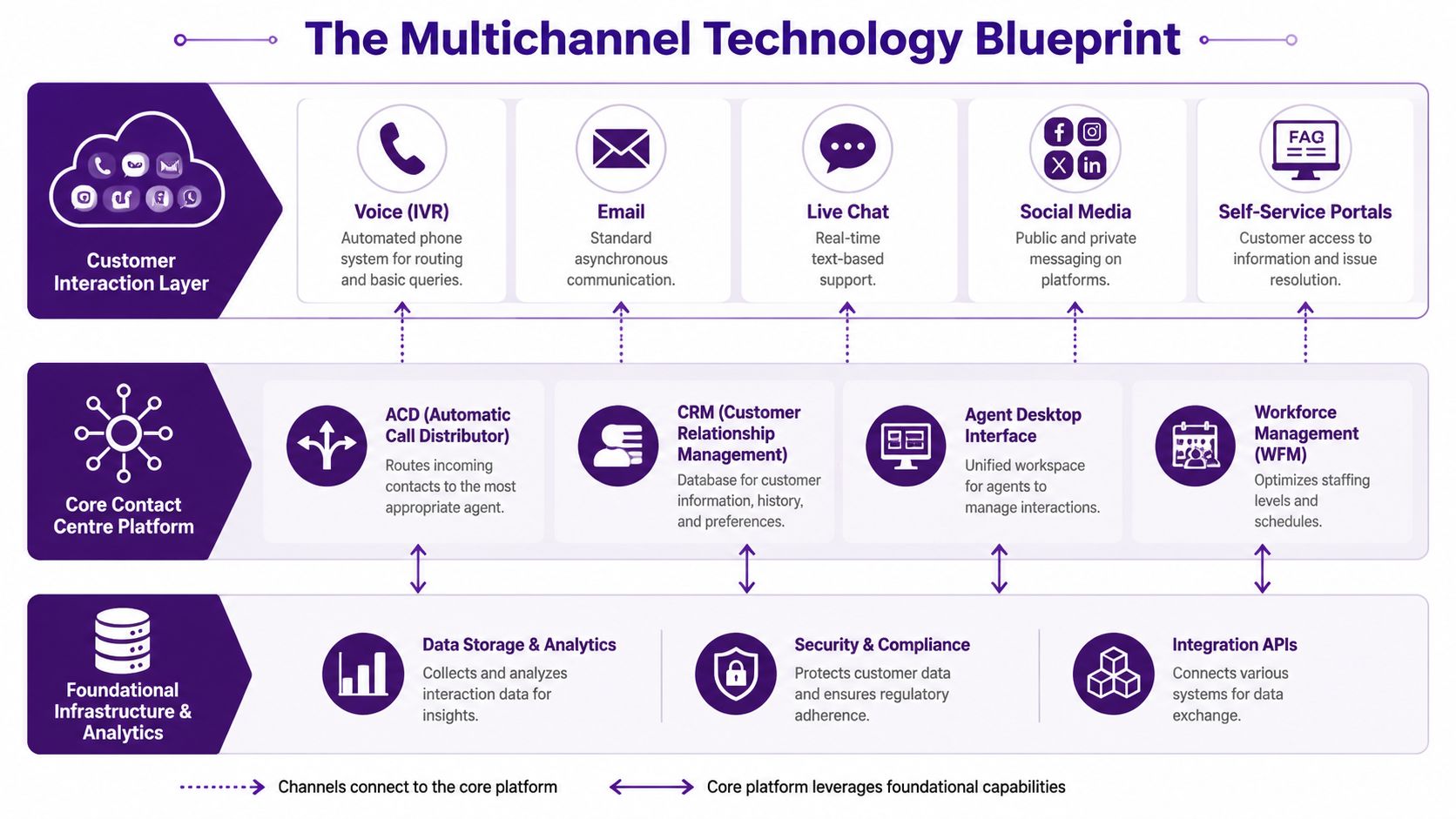
A modern multichannel contact centre usually starts with a cloud contact center platform. That platform handles routing, queueing, agent workspaces, channel management, and reporting. Around it, you need a CRM for customer records, a ticketing system for case history, a knowledge base for consistent answers, and analytics tools that show what’s happening across queues.
The core stack that usually matters
A practical stack looks like this:
- CCaaS platform: Handles voice, chat, email, SMS, routing, and agent desktops.
- CRM: Stores customer identity, account details, order data, and previous activity.
- Ticketing layer: Keeps issue status visible across asynchronous channels.
- Knowledge base: Reduces answer variability between teams and shifts.
- WFM tools: Forecast volume and align staffing to channel demand.
- QA and analytics: Expose failure points in handling, transfers, hold time, and repeat contact.
If you’re comparing platform capabilities, this breakdown of call center software features is a good checklist because it separates nice-to-have features from the ones operations use every day.
AI is changing the stack, but not replacing operations
AI is now part of the baseline conversation. Zoom reports that by 2025, approximately 80% of customer service organizations are predicted to use generative AI to enhance agent productivity. In practice, that usually means summarizing conversations, drafting replies, surfacing knowledge articles, or helping agents move between channels faster.
That’s useful. It also creates false confidence if the underlying workflows are weak.
An AI assistant can summarize a chat transcript. It can’t fix bad escalation paths, poor account tagging, or unclear ownership between chat and voice. If your CRM is incomplete or your ticket status rules are sloppy, the agent still works with a broken record.
For teams evaluating CRM-centered service workflows, this overview of Salesforce Service Cloud is helpful because it shows how service cases, customer data, and support workflows can sit inside one connected environment.
The overlooked layer is agent usability
The question I ask first is simple. How many screens does an agent need to resolve one issue?
If the answer is five or six, your multichannel operation will feel harder than it should. Agents lose time switching tabs, copying notes, checking order history, and verifying what happened on another channel. Customers experience that as pauses, repeated questions, and inconsistent answers.
The better setup is not the platform with the longest feature list. It’s the setup where an agent can quickly see what happened, what matters now, and what action to take next.
That’s why technology decisions should be made with staffing decisions, not before them.
Staffing for Success The Nearshore Advantage
The hardest part of a multichannel contact centre usually isn’t channel deployment. It’s asking real people to work across those channels without burning out.
Teams often assume one agent can answer calls, manage chat, respond to email, and monitor SMS if the software puts everything in one dashboard. On paper, that sounds efficient. In production, it often creates cognitive overload. Every channel has a different pace, tone, handling pattern, and service expectation.
That gap shows up clearly in training. Aspect reports that while 74% of businesses say they offer multichannel support, only 32% have agents trained to pivot across channels seamlessly, and the gap leads to a 28% increase in average handling time during peak volume shifts. That’s not a software problem. It’s a workforce design problem.
What good staffing looks like in practice
A reliable multichannel staffing model does three things well:
- Separates primary from secondary skills: Not every agent should be equally loaded across every channel.
- Builds rotation deliberately: Chat-heavy agents need different rhythm and coaching than voice-heavy agents.
- Uses escalation rules that fit the channel: Sensitive account issues may need voice. Simple status updates can stay in SMS or email.
A nearshore partner can reduce the time and management effort needed to build that structure internally. For North American businesses, the practical advantages are easier communication windows, closer cultural alignment, and access to bilingual teams who can support English and Spanish interactions without adding offshore distance or complexity.
Use KPIs as diagnostic tools, not vanity metrics
A lot of support teams track metrics but don’t read them correctly. In a multichannel environment, the same KPI can point to different problems depending on where it breaks.
First Contact Resolution
If FCR drops on voice after chat volume rises, that often means agents are losing context before the call starts. The fix may be routing or case visibility, not coaching alone.
Average Handle Time
If AHT spikes during peak shifts, check whether agents are switching between too many channels at once. Rising AHT can signal weak cross-channel training, poor note quality, or overloaded staffing plans.
Queue times
Long queue times on one channel while another channel stays underused usually means your skill assignment is too rigid. Good workforce planning should let you rebalance coverage without chaos.
Resolution rates by channel
If email resolution looks fine but chat resolution drops, your scripts may be too long for real-time text. Channel-specific coaching matters.
A KPI should tell you what to fix next. If it only tells you whether you’re anxious, it isn’t helping.
For companies building support capacity near the U.S., resources on how to hire tech talent in Latin America can also help frame the broader labor market, especially if your service model depends on bilingual operations and flexible scheduling.
A nearshore setup becomes more attractive when you need skilled coverage fast without creating a management burden internally. That’s one reason many growing brands look at nearshore call center support when multichannel demand starts outpacing the in-house team’s ability to train, schedule, and supervise across channels.
Key Metrics for a High-Performing Multichannel Operation
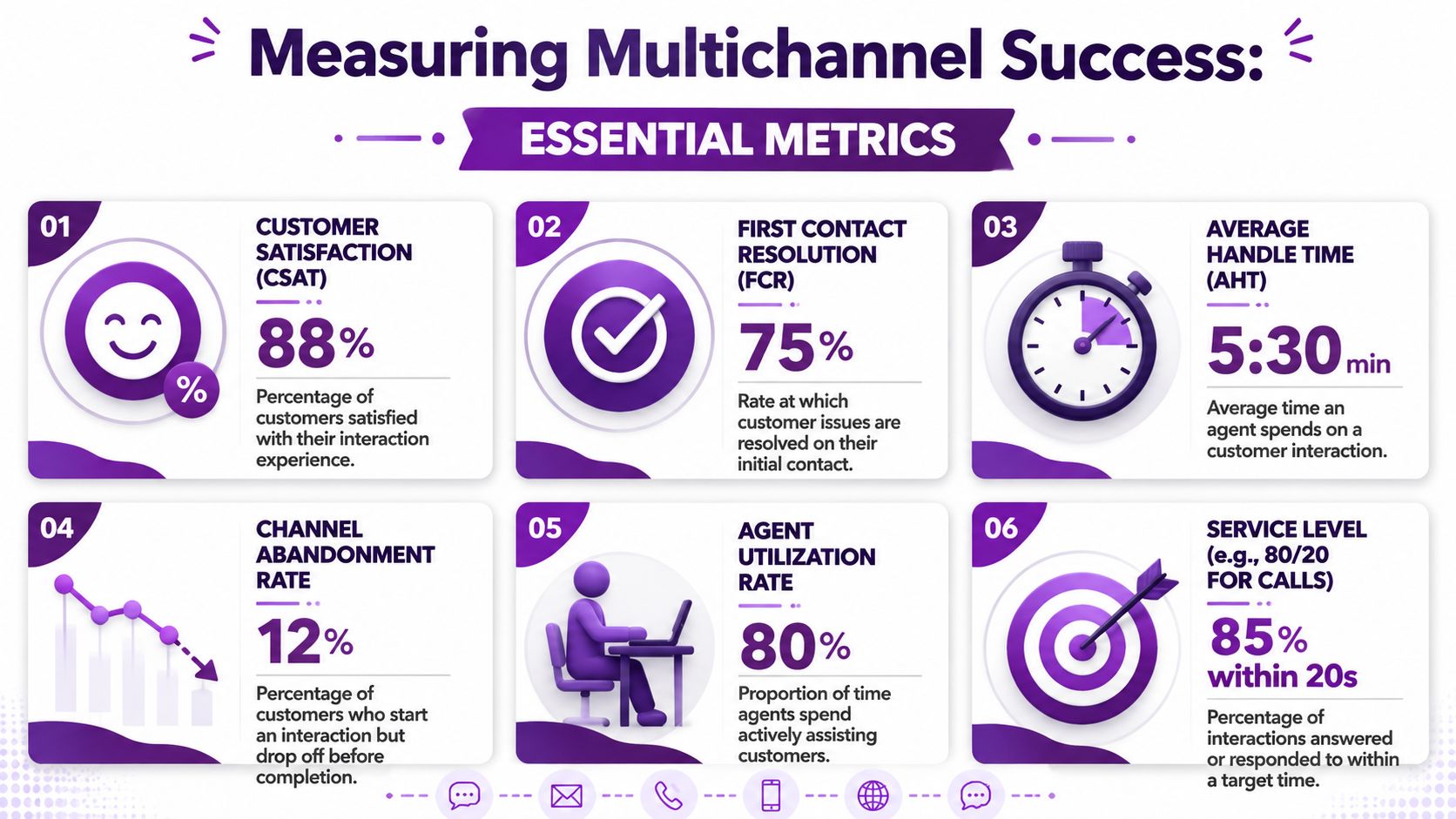
If you can’t see where service breaks, you can’t improve it. In a multichannel contact centre, metrics should tell you whether customers are getting answers, whether agents are carrying context effectively, and whether each channel is staffed for the demand it creates.
Nextiva’s guidance is practical here. To reduce multichannel limitations, businesses should monitor queue times, resolution rates, and channel usage, and they should build standardized SOPs for routing and escalation, as outlined in Nextiva’s multichannel contact center recommendations.
The metrics that actually reveal operational health
CSAT
CSAT is your outcome check. In multichannel operations, low CSAT often points to friction during handoffs, inconsistent answers, or long wait times in the channel customers consider most urgent.
FCR
FCR tells you whether your design is helping agents solve issues without bounce-backs. If FCR is weak only when customers switch channels, the problem is likely continuity rather than knowledge.
AHT
AHT should be reviewed by channel, not as one blended number. A healthy voice AHT can hide a messy chat workflow. A high email handling time may be acceptable if complexity is high. Context matters.
Queue time and backlog
These metrics show where staffing or routing is breaking. Long voice queues and growing email backlog usually mean you’re prioritizing one channel at the expense of another without a clear policy.
Add channel usage and note quality to the review
While volume by channel is often reviewed, fewer teams examine how cleanly information moves between channels.
That’s where conversation summaries, after-contact notes, and transcript quality matter. If agents can’t trust the notes left behind, every transfer becomes slower. For leaders working on documentation quality, this guide on achieving high accuracy for meeting notes is useful because it highlights the practical issue behind every handoff: the next person needs a clear record they can trust.
Build one operating rhythm around the numbers
Use one review cadence across channels, but don’t force one standard onto every channel. Voice, chat, and email behave differently. The discipline should be shared even when the benchmarks aren’t identical.
A clean operating review usually includes:
- Daily channel view: Queue status, backlog, service pressure, staffing gaps
- Weekly quality readout: Recurring friction points, bad transfers, repeated customer effort
- Monthly trend review: Channel usage shifts, staffing alignment, resolution patterns
For teams that want a cleaner framework, this guide to KPIs in customer service is a practical starting point for deciding what to track and what to stop over-measuring.
Your Roadmap to Multichannel Implementation and ROI
Most multichannel projects fail for a simple reason. Companies buy technology before they decide how service should flow. That creates a channel stack, not an operating model.
A better rollout starts with customer behavior and works backward into staffing, systems, and measurement.
Step 1 Assess where customers already reach you
Start with current demand, not channel trends. Look at where customers contact you today, where they abandon, and where repeat contacts happen. If phone and email carry most of the load, fix those before adding social messaging or in-app support.
An ecommerce brand, for example, might discover that order status questions belong in SMS and self-service, while returns need chat plus email confirmation. A healthcare practice might keep appointment reminders in secure messaging but route billing disputes to live voice because the issue is more sensitive and harder to resolve asynchronously.
Step 2 Set channel roles before you add headcount
Every channel should have a job.
- Voice should handle urgency, complexity, and emotionally charged cases.
- Chat should cover quick support and guided troubleshooting.
- Email should manage documentation-heavy or less urgent requests.
- SMS should focus on short updates, reminders, confirmations, and follow-ups.
- Social should triage public complaints and redirect private account issues into secure channels.
When channel roles are unclear, volume drifts, queues become unstable, and agents end up doing unnecessary work.
Step 3 Choose tools and partners that reduce handoff friction
The right question isn’t “Which platform has the most features?” It’s “Which setup makes the next action obvious to the agent?”
Your CRM, ticketing workflow, knowledge base, and routing logic should all support that answer. One practical option for businesses that need bilingual multichannel support is CallZent, a nearshore Tijuana-based call center and BPO that supports customer service across voice and digital channels. In this model, the partner handles a large part of the staffing, training, and operational execution that often slows internal teams down.
Step 4 Pilot with narrow scope
Don’t launch every channel at once. Start with the combinations your customers already use most.
A good pilot might look like this:
- Launch voice plus chat first: These channels expose real-time workflow issues quickly.
- Add email after SOPs are stable: That gives supervisors time to tighten escalation and note quality.
- Introduce SMS for status updates: Keep it narrow at first so it supports operations instead of distracting them.
Start with the channels your team can run consistently. Expansion should follow control, not ambition.
Step 5 Train by scenario, not by software menu
Agents don’t need a tour of every button. They need practice with realistic transitions.
Train for moments like these:
- A customer starts in chat, then asks for a callback
- A delayed-order complaint moves from social to email
- A Spanish-speaking caller needs billing support after receiving an English SMS reminder
- A healthcare patient wants a reminder by text but asks clinical questions that need a different handling path
That kind of training reduces hesitation and keeps responses consistent across channels.
Step 6 Review ROI through effort reduction
Multichannel ROI is often misunderstood. It’s not just lower cost per contact. It’s lower repeat effort for both the customer and the agent.
You should see improvement when:
- Customers stop repeating account details
- Agents spend less time rebuilding context
- Supervisors can staff channels with fewer surprises
- Escalations become cleaner and more consistent
- Backlog and queue pressure are easier to predict
That’s when a multichannel contact centre starts acting like a business asset instead of a patchwork of tools.
🚀 Ready to Build a Better Multichannel Support Model?
CallZent helps North American businesses scale bilingual nearshore customer service across voice, email, chat, SMS, and back-office workflows with better staffing, training, reporting, and operational control.
Talk to an ExpertFAQs About Multichannel Contact Centres
What is a multichannel contact centre?
A multichannel contact centre is a customer support operation that lets customers contact a business through multiple channels such as phone, email, chat, SMS, social messaging, and self-service.
What channels are included in a multichannel contact centre?
Common channels include voice, email, live chat, SMS, social media, messaging apps, ticketing portals, and self-service tools. The right mix depends on customer behavior, support complexity, and staffing capacity.
What is the difference between multichannel and omnichannel support?
Multichannel support offers multiple communication channels. Omnichannel support connects those channels into one continuous customer journey so agents can see full context when customers move from one channel to another.
Why do multichannel contact centres break down?
They often break down because channels operate in silos, customer history does not transfer cleanly, routing rules are unclear, agents are not trained across channels, or systems do not share enough data.
What technology does a multichannel contact centre need?
A strong multichannel contact centre usually needs a CCaaS platform, CRM, ticketing system, knowledge base, workforce management tools, QA tools, analytics, and reporting dashboards.
How does AI support multichannel customer service?
AI can help summarize conversations, draft responses, recommend knowledge base articles, surface customer context, and reduce agent effort. However, AI works best when routing, documentation, CRM data, and escalation workflows are already strong.
Why is staffing important in a multichannel contact centre?
Each channel has a different pace, tone, and complexity. Staffing plans need to account for skill mix, channel rotation, peak demand, escalation needs, and agent workload to prevent burnout and inconsistent service.
What KPIs should a multichannel contact centre track?
Useful KPIs include CSAT, first contact resolution, average handle time by channel, queue time, backlog, channel usage, transfer quality, note quality, escalation accuracy, and resolution rates by channel.
Why use a nearshore partner for multichannel support?
A nearshore partner can help businesses access bilingual talent, align support hours with North American operations, reduce management burden, improve communication, and scale coverage across voice and digital channels.
How can CallZent help with multichannel contact centre support?
CallZent helps North American businesses build bilingual nearshore support teams across voice, email, chat, SMS, and back-office workflows from Tijuana, Mexico, with staffing, training, QA, and operational support.
If your support operation is adding channels faster than it can standardize training, routing, and reporting, CallZent can help you design a more workable model. The team supports North American businesses with bilingual nearshore customer service and back-office solutions from Tijuana, giving growing companies a practical way to scale voice and digital support without building every process alone.