
Outsourcing Cost Benefit Analysis
Outsourcing Cost Benefit Analysis: How to Build a CFO-Ready Business Case
Learn how to build an outsourcing cost benefit analysis that accounts for total landed cost, hidden transition work, management overhead, compliance, ROI, break-even timing, and nearshore call center savings.
TL;DR — Quick Takeaways
- Outsourcing cost benefit analysis should not begin with the vendor’s hourly rate. It should begin with total landed cost.
- The strongest business cases account for transition work, supervision, quality checks, compliance, vendor management, and break-even timing.
- Customer support is often easier to model because the work is repeatable, high-volume, measurable, and easier to compare against in-house staffing.
- Hidden costs such as setup, knowledge transfer, QA calibration, legal review, rework, and management time can destroy outsourcing ROI.
- A CFO-ready model should include conservative, base, and stress-case scenarios.
- The best outsourcing decision is the one with clear net savings, realistic transition assumptions, and defensible SLA controls, not the lowest promotional price.
A CFO usually sees the same scene in an outsourcing decision. Two proposals sit on the desk, both promise lower cost, both use clean slide decks, and both make the in-house team look expensive by comparison. Then someone asks the question that matters, “What does this cost after transition, management, quality checks, and compliance?” That’s where a real outsourcing cost benefit analysis separates a smart operating move from an expensive mistake.
TL;DR: The strongest outsourcing business cases don’t start with the vendor’s hourly rate. They start with total landed cost, hidden transition work, and a break-even test that survives scrutiny from finance, operations, and compliance. For many teams, especially in customer support, the savings come from recurring labor and overhead reduction, not from a single headline price drop.
Why Most Outsourcing Decisions Fail Before They Start
A VP of Operations usually doesn’t lose money because they picked the wrong category to outsource. They lose money because they trusted the first number that looked convincing. A proposal can show a lower rate, yet still miss setup work, supervisor attention, training time, service disruption, and the cost of fixing mistakes after launch.
That’s why a structured outsourcing cost benefit analysis matters before anyone signs. The core logic is simple. Outsourcing value usually comes from recurring labor and overhead savings, and in customer service the model is often easier to measure because the work is repeatable, high-volume, and easier to compare against in-house staffing. Benchmarks from outsourcing cost summaries put average operational cost reduction in the 15–30% range across industries, with net savings after hidden costs often still landing in the 15–40% range, and customer service savings often around 40–60% per interaction relative to in-house contact center operations. Those figures are useful not because they promise certainty, but because they remind leaders where the value tends to live, in labor, supervision, and overhead, not in a flashy rate card. Deloitte-based outsourcing savings summary
Practical rule: If the proposal only makes sense when you ignore supervision, transition, and quality work, it doesn’t really make sense.
For a nearshore buyer, that’s where the conversation gets real. A Tijuana-based team can look attractive against a California payroll line item, but the comparison only works when the buyer measures it against the full in-house burden, not just base wages. If your team is still calibrating expectations with leadership, the guidance on managing expectations in outsourcing is worth reviewing before the first vendor call.
A useful way to think about the first filter is this. If the process is repetitive, measurable, and customer-facing, outsourcing tends to be easier to model. If the process is highly variable, politically sensitive, or full of undocumented exceptions, the business case gets harder fast. That’s why many firms start with support work, billing help, or back-office administration before moving anything mission-critical.
For sourcing talent comparisons outside a full BPO model, some teams also look at the best place to hire LatAm remote talent when they need a broader labor-market view. The important point is the same, the cheapest-looking option rarely stays cheapest once the actual workload shows up.
Building Your Outsourcing Cost Benefit Analysis Framework
A sound framework starts with scope, not vendor quotes. Define the business process first, whether that is inbound customer support, technical help desk, appointment scheduling, or back-office administration. If the scope is unclear, the cost math will be unclear too.
Step one, define the process you’re moving
A 50-seat in-house customer service team in California is not the same as a 50-seat nearshore team in Tijuana unless the workload, channel mix, shift coverage, and escalation rules are the same. They usually are not. The process definition should include channels, operating hours, languages, systems access, and the exceptions that require supervisor intervention.
A CFO also needs to map where labor arbitrage ends and operational complexity begins. That matters in nearshore call center models because a lower wage base can disappear fast once the work needs heavier oversight, more calibration, or tighter compliance controls. A practical overview of labor arbitrage meaning helps keep that distinction clear before the model gets built.
Step two, calculate the in-house costs you can avoid
Count the obvious items first, then the ones finance often has to pull from three departments. That includes direct wages, benefits, training, management time, recruiting, software licenses, and facility overhead. If the team uses shared office space, include the allocation for desks, devices, telecom, and local admin support.
The comparison gets sharper when you hold every role to the same standard. A payroll administrator, a patient support agent, and an e-commerce service rep may all sit in the same cost center, but their real burden differs once you include supervision, exception handling, and the systems they touch. For benefit-heavy roles, some buyers also review compare PEO vs ASO vs TPA to see how employer burden shifts when a function changes service structure.
Step three, calculate the total outsourcing cost
Vendor fees matter, but they are only one part of the answer. Add transition expense, knowledge transfer, process documentation, vendor management, quality reviews, and any compliance work that moves to legal or security. A framework that stops at the vendor quote is incomplete.
Nearshore buyers need to include the management layer that sits between the contract and the floor. In a healthcare contact center, that can mean extra review cycles for PHI handling. In finance, it can mean controls work around account access and escalation rules. In e-commerce, it often shows up as more reporting and faster issue resolution because the customer volume changes quickly.
Step four, subtract one from the other
The practical evaluation method is straightforward. Compare in-house cost against total outsourcing cost, then subtract to find savings. That is the version that survives a boardroom review because it shows what the work really costs to run month after month.
A nearshore example makes the framework easier to use. If a U.S. business is evaluating a bilingual support team in Tijuana, the in-house comparison should include U.S. payroll burden, office overhead, hiring lag, and supervisory load. The outsourcing comparison should include vendor fee, implementation work, call calibration, reporting, and the manager time needed to keep the relationship on track.
The best spreadsheet is not the one with the lowest vendor rate. It is the one that shows what the work really costs to run month after month.
Hidden Costs That Destroy Outsourcing ROI
Most bad outsourcing decisions don’t fail because the vendor underdelivered on a slogan. They fail because the buyer treated transition like a footnote. The result is a cost model that looks clean on paper and turns messy in the first quarter.
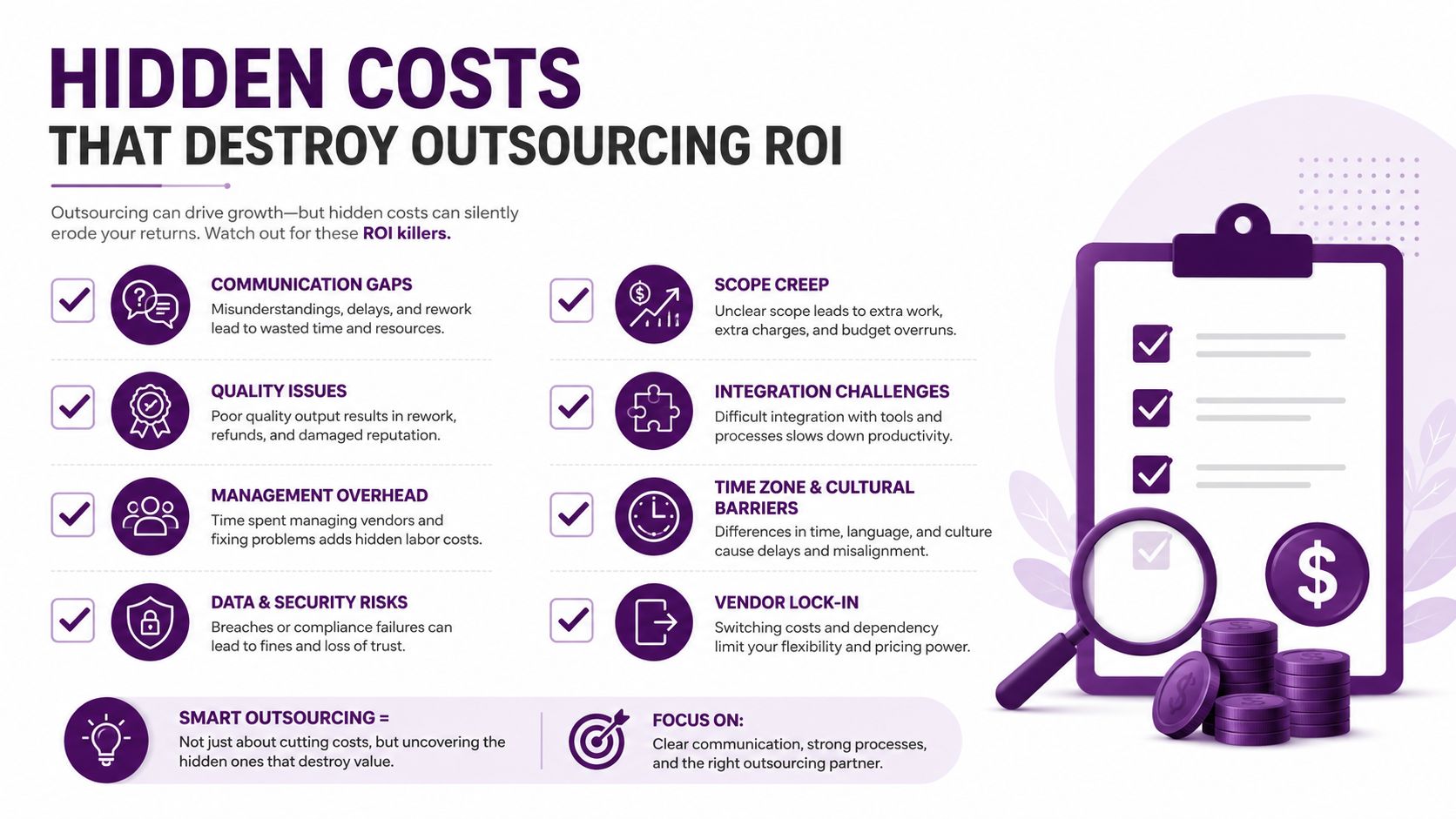
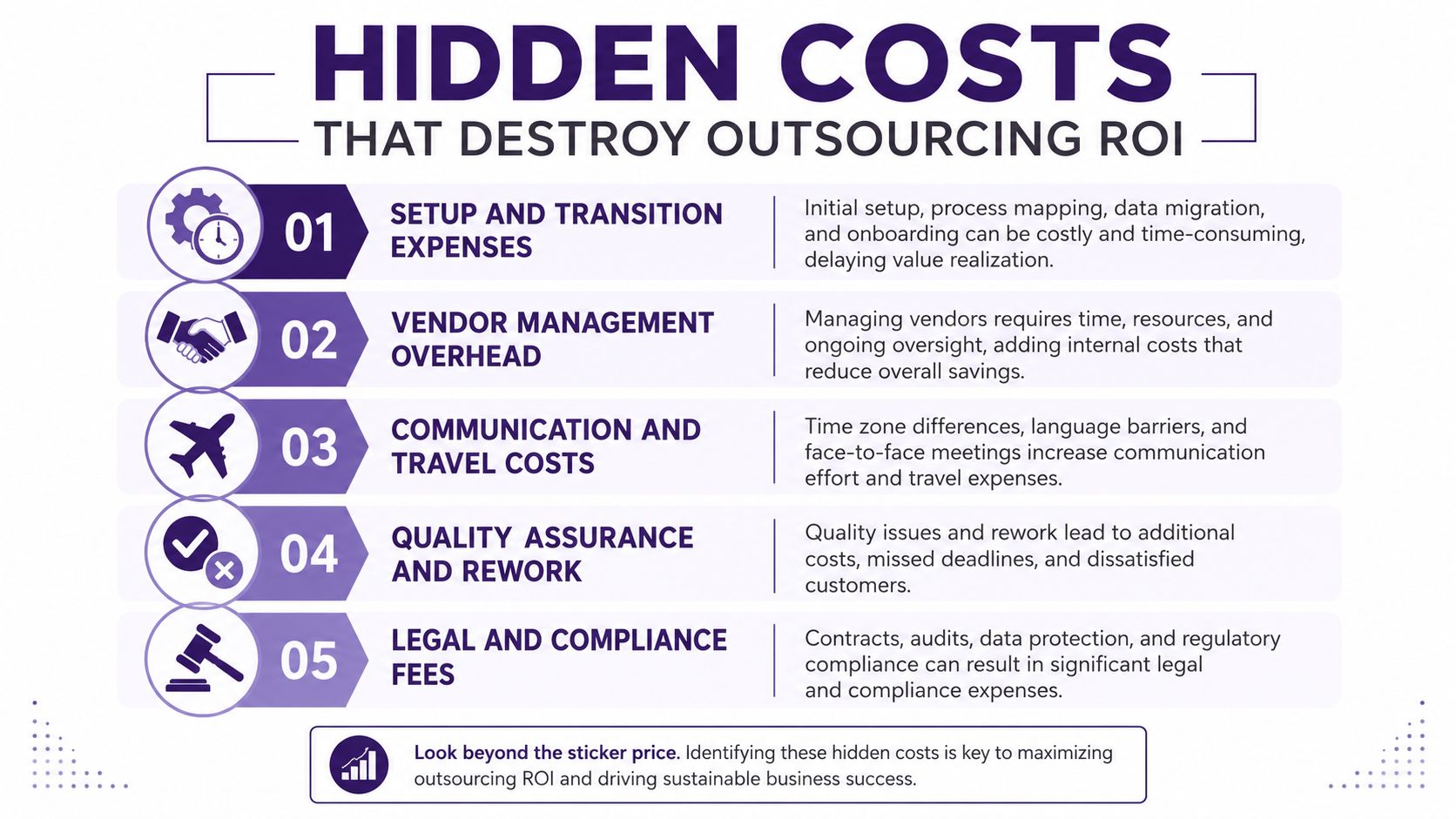
The first hidden bucket is setup and transition work. That includes process mapping, scripts, system access, training content, QA calibration, and the handoff time senior staff spend answering questions instead of doing their regular jobs. In a healthcare contact center, for example, the transition load is often heavier because the team must align on PHI handling, call flows, and escalation paths before the first live interaction.
Management overhead is a real cost, not a soft one
Vendor oversight takes time. Someone has to review scorecards, handle exceptions, monitor service levels, approve changes, and sit through recurring status meetings. That work doesn’t disappear when the function leaves payroll, it moves to a different owner.
The second hidden bucket is compliance and legal work. Finance teams usually feel this most in secure customer data workflows, but healthcare and insurance feel it too. If the provider touches sensitive information, the legal team, security lead, or compliance manager ends up involved in due diligence, contract language, access controls, and audit readiness.
The third bucket is communication friction. Nearshore often reduces that burden compared with more distant models because work happens in closer time zones, but the coordination cost still exists. If operations, QA, and the vendor are not working from the same definitions, the team spends time translating problems instead of solving them.
A few things help prevent inflated ROI assumptions:
- Set SLA targets first. Define response time, quality thresholds, escalation rules, and reporting cadence before comparing vendors.
- Add a contingency buffer. Neutral outsourcing guides increasingly recommend 10–20% to account for transition, legal, communication, and quality-control costs.
- Watch for rework. Every correction lowers the apparent savings, especially in customer support and back-office processing.
- Track management time. If leadership attention shifts from growth work to vendor policing, that opportunity cost belongs in the model.
Key point: The decision is about total net savings, not the headline rate.
That matters because direct price alone doesn’t capture quality, security, or transition risk. A nearshore Tijuana setup can still win on economics, but only if the buyer prices the whole operating system, not just the agent hour.
For a deeper view of labor arbitrage as a cost lever, the internal breakdown on labor arbitrage meaning is a helpful companion to this analysis.
Modeling ROI and Running Sensitivity Scenarios
A CFO-ready outsourcing model should work like a discounted cash-flow exercise, not a back-of-the-envelope estimate. Define the scope, list all direct and indirect costs, assign values to each item, set the analysis horizon, and discount future costs and benefits to present value before comparing total discounted benefits with total discounted costs. That is the difference between a sales pitch and a finance model. Cost-benefit analysis framework for back-office outsourcing
The reason discounting matters is simple. A year-two benefit is not the same as a year-one benefit, especially if the first several months are absorbing transition work. The model should show when break-even lands, not just whether the deal looks good after it settles.
Stress the assumptions that can flip the answer
The most useful sensitivity tests are the ones that change the decision. Test the discount rate, vendor price, and service-volume assumptions, because each one can move the result enough to change the recommendation. If call volume softens, training takes longer than expected, or the vendor adds change fees, the economics can shift quickly.
Historical outsourcing benchmarks help keep the model grounded. One 2018 industry study reported that 62% of companies saw 10–25% savings from outsourcing, while the remaining 38% reported savings as high as 40%. More recent summaries show an average 52% cost reduction versus domestic staffing, a first-year savings figure of $38,400 per outsourced full-time equivalent, and an average payback period of 4.2 weeks. Those numbers do not guarantee anything for your business, but they do show why many buyers expect the math to be measurable instead of theoretical. Outsourcing cost reduction and risk management data
A simple way to present the results is to build three cases.
- Conservative case: Higher transition cost, slower ramp, lower volume.
- Base case: Expected staffing, expected ticket flow, standard QA effort.
- Stress case: Delay in training, higher rework, added compliance review.
Rule of thumb: If the deal only works in the base case, you do not have a decision yet. You have a hope.
That matters especially for board reporting. Executives do not need a complicated spreadsheet full of false precision. They need to see what happens if service demand rises, if onboarding takes longer, or if the vendor scorecard slips below target. For a pricing-specific companion, CallZent’s nearshore call center pricing guide helps frame how vendor structure should feed the model instead of replacing it, and ROI of call center outsourcing gives a practical view of how the return shows up across direct savings, transition drag, and management overhead.
Industry Scenarios That Reveal the Real Numbers
The same framework can produce very different answers depending on the work. Healthcare, finance, and e-commerce all outsource, but they don’t carry the same risk profile or the same hidden cost stack. That’s why a generic benchmark only gets you halfway there.
Healthcare needs compliance and bilingual accuracy
Healthcare buyers usually care less about headline labor savings and more about accuracy, empathy, and privacy controls. A nearshore Tijuana team can make sense when the business needs bilingual support, same-day collaboration, and a lower-friction operating rhythm than a farther offshore site. The cost model has to include specialized training, script control, access restrictions, and the extra QA needed to keep patient conversations consistent.
The practical win here is not just cost. It’s the ability to keep patient communication moving while avoiding the cost and complexity of staffing everything in-house. For teams comparing options in this segment, healthcare customer service outsourcing is the most relevant internal reference.
Finance is a security and response-time game
Finance workflows put more weight on secure handling, escalation discipline, and real-time coordination. Dispute resolution, account verification, and payment support often depend on fast handoffs between teams, so same-time-zone collaboration can matter as much as labor rates. A nearshore model can reduce communication drag, but the buyer still has to price security reviews, audit preparation, and manager oversight correctly.
E-commerce is volume and seasonality
E-commerce usually has the clearest case for flexible staffing. Seasonal spikes, multichannel support, and abandoned cart follow-up can overwhelm an internal team fast, especially when chat, phone, and email all surge together. Outsourcing helps when the business needs a variable support layer without carrying the full fixed cost of a large permanent staff.
For operational context, it helps to compare in-house versus outsourced work in a real use case. A domestic team may give tighter control, but the nearshore model often gives a better balance of coverage, cost, and day-to-day collaboration for North American brands. That balance is exactly why many buyers run the outsourcing analysis by function, not by company-wide theory.
Your Decision-Ready Outsourcing Summary Template
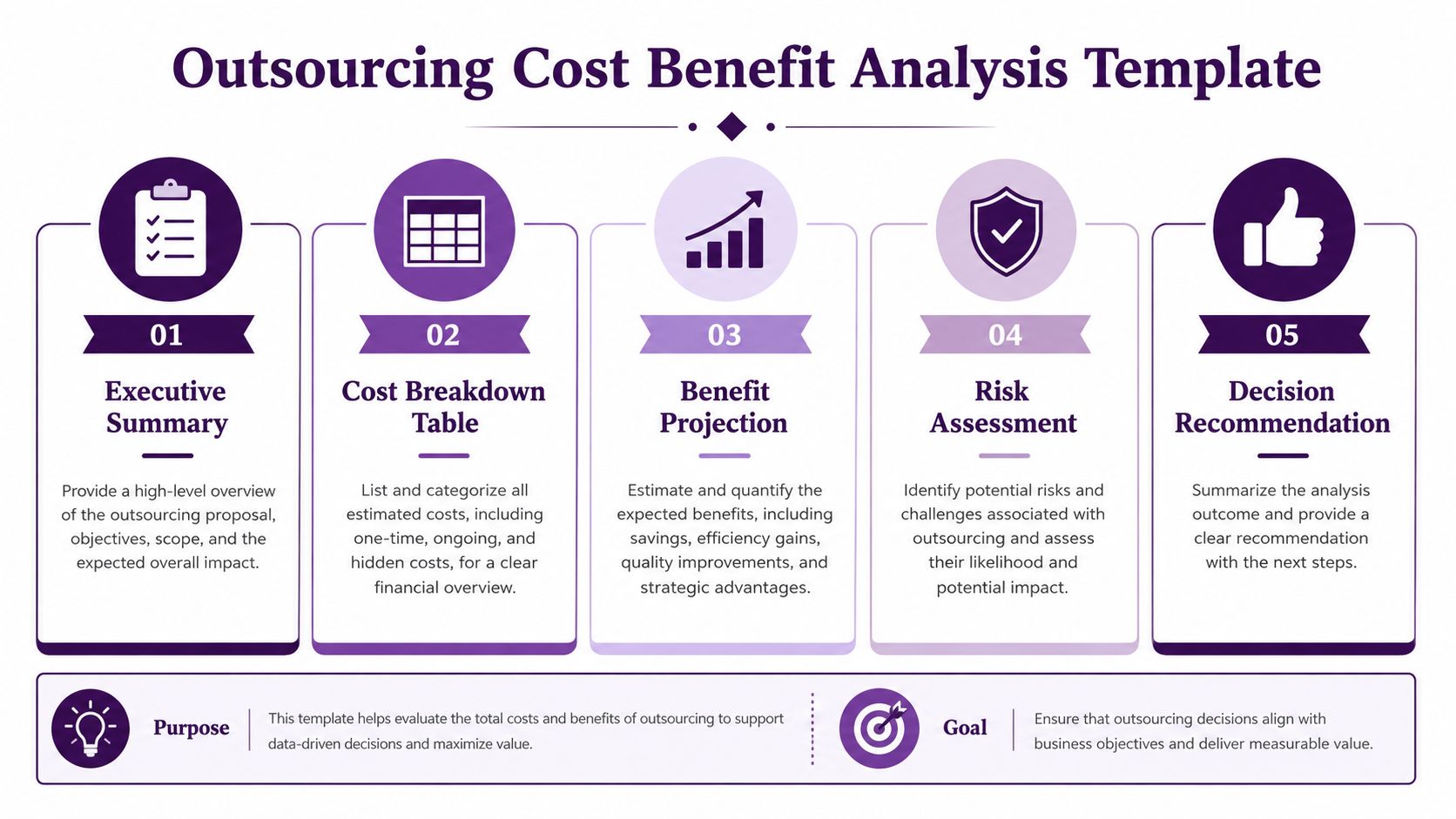
A board-ready outsourcing summary should fit on a few pages, not a slide deck full of vague optimism. Start with an executive summary that states the process, the business reason for outsourcing, and the decision you’re recommending. Then show the cost breakdown, the benefit projection, the risk assessment, and the implementation steps.
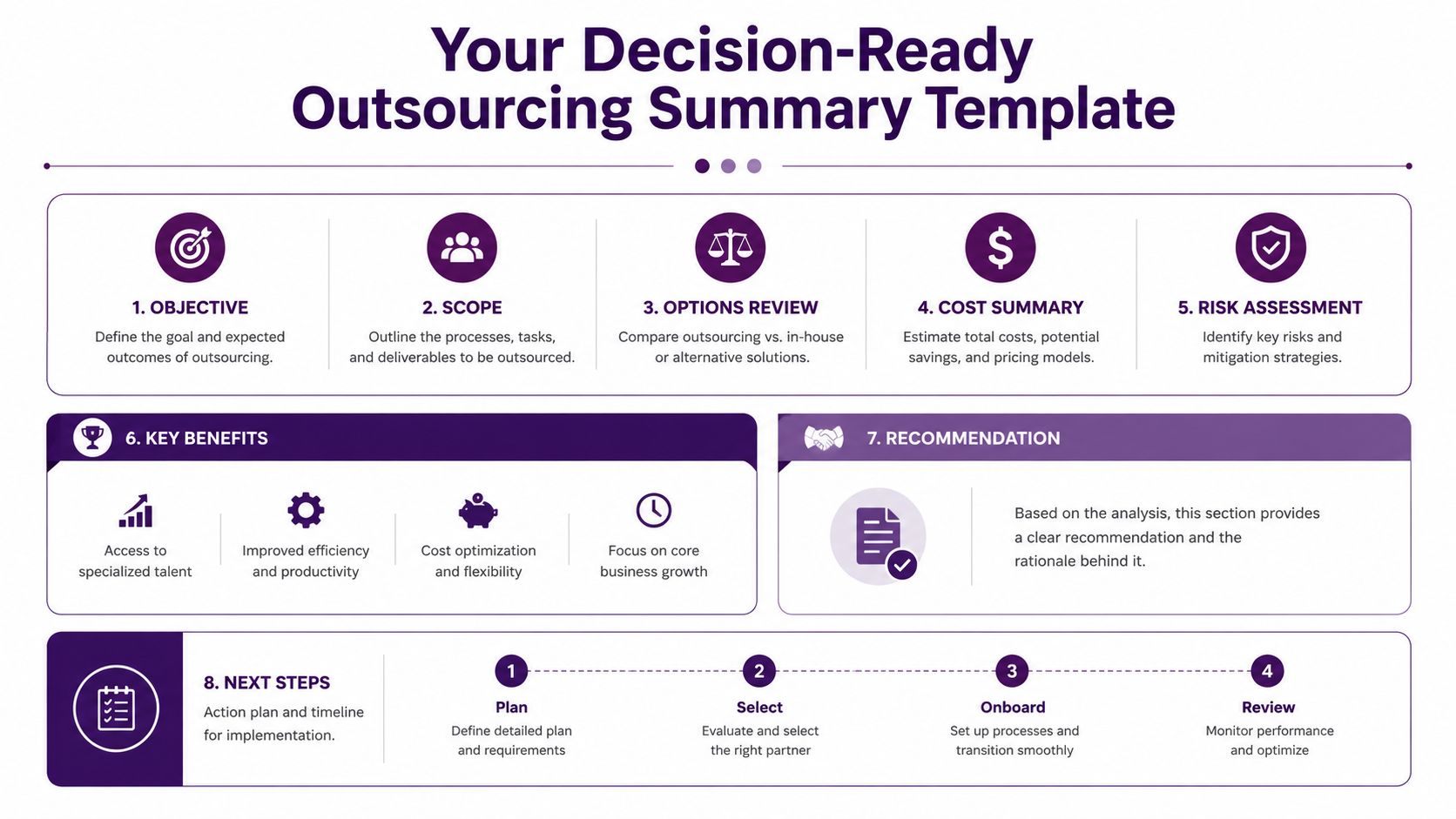
A clean way to present it is to use five blocks.
- Executive summary. One paragraph on scope, decision, and why it matters now.
- Cost dashboard. In-house cost, outsourcing cost, and transition items in one view.
- Risk matrix. Compliance, quality, service continuity, and vendor dependency.
- Sensitivity results. Best case, base case, and conservative case.
- Negotiation levers. SLA thresholds, reporting cadence, rework terms, and ramp milestones.
That structure keeps the conversation on total cost of ownership, which is where the decision lives. It also keeps the conversation away from vanity metrics like the cheapest hourly rate, which rarely tells the whole story. If the vendor can’t commit to measurable service thresholds, the savings projection should stay provisional.
The most important takeaway is simple. The strongest outsourcing decision is the one with the clearest net savings and the most defensible SLA controls, not the lowest promotional price. That’s especially true in nearshore call center work, where small changes in transition quality or management discipline can swing the year-one result.
For buyers who want to pressure-test pricing before they commit, CallZent’s nearshore call center pricing guide is a practical next stop. It helps translate vendor quotes into a cost structure a CFO can review, compare, and defend.
🚀 Build an Outsourcing Cost Model You Can Defend
CallZent builds bilingual nearshore customer support and back-office teams in Tijuana for companies that need lower operating cost without losing control of quality. If you’re weighing an outsourcing move and want a cost model built around real transition work, SLA discipline, and North American collaboration, CallZent can help you evaluate the right structure.
CallZent builds bilingual nearshore customer support and back-office teams in Tijuana for companies that need lower operating cost without losing control of quality. If you’re weighing an outsourcing move and want a cost model built around real transition work, SLA discipline, and North American collaboration, visit CallZent to talk through your use case and request a custom quote.