Skip to content

CUSTOMER EXPERIENCE / TRAINING
How to Create a Customer Service Training Program That Scales
Learn how to create a customer service training program that improves CSAT, reduces ramp time, and scales across bilingual BPO and nearshore teams.
TL;DR — Quick Takeaways
- Treat training as operational infrastructure, not a one-time onboarding task.
- Build a modular curriculum with a reusable core and client-specific modules.
- Use data from customers and QA to design targeted training programs.
- CallZent helps scale bilingual training systems for high-performance support teams.
Your phone probably isn’t just interrupting your day. It’s pulling you away from sales, operations, and customer follow-up at the exact moments your business needs focus.
This is a key reason small businesses start looking for a virtual receptionist for small business use cases. It’s not just about having someone answer the line. It’s about stopping missed opportunities, protecting your time, and building a front desk that scales without forcing you to hire a full in-house team.
A lot of owners wait too long to fix this. They assume missed calls are occasional, voicemail is acceptable, or the team can “just handle it.” In practice, that usually means leads arrive when nobody can answer, existing customers get bounced around, and staff members lose momentum because they’re switching between core work and incoming calls all day.
Why Your Phone Is Costing You More Than You Think
If you run a clinic, law office, e-commerce store, contractor business, or local service company, you’ve probably lived this routine already. You’re handling payroll, vendor issues, customer questions, and growth decisions. Then the phone rings. Then it rings again. Then a caller hangs up because nobody answered fast enough.
That pattern creates two costs at once. First, you lose time to constant interruption. Second, you lose revenue when calls go unanswered, get handled inconsistently, or reach voicemail when the caller wanted a real person.
A strong virtual receptionist for small business setup fixes that by taking phone coverage out of survival mode. Instead of reacting to every ring, you create a structured front-end system for greeting callers, routing urgency, booking appointments, and capturing lead details.
For many owners, the turning point is simple. They realize the phone shouldn’t dictate the day. The business should.
Practical rule: If your staff has to choose between serving the person in front of them and answering the next call, your phone process is already too fragile.
If you’re evaluating solutions, start with a service that can take over the basics well. A professional phone call answering service should answer consistently, route accurately, and keep your team focused on work only they can do.
Defining the Modern Virtual Receptionist
A modern virtual receptionist isn’t just an answering service with a script. It’s closer to an on-demand front desk that sits outside your office but works inside your process.

The older model was simple message taking. A caller reached a line, someone wrote down a name and number, and your team called back later. That’s still better than voicemail, but it doesn’t solve the bigger business problem. You still have delays, limited context, and weak handoffs.
The modern version works more like a shared, on-demand front desk. It can answer calls, qualify intent, route by language or issue type, schedule appointments, log details, and support customers during business hours or after hours depending on how the program is built.
What it actually includes
A virtual receptionist can be powered by:
- AI workflows that handle routine questions and routing
- Human agents who manage live conversations
- A hybrid model where automation handles simple tasks and people step in for nuance
That distinction matters. “Virtual” only describes where the service operates from. It doesn’t tell you whether the experience is robotic, flexible, transactional, or helpful.
Why more small businesses are adopting it
The category is no longer niche. The virtual receptionist market reached $3.85 billion in 2024 and is projected to reach $9 billion by 2033, with a 9.8% CAGR, according to virtual receptionist market projections. That matters because it shows small businesses aren’t treating this as a workaround. They’re treating it as a practical operating model.
A good virtual receptionist doesn’t just answer the phone. It protects your availability while preserving the customer’s sense that someone is actually there to help.
For a small business owner, the simplest way to think about it is this. A virtual receptionist gives you front-desk coverage without requiring you to build a full front desk in-house.
If you want the human version of that model, a virtual answer service with live agents is designed for businesses that need real conversations, message accuracy, and brand-consistent call handling rather than basic forwarding.
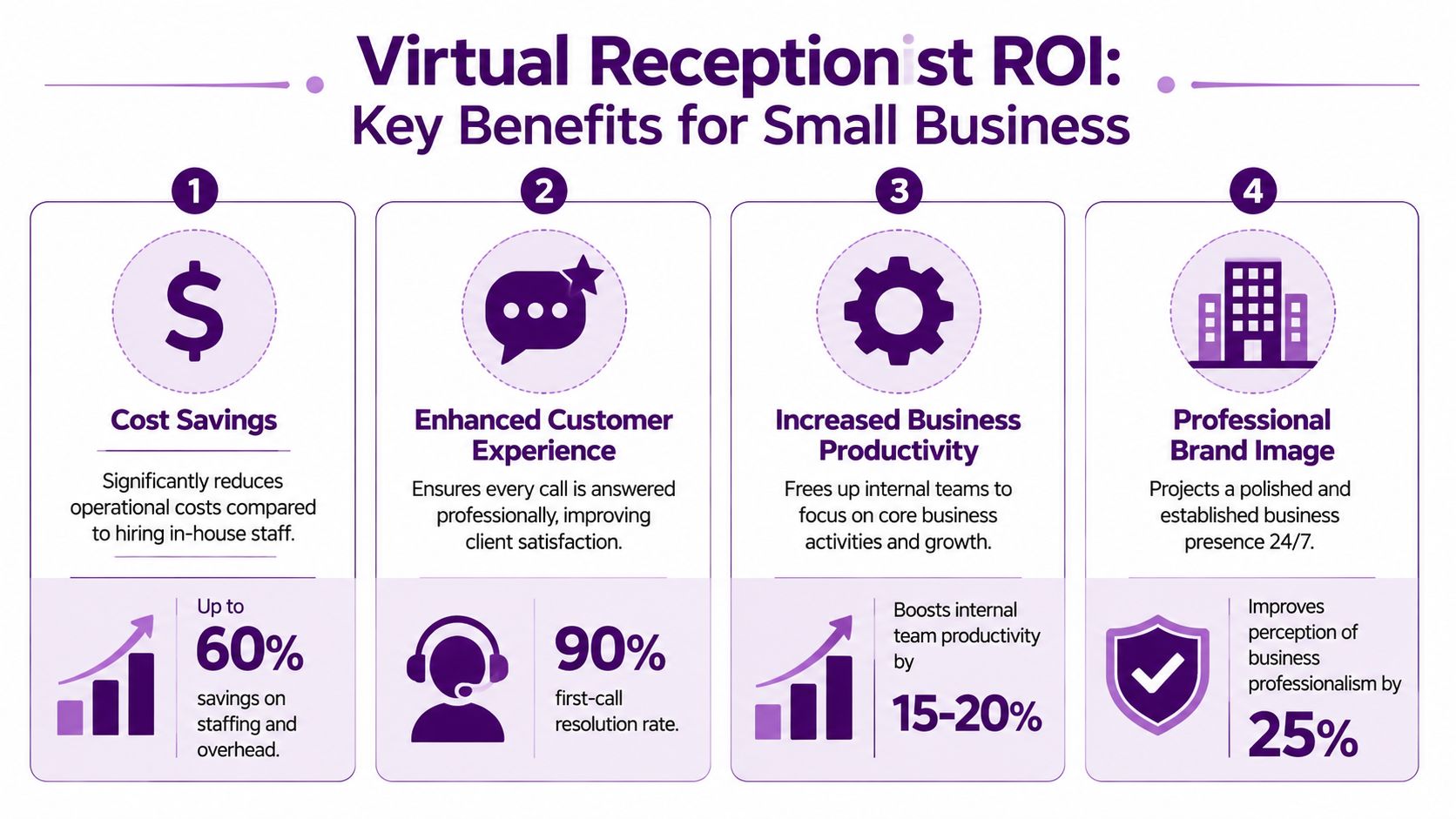
Key Benefits of a Virtual Receptionist for Small Business
A missed call at 10:17 a.m. often looks minor. In practice, it can mean a lost new patient, an estimate request that goes to a competitor, or an upset existing customer who now needs more time from your team later.
That is why the value of a virtual receptionist shows up in revenue protection, faster response times, and fewer interruptions inside the business.
Lower labor cost with better coverage control
Small businesses rarely need a full in-house receptionist schedule from open to close, plus overflow support, plus after-hours coverage. They need coverage that matches actual call patterns.
That model changes the economics. A virtual receptionist service lets you pay for answered calls, scheduled hours, or a defined service scope instead of carrying the full cost of hiring, training, managing, and backfilling one front-desk role. Nearshore teams usually make the math stronger because they reduce labor cost while keeping live human coverage in place.
The best results come when owners use clear call flows, message templates, and routing rules supported by the right call center software features for routing, reporting, and call handling. Without that operating structure, even a good receptionist team will spend too much time improvising.
Fewer no-shows and better use of booked time
For appointment-based businesses, the phone is tied directly to capacity utilization. If confirmations are inconsistent, intake notes are incomplete, or callers never reach a person who can secure the booking, revenue slips through small cracks all week.
Automated reminders and confirmations can reduce appointment no-shows, according to AppointmentReminder data on reminder effectiveness. The operational point matters more than the percentage. A receptionist team that confirms appointments, updates calendars correctly, and captures special instructions keeps your schedule productive.
This has a direct payoff in businesses such as:
- Dental practices where empty chair time cannot be recovered
- Clinics that need tighter schedule control
- Salons and med spas that depend on filled daily calendars
- Professional services firms that sell time by the hour
Stronger first impressions that convert more callers
Call handling shapes trust before your team ever delivers the service. Small businesses feel this first in lead conversion.
A caller who reaches a trained person gets answers, next steps, and a reason to stay engaged. A caller who reaches voicemail often keeps dialing. That is the fundamental trade-off. Cheap coverage can still be expensive if it fails at the moment of first contact.
Human receptionists also outperform scripted systems when the conversation turns messy. A bilingual nearshore team can clarify urgency, catch naming and address errors, and handle English and Spanish callers without forcing them through rigid prompts. For many North American businesses, that improves access and lowers friction in a way AI-only setups still struggle to match.
Cleaner handoffs to your internal team
Owners often focus on who answers the phone. The larger issue is what happens after the call.
A good virtual receptionist gives your staff usable information. That includes the reason for the call, customer history if available, urgency, scheduling details, and the exact action required. Better notes reduce repeat callbacks and internal confusion. Sales teams follow up faster. Field teams arrive better prepared. Office managers spend less time translating vague messages.
This is one reason phone infrastructure matters too. Businesses that improve communications with UK VoIP systems or similar cloud telephony setups usually get better routing, call visibility, and easier integration with receptionist workflows.
Flexibility that supports growth without adding front-desk overhead
Growth usually creates communication problems before it creates hiring plans. More ads, more referrals, new locations, seasonal spikes, and extended service hours all increase inbound complexity.
A virtual receptionist absorbs that pressure without forcing you to build a larger in-house admin team too early. That matters for small businesses trying to stay responsive while protecting margin.
Used well, a virtual receptionist becomes part of your growth system. It captures leads, protects existing customer relationships, supports scheduling discipline, and gives owners room to focus on work that moves the business forward.
Must-Have Features in a Virtual Receptionist Service
Small businesses get into trouble when they buy a receptionist service based on price alone. Low-cost coverage sounds efficient until calls get misrouted, customer notes disappear, or your team ends up doing manual cleanup after every interaction.

The right question isn’t “Can they answer the phone?” It’s “Can they answer the phone in a way that improves operations?”
Smart routing and call screening
Every business needs a different intake logic.
A plumbing company may need emergency triage. A medical office may need appointment routing and message priority. An e-commerce business may need one path for order issues and another for wholesale inquiries.
Look for a service that can handle:
- Priority-based routing so urgent calls go where they should
- Custom call screening to separate leads, vendors, spam, and existing customers
- Escalation rules for when a live transfer is necessary
- Language-based routing when English and Spanish support both matter
Scheduling that works inside your calendar
Scheduling sounds simple until double booking, incomplete intake, or unclear notes start frustrating everyone.
A receptionist service should work directly with your appointment flow. That means using your real availability, your booking rules, and your reschedule process. If the service can only take a message that says “please call back,” you’re not getting the operational benefit.
CRM integration and automatic logging
This is one of the biggest differences between a modern system and an outdated one. Virtual receptionist platforms can integrate with tools like Salesforce and HubSpot to create real-time dashboards and automatically log call data. That setup can reduce average call handling time by 15% to 25% by removing manual data entry and context switching, according to this overview of virtual receptionist integrations and analytics.
In practice, that means:
| Feature | Why it matters |
|---|---|
| Automatic call notes | Your team sees what happened without chasing details |
| CRM syncing | Sales and support don’t have to re-enter contact information |
| Real-time visibility | Managers can spot call flow issues early |
| Faster follow-up | Leads move quicker from first contact to next action |
If your phone system is part of a broader communications setup, it also helps to understand how cloud telephony affects flexibility and reliability. This overview of how to improve communications with UK VoIP systems is UK-focused, but the underlying points about call handling, mobility, and system design are still useful.
Reporting, compliance, and bilingual depth
Don’t stop at dashboards. Ask how the provider reports on message quality, transfer accuracy, missed-call handling, and coverage by time of day. A polished sales demo won’t tell you how the operation performs on a busy Monday morning.
Also verify whether the service can support your compliance needs, especially in sectors like healthcare and finance. “We can probably do that” is not an acceptable answer when customer information is involved.
For buyers comparing platforms and workflows, reviewing call center software features can help you spot the difference between cosmetic features and tools that change outcomes.
Choosing Your Model Human vs AI vs In-House Staff
A prospect calls at 12:10 while your front desk is covering lunch. The call goes to voicemail. Ten minutes later, that same prospect reaches a competitor who answers, books the appointment, and speaks Spanish without hesitation. That is the actual decision behind your receptionist model. It is not just about coverage. It is about revenue capture, service quality, and how much operational complexity your business can absorb.
Small businesses usually have three workable options. Build an in-house front desk function, route calls through AI, or use a human virtual receptionist service. Each model solves a different problem. Each also creates trade-offs in cost, control, speed, and customer experience.
Receptionist model comparison
| Criteria | In-House Receptionist | AI Virtual Receptionist | Human Virtual Receptionist Nearshore |
|---|---|---|---|
| Cost structure | Fixed payroll, benefits, management time, and coverage gaps when staff are out | Lower starting cost, but performance depends on setup quality and exception handling | Lower overhead than in-house, with live support and flexible staffing |
| Coverage | Limited to staffed hours unless you add backup coverage | Available 24/7 for routine call handling | Flexible coverage for business hours, overflow, after-hours, and peak periods |
| Customer experience | Strong if the person is well trained and stays long term | Good for simple routing and basic intake | Strong for nuance, reassurance, objection handling, and bilingual conversations |
| Scalability | Slower to expand because hiring and training take time | Scales quickly for volume | Scales faster than in-house without losing human judgment |
| Operational risk | Turnover, call-outs, and inconsistent backup plans | Misroutes, weak integrations, and caller frustration when requests fall outside the script | Onboarding takes planning, but daily execution is usually more stable once workflows are set |
| Best fit | Businesses that need an on-site administrative role every day | Businesses with narrow, repetitive call flows | Businesses that need flexibility, conversion support, and better caller handling |
Where AI fits
AI works best on calls with clear rules. It can answer common questions, route by department, collect simple intake details, and provide coverage outside business hours. For some businesses, that is enough.
The limit shows up when callers are upset, confused, price sensitive, or trying to explain something messy. Those calls need judgment. They also need a person who can hear hesitation, ask the right follow-up question, and keep the interaction from slipping into frustration. If you are assessing automation seriously, these AI agent use cases for customer conversations give a good framework for separating tasks AI can handle from calls that should stay with a person.
Why in-house is not always the premium option
Owners often assume in-house means better control. Sometimes it does. You have direct oversight, one voice at the front of the business, and tight alignment with office routines.
You also inherit every scheduling and staffing problem that comes with a single-point role. Lunch breaks, sick days, turnover, and seasonal spikes do not pause your inbound calls. In practice, many small businesses end up paying full-time employment costs for part-time phone coverage.
Why nearshore human support is often the stronger growth model
A nearshore human team usually gives small businesses the best balance of cost, flexibility, and call quality. You keep live coverage without carrying full in-house overhead. You also get something AI still struggles to deliver consistently: adaptable conversations.
That matters most when the call is tied to money. New lead intake, appointment booking, abandoned carts, billing issues, and upset customers all require calm communication and fast judgment. A trained bilingual team can also close a service gap that many U.S. small businesses underestimate. If part of your market prefers Spanish, a nearshore receptionist function is not a nice extra. It affects conversion, retention, and trust.
I usually advise clients to use a blended model. Let automation handle simple routing and repetitive status requests. Put trained human receptionists on the calls where context, reassurance, or sales awareness changes the outcome. For a growing small business, that setup tends to protect revenue better than AI alone and scale more cleanly than hiring in-house too early.
Human reception wins on calls involving urgency, confusion, emotion, or a buying decision. For many small businesses, those are the calls that matter most.
A Checklist for Choosing Your Virtual Receptionist Partner
A virtual receptionist can improve your business quickly, but only if the provider fits the way your business operates. Many owners make a preventable mistake, buying coverage before they define requirements.
Use this checklist before signing anything.
Start with your real call profile
Write down what your inbound traffic looks like. Don’t guess.
Include things like:
- Call types such as new leads, support, scheduling, billing, or order updates
- Peak periods including lunch rushes, after-hours, weekends, and seasonal spikes
- Escalation triggers that require a live transfer or same-day response
- Language needs if part of your audience prefers Spanish
If a provider can’t reflect that reality back to you in the discovery process, they’re probably selling a generic package.
Verify the workflow, not just the script
A polished greeting script doesn’t mean the operation is solid. Ask how they document messages, when they transfer live, how they handle failed escalations, and what the training process looks like for your account.
You also want clarity on onboarding. A provider should be able to explain how they learn your business, who maintains updates, and how script changes or process changes are handled when your business evolves.
Check integration and reporting depth
If your team uses a CRM, help desk, scheduling platform, or e-commerce system, ask direct questions about compatibility. Don’t settle for “we integrate with most tools.” Ask what the workflow looks like for your stack.
Good partner questions include:
- How are call notes delivered and stored
- Can the team work inside our scheduling or CRM environment
- What reporting do we receive regularly
- How are quality issues reviewed and corrected
Evaluate the nearshore fit
For North American businesses, nearshore support has a practical advantage. Time-zone alignment is easier. Communication tends to be smoother. Training collaboration is simpler than with far-offshore teams.
A provider in Tijuana can often support U.S. and Canadian businesses with tighter operating overlap, stronger English-Spanish capability, and easier day-to-day coordination than teams located much farther away. That’s especially useful when your receptionist function is tied closely to live business hours, sales handoffs, or ongoing support changes.
One option to review during your search is this guide on how to find and vet the best call center outsourcing companies. It’s useful because choosing a receptionist partner is less about buying minutes and more about evaluating operational fit.
Ask for proof of process
Before you decide, request:
- A sample call flow based on your business
- A message format example so you can see note quality
- Escalation rules for urgent or sensitive calls
- Training and QA details that show how consistency is maintained
The best partner won’t just promise responsiveness. They’ll show you how the work gets done.
Bringing It All Together: Real-World Results and Next Steps
A virtual receptionist changes more than phone coverage. It changes how a small business uses time.
A service business can stop losing appointments to weak reminders and disorganized intake. An e-commerce brand can give customers a live path for order issues instead of burying everything in email. A medical or legal office can screen inbound calls so licensed staff spend more time on actual client work and less time sorting messages.
Here’s what that looks like in practical terms:
- A dental office uses receptionist support to confirm appointments, manage reschedules, and keep front-desk staff focused on in-person patients.
- A home services company routes urgent calls differently from quote requests, which reduces chaos and helps dispatch move faster.
- A growing online retailer adds bilingual live support so Spanish-speaking customers can ask questions before abandoning a purchase.
Those outcomes don’t come from “having someone answer” alone. They come from building a front-end customer system that matches the way your business operates.
The smartest move for most small businesses isn’t choosing the cheapest option. It’s choosing the model that protects revenue, reduces interruptions, and gives customers a better first interaction. In many cases, that means a nearshore, bilingual human team supported by the right technology instead of a pure AI setup or a costly in-house hire.
🚀 Stop Losing Calls and Leads
Discover how CallZent’s virtual receptionist solutions help small businesses improve customer experience, scheduling, and inbound lead conversion.
Talk to an ExpertIf you’re ready to improve call handling without overbuilding payroll, a practical next step is to talk through your call flow, language needs, and integration requirements with CallZent. A quick conversation can tell you whether a virtual receptionist model fits your business now, what should stay human, and where automation can support the process without hurting the customer experience.